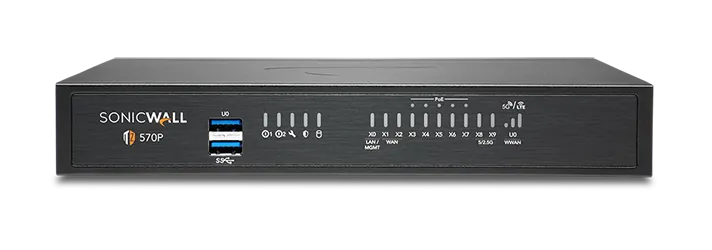
🏷️ SPECS:Whole File Scanned, Not SampledNo File Size LimitCatches Fileless AttacksSpots New RansomwareTLS 1.3 DecryptionCapture ATP SandboxUnknown Files Tested FirstVirus & Intrusion BlockingNothing Waved ThroughSonicOS 7 FirmwareZero-Touch DeploymentPost It, Plug InCloud Management ConsoleEvery Branch, One ScreenSecure SD-WANSwitches to Live LineAD Single Sign-OnRules Follow the PersonOne Renewal DateWireless & Switch ControlTZ Series DesktopFits a Small BranchNSa 1U RackmountSized for Head OfficeNSsp Data-Centre ClassDual Power SuppliesRuns on One PSU2.5GbE Multi-Gig Ports10GbE SFP+ UplinksQuiet Enough for Reception
Guest WiFi in the waiting area, staff WiFi upstairs, card machines on their own lane and CCTV kept well away from all of it. That is four networks, and most places run them as four separate headaches with four sets of wires. When the access points and switches answer to the same firewall, you set that separation once and it holds everywhere, so a visitor gets internet without ever seeing the accounts server (VLANs from one console). We do this for clinics, showrooms and co-working floors around Santiniketan.
🧭 SonicWALL UTM Firewall Appliance for Branch and Head Office Supply, Setup and Support at multi-branch offices
Head office finds out a branch is down when the branch manager rings, which is usually well after the customers noticed. Every appliance across Kolkata reports into one cloud console, so you can see which site is offline, which line is flapping and which firmware is behind, from a browser anywhere. A rule change is written once and pushed to all sites instead of typed out eleven times. Reports for the whole network arrive on schedule rather than being assembled by hand (Network Security Manager).
The owner is convinced the office spends half the afternoon on video, the staff insist the internet is simply slow, and neither side has any evidence. Category filtering closes the obvious time sinks during working hours only, while per-person reports show who actually used what. Most of the argument disappears in the first week, usually because the real culprit turns out to be a machine nobody was sitting at. Rules can be softer for management and stricter for the shop floor, with nobody maintaining a spreadsheet.
🔑 Why Businesses Pick SonicWALL UTM Firewall Appliance for Branch and Head Office when budgets are tight
Connecting four or five branches across Kolkata to head office used to mean a leased line to each one, which most businesses could never justify. Ordinary broadband at every site, joined by encrypted tunnels through these appliances, gives you a single network for a small fraction of that. Staff at a depot open the same software they would open at head office, at whatever speed the local line allows. Adding the sixth site later is an afternoon's work, not a fresh project.
Nobody enjoys finding out, halfway through a bad week, that the security subscription lapsed in March. We put the hardware, the bundle and the renewal date on one page in writing, and say plainly which services an office like yours will actually use. If a service in the bundle would never earn its keep in your office, we say so rather than let it pad the invoice. Businesses around Santiniketan usually find the licence conversation more useful than the hardware one.
Depots and Godowns on Whatever Connection the Town Offers
A sweets and namkeen chain with fourteen outlets across Kolkata was opening two more before the festival season and had nobody free to travel. We registered both appliances here, couriered them out, and the shop staff plugged them into power and the broadband socket. Each unit pulled down its own rules, its guest Wi-Fi settings and the tunnel back to head office without an engineer on site. The second shop was billing on its opening morning, which had not happened with the previous three openings.
🛡️ SUPPORT ONCE THE INVOICE IS SETTLED
How We Plan a Firewall Rollout
Most of the money wasted on firewalls is wasted at the sizing stage. We ask how many people are online together, how much of that traffic you intend to inspect, and whether branches are joining in - then quote the model that survives a bad Monday. Equally, if the smaller TZ is genuinely enough, we say so, because selling you an NSa you do not need is a short win and a long problem.
These are the tasks we are usually called in for:
▪Site-to-Site and Work-from-Home VPN Setup
▪Automatic Switching between Two Internet Lines (SD-WAN)
▪Sending a Pre-Set Box to a New Branch (Zero-Touch)
▪A Standby Box So One Failure Does Not Stop Work
*Terms: engineer hours, travel and any parts fitted are invoiced under a private service agreement that stands apart from the product warranty.*
💡 Engineering Fact: That inspection has one visible side effect: browsers complain about certificates. Installing the firewall's own certificate on office machines during setup is a ten-minute job, and skipping it earns you a week of complaints.
👥 LOGINS, NOT IP ADDRESSES
Shared counters, shift staff and an audit trail full of machine names? We tie firewall rules to your office login system so reports read as people, across every site you run from Santiniketan.
📚 Available Options and Typical Fit near Santiniketan
Compare the branch boxes against the head office models here:
TZ Desktop Firewalls for a Shop or Single Branch
The small box that sits on a shelf behind the counter and guards one or two internet lines. Right for a showroom, a clinic, a site office or any team of roughly five to fifty people.
🔹 BEST FOR
A single location of about five to fifty staff - one showroom, one clinic, one small factory office.
🔹 TWO INTERNET LINES
Fibre and a broadband backup stay plugged in together and the box quietly uses whichever one is behaving (Secure SD-WAN).
🔹 SOCKETS
Six to ten network points, some of them 2.5-gigabit, with a fibre slot on the larger models for a leased line.
NSa Rack Firewalls for a Head Office or Campus
One-rack-unit NSa gateways for the main office of a company, a nursing home group or a college - anywhere a few hundred people share the same line from morning to night. Built to bolt into the cabinet you already own.
🔹 SEVERAL ISP LINES
More than one connection terminates on the same unit and it decides what travels where (BGP, OSPF and dynamic SD-WAN routing).
🔹 IF IT FAILS
Keep a matched second unit powered beside it. The changeover takes a fraction of a second and a phone call does not drop (High Availability pair).
🔹 HEAT
A warm server room is survivable. A sealed one with a dead AC is not, and heat is what shortens the life of every unit in that cabinet.
Heavy 2U Units for Data Centres and Big Campuses
The two-rack-unit NSa and NSsp appliances, for data centres, multi-building campuses and networks carrying tens of thousands of connections at once. Anything that can fail comes doubled.
🔹 LOGS ON BOARD
Internal SSDs hold traffic history on the appliance itself, so a question about last month does not need a separate log server.
🔹 WEIGHT
A two-person lift, on rails rated for the load. An appliance this heavy resting on cabinet ledges will sag and take its ports with it.
🔹 NOISE
Nobody enjoys sitting next to one of these. Plan for a real server room, not a cabin behind the accounts desk.
Branch Boxes That Set Themselves Up (Zero-Touch SD-WAN)
For the extra showroom, the godown office, the site cabin. You courier the unit, somebody local plugs in power and internet, and it pulls down its own settings and joins the head office network.
🔹 REPORTING
Head office can see each branch's uptime and how its line is performing, which ends the argument about whose internet is at fault.
🔹 JOINING SITES
Encrypted tunnels build themselves between locations, instead of every branch hair-pinning its traffic through the main office.
🔹 SETUP
Nobody technical travels. The unit is registered before it leaves us and fetches its own configuration the first time it is switched on (Zero-Touch Deployment).
SonicWave WiFi Access Points for Full Floor Coverage
SonicWave units screwed to the ceiling so the signal reaches the far end of the floor. For any building where the WiFi works near the router and nowhere else.
🔹 VISITORS
Guests get their own name, their own login page and an expiry, kept well away from the machines running your accounts.
🔹 WALKING AND TALKING
The handover from one unit to the next is quick enough that a call carries on while somebody walks from the store room back to the billing counter.
🔹 PLANNING
Signal is eaten by brick walls, lift shafts and steel racking, so units get placed by the building's layout rather than by floor area.
Managed Switches on the Same Console as the Firewall
Switches that report to the same screen as the firewall, so ports, cameras and phones are handled from one login. For offices past the stage of stacking small unmanaged boxes under a desk.
🔹 BETWEEN BUILDINGS
Copper stops being useful at about ninety metres. Past that the uplink goes on fibre, and these units take fibre directly.
🔹 SUITS
Warehouses, hospitals and any premises where the camera count has quietly doubled since the cabling was first laid.
🔹 WHAT IT'S FOR
Replacing the chain of little unmanaged switches that has grown under the desks, one added per problem over five years.
Cloud Edge: Office Access for Staff Working from Home
Lets a person reach the one office server they need from home, a hotel or a client's site, without their laptop landing inside everything you own. Bought per person, not per building.
🔹 LOST LAPTOP
One click ends that person's access. Nobody has to change a shared VPN password and then explain it to forty people.
🔹 NO BOX AT HOME
The service runs from the cloud, so somebody who joins today is not waiting for hardware to be couriered to their flat.
🔹 WHAT IT'S FOR
The accounts person finishing a return from home, and the sales engineer who needs the price list while sitting in a client's office.
Network Security Manager: Every Branch on One Screen
A cloud console that shows all your firewalls together - rules, alerts, firmware and reports. Worth it once you have more than two or three locations to keep an eye on.
🔹 REPORTS
Monthly summaries of what was blocked and where the day's bandwidth went, in a shape a director will actually read.
🔹 FIRMWARE
Updates get scheduled for a Sunday night across the whole estate, rather than done one branch at a time over a month.
🔹 ONE CHANGE, EVERY SITE
A new blocking rule reaches twenty branches at once, instead of being typed twenty times with the twentieth forgotten.
Security Bundles and Licence Renewals
Firewalls are sold with a subscription behind them: threat updates, filtering, sandbox checks and vendor support. This is how those are bought, bundled and renewed without leaving a gap.
🔹 MULTI-YEAR TERMS
Paying for three years at once holds the price still and removes two more rounds of quotations, approvals and reminder calls.
🔹 WHEN IT EXPIRES
No alarm sounds and nothing goes dark. The unit simply stops learning about anything new while everyone assumes it is still working.
🔹 WHEN A RENEWAL IS THE WRONG ANSWER
If headcount has doubled since you bought, ask for a comparison against a larger unit before you sign anything.
✉️ Service & Maintenance Support
Need site visits, AMC contract estimates, or customized installation architecture? Connect with our technical desk directly.
🧮 Capacity, Limits and Sizing Guide for larger offices
The appliance is one buy and the protection is another. On its own the box joins your offices together, decides who can reach what, and carries staff in over a VPN. The yearly subscription is what scans for viruses, blocks intrusions and unwanted websites, and tests unknown files in the cloud. When a subscription lapses the unit keeps routing traffic and quietly stops learning about anything new.
Management is a browser page on the unit itself, plus a cloud console for anyone running more than one site. Logs and reports can sit on the appliance for recent activity or be sent off it when you need months of history for an audit. Configuration exports are small files and should live somewhere other than the same building.
🏆 CORE PARAMETER🔹 How it scansThe whole stream is reassembled and read, with no cap on file size (RFDPI)
🔹 The chip insideMulti-core system-on-chip running SonicOS 7
🔹 If the box diesActive-Standby or Active-Active pair with stateful failover
🔹 Encrypted site scanningTLS 1.3 inspection with hardware acceleration (DPI-SSL)
🔹 Shapes it comes inFanless desktop TZ, 1U rack NSa, 2U rack NSa and NSsp
🔹 Network socketsCopper 1GbE on every model, 2.5GbE multi-gig on the TZ 570 and 670, and 10GbE SFP+ fibre on the larger rack units - the mix depends on the model ordered
🔌 Second power supplyOptional on smaller rack models, standard and hot-swappable on the large ones
How These Units Are Built and Tested
If one internet line dies at eleven in the morning, your billing counter should not. Two or three connections, a mobile modem included, are measured all the time and traffic is moved onto whichever is behaving; when the dead line returns, your branch tunnels come back on their own without anyone travelling to site (Secure SD-WAN).
Hardware is specified for continuous operation in ordinary commercial premises. Compact models run without fans for quiet, dust-tolerant service at a counter or in a small office, while rack models offer redundant power and pairing for sites that cannot tolerate an outage.
✉️ SUPPORT DESK
Coordinate custom hardware configurations, AMC maintenance contracts, and site engineering visits directly with authorized integration desks.
Turnkey UTM Firewall Appliance for Branch and Head Office Metrics Checklist near Santiniketan
🛠️ Workflow Setup
Next the unit is registered and licensed in your name and your rules are loaded before it leaves us. That takes a day or so at our end and saves a couple of hours at yours.
⚠️ Pitfalls to Avoid
Never hang the firewall off the same strip as an air conditioner or a laser printer. The surge when either starts is enough to restart it, usually mid-morning.
🔌 Guidelines & Sizing
Have the rack and the incoming telecom line properly earthed before installation day. Most equipment written off as lightning damage in this country was really killed by a missing earth.
📈 Upgrade Triggers
The last virus scare was cleaned up by rebuilding three machines over a weekend, and to this day nobody can explain how it got in.
🗒️ Engineer Notes From Real Installations for demanding workloads
Spend the extra hour joining the firewall to your Windows login system at installation, even if nobody asked for it. Once rules and reports carry a person's name instead of an address, every argument about who did what stops being a debate. I put the agent on a member server rather than the area controller, using an account that can only read, which keeps your IT team and your auditor equally comfortable.
“We already have antivirus on every computer” covers the computers. The weighing machine, the barcode printer, the camera recorder and the visitor's phone cannot run antivirus, and they all sit on the same network.
Cloud-only filtering works on a laptop that has the agent installed and an internet connection. It does nothing between two machines standing in the same shop, and nothing at all for equipment that can never carry an agent.
💡 Engineering Fact: Two internet lines are never identical, and the firewall knows it. It measures delay and lost packets on each one continuously, so your calls can sit on the steady line while big downloads go over the other.
🛠️ Shops, Counters and the Cabinet Behind the Billing Desk
Go through these before the delivery date, not on the day an engineer is standing in your server room with a screwdriver.
🏢 Site Survey & Planning - The Plan for small and mid-sized teams
🔹Give the appliance its own management address on a separate VLAN and turn administration off from the internet side completely; reach it over the VPN when you are away from the office.
🔹Point the failover probes at something outside your provider's network, such as a public DNS address. Probing the provider's own gateway means a dead upstream link still looks perfectly healthy.
🔹Add the serial number to the cloud console before the box is couriered to a branch, whether that branch is across Kolkata or three states away, so staff there only have to connect power and the internet cable.
✅ Service Levels in Plain Language for single-office teams
Type of Business
What the Work Covers
Typical Lead Time
Nursing Homes and Multi-Speciality Hospitals
Patient records and billing separated from the reception counter, and consultants reading reports from home without opening the whole network
Priority slot for contract sites, otherwise next available
Engineering and Degree Colleges
Hostel WiFi kept well away from accounts and examination systems, with heavy streaming held back during class hours
Scheduled inside a semester break
CA Firms, Tax Consultants and Legal Chambers
Filing-season access from home for partners and articles, with client data staying on the office server instead of travelling on laptops
A few working days once filing season allows
✅ How It Performs on a Normal Working Day when the office is busiest
Login rush simulated at shift change on a factory network near Santiniketan.
CLEAR ADVANTAGES - IN PLAIN WORDS
COSTS BEYOND THE QUOTE SPELLED OUT UPFRONT
✓Ransomware written last week matches nothing on a signature list, so suspicious files are watched while they run instead of being judged on what they look like (RTDMI).
—Branch VPN speed is capped by whatever upload your local line delivers. No appliance can create bandwidth the ISP is not providing.
✓The eleven o'clock slowdown is rarely the internet line. The traffic report names the application eating it, and that one habit can be held back without touching anyone's work.
—Reading inside encrypted sites means pushing a certificate onto every company machine first. Phones brought from home will keep throwing warnings until somebody decides how to handle them.
✓When the fibre drops in the middle of billing, the second line picks the traffic up on its own rather than waiting for someone to notice (Secure SD-WAN).
—Renewal is not a small line item. Budget for it every year or two alongside the hardware, because a firewall with an expired bundle is not far off an expensive router.
✓One click on a convincing invoice page is how most incidents begin; fake payment pages and spoofed download sites are blocked before the click matters (content filtering).
—The smaller desktop models run off an external adapter. If that adapter fails, the site stays down until a replacement physically arrives.
✓An older box simply passed https pages along unread, and that is precisely where the trouble hides today; those sessions are opened and checked, with banking and health sites left alone by policy (TLS deep inspection).
—A proper cabinet with front-to-back airflow is expected for the 1U and 2U models. Balanced on a shelf above a photocopier, they run hot and age fast.
💡 Engineering Fact: The number on a firewall's spec sheet that runs out first is usually not speed but the count of simultaneous connections. Fifty cameras and a hundred IP phones hold thousands of them open all day while doing very little.
⚡ SYSTEM DEPLOYMENT ARCHITECTURE
Ready to secure your premises in Santiniketan?
Get comprehensive structured network setups, professional hardware alignment, and authorized warranty support allocations natively.
Q. The datasheet quotes an enormous speed. Will we actually get that?
No, and anyone promising you that figure is quoting the wrong line of the datasheet. Headline throughput is measured with the security features switched off; turn on virus scanning, intrusion prevention and inspection of encrypted sites and the real number falls a long way, often to a fraction of the top figure. The number worth reading is the one marked for threat prevention or deep inspection. We size against that, with headroom for the faster internet line you will buy in two years, which is why our recommendation sometimes looks a size bigger than you expected.
Q. How long will this box last before we have to buy another?
Expect several years of working life, governed by two published dates rather than by wear: end-of-sale and end-of-support for that particular model. Hardware seldom dies of old age in a ventilated rack; what forces the change is a model dropping off the support list, or your internet becoming fast enough that the appliance turns into the bottleneck. We check both dates before quoting, so nobody gets sold something already halfway through its life. When replacement day does arrive, settings export and import, so it is an evening's work and not a rebuild from scratch.
Q. Will this protect laptops once they leave the office?
Only partly, and it is worth being blunt about that. Traffic that comes back through the office, whether over the VPN or from a device physically in the building, is inspected; a laptop sitting on hotel WiFi is on its own. Some customers set the VPN to connect on its own so travelling staff always come home through the firewall, which works well but adds a little delay to everything. For a genuinely mobile team you still want antivirus on the machine itself - this is not a replacement for it.
Q. One supplier quoted a TZ and another quoted an NSa. Which one is right for us?
It comes down to three things - how many people sit behind it, how fast your internet line is, and whether anything is hosted in your own building. TZ models are built for small offices, shops and branches on ordinary broadband or fibre. NSa models are for head offices, factories and anywhere with several hundred staff, more than one link, or servers that outsiders connect into. If you land on the borderline, take the larger one: moving up later means buying a whole new appliance, not slotting in a card.
Q. Can we manage the switches and access points from the same screen too?
Yes, and it saves more time than people expect. Supported switches and wireless access points are adopted by the firewall and appear inside the same console, so a new lane for the CCTV recorder, or a change to the guest WiFi password, is done once and pushed out everywhere (SonicOS management). One login, one place to look when something misbehaves, instead of three web pages and three forgotten passwords. Older third-party switches will not join in - those carry on being managed separately, and we say so at the site survey rather than after the invoice.
💡 Engineering Fact: The clever part of that test is not the testing, it is the holding. The mail waits in the queue until a verdict comes back, so nobody has to be trusted to remember not to click.
🔄 THE REST OF OUR WORK
Everything Else We Supply and keep around Santiniketan
Email, Teams and Office licences: we handle Microsoft 365 setup and move old mailboxes across without losing folders.
🚩 Area Profile for Buyers Planning a Rollout around Santiniketan
📍 Santiniketan
Santiniketan is a world-renowned cultural, educational, and residential sanctuary in Kolkata, home to historic university grounds, artisan centers, and quiet villa settlements. Protecting heritage properties, homestays, and art studios requires non-intrusive yet vigilant surveillance. UTM Firewall Appliance for Branch and Head Office from SonicWALL offers sleek, high-definition security designed for modern and heritage aesthetics. Homestay operators, gallery owners, and villa residents deploy UTM Firewall Appliance for Branch and Head Office to monitor private driveways, open verandas, and reception areas.
Wide-angle optical coverage provides broad view angles without requiring messy, intrusive cabling. Preserving tranquility and safety in Santiniketan is simple with modern technology. Installing SonicWALL camera networks keeps your residence and artistic space protected with clean video feeds and dependable remote access.