🏷️ SPECS:Btrfs File SystemImmutable SnapshotsHardware RAID 5/6/10Synology Hybrid RAID (SHR)Dual 10GbE SFP+ / RJ45Hot-Swappable SATA/SAS BaysActive Backup SuiteM.2 NVMe Cache AccelerationZero Per-User License FeesPrivate Cloud Drive SyncWORM Immutable StorageAir-Gapped Backup TargetHyper Backup to CloudSurveillance Station NVRActive Directory / LDAP SyncWindows ACL IntegrationReal-Time File VersioningCross-Office ReplicationECC Memory SubsystemDual Redundant Power Supplies4-Bay to 8-Bay Desktop Tower1U to 3U Rackmount RS-SeriesExpansion Unit ScalableEnterprise IronWolf / WD Red ProSynology HAT Enterprise DrivesSilent Fan Acoustic ModeEncrypted Shared FoldersAutomated S.M.A.R.T. ChecksSealed OEM Invoiced Units3 to 5 Year Hardware Warranty
Why are staff across the office still emailing spreadsheets to themselves or carrying files on pen drives just to work together on a drawing? In nine out of ten offices I visit, the shared folder lives on an old PC under an accountant's desk that freezes whenever four people open a CAD file simultaneously. The Synology Enterprise Network Attached Storage (NAS) consolidates company files into a high-speed centralized storage array with enterprise RAID redundancy, sub-second file search, and automated version history. We size, populate with tested enterprise drives, and deploy these systems for businesses across Khanna, verifying network read-write throughput in front of you before handover.
📞 Onsite Installation and Staff Training for Synology close to Khanna
Running office storage on consumer desktop hard drives means that when a drive develops bad sectors, the entire software RAID array collapses and rebuilding fails midway through. An enterprise Synology Enterprise Network Attached Storage (NAS) pairs good for large-scale setups 24/7 NAS hard drives with dedicated hot-spare drive bays and automated S.M.A.R.T. Predictive health monitoring. When a drive shows early warning signs, the system alerts our service desk and copies data to the hot-spare before the drive fails physically. You pull the degraded drive from the front caddy and slot in a replacement without turning off the storage.
Opening a branch office in another town used to mean setting up a separate file server and trying to sync folders over unreliable VPN connections that failed during large uploads. With Synology Hybrid Share and Drive ShareSync, the head office NAS and branch NAS units synchronize active folders automatically in the background. Branch staff access files at local LAN speeds from their on-premise unit, while changes replicate back to the central hub continuously. If a broadband line drops in Kolkata, local staff continue working from local cache with zero interruption.
👍 Why Owners Stop Worrying About This close to Khanna
A storage box that lacks manufacturer hardware warranty support is a major liability. Every Synology enterprise NAS and expansion enclosure we supply carries authentic serial numbers and manufacturer warranty coverage, backed by local engineering support across Kolkata. If a hard drive or power module requires replacement, our local desk coordinates prompt diagnostic swaps to make sure your storage array remains protected.
Business managers do not want to parse raw command-line storage logs; they want clear visibility into storage consumption, disk health trends, and backup success rates. Synology storage management tools create clean visual dashboards that report storage pool utilization, drive temperatures, and snapshot status directly to your email on schedule. When auditors or board members request data governance proof, you have verified reports ready to present.
CA, Legal and Audit Practices: Secure Client Document Repositories in Kolkata
A prominent school and educational campus in Kolkata needed centralized, permission-controlled storage for faculty lesson plans, student administrative records, and exam databases. We deployed a Synology Enterprise Network Attached Storage (NAS) integrated with their existing area controller, setting up separate storage quotas and department shares for administration, teachers, and computer labs. Administrative staff work together securely, exam papers remain restricted to authorized department heads, and automated daily backups protect academic records.
🛡️ WHO ACTUALLY COMES TO YOUR SERVER ROOM
Rackmount Rail Fitting, UPS Signaling and Cable Standards
Deploying an enterprise Synology storage array into a live commercial network in Khanna begins with an inventory of shared folders, data growth rates, and department access permissions, not unboxing. We evaluate your current storage utilization, user concurrency, network switch speeds, and power protection before recommending a single enclosure. Only then do we schedule the migration window, typically over an evening, with a validated fallback plan so business operations are never disrupted.
Our engineers cover the following storage and backup tasks across Kolkata:
▪Multi-Branch File Synchronization via Synology Drive & Hybrid Share
▪10GbE SFP+ Fiber Network Card Installation & LACP Link Aggregation
▪Online UPS USB & SNMP Automated Safe-Shutdown Integration
*For clarity: Enterprise hard drives, optical transceivers, and third-party software integrations are separate line items from physical NAS enclosures.*
💡 Engineering Fact: Btrfs data scrubbing reads all data blocks across a RAID array, verifies checksum integrity, and remaps weak sectors proactively during scheduled maintenance.
🏢 10GbE HIGH-SPEED COLLABORATION
Designers and engineers waiting on slow network file transfers in Khanna? Upgrade to a 10GbE fiber-connected Synology NAS array with NVMe SSD caching for instant file opening.
Read across for chassis dimensions, power redundancy and snapshot capacity:
Plus Series Desktop NAS Towers for Small Offices and Studios
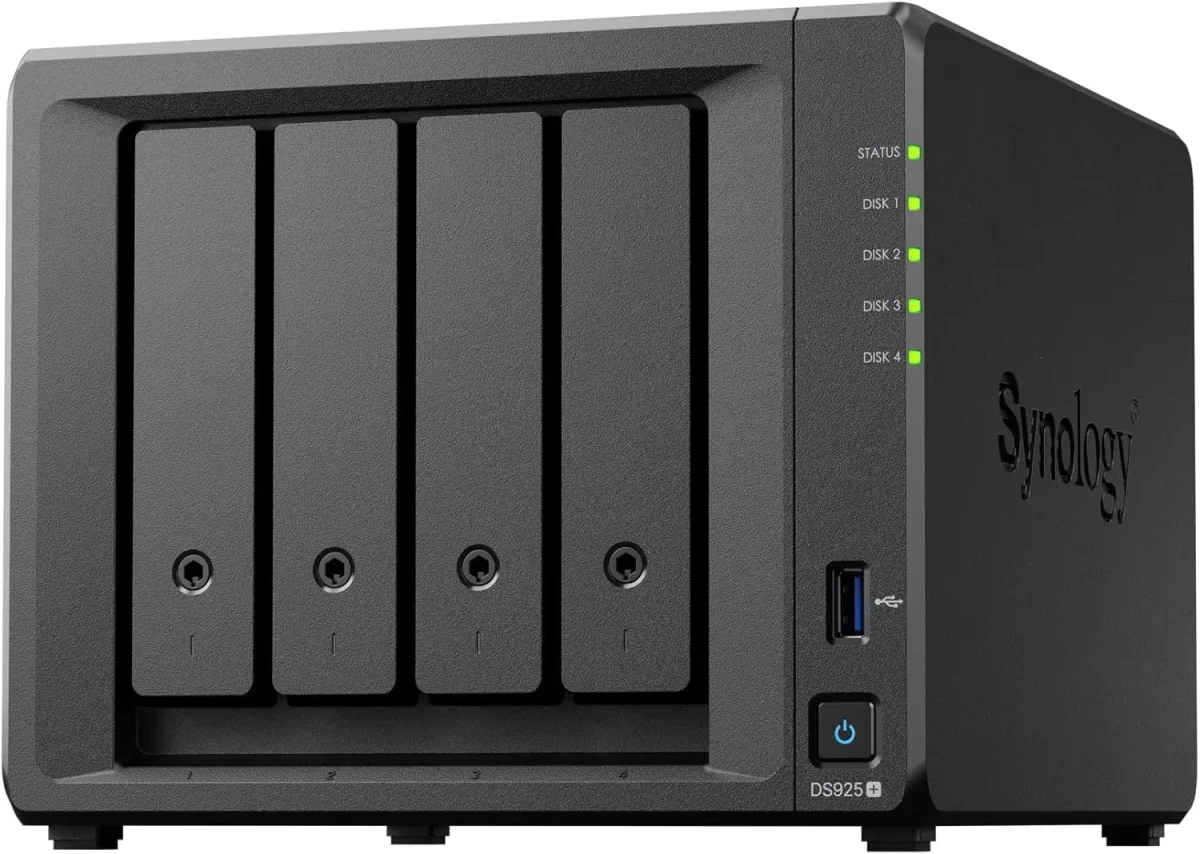
Compact 4-bay to 8-bay desktop tower NAS enclosures (such as DS923+, DS1522+, DS1821+) designed for offices of ten to fifty staff needing high-speed file sharing, private cloud access, and automated backups without requiring a server rack.
Full Btrfs support delivering automated file self-healing, real-time versioning, and immutable ransomware-proof snapshots.
🔹 EXPANSION
Supports attaching multi-bay expansion units (DX517) over eSATA when your data storage requirements grow.
1U Rackmount RS-Series NAS for Standard Server Cabinets
Compact 1U rackmount NAS enclosures (such as RS422+, RS822+, RS1221+) designed to fit shallow and standard 19-inch server cabinets, providing strong RAID storage and virtualization backup targets.
🔹 EXPANDABILITY
Connects to dedicated rackmount expansion enclosures (RX418) for adding additional drive bays easily.
🔹 POWER REDUNDANCY
Available with dual redundant power supplies (RP models) that protect storage operations against power circuit trips.
🔹 VIRTUALIZATION READY
Certified iSCSI and NFS storage target for Microsoft Hyper-V, VMware vSphere, and Citrix XenServer environments.
2U High-Capacity Rackmount Storage Servers for Enterprises
High-density 2U rackmount storage servers (such as RS2423+, RS2821RP+, RS3621xs+) built for heavy multi-user concurrent access, large media archives, and high-capacity database backup repositories.
🔹 HIGH BAY DENSITY
Twelve to sixteen front hot-swap drive bays supporting multi-hundred-terabyte enterprise SAS/SATA storage pools.
🔹 WHO IT SUITS
Large corporate headquarters, media production facilities, hospital archives, and multi-branch data consolidation hubs.
Enterprise 24/7 SAS and SATA Hard Drives and Trays
High-endurance good for large-scale setups SATA and SAS hard drives (from Seagate IronWolf Pro, WD Red Pro, and Synology HAT series) engineered for continuous 24/7 multi-bay vibration environments.
🔹 WARRANTY COVERAGE
Backed by 5-year manufacturer warranty coverage with data recovery rescue services on certified drive tiers.
🔹 WHAT IT'S FOR
Certified enterprise storage drives designed for 24/7 multi-user read-write duty cycles inside multi-bay NAS enclosures.
🔹 WHAT TO AVOID
Desktop PC hard drives lack vibration damping and error recovery control, leading to premature RAID degradation.
M.2 NVMe SSD Cache Modules and 10GbE Network Cards
High-endurance enterprise M.2 NVMe solid-state drives for read-write cache acceleration, paired with PCIe 10GbE SFP+ fiber network adapters for wire-speed collaboration.
🔹 HIGH RANDOM IOPS
Boosts random read-write throughput up to 100,000+ IOPS, making multi-user file opening instantaneous.
🔹 WHAT IT'S FOR
Eliminating storage I/O bottlenecks and accelerating file transfers for CAD designers, database users, and video editors.
Synology High Availability (SHA) Redundant Storage Clusters
Active-Passive dual-NAS clustering that combines two identical storage servers into a single redundant cluster, providing automatic sub-minute failover if hardware fails.
🔹 AUTOMATIC FAILOVER
If the primary unit suffers a hardware, power, or network fault, the secondary unit takes over all shares in seconds.
🔹 ACTIVE-PASSIVE CLUSTER
Combines two identical Synology NAS units; the active unit serves data while the passive unit mirrors changes in real time.
🔹 AUDIT COMPLIANCE
Provides verified continuous data availability for healthcare, banking, and manufacturing compliance standards.
Active Backup for Business: License-Free PC, Server and M365 Backup
Complete, centralized backup software embedded in DSM that backs up all office Windows PCs, physical servers, virtual machines, and cloud mailboxes locally with zero recurring license fees.
🔹 SERVER BACKUP
Application-aware image backups of physical Windows servers and Microsoft Hyper-V / VMware virtual machines.
🔹 ZERO LICENSE FEES
Completely license-free with no recurring monthly per-user, per-device, or per-gigabyte subscription charges.
🔹 REPORTING & ALERTS
Automated daily email summaries confirming backup job completion and flagging any disconnected laptops.
Surveillance Station NVR Storage and Camera Licensing
Turns your Synology NAS into an good for large-scale setups Network Video Recorder supporting high-definition IP cameras, automated motion recording, and secure mobile monitoring.
🔹 FAILOVER RECORDING
Dual-NAS recording failover ensures video recording continues easily if the primary NVR unit restarts.
🔹 WHAT IT'S FOR
Centralizing office, warehouse, and factory IP CCTV video recording onto secure, redundant RAID storage.
🔹 SMART SEARCH
Timeline playback and intelligent video analytics allow searching hours of footage for motion events in seconds.
Storage AMC Contracts, Health Monitoring and Preventative Upkeep
Annual maintenance contracts providing scheduled Btrfs data scrubbing, S.M.A.R.T. Drive health analysis, snapshot verification, and emergency on-site attendance.
🔹 DOCUMENTATION
Complete storage asset registers, RAID maps, and DSM administrative credentials maintained and updated at every visit.
🔹 RESTORE DRILLS
Scheduled live restore drills validating snapshot rollbacks and bare-metal PC image restores quarterly.
🔹 PREVENTATIVE VISITS
Regular physical passes - checking intake dust filters, inspecting UPS USB signaling, and updating logs.
✉️ Service & Maintenance Support
Need site visits, AMC contract estimates, or customized installation architecture? Connect with our technical desk directly.
Turnkey Enterprise Network Attached Storage (NAS) Metrics Checklist near Khanna
🛠️ Workflow Setup
RAID & Btrfs initialization: We build the hardware RAID array, format Btrfs storage pools, install NVMe cache modules, and update DSM operating system firmware.
⚠️ Pitfalls to Avoid
Never populate a multi-bay enterprise NAS with consumer desktop hard drives; desktop drives lack vibration damping and will drop out of RAID arrays.
🔌 Guidelines & Sizing
Specify genuine Synology PERC-grade hardware RAID controllers and make sure storage pools are formatted with the Btrfs file system for snapshot support.
📈 Upgrade Triggers
Someone accidentally deleted a critical client folder, and the only backup was an external hard drive that had not been plugged in for months.
📃 Feature List and Technical Detail around Khanna
Management is handled through an intuitive web-based interface (DiskStation Manager) with full Windows Active Directory and LDAP integration. User access permissions, folder quotas, storage pool health, and automated S.M.A.R.T. Disk diagnostic alerts are monitored and administered from a single screen.
Hardware enclosures and enterprise hard drives are itemized transparently on our proposals. Every unit is supplied with authentic manufacturer warranty coverage, factory service tags, and local engineering setup. We document all IP configurations, RAID maps, and snapshot retention schedules at project handover.
🏆 CORE PARAMETER🔹 Backup SuitesActive Backup for Business, Active Backup for M365, Hyper Backup
🔹 Expansion CapabilitySupports eSATA and SAS Multi-Bay Expansion Units (DX/RX Series)
Storage Backplane Soldering and High-Speed SAS/SATA Trace Tolerances
Backed by rigorous manufacturing standards and comprehensive multi-year hardware warranties, Synology storage solutions deliver verifiable data protection, continuous availability, and dependable performance for growing commercial enterprises.
Synology network attached storage appliances are engineered from the ground up to deliver reliable data consolidation, business continuity, and comprehensive data management for modern commercial enterprises. Built to handle intensive multi-user file access, automated bare-metal backups, and high-throughput collaboration, the platform provides complete data sovereignty without recurring per-user software licensing fees.
✉️ SUPPORT DESK
Coordinate custom hardware configurations, AMC maintenance contracts, and site engineering visits directly with authorized integration desks.
🛠️ Thermal Clearance, Drive Temperatures and Dust Prevention
A business NAS server rarely fails due to software; it fails from physical causes - unconditioned power cuts mid-write, accumulated fan dust, vibration from mismatched drives, or thermal pooling.
🛠️ Data Migration & Cutover Step by Step for growing offices
🔹Always populate NAS storage pools with enterprise-certified 24/7 hard drives (IronWolf Pro, WD Red Pro, or Synology Enterprise) rather than consumer desktop drives.
🔹Assign static IP addresses to bonded network interfaces and configure LACP IEEE 802.3ad link aggregation on the connecting managed switch for redundancy.
🔹Format all primary storage volumes using the Btrfs file system to enable immutable snapshots and automated data integrity self-healing.
🧠 Field Testing and What It Told Us throughout Kolkata
The first thing I inspect when auditing a company's file storage is how backups are physically handled. In eight out of ten offices around Khanna, people rely on an external USB hard drive plugged into an accountant's PC that nobody has tested in months. On a Synology Enterprise Network Attached Storage (NAS) running Active Backup for Business, bare-metal system backups of every PC and server run automatically over the local network every night with global deduplication. That single change turns disaster recovery from a complete gamble into a twenty-minute restore.
Storing company files on a desktop PC shared folder slows down whenever the computer is used, lacks enterprise permission controls, and stops working when the user restarts Windows. A dedicated Synology NAS operates independently on enterprise hardware engineered for 24/7 multi-user file access.
Public cloud storage services (like Google Drive or Dropbox) charge recurring monthly subscription fees per user that grow indefinitely, while upload and download speeds remain limited by internet bandwidth. An on-premise Synology NAS provides high-speed local LAN file transfers with fixed one-time hardware investment and zero per-user monthly fees.
💡 Engineering Fact: Synology High Availability (SHA) clustering pairs two identical NAS units over a dedicated heartbeat link, executing automatic sub-minute failover if the primary node stops.
☎️ What Is Included and What Costs Extra close to Khanna
Industry Sector
Typical NAS Storage Configuration
Standard Lead Time
Commercial Security & Facility Teams
Rackmount NAS running Surveillance Station with high-endurance surveillance hard drives for 32+ 4K IP cameras
Typically 3 to 5 business days
Corporate Head Offices
High-Availability Dual-NAS cluster with Active Backup for Microsoft 365 mailboxes and department file shares
Typically 5 to 7 business days
Manufacturing Plants & Depots
1U/2U Rackmount NAS with dual PSUs, RAID 5 enterprise drives for automated server and PC system image backups
Scheduled 5 to 7 business days
🔍 Everyday Responsiveness for Staff close to Khanna
Snapshot recovery timed on a 500GB shared folder following a simulated file overwrite.
FEWER HEADACHES - THE SHORT VERSION
WHERE IT FALLS SHORT WITHOUT THE SALES PITCH
✓Customizable storage quotas per user or department prevent a single employee from filling up the entire company storage pool.
—Desktop NAS towers placed on open office shelves accumulate airborne dust over time and require routine preventative cleaning.
✓A failed hard drive does not stop business operations; the controller continues serving data from parity and rebuilds onto a hot-spare automatically.
—Enterprise hard drives are sold separately from the NAS enclosure and represent a major part of the overall storage investment.
✓Dual redundant power supplies on rackmount models protect storage operations against electrical trips and power cord disconnections.
—10GbE network speeds require matching 10GbE switch ports, SFP+ optical transceivers, and Cat6A or fiber cabling across the network.
✓Synology Drive and Drive ShareSync synchronize files across distributed branch offices automatically, providing fast local access with centralized sync.
—A small 3-person office sharing basic Word files rarely requires a multi-bay 10GbE NAS; a basic cloud folder is usually enough.
✓Files open in seconds across the office network because the storage array manages concurrent read-write transactions on dedicated hardware.
—Synology High Availability (SHA) clustering requires purchasing two identical NAS enclosures and identical hard drive configurations.
💡 Engineering Fact: Dual hot-swappable platinum power supplies share electrical load evenly, switching to 100% load on a single supply instantly if one power circuit trips.
⚡ SYSTEM DEPLOYMENT ARCHITECTURE
Ready to secure your premises in Khanna?
Get comprehensive structured network setups, professional hardware alignment, and authorized warranty support allocations natively.
Q. Why should our business buy a Synology NAS instead of storing files on a Windows desktop PC?
A Windows desktop PC used as a file server relies on consumer components, single-channel non-ECC RAM, and a single hard drive without hardware redundancy. When multiple users open large files simultaneously, network queues form, transactions lag, and a sudden power cut can corrupt shared files. A Synology Enterprise Network Attached Storage (NAS) is engineered for 24/7 continuous multi-user storage, featuring hardware RAID redundancy, Btrfs self-healing file systems, immutable snapshot protection, and dedicated high-speed network interfaces.
Q. Why should we use enterprise NAS hard drives instead of desktop hard drives?
Desktop hard drives are designed for light eight-hour daily use in single-drive computers. They lack Rotational Vibration (RV) sensors and have short error recovery timeouts, which causes RAID controllers to drop drives during heavy multi-user access. Enterprise NAS drives (like IronWolf Pro, WD Red Pro, or Synology Enterprise) are engineered for continuous 24/7 multi-bay operation with 2-million-hour MTBF ratings and 5-year warranties.
Q. Can we set individual storage quotas for different departments or users?
Yes. DSM allows administrators to enforce custom storage quotas per shared folder, user group, or individual user account. This prevents single departments (such as video production or marketing) from consuming the entire storage pool unexpectedly.
Q. What is Active Backup for Business and are there recurring software license fees?
Active Backup for Business is a complete backup suite built directly into the Synology operating system (DSM) that backs up all office Windows PCs, physical servers, virtual machines, and Microsoft 365 accounts automatically onto the NAS. There are zero software license fees, zero user CALs, and zero monthly subscription charges. It includes global deduplication technology that saves massive amounts of storage space.
Q. What is the difference between RAID 1, RAID 5, RAID 6, and RAID 10?
RAID 1 mirrors data across two drives for basic 1-drive failure protection. RAID 5 stripes data and parity across three or more drives, allowing any single drive to fail without data loss while providing high usable capacity. RAID 6 uses dual parity across four or more drives, allowing two drives to fail simultaneously. RAID 10 combines mirroring and striping across four or more drives, delivering the highest read-write IOPS throughput for databases.
💡 Engineering Fact: AES-256 bit hardware-accelerated volume encryption protects stored data from physical drive theft without imposing computational bottlenecks on file transfers.
🔄 RELATED INFRASTRUCTURE SOLUTIONS
Complementary Enterprise Systems We Deploy in Khanna
Connect your NAS storage array directly to an enterprise Dell PowerEdge server host for virtual machine backups in Khanna.
Khanna in Kolkata lies close to major transport hubs, busy markets, and dense residential pockets. Movement is constant throughout the day, with shoppers, commuters, delivery agents, and visitors frequently passing through. Installing Synology Enterprise Network Attached Storage (NAS) helps households and small businesses keep clear visibility around gates, corridors, and street-facing areas. The locality contains narrow lanes, busy roads, and interconnected neighbourhood stretches where daily activity remains high.
Monitoring becomes important for homes near market lanes and for shops handling constant footfall. Synology Enterprise Network Attached Storage (NAS) offers strong daytime clarity, dependable night vision, and wide-angle coverage suitable for such spaces. As the locality continues to grow with new shops, residential buildings, and improved connectivity, stable surveillance solutions become necessary. Synology Enterprise Network Attached Storage (NAS) supports round-the-clock monitoring, remote viewing, and consistent performance for residents and small establishments.