
📍 Local Integration Hub • Pincode 700009

Buy Synology Rackmount & Desktop NAS for Business in Sealdah

Last Updated: September 2026
🏷️ SPECS:Btrfs File SystemImmutable SnapshotsHardware RAID 5/6/10Synology Hybrid RAID (SHR)Dual 10GbE SFP+ / RJ45Hot-Swappable SATA/SAS BaysActive Backup SuiteM.2 NVMe Cache AccelerationZero Per-User License FeesPrivate Cloud Drive SyncWORM Immutable StorageAir-Gapped Backup TargetHyper Backup to CloudSurveillance Station NVRActive Directory / LDAP SyncWindows ACL IntegrationReal-Time File VersioningCross-Office ReplicationECC Memory SubsystemDual Redundant Power Supplies4-Bay to 8-Bay Desktop Tower1U to 3U Rackmount RS-SeriesExpansion Unit ScalableEnterprise IronWolf / WD Red ProSynology HAT Enterprise DrivesSilent Fan Acoustic ModeEncrypted Shared FoldersAutomated S.M.A.R.T. ChecksSealed OEM Invoiced Units3 to 5 Year Hardware Warranty

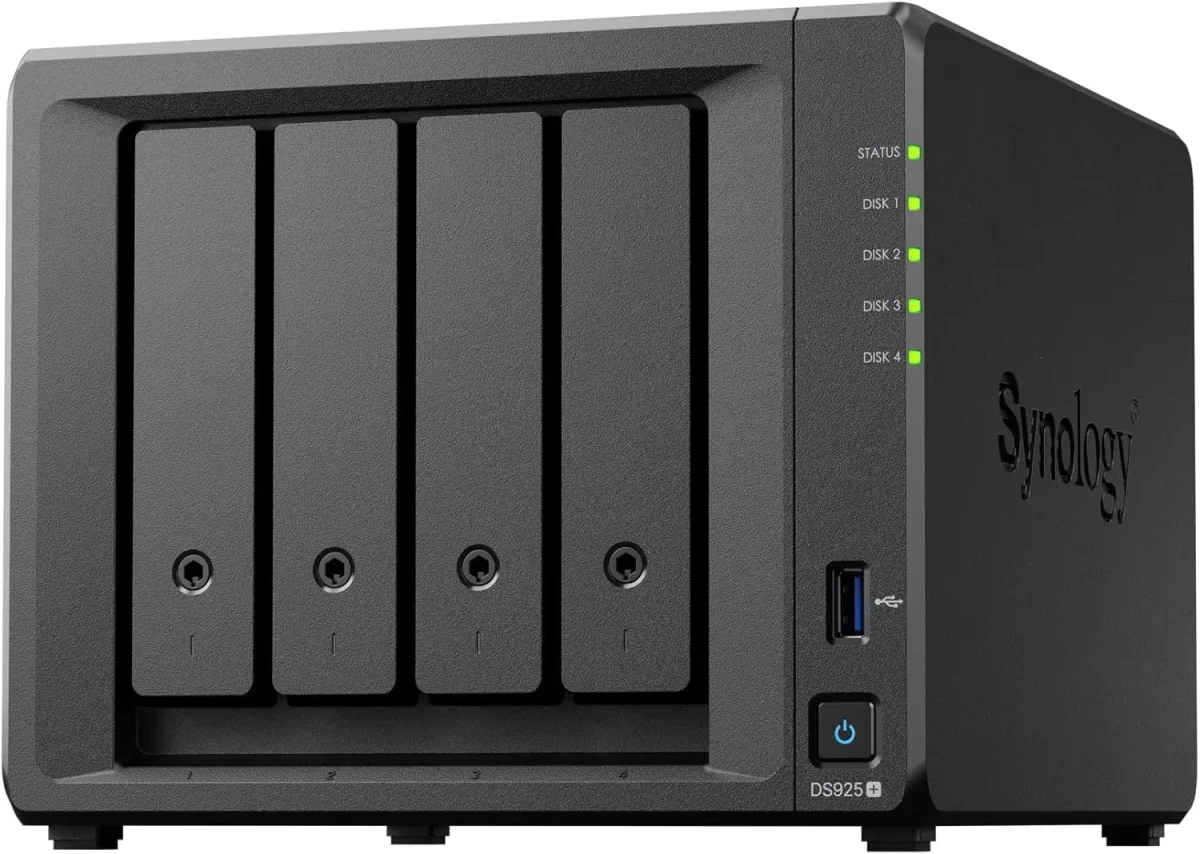
Calculate what losing five years of design files, accounting records, or project documentation actually costs your business in lost billing and legal liability. Set that figure beside the cost of an on-premise Synology storage array that backs up every PC, Windows server, and Microsoft 365 mailbox automatically with zero per-user monthly subscription fees. The Enterprise Network Attached Storage (NAS) carries built-in Active Backup suites that duplicate your entire infrastructure to local storage every night, giving our engineers the ability to restore a failed laptop or deleted folder within minutes.

🧭 Buying Synology Enterprise Network Attached Storage (NAS) Without the Guesswork at multi-branch offices

Technician inserting M.2 NVMe SSD cache sticks onto the underside expansion slots of a storage chassis

Buying a fixed 2-bay storage box that cannot be expanded means you are forced to scrap the unit and buy an entirely new system two years later when your data footprint doubles. We size the Synology Enterprise Network Attached Storage (NAS) with calculated expansion headroom: choosing multi-bay enclosures (4-bay, 6-bay, 8-bay, 12-bay) with eSATA or SAS expansion ports that allow attaching multi-drive expansion units (DX series) down the road without recreating your storage pools. Tell us your projected data growth and we will configure a storage foundation built to last five years.

Three staff in accounts try to edit the main billing ledger at the same time from an unmanaged PC share, and the file gets locked or corrupted with conflicting copies. A Synology Enterprise Network Attached Storage (NAS) sits on your network as a dedicated high-performance file server, enforcing granular Windows ACL user permissions and managing simultaneous read-write access cleanly. The Btrfs file system uses copy-on-write data architecture with automatic metadata self-healing, detecting and repairing silent file corruption in the background before anyone notices. We size the drive bays, calculate usable storage capacity after RAID parity, and configure the shares for offices in and around Sealdah.

🔑 Why Businesses Pick Synology Enterprise Network Attached Storage (NAS) when budgets are tight

Very few businesses keep a static data volume over time. Start with four 8TB enterprise drives in RAID 5 today, and the same Synology enclosure allows you to add additional drives to open bays or replace existing drives with higher-capacity models on the fly without deleting your shared folders or stopping office work. We design each storage rollout near Sealdah with expansion headroom so your investment stays scalable.

Ask any business owner who relied on an external USB hard drive for company backups what happened when they actually needed to restore data after a crash. The honest answer is usually heartbreak: the drive was unplugged months ago, dropped on the floor, or failed silently during a power surge. The Synology Enterprise Network Attached Storage (NAS) provides an automated, resilient, multi-drive storage array that runs continuously without depending on anyone remembering to plug in a cable. Businesses around Sealdah invest in genuine centralized storage once and eliminate data loss anxiety permanently.

Manufacturing Plants: Machine Logs, ERP Backups and Dispatch Records

A 40-user chartered accountancy firm near Sealdah stored five years of client audit files across separate desktop computers, suffering constant version conflicts and near-miss data loss during tax filing deadlines. We deployed a 6-bay Synology Enterprise Network Attached Storage (NAS) with 32TB of enterprise SAS/SATA storage in RAID 6, formatted with Btrfs immutable snapshots. We migrated their document archives into mapped department shares integrated with Active Directory permissions. Staff work together on shared audit ledgers easily, hourly snapshots run silently, and partners access client folders securely from home over an encrypted private cloud portal.

🛡️ SUPPORT AFTER THE STORAGE IS COMMISSIONED

What Happens When Our Storage Engineers Arrive

Every storage deployment concludes with comprehensive documentation: the hardware serial number, administrator credentials, RAID layout map, snapshot retention schedule, active backup logs, and network share permission trees. Growing companies near Sealdah frequently have multiple departments accessing shared data; our documentation ensures your storage infrastructure remains transparent and fully manageable.

A summary of the storage integration and maintenance services we provide:

Hardware RAID 1, 5, 6, 10 & Synology Hybrid RAID (SHR) Configuration
Enterprise {BRAND} Rackmount & Desktop NAS Enclosure Supply
Quarterly Storage Health Audits, Btrfs Scrubbing & Log Reviews
Emergency Degraded RAID Diagnostics & Hot-Spare Drive Replacement

*Terms: Engineering labor, commissioning, and preventive maintenance are invoiced under our private service agreement, distinct from product hardware warranties.*

💡 Engineering Fact: Active Backup for Business global deduplication analyzes data blocks across all backed-up office workstations, storing identical Windows operating system files only once.
🧾 NAS HARDWARE HEALTH & DRIVE CHECK

Need to check hard drive health, expand storage pools, or upgrade memory on an existing Synology NAS in Sealdah? Contact our storage desk for prompt diagnostic support.

Check Storage Health →

📚 Complete List of What We Supply for growing companies

Model-by-model specifications, including Btrfs features and warranty coverage:

Plus Series Desktop NAS Towers for Small Offices and Studios

Compact 4-bay to 8-bay desktop tower NAS enclosures (such as DS923+, DS1522+, DS1821+) designed for offices of ten to fifty staff needing high-speed file sharing, private cloud access, and automated backups without requiring a server rack.

🔹 WHAT IT'S FOR

Creative studios, CA firms, clinics, and commercial offices of ten to fifty staff needing centralized shared storage and automated backups.

🔹 DRIVE BAYS

Four to eight hot-swappable 3.5-inch/2.5-inch SATA drive bays supporting high-capacity enterprise NAS hard drives.

🔹 NETWORK PORTS

Multiple 1GbE/2.5GbE RJ45 ports with link aggregation, plus optional 10GbE upgrade module slots for fast file transfers.

1U Rackmount RS-Series NAS for Standard Server Cabinets

Compact 1U rackmount NAS enclosures (such as RS422+, RS822+, RS1221+) designed to fit shallow and standard 19-inch server cabinets, providing strong RAID storage and virtualization backup targets.

🔹 NETWORK UPGRADES

PCIe Gen3 expansion slots accommodating 10GbE SFP+ fiber and 10GBASE-T copper network cards.

🔹 DRIVE CAPACITY

Four hot-pluggable 3.5-inch/2.5-inch SATA/SAS drive bays supporting hardware RAID 1, 5, 6, 10, and Synology Hybrid RAID.

🔹 EXPANDABILITY

Connects to dedicated rackmount expansion enclosures (RX418) for adding additional drive bays easily.

2U High-Capacity Rackmount Storage Servers for Enterprises

High-density 2U rackmount storage servers (such as RS2423+, RS2821RP+, RS3621xs+) built for heavy multi-user concurrent access, large media archives, and high-capacity database backup repositories.

🔹 SAS EXPANSION

High-speed mini-SAS HD expansion ports supporting multiple multi-bay expansion enclosures (RX1217/RX1222sas).

🔹 ENTERPRISE DRIVES

Certified for Synology Enterprise HAT series, Seagate IronWolf Pro, and Western Digital Ultrastar hard drives.

🔹 HIGH AVAILABILITY

Configurable for Synology High Availability (SHA) clustering, pairing two identical units for sub-minute failover.

Enterprise 24/7 SAS and SATA Hard Drives and Trays

High-endurance good for large-scale setups SATA and SAS hard drives (from Seagate IronWolf Pro, WD Red Pro, and Synology HAT series) engineered for continuous 24/7 multi-bay vibration environments.

🔹 WARRANTY COVERAGE

Backed by 5-year manufacturer warranty coverage with data recovery rescue services on certified drive tiers.

🔹 HOT-PLUG READY

Mounted in durable drive caddies allowing single-drive replacement while the storage array continues serving data.

🔹 WHAT TO AVOID

Desktop PC hard drives lack vibration damping and error recovery control, leading to premature RAID degradation.

M.2 NVMe SSD Cache Modules and 10GbE Network Cards

High-endurance enterprise M.2 NVMe solid-state drives for read-write cache acceleration, paired with PCIe 10GbE SFP+ fiber network adapters for wire-speed collaboration.

🔹 ZERO DRIVE BAY LOSS

Installed in dedicated internal M.2 motherboard slots, keeping all front 3.5-inch drive bays available for storage.

🔹 WHAT IT'S FOR

Eliminating storage I/O bottlenecks and accelerating file transfers for CAD designers, database users, and video editors.

🔹 NVMe CACHE POOLS

Mirrored M.2 2280/22110 enterprise NVMe SSDs configured as high-speed read-write cache pools.

Synology High Availability (SHA) Redundant Storage Clusters

Active-Passive dual-NAS clustering that combines two identical storage servers into a single redundant cluster, providing automatic sub-minute failover if hardware fails.

🔹 REQUIREMENTS

Requires two identical Synology NAS models, identical drive capacities, and a dedicated direct heartbeat patch cable.

🔹 AUTOMATIC FAILOVER

If the primary unit suffers a hardware, power, or network fault, the secondary unit takes over all shares in seconds.

🔹 HEARTBEAT LINK

Direct high-speed network connection between units monitors hardware health, network links, and storage status continuously.

Active Backup for Business: License-Free PC, Server and M365 Backup

Complete, centralized backup software embedded in DSM that backs up all office Windows PCs, physical servers, virtual machines, and cloud mailboxes locally with zero recurring license fees.

🔹 INSTANT VM RESTORE

Boot a backed-up server image directly as a virtual machine on the NAS during emergency server outages.

🔹 SERVER BACKUP

Application-aware image backups of physical Windows servers and Microsoft Hyper-V / VMware virtual machines.

🔹 MICROSOFT 365 BACKUP

Backs up all corporate Exchange mailboxes, OneDrive accounts, and SharePoint team sites locally on schedule.

Surveillance Station NVR Storage and Camera Licensing

Turns your Synology NAS into an good for large-scale setups Network Video Recorder supporting high-definition IP cameras, automated motion recording, and secure mobile monitoring.

🔹 ISOLATED RECORDING

Video streams record directly to dedicated surveillance storage pools isolated from general office shared folders.

🔹 CAMERA SUPPORT

Compatible with over 8,000 ONVIF and enterprise IP cameras (including CP Plus, Hikvision, Dahua, and Axis).

🔹 WHAT IT'S FOR

Centralizing office, warehouse, and factory IP CCTV video recording onto secure, redundant RAID storage.

Storage AMC Contracts, Health Monitoring and Preventative Upkeep

Annual maintenance contracts providing scheduled Btrfs data scrubbing, S.M.A.R.T. Drive health analysis, snapshot verification, and emergency on-site attendance.

🔹 WHAT IT COVERS

Scheduled preventative storage audits, Btrfs data scrubbing, DSM firmware patching, and emergency callout support.

🔹 RESTORE DRILLS

Scheduled live restore drills validating snapshot rollbacks and bare-metal PC image restores quarterly.

🔹 RESPONSE TIME

Defined SLA response times with on-call engineers available for degraded storage pools and hardware alarms.

✉️ Service & Maintenance Support

Need site visits, AMC contract estimates, or customized installation architecture? Connect with our technical desk directly.

Contact Helpdesk →

🧮 Licence Tiers and What Each One Covers for larger offices

The Btrfs file system provides good for large-scale setups data protection. Advanced copy-on-write technology generates lightweight point-in-time snapshots every hour, creating immutable historical versions of your shared folders that cannot be modified by ransomware. Built-in metadata self-healing detects and corrects silent data corruption automatically, ensuring files remain readable years after creation.

Backup software is built directly into the operating system (DSM) with zero ongoing software license fees. Active Backup for Business captures bare-metal system image backups of all office Windows PCs, physical servers, and virtual machines automatically on schedule. Built-in global deduplication technology stores identical files and operating system blocks only once, saving massive amounts of disk space across the office.

🏆 CORE PARAMETER🔹 Enclosure Types4-Bay to 8-Bay Desktop Tower, 1U to 3U Rackmount Enclosures
🔹 Warranty Coverage3 to 5 Year Manufacturer Hardware Warranty with Local Support
🏠 Memory SubsystemExpandable ECC Registered DDR4 / DDR5 Memory Modules
🔹 Backup SuitesActive Backup for Business, Active Backup for M365, Hyper Backup
🔹 Expansion CapabilitySupports eSATA and SAS Multi-Bay Expansion Units (DX/RX Series)
💾 Storage AccelerationDual M.2 NVMe PCIe SSD Slots for Dedicated Read-Write Cache
🔹 Processor ArchitectureMulti-Core AMD Ryzen / Intel Xeon 64-bit Processors

Factory Hardware Diagnostics and DSM Operating System Integrity

Comprehensive backup suites embedded in the platform deliver turnkey business continuity. Active Backup for Business, Active Backup for Microsoft 365, and Hyper Backup provide automated, deduplicated protection across endpoints, physical servers, virtual machines, and cloud SaaS applications without requiring third-party software licenses.

Hardware scalability allows storage arrays to grow alongside business demands. Multi-bay desktop towers and high-density rackmount enclosures support easy to set up storage expansion units, multi-gigabit and 10GbE network daughter cards, and high-speed NVMe SSD cache acceleration.

✉️ SUPPORT DESK

Coordinate custom hardware configurations, AMC maintenance contracts, and site engineering visits directly with authorized integration desks.

Contact Helpdesk →

🛠️ 10GbE SFP+ Fiber Uplinks, Link Aggregation and Switch Port Bonding

The points below cover chassis mounting, electrical distribution, RAID architecture, and backup scheduling in the exact sequence our field engineers execute on site.

📋 Site Survey & Planning - Our Standards for busy workplaces

  • 🔹When installing M.2 NVMe SSDs for cache acceleration, configure a read-write mirrored cache pool rather than a read-only cache for optimal database throughput.
  • 🔹Connect the NAS management USB cable directly to an online double-conversion UPS and enable automated safe standby shutdown on low battery alerts.
  • 🔹Enable automated S.M.A.R.T. Disk surface scans and quarterly Btrfs data scrubbing during non-working weekend maintenance windows.

🗒️ What Our Team Sees on Site for demanding workloads

Do not pair desktop-grade hard drives with an enterprise multi-bay NAS enclosure. Desktop drives lack rotational vibration sensors and firmware recovery timing (ERC/TLER), which causes RAID controllers to drop drives from the pool during heavy concurrent writes. Always invest in enterprise NAS drives like Seagate IronWolf Pro, WD Red Pro, or Synology Enterprise HAT series designed for continuous multi-bay operation.

Third-party SaaS backup software charges expensive recurring licenses per endpoint or per gigabyte. The Synology Enterprise Network Attached Storage (NAS) includes the Active Backup suite built directly into DSM, delivering automated, deduplicated bare-metal backups for all office PCs, physical servers, and Microsoft 365 mailboxes with zero software licensing costs.

Desktop-grade SATA hard drives lack rotational vibration compensation and error recovery controls, leading to premature disk dropouts in multi-bay RAID arrays. Enterprise NAS hard drives in Synology storage arrays are rated for 24/7 continuous operation with 2-million-hour MTBF ratings.

💡 Engineering Fact: WORM (Write Once, Read Many) compliance storage volumes use hardware-enforced locking to prevent files from being modified or deleted during regulatory retention cycles.
⚙️ SYSTEM EVALUATION & CHECKLIST

Turnkey Enterprise Network Attached Storage (NAS) Metrics Checklist near Sealdah

🛠️ Workflow Setup

Backup & snapshot automation: Immutable Btrfs snapshot rules are configured, Active Backup is deployed across client PCs, and offsite replication is scheduled.

⚠️ Pitfalls to Avoid

Never run a single-drive storage setup for business data; a minimum of a 4-bay RAID 5 configuration with hot-spare support is required for data safety.

🔌 Guidelines & Sizing

Always specify good for large-scale setups 24/7 NAS hard drives (Seagate IronWolf Pro, WD Red Pro, or Synology Enterprise) with rotational vibration sensors.

📈 Upgrade Triggers

You are opening additional branch offices that need access to centralized company documents without messy email attachments.

✅ Who You Call at Nine in the Evening for single-office teams

Industry SectorTypical NAS Storage ConfigurationStandard Lead Time
Graphic Design & CAD Studios8-Bay NAS with 10GbE SFP+ fiber card, mirrored NVMe SSD cache and RAID 10 for direct multi-user project editingUsually 3 to 5 business days
Hospitals & Diagnostic Centers2U Rackmount NAS with multi-terabyte storage pool for 24/7 PACS medical imaging archives and lab recordsScheduled 7 to 10 business days
Manufacturing Plants & Depots1U/2U Rackmount NAS with dual PSUs, RAID 5 enterprise drives for automated server and PC system image backupsScheduled 5 to 7 business days

✅ Speed, Capacity and Where the Ceiling Sits when the office is busiest

Deduplication savings and storage efficiency calculated on production database archives.

WHAT WORKS IN DAILY USE - IN PLAIN WORDS

WHO IT DOES NOT SUIT SPELLED OUT UPFRONT

Hot-swappable front drive caddies allow technicians to replace a degraded drive in sixty seconds without turning off the storage server.
Enterprise hard drives are sold separately from the NAS enclosure and represent a major part of the overall storage investment.
Full manufacturer warranty with genuine serial numbers registered directly to your company, backed by local engineering support in Kolkata.
Administering granular Windows ACL permissions across complex multi-department folder trees requires structured planning before rollout.
Files open in seconds across the office network because the storage array manages concurrent read-write transactions on dedicated hardware.
Emergency component and drive replacements depend on authorized distributor stock availability for your specific pin code.
High Availability (SHA) clustering pairs two identical units so that if one NAS suffers a hardware fault, the second takes over within seconds.
Branch synchronization requires stable outbound internet bandwidth at all participating locations for smooth real-time file replication.
Hyper Backup automates secondary offsite backups to a remote NAS, external storage, or cloud repository with client-side encryption.
M.2 NVMe SSD cache requires high-endurance enterprise or NAS-rated NVMe drives; consumer SSDs will exhaust their write endurance quickly.
💡 Engineering Fact: Enterprise NAS hard drives include Rotational Vibration (RV) sensors that adjust read-write head positioning in real time to compensate for vibration from neighboring drives.
⚡ SYSTEM DEPLOYMENT ARCHITECTURE

Ready to secure your premises in Sealdah?

Get comprehensive structured network setups, professional hardware alignment, and authorized warranty support allocations natively.

Frequently Asked Questions

Q. Why should we procure through Microtech Solutions instead of buying an empty enclosure online?
Procuring through Microtech Solutions guarantees genuine, channel-sourced Synology hardware with official manufacturer warranty coverage. You receive expert pre-sales workload sizing, pre-tested enterprise hard drives with 24-hour lab surface testing, Btrfs immutable snapshot configuration, Active Directory integration, and ongoing local engineering support across Kolkata.
Q. Why is connecting the NAS to an online UPS so critical?
Sudden power cuts during disk write operations cause dirty volume shutdowns and can degrade RAID arrays. Connecting the NAS to an online UPS via USB enables automated safe mode shutdown: when the UPS battery reaches a low threshold, the NAS safely closes open files, flushes cache, and dismounts storage pools before power exhausts.
Q. What is the difference between RAID 1, RAID 5, RAID 6, and RAID 10?
RAID 1 mirrors data across two drives for basic 1-drive failure protection. RAID 5 stripes data and parity across three or more drives, allowing any single drive to fail without data loss while providing high usable capacity. RAID 6 uses dual parity across four or more drives, allowing two drives to fail simultaneously. RAID 10 combines mirroring and striping across four or more drives, delivering the highest read-write IOPS throughput for databases.
Q. Can the NAS mix with our existing Windows Active Directory area?
Yes. Synology NAS appliances mix natively with Windows Active Directory and LDAP directory services. All existing area users and security groups synchronize directly to DSM, allowing you to assign granular Windows ACL permissions to shared folders without recreating user accounts.
Q. What maintenance is required to keep our NAS storage operating reliably?
Routine maintenance includes reviewing S.M.A.R.T. Hard drive health logs, scheduling quarterly Btrfs data scrubbing, inspecting UPS USB signaling, checking snapshot retention schedules, verifying backup job completion, and applying tested DSM security updates during scheduled maintenance windows.
💡 Engineering Fact: Dual hot-swappable platinum power supplies share electrical load evenly, switching to 100% load on a single supply instantly if one power circuit trips.
🔄 RELATED INFRASTRUCTURE SOLUTIONS

Complementary Enterprise Systems We Deploy in Sealdah

Manage corporate mailboxes cleanly with Microsoft 365 licensing and cloud tenant setup across Sealdah.

📍 REGIONAL SERVICE FOOTPRINT

📍 Delivery, Staging, Commissioning and Handover

🗺️ REGIONAL PROFILE & MAP

🚩 A Quick Look at the Local Office Scene for nearby business parks

📍 Sealdah

Sealdah in Kolkata is one of the most important transport and commercial hubs, known for its railway station, busy markets, medical establishments, student hostels, and residential pockets. The area witnesses constant movement throughout the day as thousands of commuters, patients, shopkeepers, students, and vendors pass through its lanes. Because of this steady activity, having a reliable monitoring system becomes important for both homes and businesses.

Installing Synology Enterprise Network Attached Storage (NAS) helps capture clear visibility across entrances, corridors, shopfronts, and surrounding streets, supporting daily safety and orderliness in a crowded environment. Sealdah’s structure includes narrow lanes, clinics, diagnostic centers, eateries, hostels, and old residential buildings. These create multiple points that require regular supervision-delivery areas, shared staircases, storage rooms, and lane-facing shopfronts. Synology Enterprise Network Attached Storage (NAS) performs consistently across these diverse spaces, offering clarity even in low-light or uneven lighting conditions.

For medical shops, coaching centers, eateries, and student accommodations, the system helps keep awareness of both internal and external activity. This is especially helpful during late hours when movement around the station and connecting roads continues long after business hours. As Sealdah continues to expand with new facilities, redevelopment projects, and increased commercial activity, the need for strong surveillance becomes more prominent.

Synology Enterprise Network Attached Storage (NAS) supports property owners and businesses by providing stable monitoring without requiring constant manual checks. Whether it’s a shop owner overseeing footfall, a clinic tracking visitor movement, or a resident securing their building entrance, the system adds a layer of confidence. In one of Kolkata's most fast-paced transport hubs, this level of monitoring naturally becomes part of maintaining everyday safety and convenience.

📍 LOCAL PROCUREMENT NOTE

Local Enterprise Network Attached Storage (NAS) Procurement Note for Sealdah

Deploying an enterprise NAS around Sealdah goes smoothest when workload sizing and Btrfs snapshot planning occur before the proposal is finalized. Whether you are centralizing accounting archives the whole company depends on or setting up automated PC backups, design shapes safety. We track your hardware warranty dates and drive health telemetry proactively, ensuring your storage array remains protected.

Our Technology Ecosystem & Authorized Partners

We build, secure, and keep corporate environments using industry-certified enterprise assets.

Sophos Authorized Partner
SonicWALL Partner
Cisco Systems
TP-Link Omada
Dell PowerEdge
Lenovo Business
HP Commercial
Acronis Cyber Protect
Bitdefender GravityZone
Tally Prime Partner
Sophos Authorized Partner
SonicWALL Partner
Cisco Systems
TP-Link Omada
Dell PowerEdge
Lenovo Business
HP Commercial
Acronis Cyber Protect
Bitdefender GravityZone
Tally Prime Partner
✉️ TECHNICAL HELPDESK & INQUIRIES

Have queries about Enterprise Network Attached Storage (NAS) products, infrastructure setups, or AMC maintenance contracts? Connect with our technical helpdesk directly below.

* Kindly note Microtech Solutions operates as an independent IT systems integrator and solutions provider for enterprise infrastructure, and is not the direct corporate manufacturing line for original equipment manufacturers.*

🛡️

Available Enterprise Network Attached Storage (NAS) Profiles & Scenarios

Find the storage configuration that matches your actual workflow instead of guessing from a spec sheet.

💻 IT & SOFTWARE DEVELOPMENT HUBS

Multi-Tenant IPsec & SSL VPN Gateways

Secure site-to-cloud interconnects with multi-factor authentication for hybrid remote development teams.

🏫 EDUCATIONAL & CAMPUS LABS

Content Filtering & High-Density Wi-Fi

Granular web filtering policies paired with bandwidth shaping across computer labs, faculties, and student networks.

⚖️ LEGAL & ACCOUNTING CHAMBERS

Encrypted Cloud Backup & Storage Links

Automated point-in-time incremental backups with AES-256 encryption for client legal documentation.

🏪 STOREFRONTS & RETAIL MARTS

Multi-VLAN POS & Guest Wi-Fi Isolation

Dedicated network segmenting ensuring secure payment gateways and isolated bandwidth for point-of-sale systems.

🗺️ Regional Coverage Map & System Inventory Focus

📍 SERVICE COVERAGE AREA — KOLKATA[Toggle View]
Salt Lake | Kolkata | Salt Lake Sector V | Rajarhat | Rajarhat Newtown | New Town | Baguiati | Kestopur | Lake Town | Dum Dum Park | Dum Dum | Nagerbazar | Bangur Avenue | Ultadanga | Phoolbagan | Kankurgachi | Maniktala | Shyambazar | Hatibagan | Shobhabazar | Sealdah | Esplanade | Dalhousie | Camac Street | Park Street | Mullick Bazar | Rabindra Sarani | Burrabazar | Howrah | Bally | Belur | Andul | Dhulagarh | Dhulagori | Barasat | Madhyamgram | Habra | Basirhat | Bangaon | Barrackpore | Khardaha | Sodepur | Kolkata Airport | Birati | Dum Dum Cantonment | Santragachi | Satgachi | Beliaghata | Girish Park | Belgharia | Hooghly | Diamond Harbour Road | Rodkol | Seven Tanks | Science City | VIP Haldirams | Kaikhali | Taltala | Charu Market | Raghunathpur | Howrah Station | Belgachia | Tala Park | Santoshpally | Central Avenue | Beadon Street | R G Kar | Garia | New Garia | Gariahat | Ballygunge | Park Circus | New Alipore | Alipore | Behala | Kalindi | City Center | Karunamoyee | City Center 2 | Dunlop | Rajabazar | Bowbazar | Lake Gardens | Jodhpur Park | Golpark | Lalbazar | Arjunpur | Dhakuria | Selimpur | Golf Green | Dutta Bagan | Prince Anwar Shah Road | Ruby Crossing | Tollygunge | Kalighat | Rabindra Sarobar | South City | South City Mall | Minto Park | Lansdowne | Acropolis Mall | Sinthee More | Baranagar | Dakshineshwar | Chandni Chowk | Dharamtala | Brabourne Road | M G Road | Ripon Street | Shreebhumi | Pati Pukur | Bidhan Sarani | Central | Howrah Maidan | Baro Jirakpur | Baruipara | Basunagar | Belanagar | Bhabla Bazar | Bhagabatipur | Bhatpara | Bhyabla | Bijolipark | Bolpur | Chandannagar | Chandra Pally | Chinsurah | Chiriamore | Tobin Road | Dankuni | Diamond Plaza Rodkol | Dighi Road | Domjur | Gobra | Gohalbati | Golaghata | Halisahar | Hindmotor | Hridaypur | Ichapur | Itinda Road | Basirhat College | Purbalaya | Sheoraphuli | South Bankimpally | Sukanta Nagar | Itna Colony | Jalan Complex | Jangalpur | Joygachi | Kanchrapara | Ankurhati | Kalyani | Garifa | Khanna | Kodalia | Konnagar | Mahajati Nagar | Malda | Michael Nagar | Mirzapur | Naihati | Netaji Nagar | Jadavpur | Bansdroni | Bijoygarh | Bankra | Krishnanagar | Serampore | Baidyabati | Ashoknagar Kalyangarh | Argari | Alampur | Amtala | Shyamnagar | Ashok Nagar | Bandel | Batanagar | Burnpur | Digha | Hutton Road | Jalpai More | Kamarhati | Muchipara | Pujali | Rajpur Sonarpur | Ranaghat | Sevoke Road | Sukchar | Thakurpukur | Tribeni | Uttorayon | Agarpara | Asansol City Centre | ASP Steel Plant Zone | Benachity | Berhampore | Bidhannagar (Durgapur) | Budge Budge | Burdwan | City Centre (Durgapur) | DSP Steel Plant Zone | Durgapur | Ghola | Haldia Port | Hill Cart Road | Joka | Kanthi (Contai) | Khalpara | Kharagpur IIT Zone | Kharagpur Town | Kulti | Liluah | Maheshtala | Mandirtala | Matigara | Midnapore Town | Narendrapur | New Barrackpore | Phuleswar | Pradhan Nagar | Raniganj | Rishra | Salkia | Sankrail | Santiniketan | Santoshpur | Shibpur | Sonepur | Sulekha Area | Survey Park | Uluberia
📍 SERVICE COVERAGE AREA — AHMEDABAD[Toggle View]
Ahmedabad | Navrangpura | Ellisbridge | C G Road | Ambawadi | Paldi | Vasna | Ashram Road | Naranpura | Memnagar | Vastrapur | Bodakdev | Satellite | Prahladnagar | S G Highway | Thaltej | Gota | Sola | Sabarmati | Chandkheda | Ranip | Maninagar | Kankaria | Jodhpur | Narol | Bopal | Vastral | Ghodasar | Odhav | Sarkhej | Shahibag | Nikol | Vejalpur | Chandranagar | Bapunagar | Sadar Bazar | Isanpur | Makarba | Sabarmati Riverfront | Shahwadi | Mithakhali | Sarkhej Gandhinagar Highway (SG Highway) | Maninagar East | Mithakhali Six Roads | Anandnagar | Gandhinagar | South Bopal | Naroda | Khadia | Vijay Nagar | Shela | Sardarnagar | Vatva GIDC | Naroda GIDC | Odhav Industrial Estate | Changodar | Sanand Industrial Zone | Kathwada | GIFT City (Gandhinagar) | Science City (Ahmedabad) | Sindhu Bhavan Road | Vaishno Devi Circle | Infocity (Gandhinagar) | SP Ring Road
📍 SERVICE COVERAGE AREA — MUMBAI[Toggle View]
Mumbai | Andheri East | Andheri West | Bandra Kurla Complex | Powai | Thane West
⚙️ ENTERPRISE IT INFRASTRUCTURE & SERVICE ARCHITECTURE OVERVIEW[Toggle View]
Enterprise IT Systems Integration, Next-Gen UTM Firewalls & SD-WAN Gateways, Dell PowerEdge & Lenovo Rackmount Servers, Layer-2 & Layer-3 Managed Switch Fabrics, Structured Cat6/Cat6A & Fiber Optic Backbones, Immutable Cloud Backup & DRaaS Platforms, Microsoft 365 & Active Directory Governance, Commercial IP CCTV & Biometric Attendance Systems, Enterprise Wireless AP Solutions, Multi-Brand Refurbished Business Laptops & Desktops, Corporate IT AMC & Managed Infrastructure Support.
WhatsApp Call Now