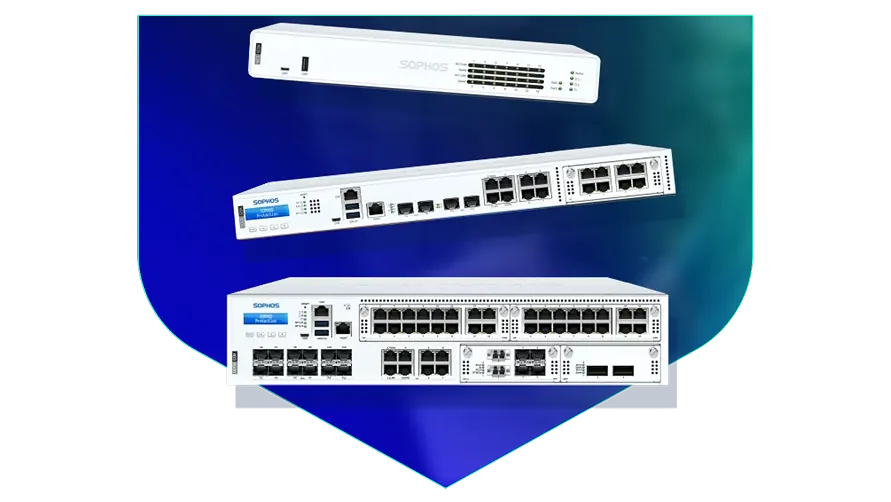
🏷️ SPECS:Scanning Without the CrawlTLS 1.3 InspectionSecond Chip for SpeedFibre Uplinks on Larger ModelsChecks Inside HTTPSProtection Stays Switched OnPorts Matched to Your BuildingHandles a Full OfficeBuilt for Busy AfternoonsBrowsing Stays FastZero-Day SandboxingBlocks RansomwareSynchronized SecurityAuto-Isolates Infected LaptopsSD-WAN FailoverAuto Line SwitchingDeep Packet InspectionOne Dashboard, All BranchesActive-Active HA ClusterStandby Unit Ready1U Rackmount ChassisDual Hot-Swap PSUFits Any RackDesktop Size ModelBypass Port PairsStays Up on FailureBranch-Size BoxModular Port BaysRuns Quiet in OfficeFront-to-Rear Airflow
Why does the office internet crawl every afternoon, even though you pay for a fast line? Nine times out of ten the firewall is the bottleneck, because it starts checking encrypted traffic and runs out of processing power by mid-day. The Sophos Next-Gen Firewall for Business Networks splits that work across two chips, so routine traffic flows straight through while the security scanning happens alongside it. We size and install these for offices in and around Beliaghata, and we run the speed test in front of you before we hand the box over.
💼 Onsite Installation and Staff Training for Sophos in Beliaghata
The auditor asked who can reach the accounting server and from where, and nobody could answer in writing. This gateway records every connection with the user's name attached, so the answer becomes a report instead of a guess. Policies are written per group - accounts, sales, guests, visitors - which keeps them readable a year later by whoever inherits them. That paperwork is what turns a two-week audit scramble into an afternoon.
Almost every site your staff open is now encrypted, and an older firewall waves that traffic straight through unopened. A SophosNext-Gen Firewall for Business Networks can look inside those sessions for hidden malware and still keep pages loading quickly, because the decryption work is done in hardware (TLS 1.3 inspection). You choose what gets opened and what stays private, so banking and medical sites can be left alone. Without it, most of what enters your office is never examined at all.
🤝 What You Get That Cheaper Options Skip in Beliaghata
Ask any office that has owned a firewall for three years what they switched off. The honest answer is usually the scanning, because everything got slow - which leaves an expensive box doing the work of a router. The SophosNext-Gen Firewall for Business Networks keeps a second processor purely for routine traffic, so the main one is always free for the checks (Xstream architecture). Businesses around Beliaghata buy the protection once and it stays switched on.
Power in and around Beliaghata does what it likes: a dip at three, a full cut at seven, a surge when the generator hands back. These appliances are built for continuous duty, and the rack models take two power supplies so you can feed them from two different circuits. We insist on an online UPS and a genuine earth connection before handover, because far more firewalls die of bad power than of hackers. It is a boring detail that quietly decides how long the box lasts.
Co-working Floors around Beliaghata: Many Tenants, One Pipe
A three-branch diagnostic lab in Kolkata was couriering reports on pen drives because the branch links kept dying mid-upload. Each branch received a small unit joined to the head office over an encrypted tunnel, with a broadband line sitting behind the fibre so a cut no longer meant a stoppage. Reports now sync as they are generated, without anybody carrying anything. The courier line quietly disappeared from the monthly accounts.
🛡️ INSTALLATION STANDARDS AND CABLE DISCIPLINE
The People Who Do the Work, and How They Work
Every install ends with a written handover: the rule list, the VLAN plan, admin credentials passed on securely, and a one-page sheet covering what to do if. Offices near Beliaghata often have three people who each know a piece of the network and nobody who knows all of it. That document exists so the network does not turn into a problem the day someone resigns.
A short list of what we are usually called in for:
▪Unknown-Attachment Checks and Quarantine Rules
▪Firewall Supply, Setup and Commissioning
▪Out-of-Hours Switchover from Your Old Firewall
▪Annual Maintenance Contracts and Response-Time Cover
*A note on scope: advisory calls beyond the commissioning period are paid engagements, arranged with us directly and not through Sophos support.*
💡 Engineering Fact: Branch tunnels send each other a small hello at regular intervals. When a branch link dies, that silence is noticed and the tunnel rebuilds itself, instead of sitting dead until someone at that branch phones to complain.
🏭 FACTORY & WAREHOUSE SITES
Dust, heat and a network cabinet in the corner of the plant? We install for industrial sites around Beliaghata with the mounting, power and earthing done properly the first time.
Read across for chassis size, power options and fibre support:
Desktop Firewalls for Small Offices and Shops
Small, silent boxes that sit on a shelf and guard the internet line of a five to fifty person office. Suits clinics, showrooms, CA practices and single-branch businesses.
🔹 SIZE
About as big as a thick hardback book, so it fits on a shelf or inside a small wall cabinet.
🔹 NOISE
No fan inside. It can live in a reception area or a director's cabin and nobody hears it.
🔹 WHAT IT'S FOR
Offices, clinics and showrooms of roughly five to fifty people sharing one or two internet lines.
Rack-Mount Firewalls for Head Offices
One-rack-unit appliances for a head office, hospital or college where a few hundred people are on the network all day. Built to sit in the server cabinet you already have.
🔹 WHO IT SUITS
Head offices, hospitals and colleges where two hundred to a thousand people share the connection.
🔹 LOAD
Antivirus, intrusion checks and encrypted-site scanning can all run together without the branch tunnels slowing to a crawl.
🔹 IF IT FAILS
Two units run as a pair with one on standby, and the handover is fast enough that a video call carries on (HA cluster).
Large Firewalls for Data Centres and Campuses
The heavy two-rack-unit units, for data centres, big campuses and companies pushing tens of thousands of connections at once. Everything that can fail is doubled up.
🔹 POWER
Two power packs come fitted as standard, and a dead one slides out and gets replaced while the rest keeps running.
🔹 VERY FAST PORTS
Twenty-five and forty-gigabit fibre sockets, so the firewall is never the narrow point between server rows.
🔹 BUSY NETWORKS
Sized for the case where thousands of people, cameras and machines all hold connections open at the same moment.
Easy to set up Branch Boxes (RED) for Small Sites
For the two-person sales office, the godown, the site cabin. You courier the box, somebody plugs it in, and that location joins the head office network by itself.
🔹 SETUP
Nobody technical travels. The box is couriered, a local hand plugs in power and internet, and it fetches its own settings.
🔹 WHAT IT IS NOT
This is not a standalone firewall. It leans on the main appliance, so budget for both together.
🔹 WHO CONTROLS IT
Every rule stays at head office. The branch cannot change a thing, which is usually the whole point.
Managed Network Switches for the Server Room
For offices that have outgrown cheap unmanaged switches and want to see which port is causing the trouble. They also feed power to cameras, phones and access points down the same cable.
🔹 LONG RUNS
Fibre uplinks reach an upper floor or a second building without the speed loss a long copper run brings.
🔹 WHAT IT'S FOR
Turning one network point into eight, twenty-four or forty-eight, with a proper record of what is plugged where.
🔹 IF SOMEONE MAKES A LOOP
Plugging both ends of one cable into the same switch normally floods the whole office; the switch spots it and shuts that port.
WiFi Access Points for Offices, Schools and Warehouses
Ceiling-mounted units that give a whole floor usable WiFi instead of one router struggling from a corner. Made for buildings where dozens of devices connect at the same time.
🔹 COVERAGE
Plan by walls, not by wattage. A brick partition or a lift shaft eats more signal than most people expect.
🔹 GUEST WIFI
Visitors get their own name and password, on their own lane, with a login page and a daily expiry if you want one.
🔹 POWER
The network cable carries power up to the ceiling, so no electrician and no plug point above the false ceiling (PoE).
Secure Remote Access for Staff Working from Home
Lets a person open the one office application they need - from home, from a client site, from a hotel - without dropping their laptop inside your whole network.
🔹 WHAT THE USER DOES
Signs in with the usual office email and password, plus a code on the phone as a second step.
🔹 WHAT IT'S FOR
Staff at home, on the road or at a client site who need the office server without the office network being wide open.
🔹 HOW IT DIFFERS FROM A VPN
An old-style VPN puts the laptop inside everything. This opens only the application that person is allowed to touch (ZTNA).
Antivirus for Laptops and Servers That Talks to the Firewall
Protection on the machines themselves, wired to the firewall so the two act together. Useful for any office where staff install their own software or carry pen drives in.
🔹 WHAT IT REPLACES
The free antivirus that quietly expired two years ago and the paid one nobody renewed after the IT person left.
🔹 WHAT IT'S FOR
Guarding the laptops, desktops and servers themselves, rather than only the door they sit behind.
🔹 WHAT'S EXTRA
Mail and mobile device protection are separate add-ons and are worth pricing at the same time.
Licence Renewals and Support Subscriptions
The yearly subscription that keeps the threat updates, web filtering and support alive. This is the part most buyers forget until the day it lapses.
🔹 MULTI-YEAR TERMS
A three-year term fixes the cost and removes two rounds of buy orders, approvals and chasing.
🔹 WHAT PEOPLE REGRET
Letting it run dry for a couple of months to save money, then paying for reinstatement plus the clean-up afterwards.
🔹 BUNDLES
One combined subscription covers most of the protection at a better rate than buying the modules one by one.
✉️ Service & Maintenance Support
Need site visits, AMC contract estimates, or customized installation architecture? Connect with our technical desk directly.
🛠️ Before the Cutover: Physical Checks Worth Ten Minutes
A firewall usually fails for physical reasons long before it fails for security ones - heat, dust, bad power, or a cable somebody tugged while pulling out a server.
🛠️ User Training & Handover Step by Step for growing offices
🔹Give the HA pair its own cable. Run the heartbeat link directly between the two appliances on a dedicated port, never through a switch that somebody might reboot.
🔹Schedule the configuration backup on day one and send an encrypted copy off the site - the day you need that file is the day the box is dead.
🔹Feed the two power supplies from two different circuits, both behind an online UPS, so a single trip during the usual evening voltage swings does not take the gateway down with it.
👀 Field Testing and What It Told Us in Beliaghata
The first thing I check on an inherited firewall is whether encrypted traffic is being inspected at all. Nine times out of ten it was turned off because the old box could not cope, which means every https download for the last three years went in unopened. On the SophosNext-Gen Firewall for Business Networks the decryption work sits on dedicated silicon, so you can switch it back on and still have people in Beliaghata saying browsing feels the same. Start with one department, watch for complaints, then widen it.
Older security appliances did every job on one general-purpose processor, which is why switching scanning on used to halve the speed. Moving routine traffic onto a separate chip is the main practical difference you will actually feel day to day.
Antivirus on each computer only acts once a file has already landed on the machine. A gateway checks it on the way in, and also covers the printers, cameras and shop-floor equipment that cannot run antivirus at all.
💡 Engineering Fact: Between the firewall and the switch, a short direct-attach cable beats a copper 10-gigabit port on all three counts: it costs less, adds almost no delay, and runs far cooler in a crowded cabinet.
📄 Preventive Checks and Monthly Reporting in Beliaghata
Who We Set Up For
What We Actually Do
Typical Turnaround
Car Dealerships and Service Centres
One rule set copied to every showroom and workshop, all managed from the head office
About two days a location, rolled out in sequence
Garment and Engineering Exporters
Machines and office computers kept on separate networks, and a factory-to-office link that stays up
Planned around a shutdown window, often a weekend
CA, Audit and Law Firms
Locking down the Tally and document servers, and safe remote logins for partners during filing season
Usually a same-day survey, live inside a day
📌 Everyday Responsiveness for Staff in Beliaghata
Unknown attachment sent off for cloud analysis, clocked until a verdict came back.
FEWER HEADACHES SUMMED UP
WHERE IT FALLS SHORT - BEFORE YOU SIGN
✓Every branch firewall is configured and watched from one browser login, which starts to matter past the third site (Sophos Central).
—Bypass ports exist only on certain rack models. If your line needs that behaviour, it has to be confirmed before the buy order, not after delivery.
✓An ageing core switch and a new fibre run can both plug into the same box, so nobody is forced into replacing the switch in the same month (port mix varies by model).
—Automatic laptop isolation only works where the matching security agent is installed. Machines without it stay invisible to the firewall.
✓The camera recorder nobody has updated since 2019 is the usual way in, so it gets fenced off from the Tally server instead of sharing a flat network with it (VLAN segmentation).
—Encrypted scanning costs throughput. Size the box for the traffic you intend to inspect, not the headline number on the brochure, or users will feel it.
✓Login names come from your existing Microsoft accounts, so reports name people instead of IP addresses (Active Directory, LDAP, SAML 2.0).
—Desktop models run on an external adapter with no second supply, so a failed adapter takes the office offline until a replacement reaches you.
✓Mail carrying an unknown attachment is held back while it is checked, and the person expecting it gets a note explaining the delay instead of silence (cloud sandbox quarantine).
—True redundancy means buying two identical appliances. One box with a spare in the cupboard is not the same thing, and the second unit costs what the first one did.
💡 Engineering Fact: The reason a visitor on your guest WiFi cannot reach the accounts server is that the firewall treats them as separate neighbourhoods with no road between them, even though both use the same cabling.
⚡ SYSTEM DEPLOYMENT ARCHITECTURE
Ready to secure your premises in Beliaghata?
Get comprehensive structured network setups, professional hardware alignment, and authorized warranty support allocations natively.
Turnkey Next-Gen Firewall for Business Networks Metrics Checklist near Beliaghata
🛠️ Workflow Setup
We agree the cutover window in advance, usually a Saturday evening or the hour after closing, and we tell you honestly how long the internet will be down. Twenty to forty minutes is typical.
⚠️ Pitfalls to Avoid
Do not run the standby unit's heartbeat cable through a switch. It goes straight from one box to the other, or both units will eventually decide they are in charge.
🔌 Guidelines & Sizing
Two power supplies only help if they are on two different circuits. Both plugged into one strip is a decorative feature, not redundancy.
📈 Upgrade Triggers
Someone in accounts opened a fake invoice email, and the only thing that saved you was that the attachment happened to be broken.
🗒️ Licence Tiers and What Each One Covers in Beliaghata
The family runs from small desktop units for one office up to rack appliances built for a head office of several hundred people and multiple internet lines. The operating system is the same across the range, so what your team learns on a small unit still applies on a large one. Growing is a change of model, not a change of habits.
Hardware and subscription are separate line items, and it is worth knowing which is which before you sign anything. The box keeps routing traffic when a subscription lapses, but the protection updates stop - a quiet failure rather than a loud one. We put the renewal date in writing and remind you well before it arrives.
🏆 CORE PARAMETER🔹 Sockets on the boxgigabit copper as standard, with 2.5-gigabit copper and 10-gigabit fibre on the models that offer them - we confirm the port list against the model you order
🔹 If a laptop gets infectedFirewall isolates it on its own - Synchronized Security heartbeat
🔹 Where it's managed fromWeb browser, command line, or the Sophos Central cloud console
💾 Log storage on boardGood for large-scale setups SSD for local reporting and audit trails
🔹 Room temperature it tolerates0°C to 40°C (32°F to 104°F)
🔹 Speed with scanning onA dedicated chip does the inspection, so the drop is far smaller than on an ordinary router - we size the model against the traffic you will actually scan
🔹 Unknown attachmentsOpened in a cloud sandbox before they reach a user
Optical Port Assembly and High-Speed Board Tolerances
If you pay for two internet connections, both should be earning their keep. Each one is measured continuously for loss, delay and wobble, and sessions move between them according to rules you set, so voice and billing get the healthy one. Branch tunnels rebuild themselves after a cut is repaired, with nobody logging in (SD-WAN).
Nearly everything your staff open now arrives encrypted, and a firewall that cannot look inside it is guarding a door somebody has propped open. That is the problem this range was built around: one processor does the inspecting while a second waves already-checked video, voice and cloud traffic through at full speed (dual-processor design).
✉️ SUPPORT DESK
Coordinate custom hardware configurations, AMC maintenance contracts, and site engineering visits directly with authorized integration desks.
It will not repair a bad line, but it can stop the drop from stopping work. Connect two links - a fibre leased line and a broadband or 4G backup, say - and the box watches both and shifts traffic onto the healthy one on its own (SD-WAN). Calls, Tally sessions and cloud apps ride whichever link is cleanest at that moment. If a single line is dropping five times a day, the real fix is a conversation with your ISP; this only makes the drops survivable.
Q. Who owns the settings and passwords afterwards?
You do. At handover you get the admin login, the licence details, the configuration backup file, and a written note of what was set up and why. We keep a copy so we can help you quickly, but the equipment and the manufacturer account stay in your name, and nothing is tied to us if you move to another vendor later. Ask for exactly this in writing from whoever you buy from - a surprising number of small offices cannot get into their own firewall.
Q. Do we have to keep paying every year?
Yes, and it is fair to know that before you sign. The box is bought once, but the protection running on it - virus updates, web filtering categories, the sandbox, the right to call support - renews annually or in multi-year blocks. Let it lapse and the firewall still passes traffic, but it stops learning about anything new, which is close to useless against a current threat. A three-year bundle bought up front usually works out cheaper per year than renewing one year at a time.
Q. Can guest WiFi, CCTV and accounts be kept apart?
Yes, and it is one of the more valuable things to do. The network is split into separate lanes so a visitor's phone, the camera recorder and the accounts server cannot see one another, with the firewall inspecting anything that crosses between them (VLAN segmentation). This is what stops a single infected machine from wandering across the whole office. Cameras and other smart devices deserve their own lane in particular, because they are rarely updated. It needs some planning of the switch layout, which is why we ask for a site visit first.
Q. How are firmware updates done without taking the office offline?
New firmware installs onto a spare partition and the unit switches over on reboot, so a bad update rolls back to the previous version instead of leaving you stranded. Where a standby pair is running, we update the quiet unit first, move traffic onto it, then update the other, and nobody upstairs notices. On a single unit there is one reboot, a few minutes, which we schedule outside working hours. We also do not push a brand-new release the week it appears - it is allowed to settle first.
💡 Engineering Fact: Nearly every website is encrypted now, and so is most of the malware arriving through them. The firewall briefly unwraps that encryption to look inside, and does the heavy maths in dedicated hardware so browsing stays quick.
🔄 OTHER THINGS WE SET UP
What Else We Install and Look After in Beliaghata
Putting in a new server at the same time? We spec, rack and commission those as well, in and around Beliaghata.
🏢 A Quick Look at the Local Office Scene across Kolkata
📍 Beliaghata
Beliaghata in Kolkata is a bustling and rapidly evolving area, home to both residential and commercial properties. With the increasing flow of people and vehicles, security concerns are only natural. Next-Gen Firewall for Business Networks from Sophos is a perfect fit for this busy locality, offering round-the-clock surveillance that ensures your home or business remains safe from any unwanted activity.
Nearby areas like Kankurgachi, Phoolbagan, and Girish Park feed a steady stream of foot traffic through Beliaghata. Next-Gen Firewall for Business Networks helps you monitor high-traffic areas like entrances, corridors, and parking lots, making sure nothing goes unnoticed. The camera’s night vision and wide coverage are especially beneficial in this high-traffic area. For anyone in Beliaghata, installing Next-Gen Firewall for Business Networks offers a straightforward and effective way to make sure that your property stays secure, day or night.