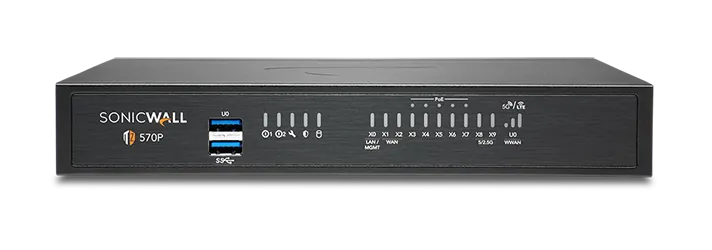
🏷️ SPECS:Whole File Scanned, Not SampledNo File Size LimitCatches Fileless AttacksSpots New RansomwareTLS 1.3 DecryptionCapture ATP SandboxUnknown Files Tested FirstVirus & Intrusion BlockingNothing Waved ThroughSonicOS 7 FirmwareZero-Touch DeploymentPost It, Plug InCloud Management ConsoleEvery Branch, One ScreenSecure SD-WANSwitches to Live LineAD Single Sign-OnRules Follow the PersonOne Renewal DateWireless & Switch ControlTZ Series DesktopFits a Small BranchNSa 1U RackmountSized for Head OfficeNSsp Data-Centre ClassDual Power SuppliesRuns on One PSU2.5GbE Multi-Gig Ports10GbE SFP+ UplinksQuiet Enough for Reception
The call almost always starts the same way: the billing software has gone sluggish, the CCTV feed stutters, and nobody can say which one is causing the other. Nine times out of ten the box at the door is an ISP router doing a job it was never built for. A SonicWALL UTM Firewall Appliance for Branch and Head Office reads the whole of a file as it arrives instead of sampling the first few pieces, so a disguised download does not get waved through (RFDPI). We size it against your real staff count and line speed, never against the number of ports on the front panel.
📞 Buying SonicWALL UTM Firewall Appliance for Branch and Head Office Without the Guesswork close to Beliaghata
The owner is convinced the office spends half the afternoon on video, the staff insist the internet is simply slow, and neither side has any evidence. Category filtering closes the obvious time sinks during working hours only, while per-person reports show who actually used what. Most of the argument disappears in the first week, usually because the real culprit turns out to be a machine nobody was sitting at. Rules can be softer for management and stricter for the shop floor, with nobody maintaining a spreadsheet.
The lease is signed, the outlet opens in three weeks, and your one IT person is already booked at head office that fortnight. A SonicWALLUTM Firewall Appliance for Branch and Head Office can be registered here, couriered to the site and brought online by whoever is standing there with a plug and an internet cable. The rules, the Wi-Fi settings and the tunnel back to head office arrive by themselves once it powers up. Chains adding shops around Beliaghata use this so opening dates stop depending on somebody's travel calendar (Zero-Touch Deployment).
👍 Why Owners Stop Worrying About This close to Beliaghata
The awkward moment in most audits is the question about which staff can open the accounting system, and from which machines. Because rules are written against your office logins, the answer comes out of the console as a list of names rather than a promise from memory. Reports can be scheduled so the evidence already exists before anyone asks for it. Firms dealing with banks, exporters and listed customers get asked this far more often than they expect.
Very few businesses stay the size they were when they bought their last firewall. One operating system covers every model, so whoever learns the branch box can already work the rack appliance at head office, and the configuration travels up with you. Extra branches, remote staff and a second internet line become settings rather than new equipment. You are buying something to grow into instead of a box you will outgrow.
Lending Branches Where Every Action Needs a Name on It
A packaging printer with a design studio in Kolkata and a plant an hour away moved artwork files of several gigabytes between the two, and every transfer strangled everything else on the line. The new gateway gives file transfers whatever bandwidth is spare but never the share reserved for calls, mail and the ERP. Two internet lines are now used together, with the heavy traffic pushed onto the cheaper one. Nobody in accounts can tell any more when a job is being sent.
🛡️ MULTI-BRANCH DEPLOYMENT PRACTICE
Standards We Hold Ourselves to in the Rack
Licences are where firewall projects quietly fall over. We keep the expiry dates for the security bundle at every site, warn you well ahead of renewal, and spell out which checks stop working the day a subscription ends. Nobody gains from a customer finding out that on a Monday morning.
Everything below is chargeable and priced before we begin:
▪Site-to-Site and Work-from-Home VPN Setup
▪A Standby Box So One Failure Does Not Stop Work
▪Access Point and Managed Switch Setup from One Console
▪Sending a Pre-Set Box to a New Branch (Zero-Touch)
*For clarity: licence renewals are billed at the applicable rate for the term you choose, and our handling of that paperwork is itself a chargeable service.*
💡 Engineering Fact: A reply from a website is allowed back in because the firewall remembers you asked the question. It holds a live table of every conversation in fast memory, and anything arriving that answers a question nobody asked is quietly discarded.
🔁 MOVING OFF AN OLD BOX
Running a security appliance that stopped getting updates a while ago? We read the existing rules, rebuild the ones still in use, and do the changeover after hours at your premises in Beliaghata.
Failover support, wireless capacity and switch limits are listed too:
TZ Desktop Firewalls for a Shop or Single Branch
The small box that sits on a shelf behind the counter and guards one or two internet lines. Right for a showroom, a clinic, a site office or any team of roughly five to fifty people.
🔹 COMMON MISTAKE
Sizing by staff count alone. Count the cameras, IP phones and card machines too - every one of them holds connections open all day.
🔹 TWO INTERNET LINES
Fibre and a broadband backup stay plugged in together and the box quietly uses whichever one is behaving (Secure SD-WAN).
🔹 SIZE AND NOISE
Book-sized, fanless on the smaller models, quiet enough to live on a reception shelf without anyone noticing it is there.
NSa Rack Firewalls for a Head Office or Campus
One-rack-unit NSa gateways for the main office of a company, a nursing home group or a college - anywhere a few hundred people share the same line from morning to night. Built to bolt into the cabinet you already own.
🔹 RULES FOLLOW THE PERSON
Because the firewall reads who signed in to Windows, a manager gets manager access from any desk in the building (Single Sign-On).
🔹 FIBRE UPLINKS
Ten-gigabit fibre ports land straight on the core switch, which keeps a media converter off the list of things that can fail (SFP+).
🔹 SIZE
One rack unit in a standard 19-inch cabinet, with airflow running front to back, so the rear of the unit must never be boxed in.
Heavy 2U Units for Data Centres and Big Campuses
The two-rack-unit NSa and NSsp appliances, for data centres, multi-building campuses and networks carrying tens of thousands of connections at once. Anything that can fail comes doubled.
🔹 WHO BUYS THIS
Hosting providers, university campuses and large manufacturers running a proper data centre floor of their own.
🔹 LOGS ON BOARD
Internal SSDs hold traffic history on the appliance itself, so a question about last month does not need a separate log server.
🔹 POWER
Both supplies come fitted. Feed them from separate circuits and one failed input turns into a log entry instead of an outage.
Branch Boxes That Set Themselves Up (Zero-Touch SD-WAN)
For the extra showroom, the godown office, the site cabin. You courier the unit, somebody local plugs in power and internet, and it pulls down its own settings and joins the head office network.
🔹 COST NOTE
A branch unit and its subscription usually work out below a leased line to the same location, which is the whole argument for SD-WAN.
🔹 REPORTING
Head office can see each branch's uptime and how its line is performing, which ends the argument about whose internet is at fault.
🔹 WHAT STAFF NOTICE
Nothing, ideally. Billing, the shared drive and the ERP screen open at the same pace as they do at head office.
SonicWave WiFi Access Points for Full Floor Coverage
SonicWave units screwed to the ceiling so the signal reaches the far end of the floor. For any building where the WiFi works near the router and nowhere else.
🔹 THE PROBLEM IT SOLVES
WiFi that is fine beside the cabin and useless at the other end of the same floor.
🔹 WHERE IT SUITS
Factory floors, hostels, showrooms with roaming billing tablets, and offices that have run out of desk network points.
🔹 CABLE POWER
One cable does both jobs, signal and electricity, which is why mounting height stops being an electrical problem (PoE).
Managed Switches on the Same Console as the Firewall
Switches that report to the same screen as the firewall, so ports, cameras and phones are handled from one login. For offices past the stage of stacking small unmanaged boxes under a desk.
🔹 BETWEEN BUILDINGS
Copper stops being useful at about ninety metres. Past that the uplink goes on fibre, and these units take fibre directly.
🔹 SUITS
Warehouses, hospitals and any premises where the camera count has quietly doubled since the cabling was first laid.
🔹 FINDING THE FAULT
When one machine floods the network, the guilty port is named on screen and closed from there, instead of by pulling cables one at a time.
Cloud Edge: Office Access for Staff Working from Home
Lets a person reach the one office server they need from home, a hotel or a client's site, without their laptop landing inside everything you own. Bought per person, not per building.
🔹 WHEN NOT TO BOTHER
If everyone works in one building and nobody travels, put the money into the firewall instead.
🔹 RECORDS
Who connected, when, and to which server - the report exists whether or not anybody ever asks to see it.
🔹 SIGNING IN
People use the office credentials they already know, and a second check on their phone means a stolen password on its own is not enough.
Network Security Manager: Every Branch on One Screen
A cloud console that shows all your firewalls together - rules, alerts, firmware and reports. Worth it once you have more than two or three locations to keep an eye on.
🔹 REPORTS
Monthly summaries of what was blocked and where the day's bandwidth went, in a shape a director will actually read.
🔹 AUDIT TRAIL
Every configuration change is recorded against a name and a time, which settles most arguments before they properly start.
🔹 WHAT IT'S FOR
Companies with several sites, where logging into each firewall separately has stopped being realistic.
Security Bundles and Licence Renewals
Firewalls are sold with a subscription behind them: threat updates, filtering, sandbox checks and vendor support. This is how those are bought, bundled and renewed without leaving a gap.
🔹 MULTI-YEAR TERMS
Paying for three years at once holds the price still and removes two more rounds of quotations, approvals and reminder calls.
🔹 BUYING PIECE BY PIECE
Individual modules can be added one at a time, which suits a site that only wants filtering, but the dates then drift apart and one always gets missed.
🔹 HOW WE TRACK IT
Microtech Solutions holds the expiry dates and raises them early, so nobody is chasing a renewal on the last working afternoon.
✉️ Service & Maintenance Support
Need site visits, AMC contract estimates, or customized installation architecture? Connect with our technical desk directly.
Design the zones before you write a single rule. I still find installations across Kolkata where cameras, accounts machines and guest Wi-Fi all sit in one zone called LAN, which means every future rule has to be an exception to something. Half a day of zone planning at the start saves a rule table nobody dares touch three years later.
Cloud-only filtering works on a laptop that has the agent installed and an internet connection. It does nothing between two machines standing in the same shop, and nothing at all for equipment that can never carry an agent.
A shop-grade wireless router with the word firewall printed on the carton gives you no user identity, no separation between the guest and the till, and a weekly reboot as its maintenance plan.
💡 Engineering Fact: When a hole is discovered in Windows or in your ERP server, the official fix takes weeks to test and apply. Meanwhile the firewall can recognise and block the attack that uses it, which is what buys you those weeks (intrusion prevention).
☎️ Warranty, Spares and Replacement Cover close to Beliaghata
Type of Business
What the Work Covers
Typical Lead Time
Franchise Outlets and Brand Stores
One rule set built once and copied to every new outlet, so a store opening in another city works the day its box is plugged in
Usually within a week of the order, subject to stock
Engineering and Degree Colleges
Hostel WiFi kept well away from accounts and examination systems, with heavy streaming held back during class hours
Scheduled inside a semester break
Car and Two-Wheeler Dealerships
Showroom counters, service bay tablets and the workshop system kept apart, all visible from the group's head office
Roughly two working days per branch
🔍 Speed, Capacity and Where the Ceiling Sits close to Beliaghata
Tunnel speed recorded between a head office and three retail outlets in Kolkata.
WHAT WORKS IN DAILY USE - THE SHORT VERSION
WHO IT DOES NOT SUIT WITHOUT THE SALES PITCH
✓One click on a convincing invoice page is how most incidents begin; fake payment pages and spoofed download sites are blocked before the click matters (content filtering).
—In-depth logs fill internal storage if rotation is left at default and nothing is being shipped off the device.
✓A salesman on hotel WiFi can reach the office system with nothing installed on his laptop and no port left open to the whole internet (SSL VPN with a second login check).
—Firmware upgrades drop live sessions for a moment. On a single appliance that means an after-hours window agreed with whoever works late.
✓Half the trouble in a small office starts with one shared login that everybody knows. Once each person signs in as themselves, the report finally names who did what (Single Sign-On with Active Directory).
—There is no fail-open relay inside these units, so a failed appliance means a dead link rather than one that keeps passing traffic. Where a production line cannot tolerate that, budget for a second unit as a failover pair instead of assuming a bypass exists.
✓Redundancy is usually the first thing struck off a quotation on price. The second unit is licensed as a high-availability partner rather than as a full second appliance, which is what keeps the pair affordable to own.
—Without a UPS behind it, every power cut becomes an unplanned restart. Repeat that twice a day through a bad week and you are gambling with the hardware, not just the uptime.
✓The audit question - who reached what, and when - is answered from the reports instead of from memory.
—Reading inside encrypted sites means pushing a certificate onto every company machine first. Phones brought from home will keep throwing warnings until somebody decides how to handle them.
💡 Engineering Fact: Zoom, YouTube and your banking site all look identical from outside - encrypted traffic on the same port. The firewall recognises them by how each one talks, which is how a video call gets priority while streaming gets capped.
⚡ SYSTEM DEPLOYMENT ARCHITECTURE
Ready to secure your premises in Beliaghata?
Get comprehensive structured network setups, professional hardware alignment, and authorized warranty support allocations natively.
📃 Licence Tiers and What Each One Covers around Beliaghata
Management is a browser page on the unit itself, plus a cloud console for anyone running more than one site. Logs and reports can sit on the appliance for recent activity or be sent off it when you need months of history for an audit. Configuration exports are small files and should live somewhere other than the same building.
Redundancy comes in layers and you can buy them one at a time. A second internet connection is the cheapest, a mobile modem behind it is cheaper still, and a paired second appliance covers the unit itself failing. Rack models take two power supplies, which matters in buildings where the generator changeover is not gentle.
🏆 CORE PARAMETER🔹 Network socketsCopper 1GbE on every model, 2.5GbE multi-gig on the TZ 570 and 670, and 10GbE SFP+ fibre on the larger rack units - the mix depends on the model ordered
🔹 Threat updatesAutomatic feeds from the vendor's threat network, nothing to download by hand
🔹 Where you manage itSonicOS web screen, command line, or Network Security Manager in the cloud
🔹 Logs kept on the boxOnboard enterprise SSD storage for local reporting
🔹 Temperature it toleratesRated for 0°C to 40°C ambient (32°F to 104°F)
🔹 How it scansThe whole stream is reassembled and read, with no cap on file size (RFDPI)
🔹 Brand-new threatsLive memory inspection plus the Capture ATP cloud sandbox (RTDMI)
SonicWALL Factory Checks Before a Box Is Sealed
Hardware is specified for continuous operation in ordinary commercial premises. Compact models run without fans for quiet, dust-tolerant service at a counter or in a small office, while rack models offer redundant power and pairing for sites that cannot tolerate an outage.
SonicWALL builds this range for organisations whose people are spread over many small sites rather than gathered in one building. The same operating system runs on a desktop unit in a single shop and on a rack appliance at head office, so a policy written once can be applied everywhere without translation.
✉️ SUPPORT DESK
Coordinate custom hardware configurations, AMC maintenance contracts, and site engineering visits directly with authorized integration desks.
Turnkey UTM Firewall Appliance for Branch and Head Office Metrics Checklist near Beliaghata
🛠️ Workflow Setup
A cutover slot is agreed with you, normally after closing or on a Sunday morning. Expect the internet to be down for about half an hour, and expect us to say so plainly rather than promise otherwise.
⚠️ Pitfalls to Avoid
Do not let the installer keep the only copy of the admin password. It happens constantly, and it turns a ten-minute change into a factory reset two years down the line.
🔌 Guidelines & Sizing
Find out what your generator does at changeover. If power drops for even a few seconds when it takes over, the firewall needs a UPS in front of it or it will reboot every single time the mains flickers.
📈 Upgrade Triggers
The VPN somebody set up years ago only lets two people in at a time, so the third person waits until one of them finishes.
🛠️ Mounting Access Points and Getting the PoE Sums Right
Small appliances get treated casually - put on a shelf, under a plant, behind a UPS - and are then blamed for being unreliable.
🛠️ Site Survey & Planning - Our Standards for busy workplaces
🔹Register the appliance and switch the security subscriptions on before cutover night at your office in Beliaghata - a unit downloading its first threat update while thirty people wait is an avoidable delay.
🔹Add up the wattage of the access points before hanging them off a switch. A power budget that looks generous on paper runs out quickly once ceiling units and a couple of cameras are drawing from it.
🔹Install the single sign-on agent on an ordinary member server using a read-only service account, then confirm that a shared counter machine shows the correct user name in the log before you write any person-based rules.
Frequently Asked Questions
Q. Can the same box run our office WiFi?
Yes. The firewall doubles as the wireless controller, and the access points feed off your existing network cabling. Because one unit is doing the security work as well, guest WiFi, staff WiFi and the billing network each get their own lane and their own rules from a single screen, instead of a row of home routers that nobody manages. Coverage is still a physical matter, though: thick walls, a mezzanine floor or a metal-clad godown will need more access points than a plasterboard office of the same area. We walk the floor around Beliaghata before quoting and give you the honest number.
Q. Our new branch opens next month and there is no IT person there. How does the firewall get set up?
We register the unit to your account at our bench, then courier it to the branch, where somebody plugs in power and the internet cable and it downloads its own settings and comes online - nothing technical is typed at the far end (zero-touch deployment). That removes an engineer's travel and hotel from the bill for every new site you open. One condition: the broadband at the branch must genuinely be live on the day the box arrives, and telecom activation is the thing that slips most often. For a complicated branch with its own server or two internet lines, we still prefer to send an engineer.
Q. We already have a firewall from another brand and it still works. Why change now?
Very often you should not, and we will say so. Keep it if it is still in support, still receiving updates and still comfortable with your line speed. The reasons that do justify a change are specific: the model has gone end-of-life so no firmware arrives any more, your internet is now faster than the box can inspect, staff numbers have doubled, or the renewal on the old brand costs more than a new appliance with a fresh bundle. Look up the end-of-support date on your current model - plenty of offices around Beliaghata are running one that quietly stopped getting updates two years ago.
Q. Will my staff notice anything on the day you install it?
Very little. There is a short gap while your internet line is moved across to the new unit, done before opening or after closing, and after that the visible changes are small - a block page on certain sites, and a one-time sign-in so each person's rules follow them to any desk. On day one we keep the filtering deliberately loose and tighten it over the following week, because blocking something the accounts team genuinely needs is the quickest way to make everyone resent a new firewall. Do warn us in advance about odd software; old accounting packages and machine-control PCs sometimes need a rule written specially for them.
Q. One supplier quoted a TZ and another quoted an NSa. Which one is right for us?
It comes down to three things - how many people sit behind it, how fast your internet line is, and whether anything is hosted in your own building. TZ models are built for small offices, shops and branches on ordinary broadband or fibre. NSa models are for head offices, factories and anywhere with several hundred staff, more than one link, or servers that outsiders connect into. If you land on the borderline, take the larger one: moving up later means buying a whole new appliance, not slotting in a card.
💡 Engineering Fact: Your manager gets manager-level internet access from any desk in the building because the firewall reads who signed in to Windows and applies rules to the person rather than to the machine (Single Sign-On).
🔄 THE REST OF OUR WORK
Everything Else We Supply and keep around Beliaghata
Buying a server in the same round? We spec, build and rack those as well, right here in Kolkata.
🌐 A Quick Look at the Local Office Scene across Kolkata
📍 Beliaghata
Beliaghata in Kolkata is a bustling and rapidly evolving area, home to both residential and commercial properties. With the increasing flow of people and vehicles, security concerns are only natural. UTM Firewall Appliance for Branch and Head Office from SonicWALL is a perfect fit for this busy locality, offering round-the-clock surveillance that ensures your home or business remains safe from any unwanted activity.
Nearby areas like Kankurgachi, Phoolbagan, and Girish Park feed a steady stream of foot traffic through Beliaghata. UTM Firewall Appliance for Branch and Head Office helps you monitor high-traffic areas like entrances, corridors, and parking lots, making sure nothing goes unnoticed. The camera’s night vision and wide coverage are especially beneficial in this high-traffic area. For anyone in Beliaghata, installing UTM Firewall Appliance for Branch and Head Office offers a straightforward and effective way to make sure that your property stays secure, day or night.