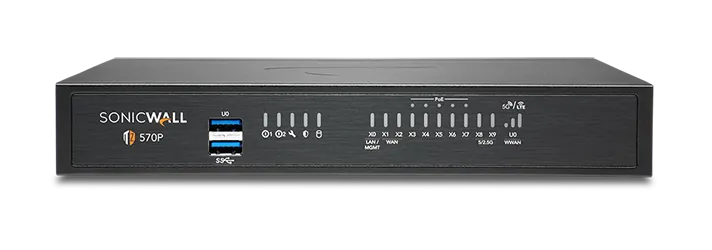
🏷️ SPECS:Whole File Scanned, Not SampledNo File Size LimitCatches Fileless AttacksSpots New RansomwareTLS 1.3 DecryptionCapture ATP SandboxUnknown Files Tested FirstVirus & Intrusion BlockingNothing Waved ThroughSonicOS 7 FirmwareZero-Touch DeploymentPost It, Plug InCloud Management ConsoleEvery Branch, One ScreenSecure SD-WANSwitches to Live LineAD Single Sign-OnRules Follow the PersonOne Renewal DateWireless & Switch ControlTZ Series DesktopFits a Small BranchNSa 1U RackmountSized for Head OfficeNSsp Data-Centre ClassDual Power SuppliesRuns on One PSU2.5GbE Multi-Gig Ports10GbE SFP+ UplinksQuiet Enough for Reception
Guest WiFi in the waiting area, staff WiFi upstairs, card machines on their own lane and CCTV kept well away from all of it. That is four networks, and most places run them as four separate headaches with four sets of wires. When the access points and switches answer to the same firewall, you set that separation once and it holds everywhere, so a visitor gets internet without ever seeing the accounts server (VLANs from one console). We do this for clinics, showrooms and co-working floors around Sukchar.
🏢 SonicWALL Deployment, Migration and Handover in and around Sukchar
An invoice arrives from a supplier you deal with every week, and the attachment is new enough that no scanner recognises it yet. Rather than guess, the firewall holds that file and opens it inside a test room in the cloud, releasing it only once it has behaved itself. Nothing lands in the accounts mailbox until the verdict comes back. For offices in Kolkata that pay against emailed attachments daily, that short pause is worth far more than it costs (Capture ATP).
Three people share the counter machine on rotation, so the network log tells you what the computer did but never who did it. Joining the firewall to your existing office logins means each rule and each line of the report carries a name instead of an address. A temporary hand gets the temporary set of permissions, wherever he happens to sit. When he leaves, one account is disabled and every branch honours it within minutes (Single Sign-On with Active Directory).
🎯 Good Reasons to Move Off Your Current Setup in and around Sukchar
Most protection still works by recognising something it has seen before, which is no help on the morning a brand-new variant reaches your accounts mailbox. This platform watches unfamiliar code while it runs in live memory, so behaviour gives it away even when no signature exists yet, and anything still unknown goes to a cloud test room before release. The practical effect is that your safety no longer depends on being late in the queue of victims. That is the part of the subscription we would argue hardest against dropping (Real-Time Deep Memory Inspection).
The real question with security hardware is not what it does on installation day but who answers the phone eleven months later. You get a named engineer, a stated response time and a replacement arrangement instead of a ticket number in a queue. Firmware updates are planned with you, in a window that suits your billing cycle, rather than pushed at random. For firms near Sukchar with no IT department of their own, that arrangement is usually why the equipment stays healthy.
Pharmacy and Grocery Counters Where Billing Cannot Stop
A formulation plant in an industrial estate near Sukchar had laboratory instruments running software the supplier stopped updating years ago, sitting on the same network as email and the internet. We fenced those machines into a zone that can talk only to the one server they report into, and nothing else. Office traffic, the plant network and the camera system now run in separate lanes through a single appliance. When the quality auditor asked how the instruments were protected, the answer was a rule list rather than a promise.
🛡️ LICENCE TRACKING AND RENEWAL DISCIPLINE
Switchover Night, and the Way Back
Most of the money wasted on firewalls is wasted at the sizing stage. We ask how many people are online together, how much of that traffic you intend to inspect, and whether branches are joining in - then quote the model that survives a bad Monday. Equally, if the smaller TZ is genuinely enough, we say so, because selling you an NSa you do not need is a short win and a long problem.
These are the tasks we are usually called in for:
▪Supply, Configuration and Go-Live of the Appliance
▪Logins That Follow the Person: Directory Sign-On Setup
▪Automatic Switching between Two Internet Lines (SD-WAN)
▪Testing Unknown Files Before They Reach Staff (Capture ATP)
*Disclaimer: migrations, rule audits and branch rollouts are charged per job or under a contract. Hardware warranty claims continue to run through the manufacturer's channels.*
💡 Engineering Fact: A reply from a website is allowed back in because the firewall remembers you asked the question. It holds a live table of every conversation in fast memory, and anything arriving that answers a question nobody asked is quietly discarded.
📦 NEW BRANCH, NO TRAVEL
A new outlet does not have to wait for an engineer's calendar. The unit is registered before it is couriered and the shop staff only have to plug it in - for openings anywhere near Sukchar.
Ports, speeds and bundle options for every size are set out below:
TZ Desktop Firewalls for a Shop or Single Branch
The small box that sits on a shelf behind the counter and guards one or two internet lines. Right for a showroom, a clinic, a site office or any team of roughly five to fifty people.
🔹 SPEED
Scanning happens on the same multi-core chip that moves the traffic, so switching virus and web filtering on does not turn browsing into a crawl.
🔹 SIZE AND NOISE
Book-sized, fanless on the smaller models, quiet enough to live on a reception shelf without anyone noticing it is there.
🔹 WHEN YOU GROW
A rack tray is available later, for the day the box has to move off the shelf and into a cabinet.
NSa Rack Firewalls for a Head Office or Campus
One-rack-unit NSa gateways for the main office of a company, a nursing home group or a college - anywhere a few hundred people share the same line from morning to night. Built to bolt into the cabinet you already own.
🔹 WORKING PACE
Virus scanning, intrusion checks and encrypted-site inspection can all run together while the branch tunnels stay usable.
🔹 TWO POWER FEEDS
Fit the second supply and run it from another circuit. The day an electrician isolates one board, the network stays up.
🔹 CHECK THIS FIRST
Cabinet depth and free rack units. More installations get delayed by a shallow cabinet than by anything technical.
Heavy 2U Units for Data Centres and Big Campuses
The two-rack-unit NSa and NSsp appliances, for data centres, multi-building campuses and networks carrying tens of thousands of connections at once. Anything that can fail comes doubled.
🔹 BOTH UNITS WORKING
A pair can run live together rather than leaving one idle, which at this price is a better use of the money (Active-Active clustering).
🔹 LOGS ON BOARD
Internal SSDs hold traffic history on the appliance itself, so a question about last month does not need a separate log server.
🔹 POWER
Both supplies come fitted. Feed them from separate circuits and one failed input turns into a log entry instead of an outage.
Branch Boxes That Set Themselves Up (Zero-Touch SD-WAN)
For the extra showroom, the godown office, the site cabin. You courier the unit, somebody local plugs in power and internet, and it pulls down its own settings and joins the head office network.
🔹 COST NOTE
A branch unit and its subscription usually work out below a leased line to the same location, which is the whole argument for SD-WAN.
🔹 WHAT STAFF NOTICE
Nothing, ideally. Billing, the shared drive and the ERP screen open at the same pace as they do at head office.
🔹 IF THE LINE DROPS
A second broadband connection, or a 4G or 5G dongle, carries that branch until the main link comes back.
SonicWave WiFi Access Points for Full Floor Coverage
SonicWave units screwed to the ceiling so the signal reaches the far end of the floor. For any building where the WiFi works near the router and nowhere else.
🔹 PLANNING
Signal is eaten by brick walls, lift shafts and steel racking, so units get placed by the building's layout rather than by floor area.
🔹 WHERE IT SUITS
Factory floors, hostels, showrooms with roaming billing tablets, and offices that have run out of desk network points.
🔹 CABLE POWER
One cable does both jobs, signal and electricity, which is why mounting height stops being an electrical problem (PoE).
Managed Switches on the Same Console as the Firewall
Switches that report to the same screen as the firewall, so ports, cameras and phones are handled from one login. For offices past the stage of stacking small unmanaged boxes under a desk.
🔹 FINDING THE FAULT
When one machine floods the network, the guilty port is named on screen and closed from there, instead of by pulling cables one at a time.
🔹 SEPARATE LANES
A camera recorder and a staff laptop can share cabling and still be unable to see each other, which is what setting up VLANs properly buys you.
🔹 ONE LOGIN
The switch shows up in the same management console as the firewall, so ports and security rules are dealt with together.
Cloud Edge: Office Access for Staff Working from Home
Lets a person reach the one office server they need from home, a hotel or a client's site, without their laptop landing inside everything you own. Bought per person, not per building.
🔹 NO BOX AT HOME
The service runs from the cloud, so somebody who joins today is not waiting for hardware to be couriered to their flat.
🔹 SIGNING IN
People use the office credentials they already know, and a second check on their phone means a stolen password on its own is not enough.
🔹 HOW IT DIFFERS
Rather than putting a laptop inside everything, each person is handed only the servers and applications they have been cleared for.
Network Security Manager: Every Branch on One Screen
A cloud console that shows all your firewalls together - rules, alerts, firmware and reports. Worth it once you have more than two or three locations to keep an eye on.
🔹 SETTINGS BACKUP
Configurations are held in the cloud, so a replacement unit at a distant branch is rebuilt from the last known-good copy.
🔹 REPORTS
Monthly summaries of what was blocked and where the day's bandwidth went, in a shape a director will actually read.
🔹 WHO IT SUITS
Retail chains, franchise groups, NBFCs with branch offices, and hospital groups running four or five units across Kolkata.
Security Bundles and Licence Renewals
Firewalls are sold with a subscription behind them: threat updates, filtering, sandbox checks and vendor support. This is how those are bought, bundled and renewed without leaving a gap.
🔹 WHAT THE BUNDLE COVERS
Gateway antivirus, intrusion prevention, web and application control, the cloud sandbox and firmware support, usually under one name and one date.
🔹 MULTI-YEAR TERMS
Paying for three years at once holds the price still and removes two more rounds of quotations, approvals and reminder calls.
🔹 AUDITS
Show an assessor a lapsed subscription and it goes straight into the report as a finding, whatever the firewall itself is doing.
✉️ Service & Maintenance Support
Need site visits, AMC contract estimates, or customized installation architecture? Connect with our technical desk directly.
💬 Common Failures and How We Fix Them in and around Sukchar
A mobile modem on the back of the unit is only a backup if the SIM has balance and validity. I have reached sites in Kolkata where the failover worked perfectly and the data pack had expired eight months earlier. Put the recharge on the same reminder as the licence renewal, and test the switchover once a quarter.
Upgrading to a bigger internet line rarely fixes slowness, because the line was rarely the problem. A gateway that shows which application is eating the connection usually costs less than a single year of the faster plan.
An open-source firewall built by a talented employee runs beautifully until he changes jobs. After that nobody can log in, nobody knows what the rules mean, and no vendor is obliged to ship you a replacement.
💡 Engineering Fact: Two internet lines are never identical, and the firewall knows it. It measures delay and lost packets on each one continuously, so your calls can sit on the steady line while big downloads go over the other.
🛠️ Clean Power for a Box That Runs Day and Night
Go through these before the delivery date, not on the day an engineer is standing in your server room with a screwdriver.
🏢 On-Site Work - A Timeline around Sukchar
🔹Give the appliance its own management address on a separate VLAN and turn administration off from the internet side completely; reach it over the VPN when you are away from the office.
🔹Point the failover probes at something outside your provider's network, such as a public DNS address. Probing the provider's own gateway means a dead upstream link still looks perfectly healthy.
🔹Add the serial number to the cloud console before the box is couriered to a branch, whether that branch is across Kolkata or three states away, so staff there only have to connect power and the internet cable.
🧰 Onsite Visits, Remote Fixes and Escalation for offices in Sukchar
Type of Business
What the Work Covers
Typical Lead Time
Small Factories and Fabrication Units
Machines, cameras and office computers on separate lanes, plus a link to the sales office that holds through the shift
Around three working days in most service areas
CA Firms, Tax Consultants and Legal Chambers
Filing-season access from home for partners and articles, with client data staying on the office server instead of travelling on laptops
A few working days once filing season allows
Nursing Homes and Multi-Speciality Hospitals
Patient records and billing separated from the reception counter, and consultants reading reports from home without opening the whole network
Priority slot for contract sites, otherwise next available
⏱️ Handling Peak Load at Month-End in and around Sukchar
Counted while sixty staff opened https sites in the same minute.
BENEFITS YOU WILL NOTICE AT A GLANCE
COMMON COMPLAINTS SET OUT PLAINLY
✓Large engineering drawings and installer files are not skipped for being too big, because there is no size cut-off on the scan (RFDPI).
—Sandboxing, filtering and threat feeds sit inside a subscription bundle. Let it lapse and the box carries on routing, but the checks you bought it for quietly stop.
✓Three logins for a firewall, a switch stack and a wireless controller become one, because the switches are configured from the same screen (SonicOS switch management).
—Rack units are loud. Put one in the corner of an open office and you will hear about it within a fortnight.
✓Stock figures that reach head office a day late are usually a tunnel problem rather than a software one; every shop links back over one encrypted connection (site-to-site IPsec).
—Single sign-on only names people whose accounts live in your directory. Contractors and shared machines will still appear as bare IP addresses in the report.
✓The audit question - who reached what, and when - is answered from the reports instead of from memory.
—Real redundancy needs two identical appliances, not one box and a spare in the cupboard. The second unit is a second buy, and its licence position needs confirming before you order.
✓Renewals arrive as one date rather than four, since filtering, sandboxing and the threat feed sit in a single bundle registered against the serial number.
—Hardware faults are settled under the manufacturer's warranty. We can raise the case and chase it, but the replacement timeline belongs to them, not to us.
💡 Engineering Fact: Padlock icons stopped meaning safe a long while ago - the padlock only hides what is travelling. The firewall opens that envelope, reads what is inside and seals it again, doing the heavy maths in dedicated hardware so nobody notices the pause.
⚡ SYSTEM DEPLOYMENT ARCHITECTURE
Ready to secure your premises in Sukchar?
Get comprehensive structured network setups, professional hardware alignment, and authorized warranty support allocations natively.
🔎 Capacity, Limits and Sizing Guide for businesses in Kolkata
The appliance is one buy and the protection is another. On its own the box joins your offices together, decides who can reach what, and carries staff in over a VPN. The yearly subscription is what scans for viruses, blocks intrusions and unwanted websites, and tests unknown files in the cloud. When a subscription lapses the unit keeps routing traffic and quietly stops learning about anything new.
Management is a browser page on the unit itself, plus a cloud console for anyone running more than one site. Logs and reports can sit on the appliance for recent activity or be sent off it when you need months of history for an audit. Configuration exports are small files and should live somewhere other than the same building.
🏆 CORE PARAMETER🔹 Linking your branchesIPsec site-to-site tunnels, SSL VPN for staff, Secure SD-WAN across lines
🔹 Network socketsCopper 1GbE on every model, 2.5GbE multi-gig on the TZ 570 and 670, and 10GbE SFP+ fibre on the larger rack units - the mix depends on the model ordered
🔹 Threat updatesAutomatic feeds from the vendor's threat network, nothing to download by hand
🔹 If the box diesActive-Standby or Active-Active pair with stateful failover
🔹 Where you manage itSonicOS web screen, command line, or Network Security Manager in the cloud
🔹 Logs kept on the boxOnboard enterprise SSD storage for local reporting
🔌 Second power supplyOptional on smaller rack models, standard and hot-swappable on the large ones
How to Tell a Grey-Market Box From a Genuine One in Sukchar
If one internet line dies at eleven in the morning, your billing counter should not. Two or three connections, a mobile modem included, are measured all the time and traffic is moved onto whichever is behaving; when the dead line returns, your branch tunnels come back on their own without anyone travelling to site (Secure SD-WAN).
Hardware is specified for continuous operation in ordinary commercial premises. Compact models run without fans for quiet, dust-tolerant service at a counter or in a small office, while rack models offer redundant power and pairing for sites that cannot tolerate an outage.
✉️ SUPPORT DESK
Coordinate custom hardware configurations, AMC maintenance contracts, and site engineering visits directly with authorized integration desks.
Turnkey UTM Firewall Appliance for Branch and Head Office Metrics Checklist near Sukchar
🛠️ Workflow Setup
Next the unit is registered and licensed in your name and your rules are loaded before it leaves us. That takes a day or so at our end and saves a couple of hours at yours.
⚠️ Pitfalls to Avoid
Never hang the firewall off the same strip as an air conditioner or a laser printer. The surge when either starts is enough to restart it, usually mid-morning.
🔌 Guidelines & Sizing
Have the rack and the incoming telecom line properly earthed before installation day. Most equipment written off as lightning damage in this country was really killed by a missing earth.
📈 Upgrade Triggers
The last virus scare was cleaned up by rebuilding three machines over a weekend, and to this day nobody can explain how it got in.
Frequently Asked Questions
Q. What happens when the subscription expires - does it just stop protecting us?
It keeps passing traffic quite normally, so nobody notices a thing on the morning it lapses, and that is exactly the danger. Virus definitions stop updating, newly malicious websites stop being categorised, and unknown attachments stop being tested in the cloud, leaving you defended against last year's threats. Firmware updates and support calls fall away too, which matters most on the day something breaks. Most bundles allow a short grace period, but treat the expiry as a hard date - we send the renewal quote about two months ahead so it is never a surprise.
Q. How long will this box last before we have to buy another?
Expect several years of working life, governed by two published dates rather than by wear: end-of-sale and end-of-support for that particular model. Hardware seldom dies of old age in a ventilated rack; what forces the change is a model dropping off the support list, or your internet becoming fast enough that the appliance turns into the bottleneck. We check both dates before quoting, so nobody gets sold something already halfway through its life. When replacement day does arrive, settings export and import, so it is an evening's work and not a rebuild from scratch.
Q. Will my staff notice anything on the day you install it?
Very little. There is a short gap while your internet line is moved across to the new unit, done before opening or after closing, and after that the visible changes are small - a block page on certain sites, and a one-time sign-in so each person's rules follow them to any desk. On day one we keep the filtering deliberately loose and tighten it over the following week, because blocking something the accounts team genuinely needs is the quickest way to make everyone resent a new firewall. Do warn us in advance about odd software; old accounting packages and machine-control PCs sometimes need a rule written specially for them.
Q. Our new branch opens next month and there is no IT person there. How does the firewall get set up?
We register the unit to your account at our bench, then courier it to the branch, where somebody plugs in power and the internet cable and it downloads its own settings and comes online - nothing technical is typed at the far end (zero-touch deployment). That removes an engineer's travel and hotel from the bill for every new site you open. One condition: the broadband at the branch must genuinely be live on the day the box arrives, and telecom activation is the thing that slips most often. For a complicated branch with its own server or two internet lines, we still prefer to send an engineer.
Q. We already have a firewall from another brand and it still works. Why change now?
Very often you should not, and we will say so. Keep it if it is still in support, still receiving updates and still comfortable with your line speed. The reasons that do justify a change are specific: the model has gone end-of-life so no firmware arrives any more, your internet is now faster than the box can inspect, staff numbers have doubled, or the renewal on the old brand costs more than a new appliance with a fresh bundle. Look up the end-of-support date on your current model - plenty of offices around Sukchar are running one that quietly stopped getting updates two years ago.
💡 Engineering Fact: That inspection has one visible side effect: browsers complain about certificates. Installing the firewall's own certificate on office machines during setup is a ten-minute job, and skipping it earns you a week of complaints.
🔄 THE REST OF OUR WORK
Everything Else We Supply and keep around Sukchar
Email, Teams and Office licences: we handle Microsoft 365 setup and move old mailboxes across without losing folders.
🧭 Area Profile for Buyers Planning a Rollout around Sukchar
📍 Sukchar
Sukchar is a peaceful yet densely inhabited residential neighborhood along the Hooghly riverbank in Kolkata, featuring heritage housing, schools, and neighborhood markets. Ensuring home safety and protecting local shops is a daily priority for residents. UTM Firewall Appliance for Branch and Head Office from SonicWALL provides simple, efficient security solutions for every home and storefront. Homeowners and retail shopkeepers use UTM Firewall Appliance for Branch and Head Office to keep entry doors, alleyways, and storage rooms under watch.
Night vision functions make sure clear visibility even in dimly lit lane conditions. Living with confidence in Sukchar comes from knowing your home is secure. Installing SonicWALL surveillance cameras gives you crisp video feeds, simple operation, and steady daily protection.