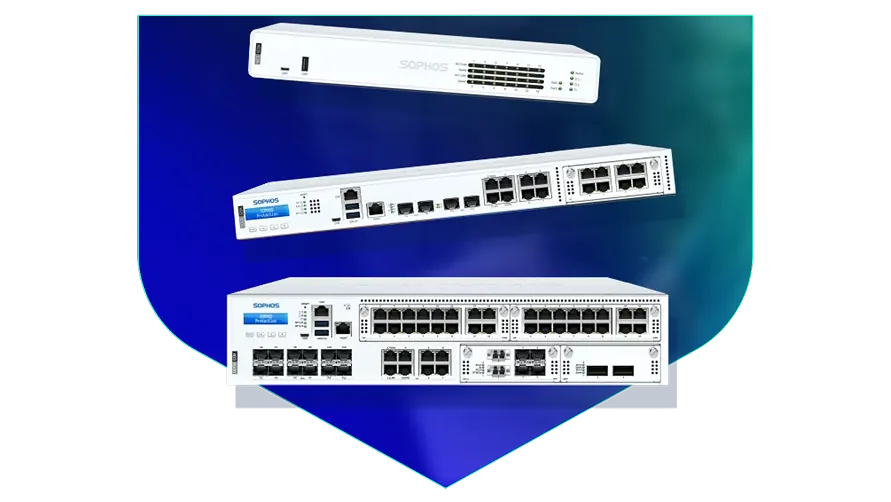
🏷️ SPECS:Scanning Without the CrawlTLS 1.3 InspectionSecond Chip for SpeedFibre Uplinks on Larger ModelsChecks Inside HTTPSProtection Stays Switched OnPorts Matched to Your BuildingHandles a Full OfficeBuilt for Busy AfternoonsBrowsing Stays FastZero-Day SandboxingBlocks RansomwareSynchronized SecurityAuto-Isolates Infected LaptopsSD-WAN FailoverAuto Line SwitchingDeep Packet InspectionOne Dashboard, All BranchesActive-Active HA ClusterStandby Unit Ready1U Rackmount ChassisDual Hot-Swap PSUFits Any RackDesktop Size ModelBypass Port PairsStays Up on FailureBranch-Size BoxModular Port BaysRuns Quiet in OfficeFront-to-Rear Airflow
Five branches, five separate internet bills, and no single place to see what any of them is doing. That is the state most growing retail and clinic chains are in by the time they ring us. Once every site runs a firewall from the same family, the branches join into one private network over the internet and you watch the lot from a single screen. A new shop then takes an afternoon to bring online instead of a week, and we handle the sizing, the licences and the on-site commissioning across Ahmedabad.
📌 Sophos Deployment, Migration and Handover near Odhav
Every second monsoon the fibre to your branch goes down and the branch simply stops billing. Put a second, cheaper broadband line into the same SophosNext-Gen Firewall for Business Networks and it watches both, shifting traffic to the healthy one before staff notice anything (SD-WAN link steering). Voice and billing get the clean line; backups and updates take whatever is left. For a branch near Odhav that used to sit idle until the line came back, that is the difference between a lost day and a slow hour.
Your guest Wi-Fi password has been on a whiteboard for two years, and the camera recorder shares a network with the accounts computer. This appliance splits one flat office network into separate lanes - staff, guests, cameras, production machines - so trouble in one lane cannot wander into another (VLAN zone policies). Visitors still get internet; they simply cannot see your servers. It is the cheapest tidy-up available to most offices and it takes an afternoon.
🌟 Reasons This Works for Small Offices near Odhav
Power in and around Odhav does what it likes: a dip at three, a full cut at seven, a surge when the generator hands back. These appliances are built for continuous duty, and the rack models take two power supplies so you can feed them from two different circuits. We insist on an online UPS and a genuine earth connection before handover, because far more firewalls die of bad power than of hackers. It is a boring detail that quietly decides how long the box lasts.
Some businesses can lose an hour. A dispatch desk, a hospital front office or a trading room cannot. Two units can be paired so the standby picks up the live sessions the instant the first one stops, fast enough that a call in progress stays up (Active-Passive HA). Most customers start with one unit and add the second at the next budget cycle, and the pairing is designed to be added later.
Warehouse and Dispatch Sites Where Downtime Costs Orders
A CA firm of about thirty staff called us in the week after a partner's laptop encrypted itself during filing season. The replacement gateway opens unknown attachments in a sealed cloud test room before they reach a mailbox, and any machine that starts behaving oddly is pulled off the network automatically. Nothing similar has reached a second computer since. The firm also picked up the access log its bank's audit team had been asking for.
🛡️ STRAIGHT ANSWERS BEFORE YOU COMMIT
Planning, Cutover and What We Leave Behind
Cabling is the part a client sees and an engineer gets judged on. Patch leads are cut to length and labelled at both ends, fibre is dressed properly, and the rack is left tidy enough that the next person can trace a link without pulling the whole bundle apart. It costs us an extra hour and saves everyone a bad afternoon a year later.
Here are the jobs our field team handles for firewall customers:
▪Fibre Links Between Buildings, Fitted and Terminated (10GbE Transceivers)
▪Unknown-Attachment Checks and Quarantine Rules
▪Emergency Hardware Replacement and Config Restore
▪Out-of-Hours Switchover from Your Old Firewall
*Fair warning: emergency attendance outside contracted hours carries a call-out charge, quoted first, and it remains separate from any manufacturer service line.*
💡 Engineering Fact: An attachment nobody has seen before is opened first inside a throwaway computer in the cloud. If it starts encrypting files or hiding from the operating system, it is never delivered to your staff.
💬 NOT SURE WHERE TO START
Describe the problem in your own words - slow internet, a virus scare, an auditor's question - and we will tell you honestly whether a firewall is even the right answer for your office in Ahmedabad.
Compare ports, speed and licence options before you decide:
Desktop Firewalls for Small Offices and Shops
Small, silent boxes that sit on a shelf and guard the internet line of a five to fifty person office. Suits clinics, showrooms, CA practices and single-branch businesses.
🔹 TWO INTERNET LINES
Keep fibre and a broadband backup plugged in together; when one drops, the switch across happens on its own (SD-WAN).
🔹 NOISE
No fan inside. It can live in a reception area or a director's cabin and nobody hears it.
🔹 WHAT IT'S FOR
Offices, clinics and showrooms of roughly five to fifty people sharing one or two internet lines.
Rack-Mount Firewalls for Head Offices
One-rack-unit appliances for a head office, hospital or college where a few hundred people are on the network all day. Built to sit in the server cabinet you already have.
🔹 ROOM TO GROW
A slot on the front accepts an add-on module - more copper ports, faster ones, or fibre - when the network expands (Flexi Port).
🔹 FIBRE PORTS
Ten-gigabit fibre sockets go straight into your core switch with no converter box in the middle (SFP+).
🔹 SPARE POWER
A second power supply can be fitted and fed from a different circuit, so one tripped MCB does not take the office offline.
Large Firewalls for Data Centres and Campuses
The heavy two-rack-unit units, for data centres, big campuses and companies pushing tens of thousands of connections at once. Everything that can fail is doubled up.
🔹 WHAT'S EXTRA
Rails, fibre modules and the right cables are quoted per site - we confirm cabinet depth before anything is dispatched.
🔹 WHO IT SUITS
Data centres, large campuses and companies holding tens of thousands of live connections at peak hour.
🔹 VERY FAST PORTS
Twenty-five and forty-gigabit fibre sockets, so the firewall is never the narrow point between server rows.
Easy to set up Branch Boxes (RED) for Small Sites
For the two-person sales office, the godown, the site cabin. You courier the box, somebody plugs it in, and that location joins the head office network by itself.
🔹 WHO CONTROLS IT
Every rule stays at head office. The branch cannot change a thing, which is usually the whole point.
🔹 HOW IT CONNECTS
An encrypted tunnel back to the main firewall makes the branch behave like another room at head office.
🔹 SETUP
Nobody technical travels. The box is couriered, a local hand plugs in power and internet, and it fetches its own settings.
Managed Network Switches for the Server Room
For offices that have outgrown cheap unmanaged switches and want to see which port is causing the trouble. They also feed power to cameras, phones and access points down the same cable.
🔹 WHO IT SUITS
Schools, hotels, hospitals and factories - anywhere the camera and phone count keeps climbing.
🔹 WHERE IT'S MANAGED FROM
The same cloud dashboard as the firewall, so one login covers both instead of two separate systems.
🔹 IF A PORT MISBEHAVES
You can spot the guilty port and shut it from the screen, instead of unplugging cables one at a time.
WiFi Access Points for Offices, Schools and Warehouses
Ceiling-mounted units that give a whole floor usable WiFi instead of one router struggling from a corner. Made for buildings where dozens of devices connect at the same time.
🔹 WHERE IT'S MANAGED FROM
One cloud console shows every unit, who is connected and which one is the busiest.
🔹 WHAT IT'S FOR
WiFi that holds up when twenty phones and laptops crowd into one meeting room.
🔹 POWER
The network cable carries power up to the ceiling, so no electrician and no plug point above the false ceiling (PoE).
Secure Remote Access for Staff Working from Home
Lets a person open the one office application they need - from home, from a client site, from a hotel - without dropping their laptop inside your whole network.
🔹 CONTRACTORS
A vendor can be given one server for a fixed number of days, after which the access simply stops.
🔹 WHAT THE USER DOES
Signs in with the usual office email and password, plus a code on the phone as a second step.
🔹 HOW IT DIFFERS FROM A VPN
An old-style VPN puts the laptop inside everything. This opens only the application that person is allowed to touch (ZTNA).
Antivirus for Laptops and Servers That Talks to the Firewall
Protection on the machines themselves, wired to the firewall so the two act together. Useful for any office where staff install their own software or carry pen drives in.
🔹 IF SOMETHING GETS THROUGH
A timeline shows where it came from - the attachment, the pen drive or the website - so the same door gets shut.
🔹 WHAT IT'S FOR
Guarding the laptops, desktops and servers themselves, rather than only the door they sit behind.
🔹 WHAT'S EXTRA
Mail and mobile device protection are separate add-ons and are worth pricing at the same time.
Licence Renewals and Support Subscriptions
The yearly subscription that keeps the threat updates, web filtering and support alive. This is the part most buyers forget until the day it lapses.
🔹 AUDITS
An auditor checking your security controls will ask for proof the subscription is live. A lapsed one is a finding.
🔹 HOW WE HANDLE IT
Microtech Solutions flags the expiry date well in advance, so the paperwork is not being run around on the last afternoon.
🔹 WHEN YOU OUTGROW IT
Ask before you renew if headcount has doubled. Sometimes a bigger unit with a fresh term works out better than renewing the old one.
✉️ Service & Maintenance Support
Need site visits, AMC contract estimates, or customized installation architecture? Connect with our technical desk directly.
📌 Annual Maintenance Options Side by Side near Odhav
Who We Set Up For
What We Actually Do
Typical Turnaround
CA, Audit and Law Firms
Locking down the Tally and document servers, and safe remote logins for partners during filing season
Usually a same-day survey, live inside a day
Car Dealerships and Service Centres
One rule set copied to every showroom and workshop, all managed from the head office
About two days a location, rolled out in sequence
Garment and Engineering Exporters
Machines and office computers kept on separate networks, and a factory-to-office link that stays up
Planned around a shutdown window, often a weekend
🖥️ Handling Peak Load at Month-End near Odhav
Checked while a hundred staff browsed https sites at the same moment.
BENEFITS YOU WILL NOTICE IN BRIEF
COMMON COMPLAINTS IN ONE PLACE
✓The steel case is shaped to pull air front to back, which is what keeps the unit alive in a warm, dusty cabinet.
—VPN speed between branches is capped by the upload speed your ISP gives you. No firewall can invent bandwidth the line does not have.
✓"We turned virus scanning off because everything crawled" is the most common thing we hear when taking over an old box; here that switch can stay on for good (Xstream FastPath offload).
—Without a UPS, every power cut becomes an unplanned reboot. Repeat that through a monsoon week and you are risking the hardware, not just the uptime.
✓The Saturday-night infection that used to reach eight machines by Monday gets stopped at the first one, with nobody in the building (Synchronized Security heartbeat).
—Desktop models run on an external adapter with no second supply, so a failed adapter takes the office offline until a replacement reaches you.
✓You can see which application is eating the bandwidth at 3pm and cap just that one, without blocking the whole internet.
—This is not a easy to set up device. Someone has to own the rule set, review it, and clear out the rules that were added temporarily two years ago.
✓Office WiFi points are managed from the same screen as the firewall, which saves buying a separate controller.
—Traffic pushed through anonymising proxies or unmanaged tunnels sits outside these controls, so policy alone will not stop a determined employee.
💡 Engineering Fact: Hosting your own website or mail server means the world can knock on your door. The firewall can stand in front of it, reading each request and turning away the standard tricks attackers try first.
⚡ SYSTEM DEPLOYMENT ARCHITECTURE
Ready to secure your premises in Odhav?
Get comprehensive structured network setups, professional hardware alignment, and authorized warranty support allocations natively.
Turn reporting on from day one, even if nobody reads it for months. A log is only ever valuable in hindsight - the week you need to answer when this started and who was on that machine, a log that began yesterday is worth nothing. I set a weekly summary for the owner and a monthly detail report for whoever handles IT in Odhav. It also turns out to be the easiest way to justify the renewal.
Every serious next-gen brand blocks much the same set of threats, so the choice usually turns on three practical things: the throughput figure with encrypted inspection switched on, how many sessions the model holds at your busiest hour, and whether you want depth at one large site or light boxes at many small ones. Ask each vendor for the inspected number rather than the headline one and the shortlist tends to write itself.
Buying separate boxes for web filtering, remote access and intrusion prevention leaves you with three renewal dates, three consoles and three vendors pointing at each other. One appliance with one policy list is easier to run and much easier to hand over.
💡 Engineering Fact: Switch full security scanning on in most routers and the whole office slows down. This one avoids that by handing routine, already-checked traffic to a second chip while the main processor does the inspecting.
⚙️ SYSTEM EVALUATION & CHECKLIST
Turnkey Next-Gen Firewall for Business Networks Metrics Checklist near Odhav
🛠️ Workflow Setup
The unit is built and tested on our bench before it ships, with your rules, users and branch links already in it, so what arrives is shaped like your business rather than the factory default.
⚠️ Pitfalls to Avoid
Skipping the MTU check on a new leased line produces a fault that shows only on big files and only over the branch link, which is days of blame before anyone finds it.
🔌 Guidelines & Sizing
Leave a blank vented panel above and below a rack unit. Heat is what actually kills these boxes through an Indian summer, far more often than the electronics failing on their own.
📈 Upgrade Triggers
You bought a second internet line for backup, and switching to it still means a person crawling under a desk to move a cable while everyone waits.
🛠️ Wall Cabinets, Half Racks and Very Small Server Rooms around Odhav
Read these before the cutover date is fixed. Most of them are far cheaper to get right now than to fix later with a rack full of live cables in Odhav.
🏢 Installation & Setup - A Timeline around Odhav
🔹Clean fibre ends with an optical pen before seating them in SFP+ slots. Most links that flap every few minutes on dusty sites near Odhav are carrying a speck of dust, not a faulty module.
🔹Before switching on inspection of encrypted sites, push the firewall's certificate out to every company computer through Group Policy. Do that first and you save yourself a morning of browser warnings.
🔹Rack it with a gap. Leave a clear 1U above and below the appliance so hot air can escape - in the unventilated cabinets common around Odhav, a unit wedged between two servers will throttle by May whatever the datasheet promises.
📌 Specifications, Explained in Plain Words near Odhav
Day-to-day management is a browser page, and the same page exists in the cloud for anyone running more than one site. Reports can be scheduled by email - heaviest users, blocked threats, which application is eating the line. Configuration backups run automatically and can be sent off-site, which is exactly what you will want on the day a unit has to be changed in Ahmedabad.
The family runs from small desktop units for one office up to rack appliances built for a head office of several hundred people and multiple internet lines. The operating system is the same across the range, so what your team learns on a small unit still applies on a large one. Growing is a change of model, not a change of habits.
🏆 CORE PARAMETER🔹 Unknown attachmentsOpened in a cloud sandbox before they reach a user
💾 Log storage on boardGood for large-scale setups SSD for local reporting and audit trails
🔹 Joining your branchesSite-to-site IPsec, SSL VPN and plug-in RED devices
🔹 Sizes you can buyFanless desktop, 1U rackmount, 2U rackmount
🔹 What's insideMulti-core processor plus a separate Xstream security chip (NPU)
🔹 If a laptop gets infectedFirewall isolates it on its own - Synchronized Security heartbeat
🔹 If the main unit failsStandby takes over - Active-Passive or Active-Active HA cluster
Firmware Signing and Secure Boot: Sophos Standards
Working from home is treated as normal here rather than something bolted on later. Your staff get an encrypted tunnel of their own, or browser-only access to a single application, with a second check at login - so the same rules apply whether somebody is at a desk or at a kitchen table (multi-factor remote access).
If you pay for two internet connections, both should be earning their keep. Each one is measured continuously for loss, delay and wobble, and sessions move between them according to rules you set, so voice and billing get the healthy one. Branch tunnels rebuild themselves after a cut is repaired, with nobody logging in (SD-WAN).
✉️ SUPPORT DESK
Coordinate custom hardware configurations, AMC maintenance contracts, and site engineering visits directly with authorized integration desks.
Q. Can we block YouTube for some staff but not others?
Yes, because rules follow the person rather than the machine. The firewall reads your office login system, so it knows who is sitting there and applies their rules to whichever desk they use (Active Directory or SAML sign-on). Marketing keeps YouTube, the shop floor does not, and a shared computer behaves correctly for each person. You can also cap instead of block - give streaming a thin slice of bandwidth and protect the rest for work.
Q. Can our staff still work from home?
Yes, and for many buyers that is half the reason for buying it. Staff install a small app, sign in with their office username plus a second factor, and then work as though they were at their desk (IPsec or SSL VPN). For anyone who cannot install software there is a browser-based route into a remote desktop or a shared folder. One limit worth naming: home broadband quality still sets the speed, and no firewall can make a weak line at somebody's house behave.
Q. Do we have to keep paying every year?
Yes, and it is fair to know that before you sign. The box is bought once, but the protection running on it - virus updates, web filtering categories, the sandbox, the right to call support - renews annually or in multi-year blocks. Let it lapse and the firewall still passes traffic, but it stops learning about anything new, which is close to useless against a current threat. A three-year bundle bought up front usually works out cheaper per year than renewing one year at a time.
Q. How does it check encrypted sites without making browsing slow?
Nearly all web traffic is https today, so a firewall that cannot look inside encrypted sessions is blind to most of what arrives. Dedicated crypto hardware inside the appliance does the decryption maths, inspects the contents, and re-encrypts, instead of borrowing the main processor for the work (hardware-accelerated TLS 1.3 inspection). Day to day, browsing feels ordinary. Two caveats: a handful of banking and government sites have to be left out of inspection, and every office device needs the firewall's certificate installed or browsers will throw warnings.
Q. What happens if it stops working on a Sunday?
Ring the support number and we start on it the same day, usually remotely, and for most faults we can talk someone through a temporary bypass so Monday morning is not a write-off. If the hardware itself has died, replacement runs through the manufacturer warranty, and the speed of that depends entirely on which support pack you bought - a next-business-day pack and a plain return-to-base pack are very different waits. We hold common spares on the shelf, but we will not pretend a unit can be at your gate within two hours. If a few hours offline is genuinely unaffordable, the honest answer is a standby unit, not a faster courier.
💡 Engineering Fact: The reason a visitor on your guest WiFi cannot reach the accounts server is that the firewall treats them as separate neighbourhoods with no road between them, even though both use the same cabling.
🔄 OTHER THINGS WE SET UP
What Else We Install and Look After in Odhav
Mail and Office licences make up the other half of most quotes we send, so we handle Microsoft 365 setup and migrations too.
🌆 Local Business area and Our Coverage around Odhav
📍 Odhav
Odhav in Ahmedabad is an important industrial and residential zone that blends well with the commercial areas surrounding it. With its proximity to industrial hubs, factories, and warehouses, Odhav experiences significant movement, making surveillance systems like Sophos Next-Gen Firewall for Business Networks a valuable investment for both homes and businesses. The system ensures that residents can monitor entrances, driveways, and other vital areas effectively.
The area is known for its variety of small businesses, industrial setups, and residential buildings, all of which help to regular activity and high foot traffic. Sophos Next-Gen Firewall for Business Networks ensures that families, workers, and business owners can stay informed about any movement within the vicinity. With excellent low-light performance and wide visibility, the system helps keep the area secure even after dark.
As Odhav grows with more residential projects, shops, and businesses, the need for constant monitoring increases. Sophos Next-Gen Firewall for Business Networks supports this need with clear surveillance, enabling residents and commercial property owners to track important spaces at all hours.