🏷️ SPECS:Whole File Scanned, Not SampledNo File Size LimitCatches Fileless AttacksSpots New RansomwareTLS 1.3 DecryptionCapture ATP SandboxUnknown Files Tested FirstVirus & Intrusion BlockingNothing Waved ThroughSonicOS 7 FirmwareZero-Touch DeploymentPost It, Plug InCloud Management ConsoleEvery Branch, One ScreenSecure SD-WANSwitches to Live LineAD Single Sign-OnRules Follow the PersonOne Renewal DateWireless & Switch ControlTZ Series DesktopFits a Small BranchNSa 1U RackmountSized for Head OfficeNSsp Data-Centre ClassDual Power SuppliesRuns on One PSU2.5GbE Multi-Gig Ports10GbE SFP+ UplinksQuiet Enough for Reception
Buying the biggest model the budget allows is the mistake I meet most often, and it is a costly one. A TZ carries a busy branch comfortably, an NSa suits a head office with servers and staff dialling in from home, and NSsp is data-centre kit that a forty-seat firm has no business paying for. What really decides it is how many people are online together, whether you want encrypted traffic inspected, and how many branch tunnels you need. Give me those three answers and the model picks itself.
🏢 Local Engineers for SonicWALL UTM Firewall Appliance for Branch and Head Office in and around New Town
Your branch has exactly one broadband line, and the morning it is cut by road work the branch stops billing. Add a second connection - even a 4G modem on the back of the unit - and the appliance watches both, moving billing and voice onto whichever one is healthy. Nobody has to phone head office to make that happen. Depots and small outlets across Kolkata run this way for roughly the price of a data pack (Secure SD-WAN).
Your ERP vendor wants remote access, your CCTV company wants remote access, and right now both hold the same password as your accountant. Each can instead be given an encrypted login that reaches exactly one machine on one port, with a second check at sign-in and a record of every session. Access can be switched on for the afternoon and off again by evening. That is a far smaller opening than the remote-desktop port most small offices in Kolkata leave facing the internet.
🎯 Good Reasons to Move Off Your Current Setup in and around New Town
Most protection still works by recognising something it has seen before, which is no help on the morning a brand-new variant reaches your accounts mailbox. This platform watches unfamiliar code while it runs in live memory, so behaviour gives it away even when no signature exists yet, and anything still unknown goes to a cloud test room before release. The practical effect is that your safety no longer depends on being late in the queue of victims. That is the part of the subscription we would argue hardest against dropping (Real-Time Deep Memory Inspection).
The real question with security hardware is not what it does on installation day but who answers the phone eleven months later. You get a named engineer, a stated response time and a replacement arrangement instead of a ticket number in a queue. Firmware updates are planned with you, in a window that suits your billing cycle, rather than pushed at random. For firms near New Town with no IT department of their own, that arrangement is usually why the equipment stays healthy.
Pharmacy and Grocery Counters Where Billing Cannot Stop
A formulation plant in an industrial estate near New Town had laboratory instruments running software the supplier stopped updating years ago, sitting on the same network as email and the internet. We fenced those machines into a zone that can talk only to the one server they report into, and nothing else. Office traffic, the plant network and the camera system now run in separate lanes through a single appliance. When the quality auditor asked how the instruments were protected, the answer was a rule list rather than a promise.
🛡️ LICENCE TRACKING AND RENEWAL DISCIPLINE
Switchover Night, and the Way Back
Nothing is finished until the documentation is in your hands: the rule list, the VLAN map, the licence expiry table, and admin passwords transferred by a method you approve. Networks in smaller firms tend to live in three different heads and no single file. We would rather hand you the file.
The following sit inside our normal scope of work:
▪Licence Renewal Tracking and Bundle Reviews
▪Site-to-Site and Work-from-Home VPN Setup
▪Encrypted Traffic Inspection and Certificate Rollout
▪Access Point and Managed Switch Setup from One Console
*Disclaimer: migrations, rule audits and branch rollouts are charged per job or under a contract. Hardware warranty claims continue to run through the manufacturer's channels.*
💡 Engineering Fact: Firewall firmware is not a phone update you can put off for two years. Fixes for holes that are already being exploited arrive in it, and a unit three versions behind is doing rather less than its owner believes.
📦 NEW BRANCH, NO TRAVEL
A new outlet does not have to wait for an engineer's calendar. The unit is registered before it is couriered and the shop staff only have to plug it in - for openings anywhere near New Town.
📋 Models, Plans and What Suits Whom in and around New Town
Throughput figures are shown with inspection on, which is the honest number:
TZ Desktop Firewalls for a Shop or Single Branch
The small box that sits on a shelf behind the counter and guards one or two internet lines. Right for a showroom, a clinic, a site office or any team of roughly five to fifty people.
🔹 COMMON MISTAKE
Sizing by staff count alone. Count the cameras, IP phones and card machines too - every one of them holds connections open all day.
🔹 TWO INTERNET LINES
Fibre and a broadband backup stay plugged in together and the box quietly uses whichever one is behaving (Secure SD-WAN).
🔹 SIZE AND NOISE
Book-sized, fanless on the smaller models, quiet enough to live on a reception shelf without anyone noticing it is there.
NSa Rack Firewalls for a Head Office or Campus
One-rack-unit NSa gateways for the main office of a company, a nursing home group or a college - anywhere a few hundred people share the same line from morning to night. Built to bolt into the cabinet you already own.
🔹 SIZE
One rack unit in a standard 19-inch cabinet, with airflow running front to back, so the rear of the unit must never be boxed in.
🔹 WORKING PACE
Virus scanning, intrusion checks and encrypted-site inspection can all run together while the branch tunnels stay usable.
🔹 IF IT FAILS
Keep a matched second unit powered beside it. The changeover takes a fraction of a second and a phone call does not drop (High Availability pair).
Heavy 2U Units for Data Centres and Big Campuses
The two-rack-unit NSa and NSsp appliances, for data centres, multi-building campuses and networks carrying tens of thousands of connections at once. Anything that can fail comes doubled.
🔹 PORT SPEEDS
Twenty-five and forty-gigabit fibre sockets are on offer, which keeps the security check from becoming a queue between server rows.
🔹 BOTH UNITS WORKING
A pair can run live together rather than leaving one idle, which at this price is a better use of the money (Active-Active clustering).
🔹 WHO BUYS THIS
Hosting providers, university campuses and large manufacturers running a proper data centre floor of their own.
Branch Boxes That Set Themselves Up (Zero-Touch SD-WAN)
For the extra showroom, the godown office, the site cabin. You courier the unit, somebody local plugs in power and internet, and it pulls down its own settings and joins the head office network.
🔹 BUILD
Metal case, low power draw, and it copes with a dusty stores room far better than the plastic router the ISP left behind.
🔹 WHAT STAFF NOTICE
Nothing, ideally. Billing, the shared drive and the ERP screen open at the same pace as they do at head office.
🔹 IF A UNIT DIES
Courier a replacement. It collects the same configuration by itself, so the branch is usually back on the same day.
SonicWave WiFi Access Points for Full Floor Coverage
SonicWave units screwed to the ceiling so the signal reaches the far end of the floor. For any building where the WiFi works near the router and nowhere else.
🔹 WHERE IT SUITS
Factory floors, hostels, showrooms with roaming billing tablets, and offices that have run out of desk network points.
🔹 MANAGED FROM
The firewall itself acts as the wireless controller, so there is no second box and no second console to log into.
🔹 CROWDED ROOMS
WiFi 6 units are designed to serve many devices politely at the same moment, and that is what a full training room actually needs.
Managed Switches on the Same Console as the Firewall
Switches that report to the same screen as the firewall, so ports, cameras and phones are handled from one login. For offices past the stage of stacking small unmanaged boxes under a desk.
🔹 WHAT IT'S FOR
Replacing the chain of little unmanaged switches that has grown under the desks, one added per problem over five years.
🔹 FINDING THE FAULT
When one machine floods the network, the guilty port is named on screen and closed from there, instead of by pulling cables one at a time.
🔹 CHANGING A DESK
Moving somebody from accounts to sales becomes a setting, not a trip to the rack with a screwdriver and a torch.
Cloud Edge: Office Access for Staff Working from Home
Lets a person reach the one office server they need from home, a hotel or a client's site, without their laptop landing inside everything you own. Bought per person, not per building.
🔹 RECORDS
Who connected, when, and to which server - the report exists whether or not anybody ever asks to see it.
🔹 SIGNING IN
People use the office credentials they already know, and a second check on their phone means a stolen password on its own is not enough.
🔹 WHAT IT'S FOR
The accounts person finishing a return from home, and the sales engineer who needs the price list while sitting in a client's office.
Network Security Manager: Every Branch on One Screen
A cloud console that shows all your firewalls together - rules, alerts, firmware and reports. Worth it once you have more than two or three locations to keep an eye on.
🔹 ALERTS
A branch losing its line, or a licence coming up for expiry, reaches you by mail before the branch manager rings.
🔹 SETTINGS BACKUP
Configurations are held in the cloud, so a replacement unit at a distant branch is rebuilt from the last known-good copy.
🔹 ONE CHANGE, EVERY SITE
A new blocking rule reaches twenty branches at once, instead of being typed twenty times with the twentieth forgotten.
Security Bundles and Licence Renewals
Firewalls are sold with a subscription behind them: threat updates, filtering, sandbox checks and vendor support. This is how those are bought, bundled and renewed without leaving a gap.
🔹 MULTI-YEAR TERMS
Paying for three years at once holds the price still and removes two more rounds of quotations, approvals and reminder calls.
🔹 AUDITS
Show an assessor a lapsed subscription and it goes straight into the report as a finding, whatever the firewall itself is doing.
🔹 WHEN IT EXPIRES
No alarm sounds and nothing goes dark. The unit simply stops learning about anything new while everyone assumes it is still working.
✉️ Service & Maintenance Support
Need site visits, AMC contract estimates, or customized installation architecture? Connect with our technical desk directly.
💬 Where the Datasheet and Reality Differ in and around New Town
In a crowded market street or a mall around New Town, the 2.4GHz band is already full of everybody else's Wi-Fi and adding power does not help. Push what you can onto 5GHz, keep the older band for barcode scanners that genuinely need it, and place access points for coverage rather than for the convenience of the cable route.
Comparing one next-generation firewall versus another is less about the datasheet than about what you live with afterwards: how many sites a single console genuinely covers, whether the licence bundle is one line on the renewal or five, and what year three costs. Ask both vendors those three questions and the difference usually shows up in the answers rather than the throughput chart.
The router that came with your connection belongs, in every practical sense, to the internet company: they set the password, they update it when they feel like it, and it knows nothing about who in your office did what.
💡 Engineering Fact: Guest WiFi cannot reach your accounting server, and the reason is not the password. The two sit in separate zones with no rule joining them, so nothing crosses unless someone deliberately writes that rule.
🧰 Contract Terms Without the Small Print for offices in New Town
Type of Business
What the Work Covers
Typical Lead Time
Car and Two-Wheeler Dealerships
Showroom counters, service bay tablets and the workshop system kept apart, all visible from the group's head office
Roughly two working days per branch
CA Firms, Tax Consultants and Legal Chambers
Filing-season access from home for partners and articles, with client data staying on the office server instead of travelling on laptops
A few working days once filing season allows
Nursing Homes and Multi-Speciality Hospitals
Patient records and billing separated from the reception counter, and consultants reading reports from home without opening the whole network
Priority slot for contract sites, otherwise next available
⏱️ Room to Grow Before You Need an Upgrade in and around New Town
A colleague pulled the power on the primary while a call was in progress.
PRACTICAL GAINS AT A GLANCE
PREPARATION YOU WILL NEED SET OUT PLAINLY
✓Half the trouble in a small office starts with one shared login that everybody knows. Once each person signs in as themselves, the report finally names who did what (Single Sign-On with Active Directory).
—There is no fail-open relay inside these units, so a failed appliance means a dead link rather than one that keeps passing traffic. Where a production line cannot tolerate that, budget for a second unit as a failover pair instead of assuming a bypass exists.
✓A separate wireless controller is one more box to buy, power and patch. The access points here register with the firewall and take their settings from it.
—Hardware faults are settled under the manufacturer's warranty. We can raise the case and chase it, but the replacement timeline belongs to them, not to us.
✓At a site you cannot simply switch off, a failed power supply on the rack models is replaced while the box keeps running (hot-swap PSU).
—Zero-touch rollout still needs a live internet connection at the branch and the right serial registered in the portal. Get either wrong and the box sits there blinking.
✓An ageing core switch and a new 10G uplink can end on the same appliance, so the network does not have to be replaced in one go (RJ45, 2.5GbE and SFP+ on larger models).
—Firmware upgrades drop live sessions for a moment. On a single appliance that means an after-hours window agreed with whoever works late.
✓A camera recorder chattering all day used to drag the billing counter down with it; each now sits in its own lane, and a compromised device has nowhere to travel (zone-based VLANs).
—In-depth logs fill internal storage if rotation is left at default and nothing is being shipped off the device.
💡 Engineering Fact: An attachment nobody in the world has seen before is held back for a couple of minutes and opened inside a cloud test room first. If it starts encrypting files there, your accounts team never receives it (Capture ATP).
⚡ SYSTEM DEPLOYMENT ARCHITECTURE
Ready to secure your premises in New Town?
Get comprehensive structured network setups, professional hardware alignment, and authorized warranty support allocations natively.
Branch sites rarely have a proper rack, so these notes assume a wall cabinet, a counter and one plug point in New Town.
🧰 Site Survey & Planning - A Walkthrough across Kolkata
🔹Install the single sign-on agent on an ordinary member server using a read-only service account, then confirm that a shared counter machine shows the correct user name in the log before you write any person-based rules.
🔹Give the appliance its own management address on a separate VLAN and turn administration off from the internet side completely; reach it over the VPN when you are away from the office.
🔹Point the failover probes at something outside your provider's network, such as a public DNS address. Probing the provider's own gateway means a dead upstream link still looks perfectly healthy.
🔎 Specifications, Explained in Plain Words for businesses in Kolkata
The range is easier to understand than the model numbers suggest. TZ units are desktop boxes for a shop, a clinic or a branch of twenty to fifty people; NSa models are rack appliances for a head office or a busy campus; NSsp sits above that for data centre work. Most businesses we quote in Kolkata end up with a TZ at each branch and one NSa at head office, and that combination behaves as a single network.
Throughput is published several ways and only one of them matters to you. Ask for the figure measured with intrusion prevention and encrypted inspection both running, because that is the state the appliance will actually work in day to day. The larger number on the front of a brochure is measured with almost everything switched off.
🏆 CORE PARAMETER🔹 Linking your branchesIPsec site-to-site tunnels, SSL VPN for staff, Secure SD-WAN across lines
🔹 Threat updatesAutomatic feeds from the vendor's threat network, nothing to download by hand
🔹 How it scansThe whole stream is reassembled and read, with no cap on file size (RFDPI)
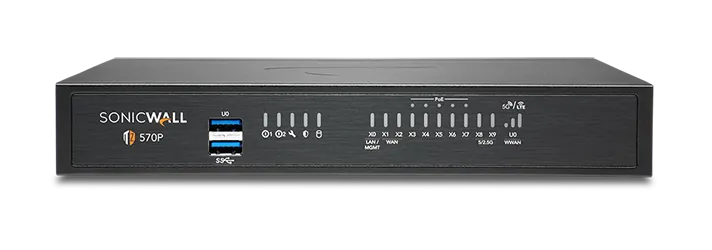
🔹 Network socketsCopper 1GbE on every model, 2.5GbE multi-gig on the TZ 570 and 670, and 10GbE SFP+ fibre on the larger rack units - the mix depends on the model ordered
🔹 Logs kept on the boxOnboard enterprise SSD storage for local reporting
🔹 The chip insideMulti-core system-on-chip running SonicOS 7
🔹 Temperature it toleratesRated for 0°C to 40°C ambient (32°F to 104°F)
Board Layout, Shielding and Heat Paths Inside the Case
Nothing waits in a queue while a scanner collects a whole file first, so a large drawing or a software installer arrives at the pace your line allows and is still checked on the way in. You never have to set a maximum file size and hope nothing bigger turns up, because traffic is read as it flows (Reassembly-Free Deep Packet Inspection).
Nobody in your office receives an attachment the world has not seen before on trust alone; it is opened in a sealed test room in the cloud first and released only when the verdict comes back. Files are also watched while they run in live memory, which is how malware written to look harmless to an ordinary scanner gets caught (Real-Time Deep Memory Inspection).
✉️ SUPPORT DESK
Coordinate custom hardware configurations, AMC maintenance contracts, and site engineering visits directly with authorized integration desks.
Turnkey UTM Firewall Appliance for Branch and Head Office Metrics Checklist near New Town
🛠️ Workflow Setup
Internal lanes come next, accounts, guest WiFi, cameras and production kept apart, and computers pick up their new settings by themselves. Nobody walks desk to desk.
⚠️ Pitfalls to Avoid
Never leave guests and staff sharing a WiFi password. Whoever printed it on the menu card has effectively given the accounts server a public entrance.
🔌 Guidelines & Sizing
Use a patch panel and cut the leads to the length the run actually needs. A cabinet stuffed with three-metre cables is impossible to trace, and tracing is what you end up paying for at midnight.
📈 Upgrade Triggers
Every new outlet costs an engineer a full day on site to set up, and four more are opening this year.
Frequently Asked Questions
Q. Our new branch opens next month and there is no IT person there. How does the firewall get set up?
We register the unit to your account at our bench, then courier it to the branch, where somebody plugs in power and the internet cable and it downloads its own settings and comes online - nothing technical is typed at the far end (zero-touch deployment). That removes an engineer's travel and hotel from the bill for every new site you open. One condition: the broadband at the branch must genuinely be live on the day the box arrives, and telecom activation is the thing that slips most often. For a complicated branch with its own server or two internet lines, we still prefer to send an engineer.
Q. What happens when the subscription expires - does it just stop protecting us?
It keeps passing traffic quite normally, so nobody notices a thing on the morning it lapses, and that is exactly the danger. Virus definitions stop updating, newly malicious websites stop being categorised, and unknown attachments stop being tested in the cloud, leaving you defended against last year's threats. Firmware updates and support calls fall away too, which matters most on the day something breaks. Most bundles allow a short grace period, but treat the expiry as a hard date - we send the renewal quote about two months ahead so it is never a surprise.
Q. The quote shows the box on one line and three more charges underneath. What are those?
Those extra lines are the subscriptions, and they are the part buyers most often miss when comparing two quotes. The hardware price alone gets you a working router and firewall; the other lines buy virus scanning, website categories, the cloud test-room for unknown files and the right to phone support, sold together as a security bundle for one, three or five years. Suppliers package these differently, so a cheaper-looking quote usually has a thinner bundle or a shorter term hiding inside it. Ask anyone quoting you - including us - to show hardware, bundle and term as three separate numbers.
Q. Why buy through Microtech Solutions rather than the cheapest listing online?
Because you are not just buying a box - you are buying a licence registered to somebody's name, and cheap online stock is often registered elsewhere, imported without local warranty, or sold with a bundle far shorter than the listing implies. We register both the hardware and the subscription to your company, keep the paperwork where you can find it at audit time, and are the people who turn up when the link drops. You also get the sizing conversation before the money is spent instead of a return request afterwards. Compare the total of hardware, bundle, installation and support across Kolkata, not the sticker price on its own.
Q. Can the same box run our office WiFi?
Yes. The firewall doubles as the wireless controller, and the access points feed off your existing network cabling. Because one unit is doing the security work as well, guest WiFi, staff WiFi and the billing network each get their own lane and their own rules from a single screen, instead of a row of home routers that nobody manages. Coverage is still a physical matter, though: thick walls, a mezzanine floor or a metal-clad godown will need more access points than a plasterboard office of the same area. We walk the floor around New Town before quoting and give you the honest number.
💡 Engineering Fact: Blocking a whole category like gambling does not mean somebody sat and typed out a list of websites. The firewall asks a cloud rating service what category the address belongs to, and the answer comes back faster than the page loads.
🔄 THE REST OF OUR WORK
Everything Else We Supply and keep around New Town
If staff still mail files to each other, a small NAS gives everyone one shared drive with proper permissions.
🧭 Local Business area and Our Coverage for offices in New Town
📍 New Town
New Town, Kolkata is one of the fastest-growing commercial and residential areas in the city, attracting people from all walks of life. With its mix of residential towers, tech hubs, and shopping malls, New Town can get hectic, especially during peak hours. That’s where UTM Firewall Appliance for Branch and Head Office from SonicWALL comes in, offering round-the-clock surveillance for your home or business.
With the nearby Salt Lake Sector V, Rajarhat, Kestopur, and Baguiati feeding a continuous flow of people, the area needs reliable security systems. UTM Firewall Appliance for Branch and Head Office helps you monitor your premises, ensuring more confidence in your daily security whether you’re at work or at home. Its discreet design and powerful features make it ideal for use in this high-traffic area.
In New Town, where both old and new businesses thrive, UTM Firewall Appliance for Branch and Head Office is an important part of keeping things secure, making it the best choice for any property in this area.