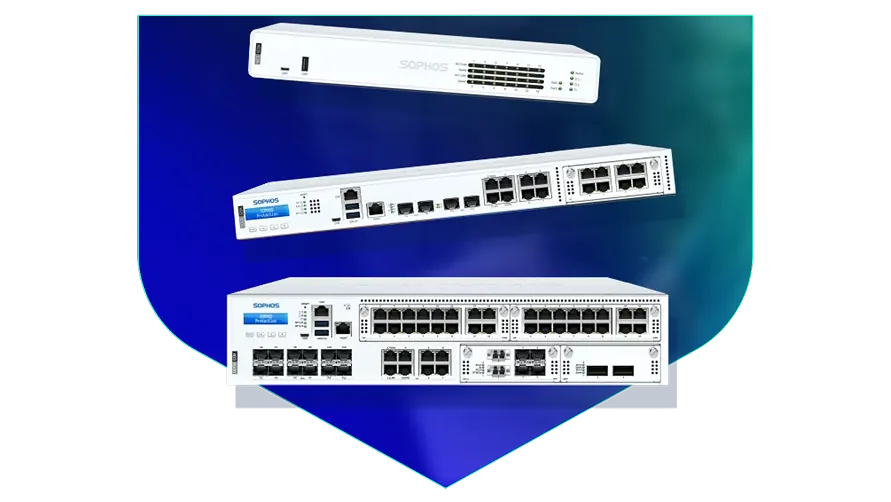
🏷️ SPECS:Scanning Without the CrawlTLS 1.3 InspectionSecond Chip for SpeedFibre Uplinks on Larger ModelsChecks Inside HTTPSProtection Stays Switched OnPorts Matched to Your BuildingHandles a Full OfficeBuilt for Busy AfternoonsBrowsing Stays FastZero-Day SandboxingBlocks RansomwareSynchronized SecurityAuto-Isolates Infected LaptopsSD-WAN FailoverAuto Line SwitchingDeep Packet InspectionOne Dashboard, All BranchesActive-Active HA ClusterStandby Unit Ready1U Rackmount ChassisDual Hot-Swap PSUFits Any RackDesktop Size ModelBypass Port PairsStays Up on FailureBranch-Size BoxModular Port BaysRuns Quiet in OfficeFront-to-Rear Airflow
The most common mistake I see is buying by port count. Someone counts twenty staff, picks the smallest unit, then wonders why the box runs out of headroom once VPN and web filtering are added. Real sizing comes from how many people browse at the same time, whether Tally or an ERP lives on a server, and how many branches will dial in. Tell us those three things and we will point you at the right Sophos model instead of the one with the biggest number on the label.
📍 Local Engineers for Sophos Next-Gen Firewall for Business Networks across Ahmedabad
When two hundred students discover the same streaming site, the exam portal is the first thing to suffer. Application-aware rules let you cap entertainment traffic and hold back a fixed slice of the line for the things that matter - exams, fee payments, the office. Staff and student networks stay apart, each with its own filtering profile. Schools and colleges in Ahmedabad run all of this on a single SophosNext-Gen Firewall for Business Networks without needing a full-time network person.
Half your team now works from home two days a week, and remote access currently means a shared password and some optimism. The SophosNext-Gen Firewall for Business Networks gives every person an encrypted tunnel of their own with a second login check on top, so a leaked password by itself opens nothing (SSL VPN with multi-factor login). A contractor can be given browser-only access to one application and nothing else. When somebody resigns, one click ends their access everywhere, which matters to any growing firm in Mithakhali Six Roads.
💡 The Case for Doing It Properly Once across Ahmedabad
Some businesses can lose an hour. A dispatch desk, a hospital front office or a trading room cannot. Two units can be paired so the standby picks up the live sessions the instant the first one stops, fast enough that a call in progress stays up (Active-Passive HA). Most customers start with one unit and add the second at the next budget cycle, and the pairing is designed to be added later.
Running four branches used to mean four different people making four different mistakes. Every unit reports into one console, so you push the same rules everywhere, see which branch has which problem, and update firmware overnight from your own desk. A new site can be sent the box, plugged into power and internet by anyone on site, and configured remotely. Retail chains and diagnostic labs spread across Ahmedabad are the usual beneficiaries.
Keeping Four Branches on the Same Rules across Ahmedabad
A school with roughly nine hundred students found its online exam portal timing out every afternoon, which turned out to be a hostel's worth of video streaming on the same line. We deployed a SophosNext-Gen Firewall for Business Networks with separate staff, student and guest networks, and capped entertainment traffic during school hours only. The very next assessment week finished on time. The IT teacher now changes the rules himself from a browser rather than phoning anyone.
🛡️ HOW WE WORK ON SITE
How We Set Up and Hand Over a Firewall
Rules are tested before they go live, not after. Where the site allows it we run the new policy alongside the old gateway, watch what breaks inside a controlled window, and keep the previous configuration exported so a rollback takes minutes. For manufacturing units around Mithakhali Six Roads, where a stopped line costs real money, that rehearsal is not optional.
Typical assignments, from a first install to a 2am hardware swap:
▪Standby Unit That Takes Over When One Fails
▪Fibre Links Between Buildings, Fitted and Terminated (10GbE Transceivers)
▪Encrypted Website Scanning and Certificate Rollout
▪Infected Laptops Cut Off Automatically (Synchronized Security)
*Note: every site visit, configuration change and troubleshooting session listed here is a paid service, quoted in advance, and separate from any support you receive directly from the manufacturer.*
💡 Engineering Fact: Fibre between two buildings works by shining a laser down glass thinner than a hair. The common short-range module reaches about 300 metres, and picking the wrong one for a longer run is the cheapest mistake in networking.
📋 FIREWALL SIZING
Not sure which model suits an office of your size in Mithakhali Six Roads? Send us your user count and internet speed and we will come back with a size, a price, and the reasoning behind both.
📦 Full Range with Honest Comparisons in and around Mithakhali Six Roads
Every model, its port layout and its rack requirement, listed together:
Desktop Firewalls for Small Offices and Shops
Small, silent boxes that sit on a shelf and guard the internet line of a five to fifty person office. Suits clinics, showrooms, CA practices and single-branch businesses.
🔹 SPEED
A second chip handles ordinary traffic while the main one runs the security checks, which is why browsing does not crawl once scanning is on (Xstream FastPath).
🔹 WHAT IT'S FOR
Offices, clinics and showrooms of roughly five to fifty people sharing one or two internet lines.
🔹 TWO INTERNET LINES
Keep fibre and a broadband backup plugged in together; when one drops, the switch across happens on its own (SD-WAN).
Rack-Mount Firewalls for Head Offices
One-rack-unit appliances for a head office, hospital or college where a few hundred people are on the network all day. Built to sit in the server cabinet you already have.
🔹 FIBRE PORTS
Ten-gigabit fibre sockets go straight into your core switch with no converter box in the middle (SFP+).
🔹 ROOM TO GROW
A slot on the front accepts an add-on module - more copper ports, faster ones, or fibre - when the network expands (Flexi Port).
🔹 HEAT
Front-to-back cooling copes with a warm server room, though we still insist on a working AC and a clean filter.
Large Firewalls for Data Centres and Campuses
The heavy two-rack-unit units, for data centres, big campuses and companies pushing tens of thousands of connections at once. Everything that can fail is doubled up.
🔹 WHO IT SUITS
Data centres, large campuses and companies holding tens of thousands of live connections at peak hour.
🔹 VERY FAST PORTS
Twenty-five and forty-gigabit fibre sockets, so the firewall is never the narrow point between server rows.
🔹 IF IT FAILS
Runs as a pair, and some sites run both units live so neither one sits idle (Active-Active clustering).
Easy to set up Branch Boxes (RED) for Small Sites
For the two-person sales office, the godown, the site cabin. You courier the box, somebody plugs it in, and that location joins the head office network by itself.
🔹 WHAT IT'S FOR
Very small sites - a warehouse office, a godown, a two-person branch - that still need to be on the head office network.
🔹 WHAT STAFF SEE
Tally, the shared folder and the head office printer open exactly the way they do at the main location.
🔹 WHAT IT IS NOT
This is not a standalone firewall. It leans on the main appliance, so budget for both together.
Managed Network Switches for the Server Room
For offices that have outgrown cheap unmanaged switches and want to see which port is causing the trouble. They also feed power to cameras, phones and access points down the same cable.
🔹 WHERE IT'S MANAGED FROM
The same cloud dashboard as the firewall, so one login covers both instead of two separate systems.
🔹 WHO IT SUITS
Schools, hotels, hospitals and factories - anywhere the camera and phone count keeps climbing.
🔹 LANES
Cameras, billing machines, guest WiFi and staff laptops stay apart on the same physical cabling (VLANs).
WiFi Access Points for Offices, Schools and Warehouses
Ceiling-mounted units that give a whole floor usable WiFi instead of one router struggling from a corner. Made for buildings where dozens of devices connect at the same time.
🔹 WHERE IT'S MANAGED FROM
One cloud console shows every unit, who is connected and which one is the busiest.
🔹 WHAT IT'S FOR
WiFi that holds up when twenty phones and laptops crowd into one meeting room.
🔹 WHO IT SUITS
Schools with tablets, hotels, co-working floors, and warehouses running handheld barcode scanners.
Secure Remote Access for Staff Working from Home
Lets a person open the one office application they need - from home, from a client site, from a hotel - without dropping their laptop inside your whole network.
🔹 HOW IT DIFFERS FROM A VPN
An old-style VPN puts the laptop inside everything. This opens only the application that person is allowed to touch (ZTNA).
🔹 IF A LAPTOP IS LOST
Access is cut from the dashboard in a minute. Nobody has to change the VPN password for the whole company.
🔹 WHAT'S EXTRA
Licensed by number of users, so a five-person accounts team is paid for as five, not as the whole staff.
Antivirus for Laptops and Servers That Talks to the Firewall
Protection on the machines themselves, wired to the firewall so the two act together. Useful for any office where staff install their own software or carry pen drives in.
🔹 IF SOMETHING GETS THROUGH
A timeline shows where it came from - the attachment, the pen drive or the website - so the same door gets shut.
🔹 WHAT'S EXTRA
Mail and mobile device protection are separate add-ons and are worth pricing at the same time.
🔹 REPORTING
One list of every machine, whether its updates are current, and which computer is the repeat offender.
Licence Renewals and Support Subscriptions
The yearly subscription that keeps the threat updates, web filtering and support alive. This is the part most buyers forget until the day it lapses.
🔹 WHEN IT LAPSES
The box keeps passing traffic and the lights stay green, but new threats stop being recognised. That gap is where the trouble walks in.
🔹 IF THE HARDWARE DIES
Support levels differ in how fast a failed unit is replaced. Choose that before you need it, not on the morning you do.
🔹 AUDITS
An auditor checking your security controls will ask for proof the subscription is live. A lapsed one is a finding.
✉️ Service & Maintenance Support
Need site visits, AMC contract estimates, or customized installation architecture? Connect with our technical desk directly.
📊 What the Numbers Mean for Your Office for offices in Mithakhali Six Roads
Specification sheets are written for engineers, so here is the short version. The appliance runs two kinds of processing side by side: one part moves ordinary traffic at full speed, the other does the inspection work, which is why throughput holds up once features are switched on. For an office in Mithakhali Six Roads, the figure that matters is not the headline number but the throughput with inspection running, and that is the one we quote.
Port layout decides how the box fits your building. Models arrive with ordinary gigabit copper ports for desks and switches, faster multi-gigabit ports for busy uplinks, and fibre slots where the cable run is long or the core switch is 10G. A leased line handed off on fibre and a broadband line on copper can end on the same unit without an extra media converter.
🏆 CORE PARAMETER🔹 If a laptop gets infectedFirewall isolates it on its own - Synchronized Security heartbeat
🔹 Joining your branchesSite-to-site IPsec, SSL VPN and plug-in RED devices
💾 Log storage on boardGood for large-scale setups SSD for local reporting and audit trails
🔌 Spare power supplyOptional on the smaller rack models, fitted as standard and hot-swappable on the larger ones
🔹 If the main unit failsStandby takes over - Active-Passive or Active-Active HA cluster
🔹 Sizes you can buyFanless desktop, 1U rackmount, 2U rackmount
🔹 Sockets on the boxgigabit copper as standard, with 2.5-gigabit copper and 10-gigabit fibre on the models that offer them - we confirm the port list against the model you order
Sophos Thermal Design and Internal Board Layout
Your unit will probably not live in a data centre. It may well live in a cupboard behind reception with the door shut, so the hardware assumes that: continuous-duty fans, power circuitry that tolerates a wobbly supply, and a steel case that bolts into a rack or sits on a shelf. On the rack models a second power supply makes a lost feed an annoyance rather than an outage.
One screen covers the rules, the address translation, the routing, what gets scanned and what gets reported, instead of five consoles that disagree with each other. Whoever inherits your network can read a single line per rule and see who it applies to, what it allows and what is being checked (one policy list).
✉️ SUPPORT DESK
Coordinate custom hardware configurations, AMC maintenance contracts, and site engineering visits directly with authorized integration desks.
🛠️ Where the Box Should Actually Sit: Rack and Room Notes for Mithakhali Six Roads
If your server room is a converted store cupboard, and in most offices around Mithakhali Six Roads it is, these notes matter more rather than less.
🧰 Installation & Setup - A Walkthrough across Ahmedabad
🔹Feed the two power supplies from two different circuits, both behind an online UPS, so a single trip during the usual evening voltage swings does not take the gateway down with it.
🔹Clean fibre ends with an optical pen before seating them in SFP+ slots. Most links that flap every few minutes on dusty sites near Mithakhali Six Roads are carrying a speck of dust, not a faulty module.
🔹Before switching on inspection of encrypted sites, push the firewall's certificate out to every company computer through Group Policy. Do that first and you save yourself a morning of browser warnings.
⚙️ SYSTEM EVALUATION & CHECKLIST
Turnkey Next-Gen Firewall for Business Networks Metrics Checklist near Mithakhali Six Roads
🛠️ Workflow Setup
Internal lanes are created next, accounts, guest WiFi, CCTV and production kept apart, and every computer picks up its new address without anybody touching a single desktop.
⚠️ Pitfalls to Avoid
Leaving the admin page open to the internet just for now is how a great many small offices get hit. Lock it to known addresses and add a second factor on day one.
🔌 Guidelines & Sizing
Fit a surge arrestor where the telecom cable enters the building. Line spikes and lightning come in through the WAN port a good deal more often than through the mains.
📈 Upgrade Triggers
Opening the second branch means a pen drive travels between locations every week because the two systems do not talk to each other.
📝 Where the Datasheet and Reality Differ across Ahmedabad
Before you touch a working firewall, export the configuration and write the rules down in ordinary language. I have walked into offices where the only person who understood the rule set left two years ago and every change since has been made by guessing. A one-page document naming each rule and why it exists is worth more than most support contracts. Keep it with the backup file, stored somewhere off the site.
Compared with leaving remote staff on shared passwords and an open remote-desktop port, giving each person an encrypted tunnel with a second login check removes the single most common way small companies get broken into.
The router your internet provider supplied is built to give you a connection, not to inspect what travels over it. It will not open an encrypted site, cannot tell you which machine is infected, and has no way to join your branches together.
💡 Engineering Fact: Files arrive split into pieces that often turn up out of order. The firewall reassembles them in memory before scanning, because half a virus in one packet and half in another would otherwise sail past untouched.
🛠️ Onsite Visits, Remote Fixes and Escalation across Ahmedabad
Who We Set Up For
What We Actually Do
Typical Turnaround
Colleges, Schools and Hostels
Blocking what students should not reach and keeping exam portals quick at peak hours
Planned around a term break, three to four days
Jewellery Showrooms and Trading Houses
Billing counters kept apart from CCTV and customer WiFi, with an alert if anything starts talking out of the shop
Next working day in most cases
Co-working Floors and Shared Offices
A network of its own for every tenant so one company cannot see another's files, plus a fair share of the line for each desk
Usually a survey within a few days, cutover on a Sunday
📊 Room to Grow Before You Need an Upgrade across Ahmedabad
Connection counts tracked with filtering active, to see how much memory was left.
PRACTICAL GAINS - THE HIGHLIGHTS
PREPARATION YOU WILL NEED - THE HONEST VERSION
✓An ageing core switch and a new fibre run can both plug into the same box, so nobody is forced into replacing the switch in the same month (port mix varies by model).
—Web application firewall rules need tuning in the first fortnight, or they will block a legitimate in-house script and the firewall will get the blame.
✓The second unit costs money and does nothing on most days, which is rather the point - it earns its keep on the one afternoon the first one dies (HA cluster).
—In-depth logging fills the internal disk if nobody sets rotation or ships the logs off the box.
✓Mail carrying an unknown attachment is held back while it is checked, and the person expecting it gets a note explaining the delay instead of silence (cloud sandbox quarantine).
—VPN speed between branches is capped by the upload speed your ISP gives you. No firewall can invent bandwidth the line does not have.
✓The steel case is shaped to pull air front to back, which is what keeps the unit alive in a warm, dusty cabinet.
—Fibre ports ship empty. Transceivers or DAC cables are a separate buy, and the wrong part simply will not link up.
✓"We turned virus scanning off because everything crawled" is the most common thing we hear when taking over an old box; here that switch can stay on for good (Xstream FastPath offload).
—A proper 19-inch rack with front-to-back airflow is expected. A firewall balanced on a cupboard shelf runs hot and dies early.
💡 Engineering Fact: Hosting your own website or mail server means the world can knock on your door. The firewall can stand in front of it, reading each request and turning away the standard tricks attackers try first.
⚡ SYSTEM DEPLOYMENT ARCHITECTURE
Ready to secure your premises in Mithakhali Six Roads?
Get comprehensive structured network setups, professional hardware alignment, and authorized warranty support allocations natively.
Q. How does it check encrypted sites without making browsing slow?
Nearly all web traffic is https today, so a firewall that cannot look inside encrypted sessions is blind to most of what arrives. Dedicated crypto hardware inside the appliance does the decryption maths, inspects the contents, and re-encrypts, instead of borrowing the main processor for the work (hardware-accelerated TLS 1.3 inspection). Day to day, browsing feels ordinary. Two caveats: a handful of banking and government sites have to be left out of inspection, and every office device needs the firewall's certificate installed or browsers will throw warnings.
Q. How are firmware updates done without taking the office offline?
New firmware installs onto a spare partition and the unit switches over on reboot, so a bad update rolls back to the previous version instead of leaving you stranded. Where a standby pair is running, we update the quiet unit first, move traffic onto it, then update the other, and nobody upstairs notices. On a single unit there is one reboot, a few minutes, which we schedule outside working hours. We also do not push a brand-new release the week it appears - it is allowed to settle first.
Q. What happens if it stops working on a Sunday?
Ring the support number and we start on it the same day, usually remotely, and for most faults we can talk someone through a temporary bypass so Monday morning is not a write-off. If the hardware itself has died, replacement runs through the manufacturer warranty, and the speed of that depends entirely on which support pack you bought - a next-business-day pack and a plain return-to-base pack are very different waits. We hold common spares on the shelf, but we will not pretend a unit can be at your gate within two hours. If a few hours offline is genuinely unaffordable, the honest answer is a standby unit, not a faster courier.
Q. What cabling, rack space and power does it need?
Smaller models are desktop-sized and live happily on a shelf; mid-range and larger ones are 1U or 2U and want a standard rack, a clean power feed, and clear air at the front and back. For 10G links inside one rack, short direct-attach copper leads are simplest and cheapest; between floors or cabinets you move to fibre with matching modules at both ends. Heat and dust do more damage in Indian server rooms than anything else, so we check ventilation and, on generator or inverter supply, the power quality too. Everything needed is listed in the quote, so install day holds no surprises.
Q. Our internet keeps dropping. Will this fix it?
It will not repair a bad line, but it can stop the drop from stopping work. Connect two links - a fibre leased line and a broadband or 4G backup, say - and the box watches both and shifts traffic onto the healthy one on its own (SD-WAN). Calls, Tally sessions and cloud apps ride whichever link is cleanest at that moment. If a single line is dropping five times a day, the real fix is a conversation with your ISP; this only makes the drops survivable.
💡 Engineering Fact: Your office has one public address on the internet and dozens of machines behind it. The firewall rewrites addresses on the way in and out to keep that straight, which is also why putting a camera recorder directly online is asking for trouble.
🔄 OTHER THINGS WE SET UP
What Else We Install and Look After in Mithakhali Six Roads
Once the traffic is safe, staff still need one shared place for files: ask about NAS storage sized for small offices.
📍 Where We Work and How Fast We Reach You for offices in Mithakhali Six Roads
📍 Mithakhali Six Roads
Mithakhali Six Roads in Ahmedabad is a busy commercial and residential hub, well known for its strategic location and heavy foot traffic. With offices, shops, and residential spaces located in close proximity, having clear visibility is vital. Sophos Next-Gen Firewall for Business Networks provides the perfect surveillance solution for businesses and residents alike, ensuring safety and security around entrances, stairways, and common areas.
This area’s popularity means that movement is constant, with visitors, workers, and shoppers coming and going throughout the day. Sophos Next-Gen Firewall for Business Networks helps property owners and tenants keep track of activity, from deliveries to customer entry points, providing more confidence in your daily security even during peak hours. As Mithakhali Six Roads continues to thrive and attract more businesses and residential developments, Sophos Next-Gen Firewall for Business Networks will remain an important tool for ensuring the safety of the area.
The system’s ability to monitor and record activity ensures that security remains reliable and accessible at all times.