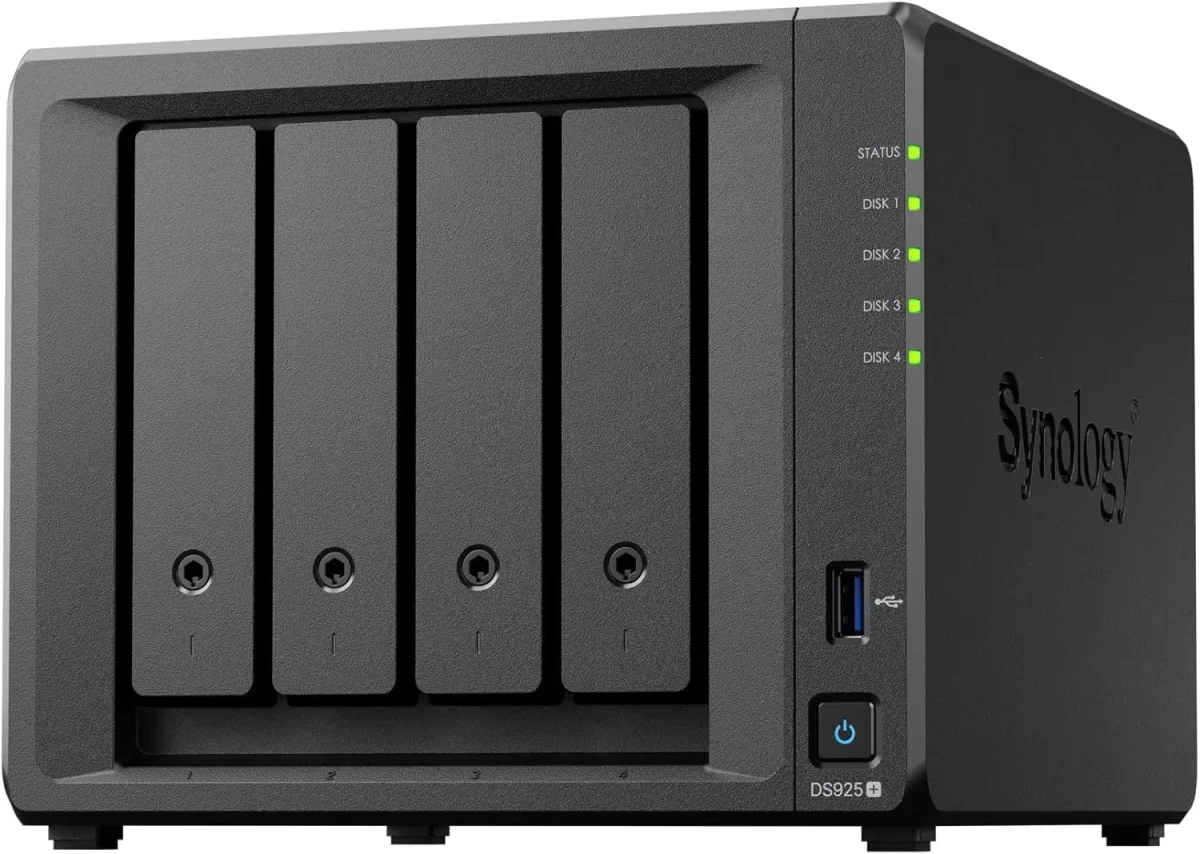
🏷️ SPECS:Btrfs File SystemImmutable SnapshotsHardware RAID 5/6/10Synology Hybrid RAID (SHR)Dual 10GbE SFP+ / RJ45Hot-Swappable SATA/SAS BaysActive Backup SuiteM.2 NVMe Cache AccelerationZero Per-User License FeesPrivate Cloud Drive SyncWORM Immutable StorageAir-Gapped Backup TargetHyper Backup to CloudSurveillance Station NVRActive Directory / LDAP SyncWindows ACL IntegrationReal-Time File VersioningCross-Office ReplicationECC Memory SubsystemDual Redundant Power Supplies4-Bay to 8-Bay Desktop Tower1U to 3U Rackmount RS-SeriesExpansion Unit ScalableEnterprise IronWolf / WD Red ProSynology HAT Enterprise DrivesSilent Fan Acoustic ModeEncrypted Shared FoldersAutomated S.M.A.R.T. ChecksSealed OEM Invoiced Units3 to 5 Year Hardware Warranty
Storage capacity on a brochure means nothing if five designers trying to open vector drawings over the network saturate the gigabit switch port and cause five-minute load times. In our staging lab, we test Synology NAS appliances under heavy simulated network stress - bonding multiple 10GbE SFP+ fiber interfaces, stressing M.2 NVMe SSD cache pools, and measuring concurrent SMB and NFS throughput. The unit that arrives at your premises near Memnagar has already proven it can handle thirty staff accessing large files simultaneously without a hiccup.
✅ Synology Enterprise Network Attached Storage (NAS) Supply, Setup and Support anywhere in Ahmedabad
Opening a branch office in another town used to mean setting up a separate file server and trying to sync folders over unreliable VPN connections that failed during large uploads. With Synology Hybrid Share and Drive ShareSync, the head office NAS and branch NAS units synchronize active folders automatically in the background. Branch staff access files at local LAN speeds from their on-premise unit, while changes replicate back to the central hub continuously. If a broadband line drops in Ahmedabad, local staff continue working from local cache with zero interruption.
Buying a fixed 2-bay storage box that cannot be expanded means you are forced to scrap the unit and buy an entirely new system two years later when your data footprint doubles. We size the Synology Enterprise Network Attached Storage (NAS) with calculated expansion headroom: choosing multi-bay enclosures (4-bay, 6-bay, 8-bay, 12-bay) with eSATA or SAS expansion ports that allow attaching multi-drive expansion units (DX series) down the road without recreating your storage pools. Tell us your projected data growth and we will configure a storage foundation built to last five years.
🧠 What Changes in the First Month with a growing team
Business managers do not want to parse raw command-line storage logs; they want clear visibility into storage consumption, disk health trends, and backup success rates. Synology storage management tools create clean visual dashboards that report storage pool utilization, drive temperatures, and snapshot status directly to your email on schedule. When auditors or board members request data governance proof, you have verified reports ready to present.
Very few businesses keep a static data volume over time. Start with four 8TB enterprise drives in RAID 5 today, and the same Synology enclosure allows you to add additional drives to open bays or replace existing drives with higher-capacity models on the fly without deleting your shared folders or stopping office work. We design each storage rollout near Memnagar with expansion headroom so your investment stays scalable.
Multi-Branch Automated File Synchronization and Private Cloud
A legal advisory and corporate compliance firm near Memnagar required an audit-compliant, encrypted document archive that could promise file immutability for statutory retention periods. We implemented a Synology Enterprise Network Attached Storage (NAS) utilizing WORM (Write Once, Read Many) compliance storage volumes and AES-256 bit hardware-encrypted shared folders. Client contracts and compliance filings are locked against deletion or modification for mandatory seven-year retention cycles, satisfying strict regulatory audit standards.
🛡️ SNAPSHOT POLICIES, PERMISSIONS AND DATA SAFETY
How We Size Storage Honestly, Even When a Smaller Unit Fits
Data migrations are verified before production go-live, never during business hours. We copy shared folder structures with active Windows ACL permissions intact, check file integrity against the source server, and keep the legacy host ready as a fallback. For trading, legal, and manufacturing firms around Memnagar, that discipline prevents lost business days.
Storage solutions delivered on site across offices and studios in Ahmedabad:
▪Multi-Branch File Synchronization via Synology Drive & Hybrid Share
▪10GbE SFP+ Fiber Network Card Installation & LACP Link Aggregation
▪License-Free Microsoft 365 & Google Workspace Local Backup Setup
▪Quarterly Storage Health Audits, Btrfs Scrubbing & Log Reviews
*Notice: Rates for storage racking, RAID recovery, and backup audits are shared before work begins. We do not act as the manufacturer's internal helpdesk.*
💡 Engineering Fact: Enterprise NAS hard drives include Rotational Vibration (RV) sensors that adjust read-write head positioning in real time to compensate for vibration from neighboring drives.
🔐 PRIVATE CLOUD & BRANCH SYNC
Need multi-branch synchronization and secure remote file access without public cloud privacy risks in Memnagar? We build secure private cloud storage architectures tailored to your business.
🏷️ Full Range with Honest Comparisons for Memnagar
What comes in the enclosure, what can be expanded, and what we configure on site:
Plus Series Desktop NAS Towers for Small Offices and Studios
Compact 4-bay to 8-bay desktop tower NAS enclosures (such as DS923+, DS1522+, DS1821+) designed for offices of ten to fifty staff needing high-speed file sharing, private cloud access, and automated backups without requiring a server rack.
🔹 BACKUP SOFTWARE
Pre-loaded with Active Backup for Business, backing up all office PCs, physical servers, and Microsoft 365 accounts with zero license fees.
🔹 NETWORK PORTS
Multiple 1GbE/2.5GbE RJ45 ports with link aggregation, plus optional 10GbE upgrade module slots for fast file transfers.
1U Rackmount RS-Series NAS for Standard Server Cabinets
Compact 1U rackmount NAS enclosures (such as RS422+, RS822+, RS1221+) designed to fit shallow and standard 19-inch server cabinets, providing strong RAID storage and virtualization backup targets.
🔹 RACK DENSITY
Compact 1U short-depth chassis design that fits into shallow 2-post and 4-post network cabinets with sliding rail kits.
🔹 VIRTUALIZATION READY
Certified iSCSI and NFS storage target for Microsoft Hyper-V, VMware vSphere, and Citrix XenServer environments.
2U High-Capacity Rackmount Storage Servers for Enterprises
High-density 2U rackmount storage servers (such as RS2423+, RS2821RP+, RS3621xs+) built for heavy multi-user concurrent access, large media archives, and high-capacity database backup repositories.
🔹 10GbE/25GbE UPLINKS
PCIe Gen3/Gen4 slots supporting dual-port 10GbE and 25GbE SFP28 fiber interfaces for high-bandwidth switch uplinks.
🔹 MEMORY CAPACITY
Expandable up to 64GB+ of high-speed ECC registered RAM across multi-channel memory architectures.
🔹 WHO IT SUITS
Large corporate headquarters, media production facilities, hospital archives, and multi-branch data consolidation hubs.
Enterprise 24/7 SAS and SATA Hard Drives and Trays
High-endurance good for large-scale setups SATA and SAS hard drives (from Seagate IronWolf Pro, WD Red Pro, and Synology HAT series) engineered for continuous 24/7 multi-bay vibration environments.
🔹 WHAT TO AVOID
Desktop PC hard drives lack vibration damping and error recovery control, leading to premature RAID degradation.
🔹 WARRANTY COVERAGE
Backed by 5-year manufacturer warranty coverage with data recovery rescue services on certified drive tiers.
🔹 HOT-PLUG READY
Mounted in durable drive caddies allowing single-drive replacement while the storage array continues serving data.
M.2 NVMe SSD Cache Modules and 10GbE Network Cards
High-endurance enterprise M.2 NVMe solid-state drives for read-write cache acceleration, paired with PCIe 10GbE SFP+ fiber network adapters for wire-speed collaboration.
🔹 10GbE SFP+ ADAPTERS
Dual-port 10GbE SFP+ PCIe cards supporting multi-mode optical transceivers and Direct Attach Copper (DAC) cables.
Synology High Availability (SHA) Redundant Storage Clusters
Active-Passive dual-NAS clustering that combines two identical storage servers into a single redundant cluster, providing automatic sub-minute failover if hardware fails.
🔹 ZERO IP CHANGES
Cluster uses a single virtual IP address, so client workstations and servers continue accessing shares without reconfiguration.
🔹 AUDIT COMPLIANCE
Provides verified continuous data availability for healthcare, banking, and manufacturing compliance standards.
🔹 ACTIVE-PASSIVE CLUSTER
Combines two identical Synology NAS units; the active unit serves data while the passive unit mirrors changes in real time.
Active Backup for Business: License-Free PC, Server and M365 Backup
Complete, centralized backup software embedded in DSM that backs up all office Windows PCs, physical servers, virtual machines, and cloud mailboxes locally with zero recurring license fees.
🔹 MICROSOFT 365 BACKUP
Backs up all corporate Exchange mailboxes, OneDrive accounts, and SharePoint team sites locally on schedule.
🔹 GLOBAL DEDUPLICATION
Advanced block-level deduplication stores identical operating system and file blocks only once, saving up to 70% space.
🔹 ZERO LICENSE FEES
Completely license-free with no recurring monthly per-user, per-device, or per-gigabyte subscription charges.
Surveillance Station NVR Storage and Camera Licensing
Turns your Synology NAS into an good for large-scale setups Network Video Recorder supporting high-definition IP cameras, automated motion recording, and secure mobile monitoring.
🔹 EXPANDABLE LICENSING
Enclosures include default camera licenses and support expansion packs up to dozens of concurrent camera streams.
🔹 FAILOVER RECORDING
Dual-NAS recording failover ensures video recording continues easily if the primary NVR unit restarts.
🔹 ISOLATED RECORDING
Video streams record directly to dedicated surveillance storage pools isolated from general office shared folders.
Storage AMC Contracts, Health Monitoring and Preventative Upkeep
Annual maintenance contracts providing scheduled Btrfs data scrubbing, S.M.A.R.T. Drive health analysis, snapshot verification, and emergency on-site attendance.
🔹 HOT-SPARE POOL
Standby enterprise NAS hard drives, optical patch leads, and tested power adapters held ready for rapid replacement.
🔹 PROACTIVE MONITORING
Telemetry monitoring tracking drive S.M.A.R.T. Health, pool space utilization, and backup job completion.
🔹 TAILORED TIERS
Available as labour-only support or comprehensive contracts including hardware components.
✉️ Service & Maintenance Support
Need site visits, AMC contract estimates, or customized installation architecture? Connect with our technical desk directly.
📋 What the Numbers Mean for Your Office for small teams
Backup software is built directly into the operating system (DSM) with zero ongoing software license fees. Active Backup for Business captures bare-metal system image backups of all office Windows PCs, physical servers, and virtual machines automatically on schedule. Built-in global deduplication technology stores identical files and operating system blocks only once, saving massive amounts of disk space across the office.
High-speed networking options adapt to demanding creative and engineering workloads. PCIe expansion slots support dual-port 10GbE SFP+ fiber and 10GBASE-T copper network cards, while dedicated M.2 NVMe SSD slots provide read-write cache acceleration that eliminates storage I/O bottlenecks during peak office hours in Ahmedabad.
🔹 Enclosure Types4-Bay to 8-Bay Desktop Tower, 1U to 3U Rackmount Enclosures
🔹 Surveillance SupportBuilt-in Surveillance Station NVR supporting 4K IP Cameras
🔹 Expansion CapabilitySupports eSATA and SAS Multi-Bay Expansion Units (DX/RX Series)
🔹 Ransomware DefenseImmutable Snapshots, WORM Compliance Volumes and Versioning
🔹 Backup SuitesActive Backup for Business, Active Backup for M365, Hyper Backup
🏠 File System ArchitectureBtrfs with Self-Healing Metadata and Ext4 Support
How Synology Builds and Tests Business Storage Arrays
Hardware scalability allows storage arrays to grow alongside business demands. Multi-bay desktop towers and high-density rackmount enclosures support easy to set up storage expansion units, multi-gigabit and 10GbE network daughter cards, and high-speed NVMe SSD cache acceleration.
Enterprise security features include AES-256 bit hardware-accelerated volume encryption, granular role-based access controls, two-factor administrator authentication, and cryptographic WORM (Write Once, Read Many) compliance storage policies.
✉️ SUPPORT DESK
Coordinate custom hardware configurations, AMC maintenance contracts, and site engineering visits directly with authorized integration desks.
🛠️ Synology NAS Deployment Checklist for Systems Engineers in Ahmedabad
Creative studios, corporate server rooms, and industrial warehouses each present unique physical environments; here is how our integration teams handle them across Ahmedabad.
✅ User Training & Handover - The Plan for small and mid-sized teams
🔹Assign static IP addresses to bonded network interfaces and configure LACP IEEE 802.3ad link aggregation on the connecting managed switch for redundancy.
🔹Format all primary storage volumes using the Btrfs file system to enable immutable snapshots and automated data integrity self-healing.
🔹Separate the NAS management DSM web interface to an administrative VLAN and disable the default administrator username to prevent brute-force attacks.
⚙️ SYSTEM EVALUATION & CHECKLIST
Turnkey Enterprise Network Attached Storage (NAS) Metrics Checklist near Memnagar
🛠️ Workflow Setup
Handover & testing: RAID failover, snapshot file recovery, and private cloud sync are tested live with your team, followed by documented handover.
⚠️ Pitfalls to Avoid
Do not let the installer keep the only copy of root administrator credentials; always store documented passwords where authorized managers can access them.
🔌 Guidelines & Sizing
Connect the NAS USB signaling cable directly to an online double-conversion UPS to enable automated safe shutdown before battery exhaustion.
📈 Upgrade Triggers
A ransomware scare encrypted a workstation, and you realized your network shares were completely exposed to modification.
🤝 Annual Maintenance Options Side by Side for multi-branch businesses
Industry Sector
Typical NAS Storage Configuration
Standard Lead Time
Corporate Head Offices
High-Availability Dual-NAS cluster with Active Backup for Microsoft 365 mailboxes and department file shares
Typically 5 to 7 business days
CA, Audit & Financial Firms
6-Bay Desktop NAS with RAID 6 Btrfs storage, Active Directory sync and immutable snapshots for client audit files
Typically 3 to 5 business days
Graphic Design & CAD Studios
8-Bay NAS with 10GbE SFP+ fiber card, mirrored NVMe SSD cache and RAID 10 for direct multi-user project editing
Usually 3 to 5 business days
🚦 How It Performs on a Normal Working Day in day-to-day use
Workload performance observed during automated nightly bare-metal workstation backups.
CLEAR ADVANTAGES - FOR BUYERS
COSTS BEYOND THE QUOTE - A QUICK LIST
✓WORM (Write Once, Read Many) compliance shared folders prevent files from being modified or deleted during mandatory regulatory retention periods.
—Initial RAID initialization, surface scanning, and parity building take several hours and must complete before loading live production data.
✓Dual redundant power supplies on rackmount models protect storage operations against electrical trips and power cord disconnections.
—Expanding an existing RAID array by replacing drives with larger models requires rebuilding parity drive by drive, taking several days to expand.
✓Synology Drive and Drive ShareSync synchronize files across distributed branch offices automatically, providing fast local access with centralized sync.
—10GbE network speeds require matching 10GbE switch ports, SFP+ optical transceivers, and Cat6A or fiber cabling across the network.
✓Proactive S.M.A.R.T. Disk telemetry alerts our service desk when a drive approaches error thresholds, allowing replacement before failure.
—Administering granular Windows ACL permissions across complex multi-department folder trees requires structured planning before rollout.
✓Full manufacturer warranty with genuine serial numbers registered directly to your company, backed by local engineering support in Ahmedabad.
—Btrfs data scrubbing and S.M.A.R.T. Extended scans temporarily increase drive activity and should be scheduled during non-working weekends.
💡 Engineering Fact: Synology High Availability (SHA) clustering pairs two identical NAS units over a dedicated heartbeat link, executing automatic sub-minute failover if the primary node stops.
⚡ SYSTEM DEPLOYMENT ARCHITECTURE
Ready to secure your premises in Memnagar?
Get comprehensive structured network setups, professional hardware alignment, and authorized warranty support allocations natively.
💡 Engineer Notes From Real Installations after years of site visits
Always choose the Btrfs file system when building storage volumes, never ext4. Btrfs provides copy-on-write architecture that makes immutable snapshots possible. If ransomware infects a shared network folder, you can roll back the entire folder to an hourly snapshot captured forty minutes earlier. It is the single most effective on-premise defense against ransomware I have deployed across Ahmedabad.
Public cloud storage services (like Google Drive or Dropbox) charge recurring monthly subscription fees per user that grow indefinitely, while upload and download speeds remain limited by internet bandwidth. An on-premise Synology NAS provides high-speed local LAN file transfers with fixed one-time hardware investment and zero per-user monthly fees.
Third-party SaaS backup software charges expensive recurring licenses per endpoint or per gigabyte. The Synology Enterprise Network Attached Storage (NAS) includes the Active Backup suite built directly into DSM, delivering automated, deduplicated bare-metal backups for all office PCs, physical servers, and Microsoft 365 mailboxes with zero software licensing costs.
💡 Engineering Fact: Metadata self-healing on Btrfs storage volumes reads duplicate metadata blocks and uses RAID parity to automatically detect and repair silent data corruption.
Frequently Asked Questions
Q. Why is connecting the NAS to an online UPS so critical?
Sudden power cuts during disk write operations cause dirty volume shutdowns and can degrade RAID arrays. Connecting the NAS to an online UPS via USB enables automated safe mode shutdown: when the UPS battery reaches a low threshold, the NAS safely closes open files, flushes cache, and dismounts storage pools before power exhausts.
Q. Can the NAS also be used to record our office IP security cameras?
Yes. Synology Surveillance Station is an enterprise NVR application built into DSM that supports over 8,000 IP camera models. It records continuous or motion-triggered video streams directly to dedicated storage pools on the NAS with multi-screen live viewing and mobile app access.
Q. How do we connect branch offices together to share company files?
With Synology Drive ShareSync and Hybrid Share, each branch office operates a local NAS that synchronizes active shared folders with the central head office NAS automatically. Branch staff open files at high local LAN speeds, while changes synchronize in the background over encrypted internet connections.
Q. Can we set individual storage quotas for different departments or users?
Yes. DSM allows administrators to enforce custom storage quotas per shared folder, user group, or individual user account. This prevents single departments (such as video production or marketing) from consuming the entire storage pool unexpectedly.
Q. Why should we use enterprise NAS hard drives instead of desktop hard drives?
Desktop hard drives are designed for light eight-hour daily use in single-drive computers. They lack Rotational Vibration (RV) sensors and have short error recovery timeouts, which causes RAID controllers to drop drives during heavy multi-user access. Enterprise NAS drives (like IronWolf Pro, WD Red Pro, or Synology Enterprise) are engineered for continuous 24/7 multi-bay operation with 2-million-hour MTBF ratings and 5-year warranties.
💡 Engineering Fact: Surveillance Station supports edge recording synchronization, retrieving footage stored on an IP camera's internal SD card after a network drop is restored.
🔄 RELATED INFRASTRUCTURE SOLUTIONS
Complementary Enterprise Systems We Deploy in Memnagar
Safeguard your office server room with biometric access control and commercial IP CCTV surveillance.
📌 Where We Work and How Fast We Reach You in Memnagar
📍 Memnagar
Memnagar in Ahmedabad is a peaceful locality, mostly residential with a few shops and local businesses scattered throughout. The area sees less foot traffic compared to more commercial zones, but security is still an important factor for homeowners and business owners alike. Enterprise Network Attached Storage (NAS) from Synology ensures that your property stays secure without attracting unwanted attention. Nearby areas like Naranpura, Vastrapur, and Satellite provide some level of movement in and out of Memnagar, making surveillance systems like Enterprise Network Attached Storage (NAS) even more important.
With its sleek design and clear video quality, Enterprise Network Attached Storage (NAS) helps you monitor key areas like entrances and common spaces without being intrusive. For anyone in Memnagar, installing Enterprise Network Attached Storage (NAS) ensures that your property remains safe, even in a quieter, more residential setting.