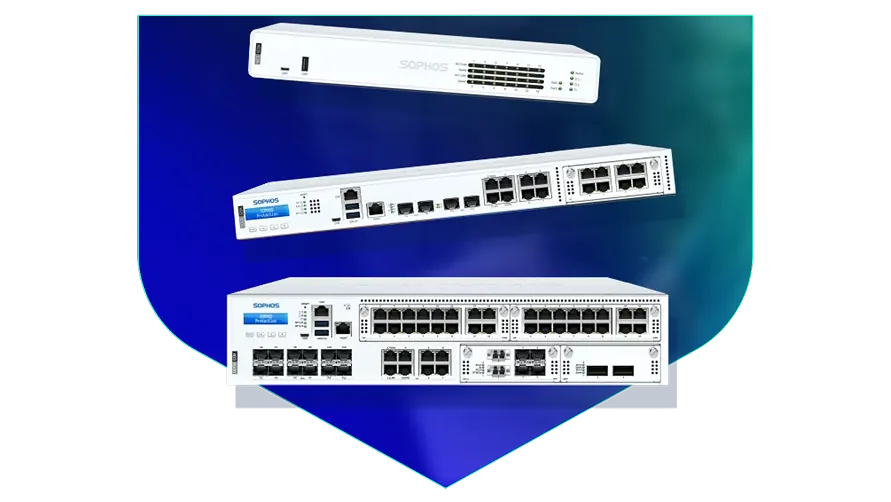
🏷️ SPECS:Scanning Without the CrawlTLS 1.3 InspectionSecond Chip for SpeedFibre Uplinks on Larger ModelsChecks Inside HTTPSProtection Stays Switched OnPorts Matched to Your BuildingHandles a Full OfficeBuilt for Busy AfternoonsBrowsing Stays FastZero-Day SandboxingBlocks RansomwareSynchronized SecurityAuto-Isolates Infected LaptopsSD-WAN FailoverAuto Line SwitchingDeep Packet InspectionOne Dashboard, All BranchesActive-Active HA ClusterStandby Unit Ready1U Rackmount ChassisDual Hot-Swap PSUFits Any RackDesktop Size ModelBypass Port PairsStays Up on FailureBranch-Size BoxModular Port BaysRuns Quiet in OfficeFront-to-Rear Airflow
Why does the office internet crawl every afternoon, even though you pay for a fast line? Nine times out of ten the firewall is the bottleneck, because it starts checking encrypted traffic and runs out of processing power by mid-day. The Sophos Next-Gen Firewall for Business Networks splits that work across two chips, so routine traffic flows straight through while the security scanning happens alongside it. We size and install these for offices in and around Matigara, and we run the speed test in front of you before we hand the box over.
💼 Local Engineers for Sophos Next-Gen Firewall for Business Networks in Matigara
When two hundred students discover the same streaming site, the exam portal is the first thing to suffer. Application-aware rules let you cap entertainment traffic and hold back a fixed slice of the line for the things that matter - exams, fee payments, the office. Staff and student networks stay apart, each with its own filtering profile. Schools and colleges in Kolkata run all of this on a single SophosNext-Gen Firewall for Business Networks without needing a full-time network person.
Half your team now works from home two days a week, and remote access currently means a shared password and some optimism. The SophosNext-Gen Firewall for Business Networks gives every person an encrypted tunnel of their own with a second login check on top, so a leaked password by itself opens nothing (SSL VPN with multi-factor login). A contractor can be given browser-only access to one application and nothing else. When somebody resigns, one click ends their access everywhere, which matters to any growing firm in Matigara.
🤝 What You Get That Cheaper Options Skip in Matigara
Ask any office that has owned a firewall for three years what they switched off. The honest answer is usually the scanning, because everything got slow - which leaves an expensive box doing the work of a router. The SophosNext-Gen Firewall for Business Networks keeps a second processor purely for routine traffic, so the main one is always free for the checks (Xstream architecture). Businesses around Matigara buy the protection once and it stays switched on.
Power in and around Matigara does what it likes: a dip at three, a full cut at seven, a surge when the generator hands back. These appliances are built for continuous duty, and the rack models take two power supplies so you can feed them from two different circuits. We insist on an online UPS and a genuine earth connection before handover, because far more firewalls die of bad power than of hackers. It is a boring detail that quietly decides how long the box lasts.
Co-working Floors around Matigara: Many Tenants, One Pipe
A three-branch diagnostic lab in Kolkata was couriering reports on pen drives because the branch links kept dying mid-upload. Each branch received a small unit joined to the head office over an encrypted tunnel, with a broadband line sitting behind the fibre so a cut no longer meant a stoppage. Reports now sync as they are generated, without anybody carrying anything. The courier line quietly disappeared from the monthly accounts.
🛡️ INSTALLATION STANDARDS AND CABLE DISCIPLINE
The People Who Do the Work, and How They Work
Every install ends with a written handover: the rule list, the VLAN plan, admin credentials passed on securely, and a one-page sheet covering what to do if. Offices near Matigara often have three people who each know a piece of the network and nobody who knows all of it. That document exists so the network does not turn into a problem the day someone resigns.
A short list of what we are usually called in for:
▪Encrypted Website Scanning and Certificate Rollout
▪Two or Three Internet Lines Used Together, Switching by Themselves (SD-WAN)
▪Out-of-Hours Switchover from Your Old Firewall
▪Firewall Supply, Setup and Commissioning
*A note on scope: advisory calls beyond the commissioning period are paid engagements, arranged with us directly and not through Sophos support.*
💡 Engineering Fact: After the first few packets of a video call or a cloud ERP session, the firewall recognises the conversation and waves the rest through at full speed instead of re-checking every packet of a stream it has already cleared.
🏭 FACTORY & WAREHOUSE SITES
Dust, heat and a network cabinet in the corner of the plant? We install for industrial sites around Matigara with the mounting, power and earthing done properly the first time.
Every model, its port layout and its rack requirement, listed together:
Desktop Firewalls for Small Offices and Shops
Small, silent boxes that sit on a shelf and guard the internet line of a five to fifty person office. Suits clinics, showrooms, CA practices and single-branch businesses.
🔹 WHAT'S EXTRA
A bracket kit is sold separately if you later want it screwed into a rack instead of standing on a table.
🔹 POWER
Draws little enough that a small office UPS carries it and the modem straight through a cut.
🔹 SIZE
About as big as a thick hardback book, so it fits on a shelf or inside a small wall cabinet.
Rack-Mount Firewalls for Head Offices
One-rack-unit appliances for a head office, hospital or college where a few hundred people are on the network all day. Built to sit in the server cabinet you already have.
🔹 FIBRE PORTS
Ten-gigabit fibre sockets go straight into your core switch with no converter box in the middle (SFP+).
🔹 HEAT
Front-to-back cooling copes with a warm server room, though we still insist on a working AC and a clean filter.
🔹 FITS
One rack unit high in a standard 19-inch cabinet, with cool air drawn in at the front and pushed out at the back.
Large Firewalls for Data Centres and Campuses
The heavy two-rack-unit units, for data centres, big campuses and companies pushing tens of thousands of connections at once. Everything that can fail is doubled up.
🔹 VERY FAST PORTS
Twenty-five and forty-gigabit fibre sockets, so the firewall is never the narrow point between server rows.
🔹 WHO IT SUITS
Data centres, large campuses and companies holding tens of thousands of live connections at peak hour.
🔹 IF IT FAILS
Runs as a pair, and some sites run both units live so neither one sits idle (Active-Active clustering).
Easy to set up Branch Boxes (RED) for Small Sites
For the two-person sales office, the godown, the site cabin. You courier the box, somebody plugs it in, and that location joins the head office network by itself.
🔹 HOW IT CONNECTS
An encrypted tunnel back to the main firewall makes the branch behave like another room at head office.
🔹 WHAT IT IS NOT
This is not a standalone firewall. It leans on the main appliance, so budget for both together.
🔹 IF IT FAILS
Swap the unit. The replacement pulls the same configuration down on its own, so there is nothing to set up again.
Managed Network Switches for the Server Room
For offices that have outgrown cheap unmanaged switches and want to see which port is causing the trouble. They also feed power to cameras, phones and access points down the same cable.
🔹 WHAT'S EXTRA
Check the total watts on offer before ordering. Thirty cameras on one switch will use up a small power budget quickly.
🔹 WHO IT SUITS
Schools, hotels, hospitals and factories - anywhere the camera and phone count keeps climbing.
🔹 IF SOMEONE MAKES A LOOP
Plugging both ends of one cable into the same switch normally floods the whole office; the switch spots it and shuts that port.
WiFi Access Points for Offices, Schools and Warehouses
Ceiling-mounted units that give a whole floor usable WiFi instead of one router struggling from a corner. Made for buildings where dozens of devices connect at the same time.
🔹 SPEED
Newer WiFi 6 units are about serving many devices at once rather than one device very fast, and that is the difference a crowded office actually feels.
🔹 WALKING AROUND
Handover between units is quick enough that a call on WiFi survives a walk from the cabin to the shop floor.
🔹 COVERAGE
Plan by walls, not by wattage. A brick partition or a lift shaft eats more signal than most people expect.
Secure Remote Access for Staff Working from Home
Lets a person open the one office application they need - from home, from a client site, from a hotel - without dropping their laptop inside your whole network.
🔹 HOW IT DIFFERS FROM A VPN
An old-style VPN puts the laptop inside everything. This opens only the application that person is allowed to touch (ZTNA).
🔹 WHAT IT NEEDS
A small agent on the laptop and the gateway running on your firewall or from the cloud console.
🔹 RECORDS
Each session is logged by person and by application, which is normally the exact evidence an audit wants.
Antivirus for Laptops and Servers That Talks to the Firewall
Protection on the machines themselves, wired to the firewall so the two act together. Useful for any office where staff install their own software or carry pen drives in.
🔹 REPORTING
One list of every machine, whether its updates are current, and which computer is the repeat offender.
🔹 SERVERS
The Tally server, ERP box and file server get settings tuned so the month-end run does not slow to a crawl.
🔹 WHAT'S EXTRA
Mail and mobile device protection are separate add-ons and are worth pricing at the same time.
Licence Renewals and Support Subscriptions
The yearly subscription that keeps the threat updates, web filtering and support alive. This is the part most buyers forget until the day it lapses.
🔹 WHEN YOU OUTGROW IT
Ask before you renew if headcount has doubled. Sometimes a bigger unit with a fresh term works out better than renewing the old one.
🔹 IF THE HARDWARE DIES
Support levels differ in how fast a failed unit is replaced. Choose that before you need it, not on the morning you do.
🔹 WHEN IT LAPSES
The box keeps passing traffic and the lights stay green, but new threats stop being recognised. That gap is where the trouble walks in.
✉️ Service & Maintenance Support
Need site visits, AMC contract estimates, or customized installation architecture? Connect with our technical desk directly.
👀 Where the Datasheet and Reality Differ in Matigara
Before you touch a working firewall, export the configuration and write the rules down in ordinary language. I have walked into offices where the only person who understood the rule set left two years ago and every change since has been made by guessing. A one-page document naming each rule and why it exists is worth more than most support contracts. Keep it with the backup file, stored somewhere off the site.
Compared with leaving remote staff on shared passwords and an open remote-desktop port, giving each person an encrypted tunnel with a second login check removes the single most common way small companies get broken into.
The router your internet provider supplied is built to give you a connection, not to inspect what travels over it. It will not open an encrypted site, cannot tell you which machine is infected, and has no way to join your branches together.
💡 Engineering Fact: Fibre between two buildings works by shining a laser down glass thinner than a hair. The common short-range module reaches about 300 metres, and picking the wrong one for a longer run is the cheapest mistake in networking.
🗒️ Licence Tiers and What Each One Covers in Matigara
The family runs from small desktop units for one office up to rack appliances built for a head office of several hundred people and multiple internet lines. The operating system is the same across the range, so what your team learns on a small unit still applies on a large one. Growing is a change of model, not a change of habits.
Hardware and subscription are separate line items, and it is worth knowing which is which before you sign anything. The box keeps routing traffic when a subscription lapses, but the protection updates stop - a quiet failure rather than a loud one. We put the renewal date in writing and remind you well before it arrives.
🏆 CORE PARAMETER🔌 Spare power supplyOptional on the smaller rack models, fitted as standard and hot-swappable on the larger ones
🔹 What's insideMulti-core processor plus a separate Xstream security chip (NPU)
🔹 If the main unit failsStandby takes over - Active-Passive or Active-Active HA cluster
🔹 Speed with scanning onA dedicated chip does the inspection, so the drop is far smaller than on an ordinary router - we size the model against the traffic you will actually scan
💾 Log storage on boardGood for large-scale setups SSD for local reporting and audit trails
🔹 If a laptop gets infectedFirewall isolates it on its own - Synchronized Security heartbeat
Sophos Thermal Design and Internal Board Layout
If you pay for two internet connections, both should be earning their keep. Each one is measured continuously for loss, delay and wobble, and sessions move between them according to rules you set, so voice and billing get the healthy one. Branch tunnels rebuild themselves after a cut is repaired, with nobody logging in (SD-WAN).
Nearly everything your staff open now arrives encrypted, and a firewall that cannot look inside it is guarding a door somebody has propped open. That is the problem this range was built around: one processor does the inspecting while a second waves already-checked video, voice and cloud traffic through at full speed (dual-processor design).
✉️ SUPPORT DESK
Coordinate custom hardware configurations, AMC maintenance contracts, and site engineering visits directly with authorized integration desks.
📄 Onsite Visits, Remote Fixes and Escalation in Matigara
Who We Set Up For
What We Actually Do
Typical Turnaround
Diagnostic Labs and Small Hospitals
Patient records fenced off from front-desk computers, and doctors logging in from home without opening the whole network
Priority attendance, usually the same working day
Jewellery Showrooms and Trading Houses
Billing counters kept apart from CCTV and customer WiFi, with an alert if anything starts talking out of the shop
Next working day in most cases
CA, Audit and Law Firms
Locking down the Tally and document servers, and safe remote logins for partners during filing season
Usually a same-day survey, live inside a day
📌 Room to Grow Before You Need an Upgrade in Matigara
Connection counts tracked with filtering active, to see how much memory was left.
PRACTICAL GAINS SUMMED UP
PREPARATION YOU WILL NEED - BEFORE YOU SIGN
✓A cheap second broadband connection stops being a spare cable in a drawer and becomes real insurance, because the box moves traffic onto it without anyone logging in (SD-WAN).
—VPN speed between branches is capped by the upload speed your ISP gives you. No firewall can invent bandwidth the line does not have.
✓Selected rack models keep the wire connected even if the appliance loses power, so a production line does not halt (bypass ports).
—Without a UPS, every power cut becomes an unplanned reboot. Repeat that through a monsoon week and you are risking the hardware, not just the uptime.
✓"We turned virus scanning off because everything crawled" is the most common thing we hear when taking over an old box; here that switch can stay on for good (Xstream FastPath offload).
—Firmware updates drop sessions briefly. On a single unit that means a late-night window agreed with the people who actually work late.
✓The steel case is shaped to pull air front to back, which is what keeps the unit alive in a warm, dusty cabinet.
—Traffic pushed through anonymising proxies or unmanaged tunnels sits outside these controls, so policy alone will not stop a determined employee.
✓Threat lists refresh on their own through the day, so protection never depends on somebody remembering to update it.
—In-depth logging fills the internal disk if nobody sets rotation or ships the logs off the box.
💡 Engineering Fact: Hosting your own website or mail server means the world can knock on your door. The firewall can stand in front of it, reading each request and turning away the standard tricks attackers try first.
⚡ SYSTEM DEPLOYMENT ARCHITECTURE
Ready to secure your premises in Matigara?
Get comprehensive structured network setups, professional hardware alignment, and authorized warranty support allocations natively.
🛠️ Before the Cutover: Physical Checks Worth Ten Minutes
A firewall usually fails for physical reasons long before it fails for security ones - heat, dust, bad power, or a cable somebody tugged while pulling out a server.
🛠️ Rollout Across Branches - A Walkthrough across Kolkata
🔹Give the HA pair its own cable. Run the heartbeat link directly between the two appliances on a dedicated port, never through a switch that somebody might reboot.
🔹Schedule the configuration backup on day one and send an encrypted copy off the site - the day you need that file is the day the box is dead.
🔹Feed the two power supplies from two different circuits, both behind an online UPS, so a single trip during the usual evening voltage swings does not take the gateway down with it.
⚙️ SYSTEM EVALUATION & CHECKLIST
Turnkey Next-Gen Firewall for Business Networks Metrics Checklist near Matigara
🛠️ Workflow Setup
We agree the cutover window in advance, usually a Saturday evening or the hour after closing, and we tell you honestly how long the internet will be down. Twenty to forty minutes is typical.
⚠️ Pitfalls to Avoid
Do not run the standby unit's heartbeat cable through a switch. It goes straight from one box to the other, or both units will eventually decide they are in charge.
🔌 Guidelines & Sizing
Two power supplies only help if they are on two different circuits. Both plugged into one strip is a decorative feature, not redundancy.
📈 Upgrade Triggers
Someone in accounts opened a fake invoice email, and the only thing that saved you was that the attachment happened to be broken.
Frequently Asked Questions
Q. How does it check encrypted sites without making browsing slow?
Nearly all web traffic is https today, so a firewall that cannot look inside encrypted sessions is blind to most of what arrives. Dedicated crypto hardware inside the appliance does the decryption maths, inspects the contents, and re-encrypts, instead of borrowing the main processor for the work (hardware-accelerated TLS 1.3 inspection). Day to day, browsing feels ordinary. Two caveats: a handful of banking and government sites have to be left out of inspection, and every office device needs the firewall's certificate installed or browsers will throw warnings.
Q. Who owns the settings and passwords afterwards?
You do. At handover you get the admin login, the licence details, the configuration backup file, and a written note of what was set up and why. We keep a copy so we can help you quickly, but the equipment and the manufacturer account stay in your name, and nothing is tied to us if you move to another vendor later. Ask for exactly this in writing from whoever you buy from - a surprising number of small offices cannot get into their own firewall.
Q. Is one enough, or do we need two?
One is enough for most offices. Two is worth it when a few hours offline would genuinely cost money or safety - a production line, a hospital, a call centre, a trading desk. The second unit sits quiet and takes over inside a second when the first one fails, so nobody on a call notices anything (Active-Passive HA). It roughly doubles the hardware spend, so do the sum honestly: what does one lost day actually cost you?
Q. Will this slow down our internet?
In normal use you should not notice it at all. The appliance carries a second chip that handles routine traffic while the main chip does the security checks, so the scanning and the routing happen side by side rather than queueing (Xstream FastPath). Slowdowns creep in when a unit is undersized for the number of staff, or when every last rule is set to deep-scan everything. We size the box against your headcount and your line speed, and we tell you which settings cost speed before you switch them on.
Q. How do we connect branch offices back to head office?
Two ways, depending on the branch. A small outlet gets a compact plug-in unit that dials home by itself the moment it has any internet - no engineer trip, no configuration done at the branch (Remote Ethernet Device). A larger branch with its own firewall gets a permanent encrypted link between the two sites instead. Either way the branch is treated as another wing of your network, so head-office filtering and rules apply there too, whether it is one shop or twenty across Kolkata.
💡 Engineering Fact: On the larger models, two power packs share the load, and if one input dies the other takes the whole thing on instantly. In practice that input usually dies because of a tripped circuit or a wrongly pulled plug.
🔄 OTHER THINGS WE SET UP
What Else We Install and Look After in Matigara
Putting in a new server at the same time? We spec, rack and commission those as well, in and around Matigara.
🏢 A Quick Look at the Local Office Scene across Kolkata
📍 Matigara
Matigara is a rapidly urbanizing commercial, educational, and shopping mall hub in Kolkata, housing large retail plazas, transport terminals, and housing townships. The steady mix of shoppers, university students, and commuters requires strong property security setups. Next-Gen Firewall for Business Networks powered by Sophos offers flexible, high-definition camera networks built for modern properties. Store owners and residential society leads deploy Next-Gen Firewall for Business Networks to monitor sales floors, entrance gates, and open parking grounds.
Smart motion alerts push instant notifications to property managers during non-operational hours. Protecting your business or home in Matigara is simple with reliable tech. Deploying Sophos surveillance systems gives you sharp visual footage, simple app controls, and total daily safety.