🏷️ SPECS:Scanning Without the CrawlTLS 1.3 InspectionSecond Chip for SpeedFibre Uplinks on Larger ModelsChecks Inside HTTPSProtection Stays Switched OnPorts Matched to Your BuildingHandles a Full OfficeBuilt for Busy AfternoonsBrowsing Stays FastZero-Day SandboxingBlocks RansomwareSynchronized SecurityAuto-Isolates Infected LaptopsSD-WAN FailoverAuto Line SwitchingDeep Packet InspectionOne Dashboard, All BranchesActive-Active HA ClusterStandby Unit Ready1U Rackmount ChassisDual Hot-Swap PSUFits Any RackDesktop Size ModelBypass Port PairsStays Up on FailureBranch-Size BoxModular Port BaysRuns Quiet in OfficeFront-to-Rear Airflow
A firewall with half its features switched off is not a firewall. That is what usually happens in practice: someone turns on virus scanning, the network slows to a crawl, and within a week the setting is quietly disabled again. The XGS boxes carry a separate chip for ordinary traffic, which is the whole reason the protection can stay on all the time. At Microtech Solutions we commission them with everything running, then show you the throughput figures so you know nothing was traded away.
📞 Sophos Next-Gen Firewall for Business Networks Supply, Setup and Support close to Manjalpur
Almost every site your staff open is now encrypted, and an older firewall waves that traffic straight through unopened. A SophosNext-Gen Firewall for Business Networks can look inside those sessions for hidden malware and still keep pages loading quickly, because the decryption work is done in hardware (TLS 1.3 inspection). You choose what gets opened and what stays private, so banking and medical sites can be left alone. Without it, most of what enters your office is never examined at all.
Buying a firewall two sizes too big is expensive; buying one size too small is worse, because features get switched off one by one until it is just a router. We size the SophosNext-Gen Firewall for Business Networks against your actual staff count, your internet speed and the branches you plan to add. The range runs from a small desktop unit for one office to rack appliances with fibre ports for a head office. Tell us where you expect to be in three years and the quote for your site in Vadodara will be built for that, not for today.
👍 Why Owners Stop Worrying About This close to Manjalpur
A firewall that cannot be reached at nine at night is not really protecting anything. Our engineers configure and burn in each unit on our own bench before it ships, so what arrives on site already carries your rules and your addressing. If a unit fails inside warranty we arrange the replacement and put the saved configuration back on it. You get a named engineer to call, not a ticket number in a queue.
Owners rarely want to read firewall logs. They want three answers: is anything getting in, who is eating the internet line, and are we exposed anywhere obvious. Scheduled reports arrive by email in plain tables a manager can read without a translator, and the technical detail stays underneath for whoever needs it. When an insurer or a customer's compliance team asks about your controls, you have something real to send.
CA and Law Firms: Client Data That Stays Where It Should
A co-working operator with four floors had one tenant's downloading habit ruining the connection for everybody else on that floor. Each tenant now sits in an isolated network with its own bandwidth ceiling, handed out from a single appliance instead of a cupboard full of consumer routers. Tenants stopped comparing notes about the Wi-Fi in the lift. The operator now shows prospective tenants a page explaining how their traffic is kept separate.
🛡️ WHO ACTUALLY TURNS UP AT YOUR SITE
Cabling, Labelling and Rack Work Standards
Cabling is the part a client sees and an engineer gets judged on. Patch leads are cut to length and labelled at both ends, fibre is dressed properly, and the rack is left tidy enough that the next person can trace a link without pulling the whole bundle apart. It costs us an extra hour and saves everyone a bad afternoon a year later.
Here are the jobs our field team handles for firewall customers:
▪Quarterly Rule Review and Clean-Up of Dead Policies
▪Annual Maintenance Contracts and Response-Time Cover
▪Firewall Supply, Setup and Commissioning
▪Unknown-Attachment Checks and Quarantine Rules
*To be clear: our consultation and field work is chargeable, agreed in writing before we begin, and independent of the vendor's helpdesk.*
💡 Engineering Fact: Log writing happens off to one side rather than in the middle of the traffic path. That is deliberate: recording what happened should never be the reason a packet takes longer to get through.
🏢 MULTI-BRANCH ROLLOUT
Opening a new branch and want it working on day one? We configure each unit on the bench, courier it out, and bring it onto your network without a second visit to Manjalpur.
🗂️ Models, Plans and What Suits Whom for offices in Manjalpur
What comes in the box, what costs extra, and what we add on site:
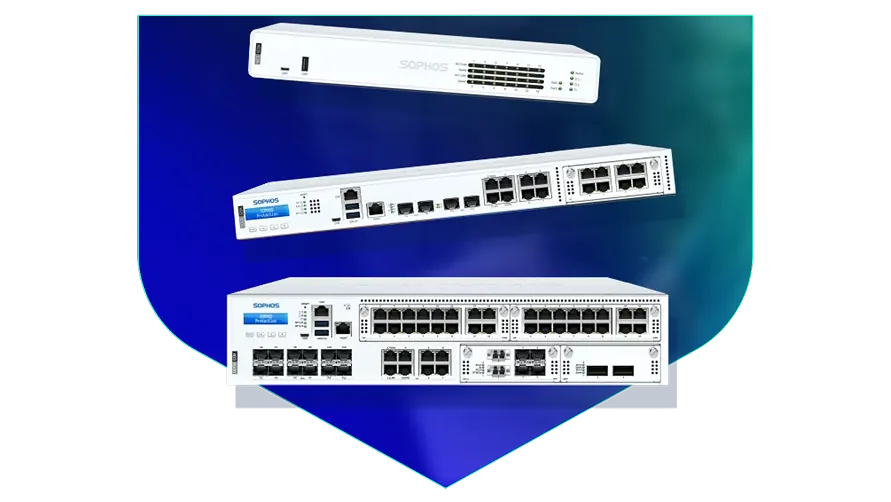
Desktop Firewalls for Small Offices and Shops
Small, silent boxes that sit on a shelf and guard the internet line of a five to fifty person office. Suits clinics, showrooms, CA practices and single-branch businesses.
🔹 POWER
Draws little enough that a small office UPS carries it and the modem straight through a cut.
🔹 SIZE
About as big as a thick hardback book, so it fits on a shelf or inside a small wall cabinet.
🔹 TWO INTERNET LINES
Keep fibre and a broadband backup plugged in together; when one drops, the switch across happens on its own (SD-WAN).
Rack-Mount Firewalls for Head Offices
One-rack-unit appliances for a head office, hospital or college where a few hundred people are on the network all day. Built to sit in the server cabinet you already have.
🔹 IF THE POWER GOES
Some models carry bypass sockets that physically join the two sides on power loss, keeping the line alive until you get there.
🔹 FITS
One rack unit high in a standard 19-inch cabinet, with cool air drawn in at the front and pushed out at the back.
🔹 SPARE POWER
A second power supply can be fitted and fed from a different circuit, so one tripped MCB does not take the office offline.
Large Firewalls for Data Centres and Campuses
The heavy two-rack-unit units, for data centres, big campuses and companies pushing tens of thousands of connections at once. Everything that can fail is doubled up.
🔹 STORAGE
A pair of internal SSDs keep logs on the box itself, so a question about traffic from last month is answered from the appliance.
🔹 BUSY NETWORKS
Sized for the case where thousands of people, cameras and machines all hold connections open at the same moment.
🔹 WHO IT SUITS
Data centres, large campuses and companies holding tens of thousands of live connections at peak hour.
Easy to set up Branch Boxes (RED) for Small Sites
For the two-person sales office, the godown, the site cabin. You courier the box, somebody plugs it in, and that location joins the head office network by itself.
🔹 HOW IT CONNECTS
An encrypted tunnel back to the main firewall makes the branch behave like another room at head office.
🔹 WHAT IT'S FOR
Very small sites - a warehouse office, a godown, a two-person branch - that still need to be on the head office network.
🔹 WHAT STAFF SEE
Tally, the shared folder and the head office printer open exactly the way they do at the main location.
Managed Network Switches for the Server Room
For offices that have outgrown cheap unmanaged switches and want to see which port is causing the trouble. They also feed power to cameras, phones and access points down the same cable.
🔹 WHAT'S EXTRA
Check the total watts on offer before ordering. Thirty cameras on one switch will use up a small power budget quickly.
🔹 IF A PORT MISBEHAVES
You can spot the guilty port and shut it from the screen, instead of unplugging cables one at a time.
🔹 WHERE IT'S MANAGED FROM
The same cloud dashboard as the firewall, so one login covers both instead of two separate systems.
WiFi Access Points for Offices, Schools and Warehouses
Ceiling-mounted units that give a whole floor usable WiFi instead of one router struggling from a corner. Made for buildings where dozens of devices connect at the same time.
🔹 WHO IT SUITS
Schools with tablets, hotels, co-working floors, and warehouses running handheld barcode scanners.
🔹 POWER
The network cable carries power up to the ceiling, so no electrician and no plug point above the false ceiling (PoE).
🔹 GUEST WIFI
Visitors get their own name and password, on their own lane, with a login page and a daily expiry if you want one.
Secure Remote Access for Staff Working from Home
Lets a person open the one office application they need - from home, from a client site, from a hotel - without dropping their laptop inside your whole network.
🔹 WHAT THE USER DOES
Signs in with the usual office email and password, plus a code on the phone as a second step.
🔹 WHAT'S EXTRA
Licensed by number of users, so a five-person accounts team is paid for as five, not as the whole staff.
🔹 WHAT IT NEEDS
A small agent on the laptop and the gateway running on your firewall or from the cloud console.
Antivirus for Laptops and Servers That Talks to the Firewall
Protection on the machines themselves, wired to the firewall so the two act together. Useful for any office where staff install their own software or carry pen drives in.
🔹 RANSOMWARE
It watches for a program that suddenly starts encrypting files, stops it, and puts the changed files back.
🔹 WHAT IT REPLACES
The free antivirus that quietly expired two years ago and the paid one nobody renewed after the IT person left.
🔹 SERVERS
The Tally server, ERP box and file server get settings tuned so the month-end run does not slow to a crawl.
Licence Renewals and Support Subscriptions
The yearly subscription that keeps the threat updates, web filtering and support alive. This is the part most buyers forget until the day it lapses.
🔹 BUNDLES
One combined subscription covers most of the protection at a better rate than buying the modules one by one.
🔹 WHEN IT LAPSES
The box keeps passing traffic and the lights stay green, but new threats stop being recognised. That gap is where the trouble walks in.
🔹 WHEN YOU OUTGROW IT
Ask before you renew if headcount has doubled. Sometimes a bigger unit with a fresh term works out better than renewing the old one.
✉️ Service & Maintenance Support
Need site visits, AMC contract estimates, or customized installation architecture? Connect with our technical desk directly.
🧠 Engineer Notes From Real Installations throughout Vadodara
Run the HA heartbeat straight between the two appliances. I have seen split-brain clusters caused by nothing more than an intermediate switch rebooting during a power event, after which both units believe they are in charge. A one-metre direct cable removes that entire class of problem. It is the cheapest reliability decision on the whole installation.
Antivirus on each computer only acts once a file has already landed on the machine. A gateway checks it on the way in, and also covers the printers, cameras and shop-floor equipment that cannot run antivirus at all.
Cloud-only filtering protects users while they are online through that service, but traffic between machines inside your own office never passes through it - and internal spread is exactly how ransomware travels once it is in.
💡 Engineering Fact: Every minute or so the box quietly tests each internet line by pinging a known point and timing the reply. When one line starts dropping packets, calls shift to the other before anybody in the office complains.
⚙️ SYSTEM EVALUATION & CHECKLIST
Turnkey Next-Gen Firewall for Business Networks Metrics Checklist near Manjalpur
🛠️ Workflow Setup
On the day, the box goes into the rack, power comes off two circuits wherever the room allows, and the internet cable moves across from the old router. The old one stays connected and ready to go back.
⚠️ Pitfalls to Avoid
Rolling out encrypted-traffic checking before the certificate has reached every computer is the fastest possible way to have the whole office declare the new firewall broken.
🔌 Guidelines & Sizing
Label every cable at both ends before the cabinet door closes. The half hour you spend now is the half hour nobody spends at midnight guessing which lead goes where.
📈 Upgrade Triggers
The firewall you have stopped getting updates a couple of years ago and the manufacturer's site now lists it as end-of-life.
☎️ Preventive Checks and Monthly Reporting close to Manjalpur
Who We Set Up For
What We Actually Do
Typical Turnaround
Cold Storage and Food Processing Units
Keeping temperature alarms and dispatch systems online when one internet line drops
Typically a day or two, planned around a dispatch lull
CA, Audit and Law Firms
Locking down the Tally and document servers, and safe remote logins for partners during filing season
Usually a same-day survey, live inside a day
Jewellery Showrooms and Trading Houses
Billing counters kept apart from CCTV and customer WiFi, with an alert if anything starts talking out of the shop
Next working day in most cases
🔍 How It Performs on a Normal Working Day close to Manjalpur
Traffic pushed across two internet lines while one was deliberately dropped.
CLEAR ADVANTAGES - THE SHORT VERSION
COSTS BEYOND THE QUOTE WITHOUT THE SALES PITCH
✓Two power supplies mean a dead PSU is a spare-part job on Monday rather than an office shutdown on Friday (hot-swap redundant PSU).
—Desktop models run on an external adapter with no second supply, so a failed adapter takes the office offline until a replacement reaches you.
✓Office WiFi points are managed from the same screen as the firewall, which saves buying a separate controller.
—Bypass ports exist only on certain rack models. If your line needs that behaviour, it has to be confirmed before the buy order, not after delivery.
✓The second unit costs money and does nothing on most days, which is rather the point - it earns its keep on the one afternoon the first one dies (HA cluster).
—Central cloud reporting needs a working outbound connection. At a site with a flaky line, expect gaps in the dashboards.
✓"We turned virus scanning off because everything crawled" is the most common thing we hear when taking over an old box; here that switch can stay on for good (Xstream FastPath offload).
—Rackmount units are audibly loud under load. Put one in an open office and somebody will complain by the second week.
✓Selected rack models keep the wire connected even if the appliance loses power, so a production line does not halt (bypass ports).
—Fibre ports ship empty. Transceivers or DAC cables are a separate buy, and the wrong part simply will not link up.
💡 Engineering Fact: Switch full security scanning on in most routers and the whole office slows down. This one avoids that by handing routine, already-checked traffic to a second chip while the main processor does the inspecting.
⚡ SYSTEM DEPLOYMENT ARCHITECTURE
Ready to secure your premises in Manjalpur?
Get comprehensive structured network setups, professional hardware alignment, and authorized warranty support allocations natively.
🛠️ Heat, Dust and Humidity: Keeping the Gateway Alive
Everything below comes from actual site visits rather than from a manual, so treat it as the checklist your installer ought to be working through.
🔧 Server Room Housekeeping - The Plan for small and mid-sized teams
🔹Rack it with a gap. Leave a clear 1U above and below the appliance so hot air can escape - in the unventilated cabinets common around Manjalpur, a unit wedged between two servers will throttle by May whatever the datasheet promises.
🔹Reserve bandwidth for the phones and for Tally or your ERP before you open general internet access; loosening a limit later is far easier than explaining choppy calls.
🔹Save yourself an argument with the routing table next year: put the LAN gateway address on a real physical port rather than inside a bridge group, because every VLAN you add later has to live with that decision.
📃 Specifications, Explained in Plain Words around Manjalpur
Hardware and subscription are separate line items, and it is worth knowing which is which before you sign anything. The box keeps routing traffic when a subscription lapses, but the protection updates stop - a quiet failure rather than a loud one. We put the renewal date in writing and remind you well before it arrives.
Specification sheets are written for engineers, so here is the short version. The appliance runs two kinds of processing side by side: one part moves ordinary traffic at full speed, the other does the inspection work, which is why throughput holds up once features are switched on. For an office in Manjalpur, the figure that matters is not the headline number but the throughput with inspection running, and that is the one we quote.
🏆 CORE PARAMETER🔹 Speed with scanning onA dedicated chip does the inspection, so the drop is far smaller than on an ordinary router - we size the model against the traffic you will actually scan
🔹 Sizes you can buyFanless desktop, 1U rackmount, 2U rackmount
🔹 Unknown attachmentsOpened in a cloud sandbox before they reach a user
🔌 Spare power supplyOptional on the smaller rack models, fitted as standard and hot-swappable on the larger ones
🔹 If the main unit failsStandby takes over - Active-Passive or Active-Active HA cluster
💾 Log storage on boardGood for large-scale setups SSD for local reporting and audit trails
🔹 If a laptop gets infectedFirewall isolates it on its own - Synchronized Security heartbeat
How Sophos Actually Builds These Units
Nearly everything your staff open now arrives encrypted, and a firewall that cannot look inside it is guarding a door somebody has propped open. That is the problem this range was built around: one processor does the inspecting while a second waves already-checked video, voice and cloud traffic through at full speed (dual-processor design).
Your unit will probably not live in a data centre. It may well live in a cupboard behind reception with the door shut, so the hardware assumes that: continuous-duty fans, power circuitry that tolerates a wobbly supply, and a steel case that bolts into a rack or sits on a shelf. On the rack models a second power supply makes a lost feed an annoyance rather than an outage.
✉️ SUPPORT DESK
Coordinate custom hardware configurations, AMC maintenance contracts, and site engineering visits directly with authorized integration desks.
Q. Can guest WiFi, CCTV and accounts be kept apart?
Yes, and it is one of the more valuable things to do. The network is split into separate lanes so a visitor's phone, the camera recorder and the accounts server cannot see one another, with the firewall inspecting anything that crosses between them (VLAN segmentation). This is what stops a single infected machine from wandering across the whole office. Cameras and other smart devices deserve their own lane in particular, because they are rarely updated. It needs some planning of the switch layout, which is why we ask for a site visit first.
Q. We are a 20-person office. Is this overkill for us?
Not really - the model matters far more than the brand. A small office on an entry-level unit gets the same scanning engine as a large one; it simply handles fewer users and less traffic. Overkill is buying a rack-sized box with modules you will never switch on, which does happen. Tell us your staff count, your line speed, whether you host anything in-house, and how many branches there are, and we will point at the smallest thing that fits comfortably.
Q. Will this slow down our internet?
In normal use you should not notice it at all. The appliance carries a second chip that handles routine traffic while the main chip does the security checks, so the scanning and the routing happen side by side rather than queueing (Xstream FastPath). Slowdowns creep in when a unit is undersized for the number of staff, or when every last rule is set to deep-scan everything. We size the box against your headcount and your line speed, and we tell you which settings cost speed before you switch them on.
Q. How long does installation take, and will the office be shut?
A single-site install is generally a one-day job, and the only real interruption is the ten to twenty minutes when your internet connection moves across to the new box. We do that changeover early morning, after hours, or on a Saturday - whichever hurts least. Sites with several floors, more than one internet line, or a big pile of existing rules take two or three days, because rules have to be rebuilt and tested rather than copied over blindly. The cutover window is agreed with you in writing before anyone turns up in Manjalpur.
Q. Is one enough, or do we need two?
One is enough for most offices. Two is worth it when a few hours offline would genuinely cost money or safety - a production line, a hospital, a call centre, a trading desk. The second unit sits quiet and takes over inside a second when the first one fails, so nobody on a call notices anything (Active-Passive HA). It roughly doubles the hardware spend, so do the sum honestly: what does one lost day actually cost you?
💡 Engineering Fact: On the larger models, two power packs share the load, and if one input dies the other takes the whole thing on instantly. In practice that input usually dies because of a tripped circuit or a wrongly pulled plug.
🔄 OTHER THINGS WE SET UP
What Else We Install and Look After in Manjalpur
Bad cabling causes more slow days than any virus - our structured cabling teams redo tired Cat6 runs across Vadodara.
🌐 Local Business area and Our Coverage throughout Vadodara
📍 Manjalpur
Manjalpur in Vadodara is a high-density residential and retail sector in South Vadodara. From busy market crossroads to family apartments, keeping a reliable video security log is an everyday priority. Installing Next-Gen Firewall for Business Networks by Sophos delivers complete visual control. Equipped with Smart IR night vision and H.265+ smart compression, Sophos security cameras save local NVR storage space while preserving high-definition 4K resolution clarity.
Protect your home or store in Manjalpur with Sophos camera setups, delivering 24/7 reliability and simple app-based viewing.