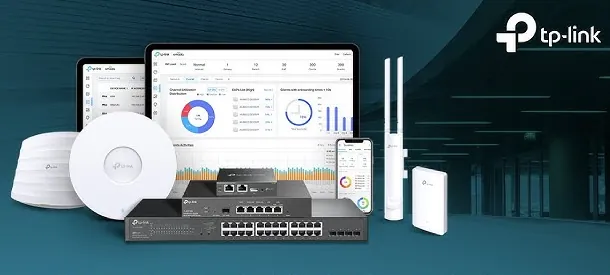
Calculate what continuous dropped video calls, unrecorded security camera streams, and unmanaged network loops actually cost your business in lost billing hours and operational frustration. Set that recurring cost beside the predictable, cost-effective investment in an enterprise TP-Link Omada SDN network. The Software-Defined Business Networking (SDN) eliminates expensive network troubleshooting calls by providing centralized real-time telemetry, automated rogue AP detection, and built-in virtual cable testing that pinpoints physical wire faults in seconds.
🧭 Annual Maintenance and Renewal for TP-Link Omada Software-Defined Business Networking (SDN) at multi-branch offices
Running separate power adapters to multiple security cameras, access control doors, and ceiling access points creates a tangled web of power bricks and fire hazards inside comms closets. An enterprise TP-Link Omada Software-Defined Business Networking (SDN) operates over high-budget Power over Ethernet (IEEE 802.3af/at PoE+). A single solid bare copper Cat6 network cable delivers multi-gigabit data and DC electrical power directly from the central managed switch to connected devices up to 100 meters away (or up to 250 meters in extended range mode). Cable clutter is eliminated, installation time is halved, and all connected devices are backed up by the central server room UPS.
Your company's comms cupboard has become an unmanaged mess of three different desktop switches and home routers bought over five years, with no labelling and nobody knowing which wire leads where. Consolidating your building onto a unified TP-Link Omada Software-Defined Business Networking (SDN) infrastructure brings every router, switch, and access point under a single centralized cloud management console. A single unified management screen displays live network topology, port link speeds, and connected devices, allowing our engineering desk in Ahmedabad to configure VLANs and troubleshoot links remotely.
🔑 Why Businesses Pick TP-Link Omada Software-Defined Business Networking (SDN) when budgets are tight
Very few commercial businesses keep a static employee headcount over time. Start with an 8-port router and two access points today, and the same TP-Link Omada cloud controller architecture allows you to add secondary 24-port PoE+ switches, 10G fiber uplinks, outdoor access points, and branch office networks simply by adopting new hardware into your cloud tenant. We design each networking deployment near Makarba with expansion headroom so your investment stays scalable.
Ask any business owner whose office suffered from daily network dropouts what networking hardware was installed in the cupboard. In almost every case, the building was running on unmanaged consumer desktop routers or cheap hubs that locked up whenever multi-user traffic spiked. The TP-Link Omada Software-Defined Business Networking (SDN) provides an automated, commercial-grade software-defined networking architecture with Multi-WAN redundancy, 802.11r fast roaming, and enterprise VLAN segmentation that works reliably day in and day out. Businesses around Makarba invest in genuine commercial networking once and eliminate network crashes and dead zones permanently.
Healthcare Clinics & Diagnostic Centers: Medical Tablet Roaming and VoIP
A 60-user corporate consulting headquarters near Makarba suffered daily internet dropouts and video meeting freezes because their primary broadband provider experienced frequent local cable cuts. We deployed an enterprise TP-Link Omada Software-Defined Business Networking (SDN) solution featuring a Multi-WAN VPN router balancing a primary fiber leased line with a secondary high-speed broadband backup, two 24-port PoE+ managed switches, and six ceiling-mount Wi-Fi 6 access points managed by an OC200 cloud controller. Internet failover operates in under a second with zero dropped calls, staff roam easily across the entire 6,000 sq. Ft. Facility, and guest smartphones connect through a branded captive portal isolated from internal financial servers.
🛡️ SUPPORT AFTER THE SYSTEM IS COMMISSIONED
What Happens When Our Network Engineers Arrive
Every networking deployment concludes with comprehensive documentation: the master cloud controller URL, administrative credentials, switch port allocation sheets, Multi-WAN gateway maps, guest captive portal runbooks, and visual coverage heatmaps. Growing businesses near Makarba frequently have multiple departments operating mobile devices; our documentation ensures your networking infrastructure remains transparent and fully manageable.
A summary of the networking integration and maintenance services we provide:
▪Structured Solid Bare Copper Cat6 Network Cabling & Cabinet Racking
▪Quarterly Network Health Audits, Firmware Updates & Multi-WAN Reviews
▪802.11k/v/r Seamless Fast Roaming & Client Handoff Configuration
▪Annual Network Maintenance Contracts (AMC) with Defined SLAs
*Terms: Engineering labor, commissioning, and preventive maintenance are invoiced under our private service agreement, distinct from product hardware warranties.*
💡 Engineering Fact: Client isolation on guest captive portals blocks connected visitor devices from communicating with or scanning each other, ensuring public Wi-Fi security.
🧾 NETWORK HEALTH & POE POWER CHECK
Experiencing random access point reboots, slow file transfers, or link drop alerts on existing systems in Makarba? Contact our network desk for prompt diagnostic support.
High-performance enterprise Multi-WAN VPN routers (such as ER605, ER7206, ER8411) supporting up to four WAN connections, intelligent load balancing, automated line failover, and hardware-accelerated VPNs.
🔹 DIRECT GST BILLING
Invoiced in Indian Rupees (INR) with verified GST input tax credit documentation.
🔹 MULTI-WAN ROUTING
Supports up to 4 to 10 WAN ports (Gigabit RJ45 and 10G SFP+), balancing traffic dynamically across multiple broadband lines.
🔹 WHAT IT'S FOR
Commercial offices, showrooms, and branch networks terminating multiple internet providers for automated 100% uptime failover.
Layer-2+ Managed Gigabit PoE+ Switches with 10G SFP+ Uplinks
Enterprise 8, 16, 24, and 48-port Gigabit managed switches (such as SG2210P, SG3428MP, SG3452XP) delivering high-budget Class 4 PoE+ power, 10G fiber uplinks, and VLAN segmentation.
🔹 WHO IT SUITS
Corporate offices, hotels, hospitals, and commercial facilities powering access points and IP cameras cleanly over Cat6.
🔹 LIFETIME WARRANTY
Backed by official limited lifetime manufacturer hardware warranty with local engineering support.
🔹 1U RACKMOUNT
Heavy-duty metal chassis mounting inside 19-inch cabinets with horizontal cable management panels.
High-performance indoor Wi-Fi 6 access points (such as EAP610, EAP653, EAP670) designed for corporate offices, meeting rooms, and banquets requiring high concurrency and seamless roaming.
🔹 MULTI-SSID VLANs
Supports up to 16 separate SSIDs with 802.1Q VLAN isolation for Corporate, Guest, Voice, and IoT subnets.
🔹 FAST ROAMING
Full 802.11k/v/r roaming protocols allowing mobile devices to hand over sessions between access points in under 30ms.
🔹 WI-FI 6 SPEEDS
Dual-band AX3000 to AX5400 wireless speeds delivering up to 4.8Gbps on 5GHz and 574Mbps on 2.4GHz bands.
In-Wall Hospitality & Executive Cabin Access Points with Gigabit Ports
Compact in-wall Wi-Fi 6 access points (such as EAP615-Wall) designed to mount directly into standard single-gang electrical wall boxes, providing discrete wireless coverage and local Ethernet switch ports.
🔹 FLUSH WALL MOUNT
Mounts cleanly into standard single-gang electrical wall boxes, sitting flush against plasterboard or wooden partitions.
🔹 WI-FI 6 COVERAGE
Dedicated dual-band Wi-Fi 6 radio providing strong, localized wireless coverage without signal bleeding into adjacent rooms.
🔹 BUILT-IN ETHERNET SWITCH
Four onboard Gigabit RJ45 ports on the bottom plate allowing wired connection for IP phones, IPTVs, and PCs.
—Fast roaming (802.11r) requires client device hardware support; legacy smartphones without 802.11r support rely on standard 802.11k/v handoffs.
✓Heavy-duty IP67 weatherproof outdoor models extend wireless coverage across industrial factory sheds, loading bays, and parking yards.
—Wi-Fi 6 multi-gigabit speeds require 100% solid bare copper Cat6 cabling; cheap copper-clad aluminium (CCA) wires cause PoE voltage failure.
✓Next-generation Wi-Fi 6 (802.11ax) technology delivers multi-gigabit speeds and eliminates buffering in crowded conference rooms.
—Setting 2.4GHz channel width to 40MHz in crowded commercial buildings causes severe co-channel interference; 20MHz width is mandatory.
💡 Engineering Fact: Multi-WAN load balancing on Omada routers evaluates real-time line latency and bandwidth utilization, distributing traffic across up to four ISP lines simultaneously.
⚡ SYSTEM DEPLOYMENT ARCHITECTURE
Ready to secure your premises in Makarba?
Get comprehensive structured network setups, professional hardware alignment, and authorized warranty support allocations natively.
🛠️ 10GbE SFP+ Fiber Uplinks, LACP Trunking and Switch Bonding
The points below cover physical cabinet racking, PoE switch distribution, multi-VLAN segmentation, and cloud controller adoption in the exact sequence our field engineers execute on site.
📋 Site Survey & Planning - Site Rules for offices in Makarba
🔹Set 2.4GHz radio channels manually to 20MHz width on non-overlapping channels (1, 6, 11) to eliminate adjacent channel interference in crowded commercial buildings.
🔹Deploy a dedicated hardware cloud controller (such as the OC200 or OC300) on a static IP to make sure continuous network management and captive portal authentication.
🔹Connect the Multi-WAN router and PoE+ switches directly to an online double-conversion UPS to make sure continuous network uptime through power cuts.
⚙️ SYSTEM EVALUATION & CHECKLIST
Turnkey Software-Defined Business Networking (SDN) Metrics Checklist near Makarba
🛠️ Workflow Setup
Failover & roaming drill: An active walking roaming test and live physical ISP cable cut failover test are demonstrated in front of your team.
⚠️ Pitfalls to Avoid
Do not deploy Multi-WAN routers without configuring online DNS health probes; simple link-up detection will fail to catch upstream fiber cuts.
🔌 Guidelines & Sizing
Always specify 100% solid bare copper 23 AWG Cat6 cabling for all access point and switch runs; cheap copper-clad aluminium (CCA) wires cause severe PoE+ voltage drops.
📈 Upgrade Triggers
You are opening additional branch showrooms or warehouses that need to be monitored centrally from head office on one screen.
🗒️ Lessons From Deployments That Went Wrong for demanding workloads
Always separate Guest Wi-Fi onto a dedicated 802.1Q VLAN with client isolation enabled. Visitors in your waiting area should enjoy fast internet via a branded captive portal, but they must never be allowed to scan your local network or see your accounting servers.
Consumer routers require logging into separate local IP addresses on each box to change a password or check a setting. A TP-Link Omada cloud-managed networking system allows configuring global policies, updating firmware, and reviewing traffic across all branches from one central web dashboard.
Unmanaged routers treat all traffic equally, allowing large background file downloads to ruin real-time VoIP and Zoom meetings. TP-Link Omada routers and switches enforce Layer-7 Application Control and Quality of Service (QoS) queues that prioritize business voice and video automatically.
💡 Engineering Fact: Centralized cloud hardware controllers (like OC200 and OC300) operate 24/7 with zero mandatory recurring monthly or annual cloud software licensing fees.
🧮 Licence Tiers and What Each One Covers for larger offices
Power over Ethernet (PoE+) infrastructure eliminates separate electrical adapters at ceiling mounting locations. High-budget managed PoE+ switches deliver 48V DC power and gigabit data over a single Cat6 network cable up to 100 meters (or up to 250 meters in extended mode). Connected directly to an online double-conversion UPS, the entire network backplane operates continuously through building power outages.
Wireless mobility is delivered through high-density Wi-Fi 6 (802.11ax) access points featuring 802.11k/v/r fast roaming protocols. Client devices transition their active sessions between access points in under thirty milliseconds, allowing staff to walk between rooms and floors while on live Zoom, Teams, or WhatsApp voice calls without audio dropouts or reconnection pauses.
Wireless access points use enterprise Wi-Fi 6 (802.11ax) multi-radio architectures supporting OFDMA, 1024-QAM modulation, and bi-directional Multi-User MIMO. Seamless 802.11k/v/r fast roaming protocols orchestrate sub-30ms client handoffs between access points without dropping active voice, video, or database sessions.
Centralized cloud orchestration (via OC200, OC300, or Cloud Controller) delivers single-pane-of-glass administrative visibility. From zero-touch branch provisioning and live visual topology analytics to automated firmware lifecycle staging, network administrators keep complete operational control from any modern browser.
✉️ SUPPORT DESK
Coordinate custom hardware configurations, AMC maintenance contracts, and site engineering visits directly with authorized integration desks.
Q. How does a branded guest captive portal work with SMS OTP authentication?
When a visitor connects to your Guest Wi-Fi, their smartphone automatically opens a branded welcome web page displaying your company logo and terms of service. The visitor enters their mobile number, receives an automated one-time password (OTP) via SMS, and is granted internet access with a preset time limit and bandwidth cap, satisfying statutory guest logging compliance.
Q. What happens if a network cable connected to an access point is damaged?
Enterprise TP-Link Omada access points support automated dynamic wireless mesh failover. If an access point loses its wired Ethernet uplink, it establishes an encrypted wireless mesh link automatically with the nearest functioning access point, keeping wireless coverage active while the cable is repaired.
Q. How does Wi-Fi 6 OFDMA and MU-MIMO handle crowded conference room meetings?
Older Wi-Fi standards transmit to only one device at a time, forcing devices to wait in queues during large meetings. Wi-Fi 6 utilizes OFDMA (which subdivides radio channels into smaller resource units) and MU-MIMO (which transmits multiple spatial streams simultaneously), allowing the access point to communicate with dozens of laptops and phones at the exact same millisecond without buffering.
Q. Are there mandatory monthly or annual cloud subscription license fees for TP-Link Omada?
No. Unlike other enterprise brands that charge mandatory recurring per-device cloud licenses just to keep the management dashboard accessible, TP-Link Omada provides full-featured centralized management via dedicated hardware cloud controllers (OC200 / OC300) with zero mandatory ongoing cloud subscription fees.
Q. What is multi-SSID VLAN segmentation and why is it important for office security?
Multi-SSID VLAN segmentation divides a single physical network infrastructure into multiple isolated virtual networks. For example, staff laptops connect to an encrypted Corporate Wi-Fi network with access to servers, while visiting clients connect to an isolated Guest Wi-Fi network. Guests enjoy fast internet access but are completely blocked from seeing, scanning, or accessing internal company servers.
💡 Engineering Fact: Layer-7 Application Control engines inspect network traffic at the gateway, allowing administrators to rate-limit video streaming and prioritize business applications.
🔄 RELATED INFRASTRUCTURE SOLUTIONS
Complementary Enterprise Systems We Deploy in Makarba
Manage corporate mailboxes and cloud user authentication cleanly with Microsoft 365 tenant governance.
🚩 A Quick Look at the Local Office Scene for nearby business parks
📍 Makarba
Makarba in Ahmedabad is an up-and-coming locality that blends residential properties with commercial hubs. The area is continuously expanding, with new homes, offices, and retail spaces popping up. TP-Link Omada Software-Defined Business Networking (SDN) ensures that this growing area remains well-monitored and secure by providing reliable surveillance around entrances, shared spaces, and parking areas. Makarba is located close to some of the city's major roads, leading to increased foot and vehicle traffic.
Whether you're monitoring a residential building or a commercial space, TP-Link Omada Software-Defined Business Networking (SDN) offers the ideal solution for providing more confidence in your daily security and ensuring the safety of both residents and business owners. With more families and businesses settling in Makarba, having a strong security system like TP-Link Omada Software-Defined Business Networking (SDN) becomes increasingly important.
The system’s continuous monitoring helps safeguard the area, ensuring that everything from deliveries to late-night foot traffic is accounted for.