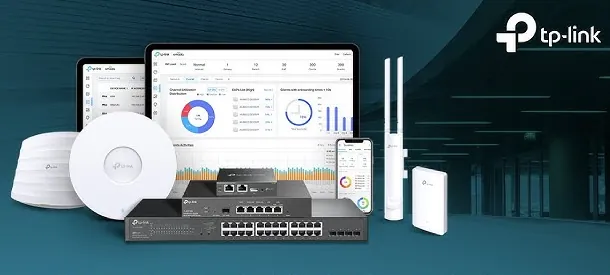
The most common mistake business owners make when deploying commercial wireless and switching is buying expensive enterprise brands that demand mandatory, recurring per-port annual cloud subscription licenses just to keep the hardware running. If a license lapses, your management dashboard locks you out. TP-Link Omada delivers commercial-grade hardware reliability, 10G SFP+ fiber uplinks, and sub-second Wi-Fi 6 roaming with zero mandatory recurring cloud software license fees. Tell us your device counts and building layout, and our team will configure the exact hardware models, PoE power budgets, and cloud controller architecture suited for your organization.
✅ Who Installs TP-Link Omada Software-Defined Business Networking (SDN) and Looks After It anywhere in Kolkata
An executive walks between conference rooms and private cabins while on an important video call, and the connection drops repeatedly because unmanaged standalone routers fail to hand over mobile sessions cleanly. An enterprise TP-Link Omada Software-Defined Business Networking (SDN) wireless deployment utilizes 802.11k/v/r fast roaming protocols coordinated by a centralized Omada controller. Client devices transition their active wireless sessions between ceiling access points in under thirty milliseconds with zero dropped voice packets or video freezing. Workplaces across Kolkata rely on this seamless mobility to eliminate dropped calls permanently.
Visiting clients, contractors, and employee personal mobile phones connect to the main office Wi-Fi, congesting bandwidth and allowing unmanaged personal devices to browse internal corporate server ranges. An enterprise TP-Link Omada Software-Defined Business Networking (SDN) enforces multi-SSID 802.1Q VLAN isolation. Corporate computers operate on an encrypted private network with access to servers, while visitors connect to a branded Guest Wi-Fi portal with SMS OTP authentication, custom terms of service, and automated per-user speed limits (e.g., 5Mbps). For an office near Khanna, that means hospitable visitor internet with zero risk to internal financial databases.
🧠 What Changes in the First Month with a growing team
Business leaders do not want to parse raw command-line packet logs; they want clear visibility into office bandwidth consumption, connected client counts, and network uptime. TP-Link Omada management tools create clean executive visual dashboards that display live network topology maps, top bandwidth-consuming applications, and client connection health directly on screen. When auditors or board members request infrastructure records, you have verified reports ready to share.
Very few commercial businesses keep a static employee headcount over time. Start with an 8-port router and two access points today, and the same TP-Link Omada cloud controller architecture allows you to add secondary 24-port PoE+ switches, 10G fiber uplinks, outdoor access points, and branch office networks simply by adopting new hardware into your cloud tenant. We design each networking deployment near Khanna with expansion headroom so your investment stays scalable.
A commercial automotive dealership and multi-bay service center near Khanna needed continuous wireless coverage across its indoor showroom and outdoor vehicle inspection bays. We deployed a hybrid indoor/outdoor TP-Link Omada system with IP67 weatherproof access points covering the service yard. Service technicians use diagnostic tablets to scan vehicles outdoors live, service job cards sync instantly to the central server, and showroom customers enjoy high-speed guest Wi-Fi.
🛡️ ROUTING POLICIES, ROAMING AND SAFETY
How We Size Networks Honestly, Even When Fewer Access Points Fit
We expect channel fine-tuning and bandwidth policy adjustments during the first month following deployment, and we plan for them. Adjusting Multi-WAN load ratios, whitelisting newly partnered vendor devices, or tuning guest bandwidth rate limits are handled promptly by our helpdesk as part of the commissioning process.
What you can hand over to our infrastructure team on a project or contract basis:
*Notice: Rates for network audits, Multi-WAN re-tuning, and coverage expansions are shared before work begins. We do not act as the manufacturer's internal helpdesk.*
💡 Engineering Fact: True 802.1Q VLAN segmentation divides a single physical network fabric into multiple isolated virtual networks, keeping guest devices completely separated from corporate servers.
🔐 GUEST CAPTIVE PORTAL & ISOLATION
Are visiting guests using your corporate Wi-Fi password and accessing internal office network ranges in Khanna? We separate guest traffic onto branded captive portals with complete VLAN security.
High-performance enterprise Multi-WAN VPN routers (such as ER605, ER7206, ER8411) supporting up to four WAN connections, intelligent load balancing, automated line failover, and hardware-accelerated VPNs.
🔹 AUTOMATED FAILOVER
Detects ISP line drops in milliseconds, shifting active business connections to healthy secondary links automatically.
🔹 DIRECT GST BILLING
Invoiced in Indian Rupees (INR) with verified GST input tax credit documentation.
High-performance indoor Wi-Fi 6 access points (such as EAP610, EAP653, EAP670) designed for corporate offices, meeting rooms, and banquets requiring high concurrency and seamless roaming.
🔹 FAST ROAMING
Full 802.11k/v/r roaming protocols allowing mobile devices to hand over sessions between access points in under 30ms.
🔹 MULTI-SSID VLANs
Supports up to 16 separate SSIDs with 802.1Q VLAN isolation for Corporate, Guest, Voice, and IoT subnets.
🔹 HIGH-DENSITY CLIENTS
Supports over 250 to 500 concurrent active client devices per access point with OFDMA and MU-MIMO scheduling.
In-Wall Hospitality & Executive Cabin Access Points with Gigabit Ports
Compact in-wall Wi-Fi 6 access points (such as EAP615-Wall) designed to mount directly into standard single-gang electrical wall boxes, providing discrete wireless coverage and local Ethernet switch ports.
🔹 FLUSH WALL MOUNT
Mounts cleanly into standard single-gang electrical wall boxes, sitting flush against plasterboard or wooden partitions.
🔹 IDEAL FOR
Dense multi-room environments where thick concrete walls block ceiling-mounted access point signals.
🔹 CENTRALIZED CONTROL
Managed globally from the central cloud controller alongside ceiling access points with unified policy control.
💡 Advice We Give Before Anyone Buys after years of site visits
Set 2.4GHz channels manually to 20MHz width on non-overlapping channels (1, 6, 11). Setting 2.4GHz to 40MHz width in dense commercial buildings causes severe co-channel interference with neighbouring offices, destroying your wireless speed.
Consumer routers lack radio resource intelligence, causing channels to overlap and jam neighbouring Wi-Fi signals. TP-Link Omada enterprise access points feature automated Radio Resource Management (RRM) that scans background spectrum and selects clean, non-interfering channels dynamically.
Running separate power adapters to multiple ceiling locations creates messy wiring and electrical failure points. An enterprise TP-Link Omada system delivers data and electrical power over a single Cat6 network cable via Power over Ethernet (PoE+) directly from the central server room UPS.
💡 Engineering Fact: Fast roaming protocols (802.11k/v/r) exchange authentication keys before client devices move, allowing seamless access point handoffs in under 30 milliseconds without dropping calls.
🤝 Warranty, Spares and Replacement Cover for multi-branch businesses
High-capacity 500+ client APs, automated rogue AP detection, web content filtering for students
Planned around academic breaks
🚦 Recovery Speed After a Failure in day-to-day use
Measured under live multi-WAN load balancing and high-volume data forwarding.
WHERE IT SHINES - FOR BUYERS
ONGOING EFFORT NEEDED - A QUICK LIST
✓Per-user bandwidth rate limiting prevents single employees from consuming entire internet lines with non-work downloads.
—Fast roaming (802.11r) requires client device hardware support; legacy smartphones without 802.11r support rely on standard 802.11k/v handoffs.
✓Seamless 802.11k/v/r fast roaming protocols allow staff to walk between rooms and floors without dropping active voice or video calls.
—Enterprise wireless access points require dedicated managed PoE/PoE+ network switches to deliver power; switches are priced separately.
✓Solid bare copper Cat6 cabling and managed PoE+ switching make sure continuous power delivery and zero packet dropouts.
—Cloud controller management requires an active internet connection to download firmware updates and synchronize cloud policy changes.
✓Airtime Fairness algorithms prevent older legacy smartphones from monopolizing radio channels and slowing down the rest of the office.
—A small 1-room office with three staff and zero roaming requirements is often adequately served by a simple basic router.
✓Multi-WAN load balancing and automated failover aggregate up to four broadband lines, ensuring internet uptime never drops.
—Access point ceiling brackets must be anchored securely to structural ceiling grids; mounting directly on weak plasterboard risks sagging.
💡 Engineering Fact: Multi-WAN load balancing on Omada routers evaluates real-time line latency and bandwidth utilization, distributing traffic across up to four ISP lines simultaneously.
⚡ SYSTEM DEPLOYMENT ARCHITECTURE
Ready to secure your premises in Khanna?
Get comprehensive structured network setups, professional hardware alignment, and authorized warranty support allocations natively.
Turnkey Software-Defined Business Networking (SDN) Metrics Checklist near Khanna
🛠️ Workflow Setup
Multi-WAN & VLAN configuration: ISP line failover rules, 802.1Q VLAN subnets (Corporate, Guest, CCTV), and Multi-SSID profiles are activated.
⚠️ Pitfalls to Avoid
Avoid deploying access points on cheap copper-clad aluminium (CCA) cabling; high resistance causes PoE voltage drops that reboot APs under load.
🔌 Guidelines & Sizing
Set 2.4GHz radio channels manually to 20MHz width using non-overlapping channels (1, 6, 11) to eliminate adjacent channel bleeding.
📈 Upgrade Triggers
Your office is currently covered by a patchwork of four different home routers broadcasting separate Wi-Fi names.
🛠️ TP-Link Omada Network Commissioning Checklist for Systems Engineers in Kolkata
If your networking hardware is deployed across multi-floor commercial buildings or industrial warehouse sheds - as many are around Khanna - proper cable management, RF heatmap planning, and clean UPS power matter twice as much.
🧰 Labelling & Documentation - What to Expect near Khanna
🔹Configure Multi-WAN load balancing with online link detection (probing public DNS addresses like 8.8.8.8) to trigger automated failover the instant an ISP line drops.
🔹Separate the Omada management interface onto a dedicated management VLAN and enforce complex passwords with two-factor authentication (2FA).
🔹Set 2.4GHz radio channels manually to 20MHz width on non-overlapping channels (1, 6, 11) to eliminate adjacent channel interference in crowded commercial buildings.
📋 Capacity, Limits and Sizing Guide for small teams
Software-defined networking specifications look complex on paper, so here is the practical summary. The TP-Link Omada Software-Defined Business Networking (SDN) utilizes commercial-grade Multi-WAN routers, Layer-2+ managed PoE+ switches, and Wi-Fi 6 access points unified under a centralized cloud controller without unmanaged router dropouts. For a business in Khanna, the figure that matters is automated internet line failover and seamless wireless mobility across all desks, and that is what we configure.
Gateway routing architecture is engineered for continuous business uptime. Multi-WAN routers end up to four broadband, leased-line, and 4G backup connections simultaneously, balancing traffic dynamically and executing automated sub-second line failover the instant an ISP line is cut. Built-in hardware VPN engines provide secure, high-throughput encrypted tunnels linking remote branch offices and mobile staff.
🔒 Security StandardsWPA3-Enterprise (192-bit), WPA3-Personal, 802.1X Port Security, Multi-VLAN Tagging
⚙️ Guest ManagementBranded Web Captive Portals with SMS OTP Authentication & Timed Voucher Generation
TP-Link Omada Hardware Architecture, AI RF Optimization and Quality Checks
Routing performance is driven by high-throughput multi-core processors supporting intelligent Multi-WAN load balancing and automated link failover across fiber, broadband, and cellular connections. Dedicated hardware crypto engines deliver high-speed IPsec, OpenVPN, and WireGuard site-to-site tunnels connecting distributed branch offices securely.
Switching infrastructure delivers non-blocking wire-speed packet forwarding and high-budget Power over Ethernet (IEEE 802.3af/at PoE+). Advanced Layer-2+ features include 802.1Q VLAN segmentation, Spanning Tree (STP/RSTP) loop prevention, LACP port bonding, and Voice VLAN traffic prioritization.
✉️ SUPPORT DESK
Coordinate custom hardware configurations, AMC maintenance contracts, and site engineering visits directly with authorized integration desks.
Q. What is 802.11r seamless fast roaming and how does it prevent dropped calls?
Standard Wi-Fi forces a device to disconnect and re-authenticate when moving between access points, causing a noticeable 2 to 5-second connection drop. The 802.11r fast roaming protocol pre-authenticates the device with neighbouring access points in the background. When you walk between rooms, the handoff executes in under 30 milliseconds - fast enough that live Zoom, Teams, or WhatsApp voice calls never drop.
Q. How does Multi-WAN load balancing and automated ISP failover work?
An Omada Multi-WAN router terminates up to four independent internet connections simultaneously (such as a primary fiber leased line, a secondary broadband connection, and a 4G/5G backup modem). The router balances traffic across lines to maximize bandwidth and continuously tests link health. If your primary ISP suffers a cable cut, traffic shifts to the secondary line automatically in milliseconds without dropping active connections.
Q. Why should our commercial facility use TP-Link Omada SDN networking instead of standard home routers?
Home routers operate independently with separate Wi-Fi names and single internet lines, dropping connections when walking between rooms and halting business completely if the broadband line cuts out. A TP-Link Omada Software-Defined Business Networking (SDN) deployment integrates Multi-WAN routers with automated ISP line failover, managed PoE+ switches, and Wi-Fi 6 access points under a central cloud controller, providing a single unified Wi-Fi name, sub-30ms fast roaming, and 100% internet continuity with zero recurring license fees.
Q. What is WPA3 Enterprise encryption and how does it protect company data?
WPA3 Enterprise is the latest wireless security standard, utilizing 192-bit cryptographic protocols and individualized data encryption. It protects corporate wireless transmissions against eavesdropping and brute-force dictionary attacks, ensuring that corporate data remains secure even in dense commercial buildings with neighbouring networks.
Q. What happens if a network cable connected to an access point is damaged?
Enterprise TP-Link Omada access points support automated dynamic wireless mesh failover. If an access point loses its wired Ethernet uplink, it establishes an encrypted wireless mesh link automatically with the nearest functioning access point, keeping wireless coverage active while the cable is repaired.
💡 Engineering Fact: Automated Radio Resource Management (RRM) continuously analyzes background RF spectrum, adjusting transmit power and switching to clean channels to avoid interference.
🔄 RELATED INFRASTRUCTURE SOLUTIONS
Complementary Enterprise Systems We Deploy in Khanna
make sure structured network delivery to every desk and access point with certified Cat6 cabling in Khanna.
📌 Area Profile for Buyers Planning a Rollout for offices in Khanna
📍 Khanna
Khanna in Kolkata lies close to major transport hubs, busy markets, and dense residential pockets. Movement is constant throughout the day, with shoppers, commuters, delivery agents, and visitors frequently passing through. Installing TP-Link Omada Software-Defined Business Networking (SDN) helps households and small businesses keep clear visibility around gates, corridors, and street-facing areas. The locality contains narrow lanes, busy roads, and interconnected neighbourhood stretches where daily activity remains high.
Monitoring becomes important for homes near market lanes and for shops handling constant footfall. TP-Link Omada Software-Defined Business Networking (SDN) offers strong daytime clarity, dependable night vision, and wide-angle coverage suitable for such spaces. As the locality continues to grow with new shops, residential buildings, and improved connectivity, stable surveillance solutions become necessary. TP-Link Omada Software-Defined Business Networking (SDN) supports round-the-clock monitoring, remote viewing, and consistent performance for residents and small establishments.