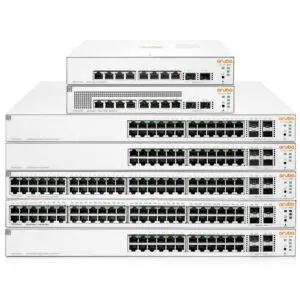
🏷️ SPECS:24 & 48 Gigabit PortsHigh-Budget PoE+ Class 410G SFP+ Fiber UplinksHardware Layer-3 RoutingLoop-Free STP/RSTP/MSTPDedicated Stacking PortsZero-Lag Backplane FabricPer-Port Power BudgetingVoice VLAN PriorityChassis Airflow IntakeMulti-VLAN SegmentationLACP Port TrunkingAccess Control Lists (ACL)DHCP Snooping & Guard802.1X Port AuthenticationIGMP Snooping for IP VideoStatic & OSPF RoutingDual Redundant Power FeedsSNMP & Syslog TelemetryLoopback Broadcast Storm Lock1U Rackmount 19-Inch FormCisco Catalyst 1000/9200Aruba CX 6000/6100/6200Solid Copper Cat6 ReadyTool-Less Rack Ear MountsConsole & Out-of-Band PortSmart Dynamic Fan CurvesSealed OEM Invoiced StockLimited Lifetime WarrantyOnsite Engineering Setup
Four floors of an office building linked together over long copper runs that drop link speeds to 100Mbps are an invisible bottleneck on your business. With Cisco managed switches equipped with dual 10GbE SFP+ fiber uplinks, inter-floor traffic rides over clean multi-mode fiber optic lines with zero electromagnetic interference. Floor-to-floor file access, camera feeds, and server traffic move at wire speed without sharing lines. We handle the complete optical transceiver sizing, VLAN trunking, and physical rack dressing across Kolkata.
🧭 Cisco Enterprise Managed Network Switches Supply, Setup and Support at multi-branch offices
Opening a branch office in another town used to require sending a senior network engineer to configure local switch ports and VLANs. With Cisco cloud management (Aruba Central / Cisco Catalyst Center), branch switches are provisioned with standardized policy templates before shipping. Local staff connect power and the uplink, and the switch downloads its VLANs, port security, and QoS rules automatically. If a port needs reconfiguring later, our team adjusts it from our central desk in Kolkata without travelling.
Buying a basic 16-port switch with zero expansion slots means you are forced to scrap the unit and buy an entirely new switch when your office adds five more desks next year. We size the CiscoEnterprise Managed Network Switches with calculated expansion headroom: choosing 24-port or 48-port rackmount chassis with dedicated stacking ports or 10G uplinks that allow linking a second switch down the road without creating a bottleneck. Tell us your growth plans and we will configure a switching foundation built for five years of reliable service.
🔑 Why Businesses Pick Cisco Enterprise Managed Network Switches when budgets are tight
Very few companies keep a fixed employee headcount over time. Start with twenty-four ports today, and the same Cisco architecture allows you to add secondary switches linked via 10G SFP+ fiber or hardware stacking cables that act as a single logical switch with unified management. We design each network switching rollout near Dutta Bagan with growth headroom so your investment stays scalable.
Ask any IT administrator whose office suffered a complete network crash what caused the outage. In almost every case, the culprit was an unmanaged desktop switch that developed a loop or a damaged patch cable that flooded the network with broadcast packets. The CiscoEnterprise Managed Network Switches is built with enterprise switching silicon, hardware loop protection, and automated storm control that isolates faults to a single port without affecting the rest of the building. Businesses around Dutta Bagan invest in genuine managed switching once and eliminate random network blackouts.
Healthcare & Diagnostic Centers: PACS Imaging and Clinical VLANs
A 60-user corporate consulting firm near Dutta Bagan suffered daily network freezes because staff computers, a guest Wi-Fi router, and twelve IP security cameras were sharing an unmanaged 24-port hub. We deployed a 48-port CiscoEnterprise Managed Network Switches Layer-2 managed switch, configured isolated VLANs for Management, Accounts, Cameras, and Guests, and enabled RSTP loop protection. Network broadcast storms ceased immediately, internet speeds remained steady across all desks, and the accounting department operates on an isolated, secure network segment.
🛡️ SUPPORT AFTER THE SWITCH IS COMMISSIONED
What Happens When Our Network Engineers Arrive
Switch sizing is where most business projects go wrong. We ask how many network drops you need today, how many PoE access points and cameras are connected, what wattage each camera draws under night vision, and whether 10G fiber uplinks are needed - then configure the chassis and power supply tier that handles that load with three-to-five years of expansion headroom.
Here is the network switching work we take on, quoted transparently before we begin:
▪Hardware Spanning Tree Protocol (RSTP/MSTP) & Loop Protection
▪Centralized Cloud Management (Aruba Central / Cisco Catalyst Center)
▪Emergency Switch Hardware Diagnostics & Part Swap Coordination
*Terms: Engineering labor, commissioning, and preventive maintenance are invoiced under our private service agreement, distinct from product hardware warranties.*
💡 Engineering Fact: 10GbE SFP+ Direct Attach Copper (DAC) cables use twinaxial copper wiring to deliver 10Gbps transmission over short distances with latency below 0.1 microseconds.
🧾 SWITCH HEALTH & PORT DIAGNOSTICS
Experiencing packet loss, duplex mismatches, or PoE reboots on existing switches in Dutta Bagan? Contact our network desk for prompt diagnostic testing and cable certification.
Compact, fanless Layer-2 managed switches (such as Cisco Catalyst 1000-8P or Aruba CX 6000 12G) designed for small branch offices, retail shops, and meeting rooms needing quiet PoE+ power.
🔹 LOOP PROTECTION
Rapid Spanning Tree (RSTP) and loop protection that instantly disable looping ports before the network drops.
🔹 COMPACT FORM
Desktop metal casing with included rubber feet and wall-mount bracket kits for flexible physical mounting.
🔹 PORT LAYOUT
Eight to twelve Gigabit RJ45 ports with two SFP optical fiber uplink slots for connecting back to head office.
24-Port High-Budget PoE+ Layer-2/3 Switches with 10G SFP+
Standard 24-port 1U rackmount switches (such as Aruba CX 6100 24G / Cisco Catalyst 1000/9200 24P) providing high-budget PoE+ power delivery and 10GbE fiber uplinks for commercial offices.
🔹 WHO IT SUITS
Corporate offices, regional headquarters, and commercial facilities running 20 to 40 networked computers, phones, and cameras.
🔹 HIGH POE BUDGET
Total PoE+ power budget up to 370W, powering high-draw Wi-Fi 6 access points, PTZ cameras, and video phones.
🔹 LACP BONDING
Link Aggregation (802.3ad) allows combining dual fiber uplinks for 20Gbps aggregated bandwidth and automatic failover.
48-Port Enterprise PoE+ Layer-3 Core and Distribution Switches
High-density 48-port enterprise switches (such as Aruba CX 6200F 48G / Cisco Catalyst 9200 48P) built for high-concurrency corporate networks, multi-floor backbone distribution, and server rooms.
Supports hardware stacking cables (up to 8 units), managing up to 384 ports as a single logical switch with one IP.
🔹 WHO IT SUITS
Large corporate headquarters, manufacturing facilities, hospital server rooms, and multi-floor commercial buildings.
10GbE SFP+ Optical Transceivers and Direct-Attach Cables
Certified optical SFP+ transceivers and Direct Attach Copper (DAC) cables providing low-latency fiber connectivity between switches, servers, and storage arrays.
🔹 WHAT IT'S FOR
Connecting managed switches to core distribution switches, server hosts, and NAS storage arrays over high-speed links.
🔹 10GBASE-T COPPER
SFP+ to RJ45 copper transceivers connecting 10-gigabit speeds over standard Cat6A twisted-pair cabling.
🔹 10G SFP+ SINGLE-MODE
1310nm long-range (LR) optical transceivers delivering 10Gbps transmission over single-mode fiber up to 10km.
High-Capacity PoE+ Power Supplies and Redundancy Modules
Field-replaceable modular power supplies and external RPS redundancy units that make sure your managed switch and connected PoE devices never lose power.
🔹 DUAL INPUT BALANCING
Shares electrical load evenly across two independent AC power circuits connected to separate online UPS units.
🔹 CABLING NOTE
We supply heavy-duty 16A/10A power cords with locking clips matching your server room PDU outlets.
🔹 WHAT IT'S FOR
Upgrading switch PoE power capacity and providing electrical circuit redundancy inside corporate comms racks.
Hardware Stacking Modules and High-Speed Stacking Cables
Dedicated stacking modules and multi-gigabit stacking cables that combine up to eight physical switches into a single logical switch with unified management.
🔹 UNIFIED MANAGEMENT
Configure VLANs, port security, and QoS once across all stacked switches rather than logging into each box separately.
🔹 HOT-INSERTION
Add or replace a switch in the stack dynamically without taking the existing stacked switches offline.
🔹 WHAT IT'S FOR
Managing multiple 24-port or 48-port switches as a single virtual switch with one management IP address.
Aruba Central & Cisco Catalyst Center Cloud Management
Centralized cloud and on-premise network orchestration platforms that provide automated zero-touch provisioning, firmware staging, and AI-driven troubleshooting.
🔹 BATCH FIRMWARE UPDATES
Schedule automated firmware updates across dozens of switches simultaneously during quiet weekend windows.
🔹 LIVE TOPOLOGY MAPS
Visual network mapping displaying connected devices, switch port links, and VLAN assignments in real time.
🔹 WHAT IT'S FOR
Centralized configuration, monitoring, and compliance auditing across all switches, access points, and branch networks.
1U Horizontal Cable Managers and Cat6 Patch Panels
High-density 24-port and 48-port Cat6/Cat6A patch panels and 1U horizontal cable management panels that keep your server cabinet clean and readable.
🔹 STRAIN RELIEF
Rear cable support bars that secure incoming building Cat6 bundles and eliminate physical tension on main part jacks.
🔹 TESTED BEFORE SIGN-OFF
Every patch drop is tested with digital cable analyzers to certify wire map and continuity before handover.
🔹 CAT6 PATCH PANELS
110-IDC punch-down and main part jack patch panels certified for Gigabit and 10-Gigabit transmission bandwidth.
Switch AMC Contracts, Port Audits and Preventative Maintenance
🛠️ 10GbE SFP+ Fiber Transceivers, DAC Cabling and Trunk Bonding
Review these physical switching installation standards before fixing your network cutover date. Getting rack alignment, cable dressing, and grounding right upfront prevents intermittent link flapping in Dutta Bagan.
🏢 Installation & Setup - The Plan for small and mid-sized teams
🔹Label every physical switch port on the front bezel and record port numbers on the corresponding patch panel drops before handing over the cabinet.
🔹Enable DHCP Snooping on all user access VLANs and configure only the uplink port connected to your authorized DHCP server or firewall as trusted.
🔹Connect the primary switch power cord and redundant power supply to two separate online double-conversion UPS lines to eliminate single-point electrical failures.
⚙️ SYSTEM EVALUATION & CHECKLIST
Turnkey Enterprise Managed Network Switches Metrics Checklist near Dutta Bagan
🛠️ Workflow Setup
Lab pre-staging: The switch chassis is unboxed on our Kolkata bench, firmware is updated, and 802.1Q VLANs and RSTP loop protection are configured.
⚠️ Pitfalls to Avoid
Never lose the documentation folder containing switch IP addresses, VLAN allocation tables, and passwords delivered at handover.
🔌 Guidelines & Sizing
Specify multi-mode OM3/OM4 duplex fiber patch cables with LC connectors when routing 10GbE uplinks between switches and server hosts.
📈 Upgrade Triggers
Your security cameras reboot or drop offline at night because your existing unmanaged switch lacks enough PoE power capacity.
🗒️ Engineer Notes From Real Installations for demanding workloads
Always enable RSTP (Rapid Spanning Tree Protocol) and BPDU Guard on all edge access ports from day one. In office environments, users frequently plug both ends of a patch lead into adjacent wall sockets or connect an unmanaged switch with a loop. BPDU Guard shuts down that specific port in milliseconds, preventing a circular loop from bringing down the entire company's network.
Flat unmanaged networks allow cameras, guest phones, and corporate computers to broadcast across the same lane, causing latency and security vulnerabilities. A Cisco managed switch enforces 802.1Q VLAN segmentation, isolating sensitive accounting databases and servers from general network traffic.
Consumer desktop switches lack fiber optic expansion ports, forcing multi-floor links to run over long copper cables that suffer electromagnetic interference and speed drops. Cisco switches feature dedicated 10GbE SFP+ optical fiber cages for low-latency, noise-free backbone connectivity.
💡 Engineering Fact: Hardware stacking combines multiple physical switch chassis into a single logical entity with a single management IP and unified control plane.
🧮 Key Figures Every Buyer Should Check for larger offices
High-speed networking options adapt to demanding compute and storage workloads. Dedicated 10GbE SFP+ fiber uplink cages connect directly to server hosts, NAS storage arrays, and distribution switches over multi-mode optical fiber or Direct Attach Copper (DAC) cables, eliminating inter-switch bandwidth bottlenecks.
The managed switch family ranges from compact 8-port fanless desktop models for small branch offices up to 48-port Layer-3 enterprise workhorses supporting hardware stacking and multi-gigabit uplinks. The management interface is standardized across models, making network expansion seamless.
✅ Warranty, Spares and Replacement Cover for single-office teams
Industry Sector
Typical Switch Configuration
Standard Lead Time
Commercial Offices & IT Hubs
48-Port PoE+ Switch with 10G SFP+ fiber uplinks, Voice VLAN and 802.1X port security
Usually 3 to 5 business days
Retail Chains & Multi-Counter Stores
8-Port/24-Port PoE+ Switch isolating payment POS terminals from customer Wi-Fi
Typically 3 to 5 business days
Commercial Security Control Rooms
High-capacity 24-Port PoE+ Switch running IGMP Snooping for 32+ 4K IP surveillance cameras
Typically 3 to 5 business days
✅ How It Performs on a Normal Working Day when the office is busiest
Workload performance observed during concurrent multi-user database report generations.
CLEAR ADVANTAGES - IN PLAIN WORDS
COSTS BEYOND THE QUOTE SPELLED OUT UPFRONT
✓Network dropouts stop permanently because hardware Spanning Tree Protocol (STP/RSTP) detects and disables circular loops in milliseconds.
—A small 3-person office sharing one printer and an internet router does not require a 24-port managed switch; an unmanaged unit is enough.
✓Dual internal power supply options on enterprise models allow connecting feeds across separate UPS circuits for continuous uptime.
—Fan-cooled 48-port PoE+ enterprise switches produce audible acoustic noise and belong in a ventilated comms rack, not in an open office.
✓Compact 1U rackmount chassis with sliding ReadyRails and front-facing LED indicators make easier cabinet maintenance.
—TDR cable diagnostics provide accurate distance measurements on standard copper pairs but cannot diagnose optical fiber cable fractures.
✓SNMP (v2c/v3) and Syslog telemetry alert our service desk when a link flaps, power drops, or packet errors go beyond normal thresholds.
—Single-power-supply models provide zero electrical redundancy if their power adapter or internal power module experiences a fault.
✓IGMP Snooping optimizes multi-cast video streams, preventing security camera traffic from flooding general office workstations.
—Restructuring flat networks into multi-VLAN topologies requires a scheduled maintenance cutover window to test department routing.
💡 Engineering Fact: Class 4 PoE+ (IEEE 802.3at) supplies up to 30.0 watts of continuous DC power per port over two pairs of a standard Cat6 twisted-pair network cable.
⚡ SYSTEM DEPLOYMENT ARCHITECTURE
Ready to secure your premises in Dutta Bagan?
Get comprehensive structured network setups, professional hardware alignment, and authorized warranty support allocations natively.
Q. What is 802.1Q VLAN segmentation and why does our office need it?
A Virtual Local Area Network (VLAN) divides a single physical switch into multiple isolated virtual networks. For example, your accounting workstations live on VLAN 10, IP security cameras on VLAN 20, voice phones on VLAN 30, and guest Wi-Fi on VLAN 40. Devices on the guest Wi-Fi cannot see or scan accounting servers, and heavy camera streaming traffic never slows down office workstations.
Q. Can we schedule PoE power to turn off automatically outside working hours?
Yes. Cisco managed switches support automated PoE port scheduling. You can configure the switch to turn off power to Wi-Fi access points and VoIP desk phones automatically at 8:00 PM and power them back on at 7:00 AM, saving electrical energy and preventing unauthorized after-hours Wi-Fi access.
Q. Why should we procure through Microtech Solutions instead of buying unmanaged hardware online?
Procuring through Microtech Solutions guarantees genuine, channel-sourced Cisco hardware with official limited lifetime manufacturer warranty coverage. You receive professional pre-sales PoE power budgeting, lab pre-staging, 802.1Q VLAN configuration, structured cable dressing, and local engineering support across Kolkata.
Q. What is hardware stacking and how does it differ from daisy-chaining?
Daisy-chaining connects switches using standard patch cables, creating a narrow 1Gbps bottleneck between units and requiring separate management for each switch. Hardware stacking uses dedicated high-speed cables (up to 160Gbps) to combine up to eight switches into a single virtual switch with a single management IP address and unified configuration.
Q. What is PoE+ and how does it power our IP cameras and access points?
Power over Ethernet (PoE+ IEEE 802.3at) allows the network switch to deliver up to 30 watts of DC electrical power alongside data over a single Cat6 network cable. This eliminates the need to install separate electrical plug points near ceiling-mounted Wi-Fi access points or outdoor IP security cameras, significantly reducing electrical cabling costs.
💡 Engineering Fact: Digital Optical Monitoring (DOM) on SFP+ transceivers reports real-time laser bias current, optical transmit/receive power, and module temperature.
🔄 RELATED INFRASTRUCTURE SOLUTIONS
Complementary Enterprise Systems We Deploy in Dutta Bagan
Deliver seamless high-speed wireless coverage across your floors with business Wi-Fi access points in Kolkata.
🚩 Landmarks and Routes Our Engineers Know around Dutta Bagan
📍 Dutta Bagan
Dutta Bagan in Kolkata is a well-established residential locality situated close to Shyambazar and Paikpara. The area features a mix of old homes, new apartments, local shops, and community spaces that remain active throughout the day. The streets see regular movement of school students, residents, domestic helpers, and vendors, making it important for households and business owners to keep track of activity around entrances, parking stretches, and building boundaries.
Installing Cisco Enterprise Managed Network Switches provides dependable visibility across these key points. The neighbourhood includes several narrow by-lanes where movement is frequent but difficult to track manually. Delivery staff, visitors, and daily-wage workers pass through regularly. Cisco Enterprise Managed Network Switches ensures that even congested or low-light sections remain clearly visible, offering homeowners and shops a practical way to monitor gate-side or roadside areas.
For residential buildings located close to the main road, round-the-clock surveillance helps keep awareness of surrounding activities. As Dutta Bagan continues to see new houses, renovated properties, and growing families, maintaining a secure environment becomes increasingly important. Cisco Enterprise Managed Network Switches supports these needs effectively by capturing clear visuals of shared pathways, entrances, and outside lanes. With reliable monitoring, residents gain improved more confidence in your daily security and better control over their everyday surroundings.