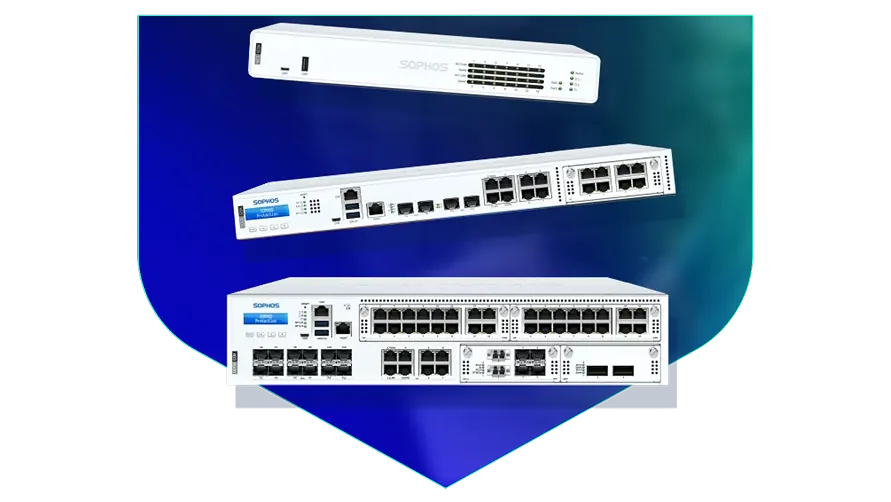
🏷️ SPECS:Scanning Without the CrawlTLS 1.3 InspectionSecond Chip for SpeedFibre Uplinks on Larger ModelsChecks Inside HTTPSProtection Stays Switched OnPorts Matched to Your BuildingHandles a Full OfficeBuilt for Busy AfternoonsBrowsing Stays FastZero-Day SandboxingBlocks RansomwareSynchronized SecurityAuto-Isolates Infected LaptopsSD-WAN FailoverAuto Line SwitchingDeep Packet InspectionOne Dashboard, All BranchesActive-Active HA ClusterStandby Unit Ready1U Rackmount ChassisDual Hot-Swap PSUFits Any RackDesktop Size ModelBypass Port PairsStays Up on FailureBranch-Size BoxModular Port BaysRuns Quiet in OfficeFront-to-Rear Airflow
Work out what one day of a stopped office actually costs you: salaries paid for nothing, dispatches missed, a GST filing that slides past its date. Set that beside the price of a properly sized firewall and the argument tends to finish itself. Ransomware rarely arrives looking like an attack; it walks in through an encrypted website nobody inspected, spreads sideways, and locks the accounts server on a Saturday night. The Next-Gen Firewall for Business Networks looks inside those encrypted sessions and pulls an infected machine off the network by itself, within seconds.
🗺️ Who Installs Sophos Next-Gen Firewall for Business Networks and Looks After It throughout Kolkata
One salesman's laptop picked up something from a pen drive, and by lunchtime three other machines were behaving strangely. The firewall talks continuously to the protection software on each computer, so a machine that starts misbehaving is cut off the network within seconds (Synchronized Security). Nobody has to notice it, ring IT and wait - the box does that part on its own. That single behaviour is why most of our customers in Kolkata stop treating antivirus as the whole plan.
Every second monsoon the fibre to your branch goes down and the branch simply stops billing. Put a second, cheaper broadband line into the same SophosNext-Gen Firewall for Business Networks and it watches both, shifting traffic to the healthy one before staff notice anything (SD-WAN link steering). Voice and billing get the clean line; backups and updates take whatever is left. For a branch near Dankuni that used to sit idle until the line came back, that is the difference between a lost day and a slow hour.
⭐ Where Sophos Next-Gen Firewall for Business Networks Earns Its Keep around Dankuni
Running four branches used to mean four different people making four different mistakes. Every unit reports into one console, so you push the same rules everywhere, see which branch has which problem, and update firmware overnight from your own desk. A new site can be sent the box, plugged into power and internet by anyone on site, and configured remotely. Retail chains and diagnostic labs spread across Kolkata are the usual beneficiaries.
Firewall pricing confuses people because the hardware and the subscriptions are two separate things. We put both on one page: what the box costs, which protection bundle your kind of office genuinely needs, what renews and on what date. If something in a bundle is of no practical use to you, we will say so rather than sell it. Nobody enjoys finding out an expired licence in the middle of an incident, least of all in a busy office near Dankuni.
A School Network That Survives Exam Week
A footwear chain with eleven counters across Kolkata kept losing card payments whenever the shop Wi-Fi filled up with customer phones. A firewall at each store now keeps the payment terminals on their own lane with priority on the line, and the guest network cannot see them at all. Queue times at the till stopped being an internet problem. Head office also gained one screen showing which store's connection is misbehaving today.
🛡️ FIELD EXPERIENCE AND ENGINEERING PRACTICE
Why We Write Everything Down
Every install ends with a written handover: the rule list, the VLAN plan, admin credentials passed on securely, and a one-page sheet covering what to do if. Offices near Dankuni often have three people who each know a piece of the network and nobody who knows all of it. That document exists so the network does not turn into a problem the day someone resigns.
A short list of what we are usually called in for:
▪A Bouncer for Your Website and Mail Server (WAF)
▪Unknown-Attachment Checks and Quarantine Rules
▪Two or Three Internet Lines Used Together, Switching by Themselves (SD-WAN)
▪Out-of-Hours Switchover from Your Old Firewall
*Please read: we are an independent service provider. Our engineering time is billable, and it is neither a substitute for nor connected to Sophos's own warranty helpdesk.*
💡 Engineering Fact: On the larger models, two power packs share the load, and if one input dies the other takes the whole thing on instantly. In practice that input usually dies because of a tripped circuit or a wrongly pulled plug.
⚡ SWITCHOVER AFTER HOURS
Replacing a firewall that is still carrying live traffic in Dankuni? We plan the cutover for after hours, leave the old unit racked until the morning passes quietly, and hand over the rollback steps in writing.
🛒 Complete List of What We Supply for growing companies
Here is what each model gives you, in plain numbers:
Desktop Firewalls for Small Offices and Shops
Small, silent boxes that sit on a shelf and guard the internet line of a five to fifty person office. Suits clinics, showrooms, CA practices and single-branch businesses.
🔹 WHAT IT'S FOR
Offices, clinics and showrooms of roughly five to fifty people sharing one or two internet lines.
🔹 SIZE
About as big as a thick hardback book, so it fits on a shelf or inside a small wall cabinet.
🔹 TWO INTERNET LINES
Keep fibre and a broadband backup plugged in together; when one drops, the switch across happens on its own (SD-WAN).
Rack-Mount Firewalls for Head Offices
One-rack-unit appliances for a head office, hospital or college where a few hundred people are on the network all day. Built to sit in the server cabinet you already have.
🔹 LOAD
Antivirus, intrusion checks and encrypted-site scanning can all run together without the branch tunnels slowing to a crawl.
🔹 FIBRE PORTS
Ten-gigabit fibre sockets go straight into your core switch with no converter box in the middle (SFP+).
🔹 SPARE POWER
A second power supply can be fitted and fed from a different circuit, so one tripped MCB does not take the office offline.
Large Firewalls for Data Centres and Campuses
The heavy two-rack-unit units, for data centres, big campuses and companies pushing tens of thousands of connections at once. Everything that can fail is doubled up.
🔹 IF IT FAILS
Runs as a pair, and some sites run both units live so neither one sits idle (Active-Active clustering).
🔹 VERY FAST PORTS
Twenty-five and forty-gigabit fibre sockets, so the firewall is never the narrow point between server rows.
🔹 SIZE
Two rack units, considerably heavier, and it needs proper rails in a full-depth cabinet rather than a shelf.
Easy to set up Branch Boxes (RED) for Small Sites
For the two-person sales office, the godown, the site cabin. You courier the box, somebody plugs it in, and that location joins the head office network by itself.
🔹 BUILD
Metal body, low power draw, no fan, so it survives a dusty stores room far better than a plastic consumer router.
🔹 WHO CONTROLS IT
Every rule stays at head office. The branch cannot change a thing, which is usually the whole point.
🔹 WHAT IT'S FOR
Very small sites - a warehouse office, a godown, a two-person branch - that still need to be on the head office network.
Managed Network Switches for the Server Room
For offices that have outgrown cheap unmanaged switches and want to see which port is causing the trouble. They also feed power to cameras, phones and access points down the same cable.
🔹 LONG RUNS
Fibre uplinks reach an upper floor or a second building without the speed loss a long copper run brings.
🔹 IF SOMEONE MAKES A LOOP
Plugging both ends of one cable into the same switch normally floods the whole office; the switch spots it and shuts that port.
🔹 WHAT IT'S FOR
Turning one network point into eight, twenty-four or forty-eight, with a proper record of what is plugged where.
WiFi Access Points for Offices, Schools and Warehouses
Ceiling-mounted units that give a whole floor usable WiFi instead of one router struggling from a corner. Made for buildings where dozens of devices connect at the same time.
🔹 GUEST WIFI
Visitors get their own name and password, on their own lane, with a login page and a daily expiry if you want one.
🔹 POWER
The network cable carries power up to the ceiling, so no electrician and no plug point above the false ceiling (PoE).
🔹 WHAT PEOPLE GET WRONG
Buying two very powerful units instead of five ordinary ones. Spread beats strength almost every time.
Secure Remote Access for Staff Working from Home
Lets a person open the one office application they need - from home, from a client site, from a hotel - without dropping their laptop inside your whole network.
🔹 WHAT IT NEEDS
A small agent on the laptop and the gateway running on your firewall or from the cloud console.
🔹 HOW IT DIFFERS FROM A VPN
An old-style VPN puts the laptop inside everything. This opens only the application that person is allowed to touch (ZTNA).
🔹 RECORDS
Each session is logged by person and by application, which is normally the exact evidence an audit wants.
Antivirus for Laptops and Servers That Talks to the Firewall
Protection on the machines themselves, wired to the firewall so the two act together. Useful for any office where staff install their own software or carry pen drives in.
🔹 WHAT IT'S FOR
Guarding the laptops, desktops and servers themselves, rather than only the door they sit behind.
🔹 IF SOMETHING GETS THROUGH
A timeline shows where it came from - the attachment, the pen drive or the website - so the same door gets shut.
🔹 WHAT'S EXTRA
Mail and mobile device protection are separate add-ons and are worth pricing at the same time.
Licence Renewals and Support Subscriptions
The yearly subscription that keeps the threat updates, web filtering and support alive. This is the part most buyers forget until the day it lapses.
🔹 WHEN YOU OUTGROW IT
Ask before you renew if headcount has doubled. Sometimes a bigger unit with a fresh term works out better than renewing the old one.
🔹 WHEN IT LAPSES
The box keeps passing traffic and the lights stay green, but new threats stop being recognised. That gap is where the trouble walks in.
🔹 AUDITS
An auditor checking your security controls will ask for proof the subscription is live. A lapsed one is a finding.
✉️ Service & Maintenance Support
Need site visits, AMC contract estimates, or customized installation architecture? Connect with our technical desk directly.
🔍 Advice We Give Before Anyone Buys for offices in Dankuni
During the rains, on nearly every industrial site I visit around Kolkata, the incoming supply does something ugly at least once a week. Put the appliance behind a proper online UPS rather than a cheap offline one, and check that the earth pit is a real earth and not a easy water pipe. Board-level damage from a floating neutral is not covered by anybody's warranty. Five minutes with a multimeter before handover has saved more appliances than any firmware update.
Software firewalls installed on a Windows server share that server's fate. When it needs a reboot, fills its disk or catches something, your perimeter goes with it - a separate appliance simply keeps working.
Every serious next-gen brand blocks much the same set of threats, so the choice usually turns on three practical things: the throughput figure with encrypted inspection switched on, how many sessions the model holds at your busiest hour, and whether you want depth at one large site or light boxes at many small ones. Ask each vendor for the inspected number rather than the headline one and the shortlist tends to write itself.
💡 Engineering Fact: The reason a visitor on your guest WiFi cannot reach the accounts server is that the firewall treats them as separate neighbourhoods with no road between them, even though both use the same cabling.
📈 Licence Tiers and What Each One Covers across Kolkata
Rack models take two power supplies and can be paired with a second appliance, so neither a failed power feed nor a failed unit has to stop the office. Failover carries the live sessions across, which is the difference between a blip and a room full of dropped calls. Desktop models trade that redundancy for size and price, and for a single office in Kolkata that is usually the right trade.
On the software side you get web and application filtering, intrusion prevention, mail scanning, a cloud test room for unknown files, and a filter that can sit in front of your own web or mail server. All of it is configured in one place rather than across five separate products. Rules can be written per user group, which is what keeps them readable a year later.
🏆 CORE PARAMETER🔹 Where it's managed fromWeb browser, command line, or the Sophos Central cloud console
🔹 Room temperature it tolerates0°C to 40°C (32°F to 104°F)
🔹 Speed with scanning onA dedicated chip does the inspection, so the drop is far smaller than on an ordinary router - we size the model against the traffic you will actually scan
🔹 If a laptop gets infectedFirewall isolates it on its own - Synchronized Security heartbeat
🔹 Joining your branchesSite-to-site IPsec, SSL VPN and plug-in RED devices
🔹 Sockets on the boxgigabit copper as standard, with 2.5-gigabit copper and 10-gigabit fibre on the models that offer them - we confirm the port list against the model you order
🔹 Unknown attachmentsOpened in a cloud sandbox before they reach a user
Sophos Component Selection and Quality Checks
If a computer in your office starts behaving like an infected one, you should not have to wait for somebody to raise a ticket. The protection software on the machine and the gateway talk to each other continuously, so an unhealthy machine is cut back within seconds and the alert names both the machine and the person using it (Synchronized Security).
Open one login and you see every site you run, with the same rules, the same scheduled firmware updates and a stored copy of each configuration. A new branch joins the network without an engineer travelling there to type anything in, which is the difference between a week and an afternoon when you open shop number five (cloud console).
✉️ SUPPORT DESK
Coordinate custom hardware configurations, AMC maintenance contracts, and site engineering visits directly with authorized integration desks.
Turnkey Next-Gen Firewall for Business Networks Metrics Checklist near Dankuni
🛠️ Workflow Setup
If you bought a standby unit, we connect the pair, pull the power from the main one deliberately, and let you watch the second take over while you are standing there.
⚠️ Pitfalls to Avoid
Nobody writes the passwords down, and then the engineer who set it up changes jobs. Get credentials in writing and keep them somewhere two people can reach.
🔌 Guidelines & Sizing
Buy solid copper Cat6, not the cheaper copper-clad aluminium sold under the same label. The thin stuff heats up and resists current, and the drops it causes look exactly like an internet fault.
📈 Upgrade Triggers
Your bank, your largest customer or an auditor has begun asking for a written network security policy and logs that back it up.
🔧 Support Cover, Response Times and Visit Schedule throughout Kolkata
Who We Set Up For
What We Actually Do
Typical Turnaround
Garment and Engineering Exporters
Machines and office computers kept on separate networks, and a factory-to-office link that stays up
Planned around a shutdown window, often a weekend
Colleges, Schools and Hostels
Blocking what students should not reach and keeping exam portals quick at peak hours
Planned around a term break, three to four days
Jewellery Showrooms and Trading Houses
Billing counters kept apart from CCTV and customer WiFi, with an alert if anything starts talking out of the shop
Next working day in most cases
📈 Recovery Speed After a Failure for offices in Dankuni
Measured on a fibre uplink with scanning fully on, not in bypass mode.
WHERE IT SHINES ON ONE PAGE
ONGOING EFFORT NEEDED - WORTH READING FIRST
✓You can see which application is eating the bandwidth at 3pm and cap just that one, without blocking the whole internet.
—Web application firewall rules need tuning in the first fortnight, or they will block a legitimate in-house script and the firewall will get the blame.
✓Hosting your own website or mail server is what turns your office address into a target; a filter in front of it absorbs the standard break-in attempts before they reach the server (Web Application Firewall).
—The sandbox, web filtering and threat feeds are subscription items. When the term ends those checks stop, and renewal is a real line in next year's budget.
✓Threat lists refresh on their own through the day, so protection never depends on somebody remembering to update it.
—In-depth logging fills the internal disk if nobody sets rotation or ships the logs off the box.
✓Mail carrying an unknown attachment is held back while it is checked, and the person expecting it gets a note explaining the delay instead of silence (cloud sandbox quarantine).
—Automatic laptop isolation only works where the matching security agent is installed. Machines without it stay invisible to the firewall.
✓An ageing core switch and a new fibre run can both plug into the same box, so nobody is forced into replacing the switch in the same month (port mix varies by model).
—Bypass ports exist only on certain rack models. If your line needs that behaviour, it has to be confirmed before the buy order, not after delivery.
💡 Engineering Fact: Every minute or so the box quietly tests each internet line by pinging a known point and timing the reply. When one line starts dropping packets, calls shift to the other before anybody in the office complains.
⚡ SYSTEM DEPLOYMENT ARCHITECTURE
Ready to secure your premises in Dankuni?
Get comprehensive structured network setups, professional hardware alignment, and authorized warranty support allocations natively.
The points below cover where the unit sits, how it is powered and how it is wired, in roughly the order an engineer would work through them.
📋 Server Room Housekeeping - What to Expect near Dankuni
🔹Before switching on inspection of encrypted sites, push the firewall's certificate out to every company computer through Group Policy. Do that first and you save yourself a morning of browser warnings.
🔹Rack it with a gap. Leave a clear 1U above and below the appliance so hot air can escape - in the unventilated cabinets common around Dankuni, a unit wedged between two servers will throttle by May whatever the datasheet promises.
🔹Reserve bandwidth for the phones and for Tally or your ERP before you open general internet access; loosening a limit later is far easier than explaining choppy calls.
Frequently Asked Questions
Q. What paperwork does this give us at audit time?
Logs and reports showing who went where, what was blocked, and when someone changed a rule - which is usually what an ISO, RBI or customer security audit is really asking to see. Reports can be scheduled and mailed to a named person every month, so nobody has to remember. Bear in mind that keeping logs for a long period needs storage, either on the appliance or on a central reporting service, and that is a decision better made before the auditor arrives than after. We set the reporting up during installation.
Q. Is one enough, or do we need two?
One is enough for most offices. Two is worth it when a few hours offline would genuinely cost money or safety - a production line, a hospital, a call centre, a trading desk. The second unit sits quiet and takes over inside a second when the first one fails, so nobody on a call notices anything (Active-Passive HA). It roughly doubles the hardware spend, so do the sum honestly: what does one lost day actually cost you?
Q. How long does installation take, and will the office be shut?
A single-site install is generally a one-day job, and the only real interruption is the ten to twenty minutes when your internet connection moves across to the new box. We do that changeover early morning, after hours, or on a Saturday - whichever hurts least. Sites with several floors, more than one internet line, or a big pile of existing rules take two or three days, because rules have to be rebuilt and tested rather than copied over blindly. The cutover window is agreed with you in writing before anyone turns up in Dankuni.
Q. Someone in accounts opened a bad attachment last year. Would this have caught it?
Very likely, though no one honest says always. Unknown files arriving from outside are opened first inside a sealed test space away from your network, and if the file starts encrypting things or calling home, it never reaches the mailbox (sandboxing). What it cannot do is stop a staff member typing the company bank password into a convincing fake login page - that is staff training and two-factor login, not hardware. Think of it as removing most of the risk, not all of it.
Q. What happens if it stops working on a Sunday?
Ring the support number and we start on it the same day, usually remotely, and for most faults we can talk someone through a temporary bypass so Monday morning is not a write-off. If the hardware itself has died, replacement runs through the manufacturer warranty, and the speed of that depends entirely on which support pack you bought - a next-business-day pack and a plain return-to-base pack are very different waits. We hold common spares on the shelf, but we will not pretend a unit can be at your gate within two hours. If a few hours offline is genuinely unaffordable, the honest answer is a standby unit, not a faster courier.
💡 Engineering Fact: A firewall remembers conversations, not just packets. Because it noted your request going out, the reply is allowed back in - and a packet claiming to answer a question nobody asked is dropped without ceremony.
🔄 OTHER THINGS WE SET UP
What Else We Install and Look After in Dankuni
Still running the gate on keys and a register? We fit access control readers on office and factory doors near Dankuni.
🗺️ A Quick Look at the Local Office Scene for nearby business parks
📍 Dankuni
Dankuni in Kolkata is an important industrial and residential hub with warehouses, offices, transport facilities, and growing housing clusters. Daily activity begins early with trucks, workers, and commuters moving through connecting roads. Installing Sophos Next-Gen Firewall for Business Networks gives residents and businesses consistent visibility of surrounding movement. Industrial roads, shared service lanes, and busy market pockets bring frequent activity, making surveillance useful for households and shops located close to the main routes.
Sophos Next-Gen Firewall for Business Networks offers clear visuals, wide-angle coverage, and consistent low-light clarity, ensuring steady monitoring throughout the day. With ongoing development and widening connectivity, Dankuni continues to expand. Sophos Next-Gen Firewall for Business Networks supports this growth by offering dependable remote access, round-the-clock operation, and stable monitoring for homes, warehouses, and offices across the area.