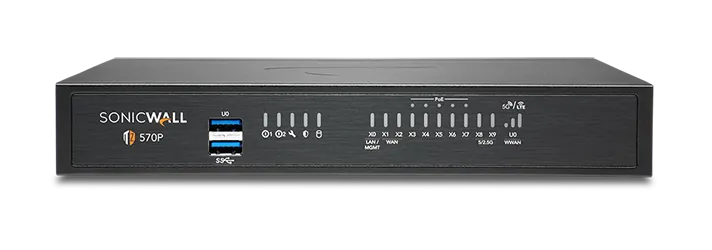
🏷️ SPECS:Whole File Scanned, Not SampledNo File Size LimitCatches Fileless AttacksSpots New RansomwareTLS 1.3 DecryptionCapture ATP SandboxUnknown Files Tested FirstVirus & Intrusion BlockingNothing Waved ThroughSonicOS 7 FirmwareZero-Touch DeploymentPost It, Plug InCloud Management ConsoleEvery Branch, One ScreenSecure SD-WANSwitches to Live LineAD Single Sign-OnRules Follow the PersonOne Renewal DateWireless & Switch ControlTZ Series DesktopFits a Small BranchNSa 1U RackmountSized for Head OfficeNSsp Data-Centre ClassDual Power SuppliesRuns on One PSU2.5GbE Multi-Gig Ports10GbE SFP+ UplinksQuiet Enough for Reception
How much of your own network can you actually see from where you sit? For an owner running four outlets the honest answer is usually none of it: every shop has its own router, its own password and its own problem. Put a SonicWALL unit at each site and they all report into one dashboard, so the outlet and the warehouse appear on the same screen (Network Security Manager). Opening a fifth shop then becomes a form to fill in rather than a trip out of town.
📞 Sizing, Licensing and Ordering SonicWALL UTM Firewall Appliance for Branch and Head Office close to C G Road
Your ERP vendor wants remote access, your CCTV company wants remote access, and right now both hold the same password as your accountant. Each can instead be given an encrypted login that reaches exactly one machine on one port, with a second check at sign-in and a record of every session. Access can be switched on for the afternoon and off again by evening. That is a far smaller opening than the remote-desktop port most small offices in Ahmedabad leave facing the internet.
The security box in your rack still shows a green light, which is the most misleading thing about it. Once the subscription lapsed it stopped receiving new threat information, and it was never built to look inside the encrypted traffic that now carries almost everything. We read the old rules, rebuild only the ones still in use on a current SonicWALLUTM Firewall Appliance for Branch and Head Office, and switch over in the evening at your office in Ahmedabad. The old unit stays racked and powered off for a week in case anybody misses something.
👍 Why Owners Stop Worrying About This close to C G Road
The awkward moment in most audits is the question about which staff can open the accounting system, and from which machines. Because rules are written against your office logins, the answer comes out of the console as a list of names rather than a promise from memory. Reports can be scheduled so the evidence already exists before anyone asks for it. Firms dealing with banks, exporters and listed customers get asked this far more often than they expect.
Very few businesses stay the size they were when they bought their last firewall. One operating system covers every model, so whoever learns the branch box can already work the rack appliance at head office, and the configuration travels up with you. Extra branches, remote staff and a second internet line become settings rather than new equipment. You are buying something to grow into instead of a box you will outgrow.
Lending Branches Where Every Action Needs a Name on It
A packaging printer with a design studio in Ahmedabad and a plant an hour away moved artwork files of several gigabytes between the two, and every transfer strangled everything else on the line. The new gateway gives file transfers whatever bandwidth is spare but never the share reserved for calls, mail and the ERP. Two internet lines are now used together, with the heavy traffic pushed onto the cheaper one. Nobody in accounts can tell any more when a job is being sent.
🛡️ MULTI-BRANCH DEPLOYMENT PRACTICE
Standards We Hold Ourselves to in the Rack
Nothing is finished until the documentation is in your hands: the rule list, the VLAN map, the licence expiry table, and admin passwords transferred by a method you approve. Networks in smaller firms tend to live in three different heads and no single file. We would rather hand you the file.
The following sit inside our normal scope of work:
▪Supply, Configuration and Go-Live of the Appliance
▪Access Point and Managed Switch Setup from One Console
▪Testing Unknown Files Before They Reach Staff (Capture ATP)
▪Automatic Switching between Two Internet Lines (SD-WAN)
*For clarity: licence renewals are billed at the applicable rate for the term you choose, and our handling of that paperwork is itself a chargeable service.*
💡 Engineering Fact: Zoom, YouTube and your banking site all look identical from outside - encrypted traffic on the same port. The firewall recognises them by how each one talks, which is how a video call gets priority while streaming gets capped.
🔁 MOVING OFF AN OLD BOX
Running a security appliance that stopped getting updates a while ago? We read the existing rules, rebuild the ones still in use, and do the changeover after hours at your premises in C G Road.
🗂️ Models, Plans and What Suits Whom for offices in C G Road
Included accessories are marked, so nothing surprises you at delivery:
TZ Desktop Firewalls for a Shop or Single Branch
The small box that sits on a shelf behind the counter and guards one or two internet lines. Right for a showroom, a clinic, a site office or any team of roughly five to fifty people.
🔹 TWO INTERNET LINES
Fibre and a broadband backup stay plugged in together and the box quietly uses whichever one is behaving (Secure SD-WAN).
🔹 SIZE AND NOISE
Book-sized, fanless on the smaller models, quiet enough to live on a reception shelf without anyone noticing it is there.
🔹 SOCKETS
Six to ten network points, some of them 2.5-gigabit, with a fibre slot on the larger models for a leased line.
NSa Rack Firewalls for a Head Office or Campus
One-rack-unit NSa gateways for the main office of a company, a nursing home group or a college - anywhere a few hundred people share the same line from morning to night. Built to bolt into the cabinet you already own.
🔹 CHECK THIS FIRST
Cabinet depth and free rack units. More installations get delayed by a shallow cabinet than by anything technical.
🔹 IF IT FAILS
Keep a matched second unit powered beside it. The changeover takes a fraction of a second and a phone call does not drop (High Availability pair).
🔹 FIBRE UPLINKS
Ten-gigabit fibre ports land straight on the core switch, which keeps a media converter off the list of things that can fail (SFP+).
Heavy 2U Units for Data Centres and Big Campuses
The two-rack-unit NSa and NSsp appliances, for data centres, multi-building campuses and networks carrying tens of thousands of connections at once. Anything that can fail comes doubled.
🔹 WHO BUYS THIS
Hosting providers, university campuses and large manufacturers running a proper data centre floor of their own.
🔹 BOTH UNITS WORKING
A pair can run live together rather than leaving one idle, which at this price is a better use of the money (Active-Active clustering).
🔹 PORT SPEEDS
Twenty-five and forty-gigabit fibre sockets are on offer, which keeps the security check from becoming a queue between server rows.
Branch Boxes That Set Themselves Up (Zero-Touch SD-WAN)
For the extra showroom, the godown office, the site cabin. You courier the unit, somebody local plugs in power and internet, and it pulls down its own settings and joins the head office network.
🔹 JOINING SITES
Encrypted tunnels build themselves between locations, instead of every branch hair-pinning its traffic through the main office.
🔹 REPORTING
Head office can see each branch's uptime and how its line is performing, which ends the argument about whose internet is at fault.
🔹 COST NOTE
A branch unit and its subscription usually work out below a leased line to the same location, which is the whole argument for SD-WAN.
SonicWave WiFi Access Points for Full Floor Coverage
SonicWave units screwed to the ceiling so the signal reaches the far end of the floor. For any building where the WiFi works near the router and nowhere else.
🔹 MANAGED FROM
The firewall itself acts as the wireless controller, so there is no second box and no second console to log into.
🔹 CHECK BEFORE ORDERING
Where the network cabling already runs. Pulling fresh cable through a finished ceiling costs more than the access point does.
🔹 WHERE IT SUITS
Factory floors, hostels, showrooms with roaming billing tablets, and offices that have run out of desk network points.
Managed Switches on the Same Console as the Firewall
Switches that report to the same screen as the firewall, so ports, cameras and phones are handled from one login. For offices past the stage of stacking small unmanaged boxes under a desk.
🔹 POWER OVER THE CABLE
Cameras, IP phones and access points draw electricity from the network cable, so no adaptor sits stranded above a ceiling tile (PoE).
🔹 BETWEEN BUILDINGS
Copper stops being useful at about ninety metres. Past that the uplink goes on fibre, and these units take fibre directly.
🔹 SEPARATE LANES
A camera recorder and a staff laptop can share cabling and still be unable to see each other, which is what setting up VLANs properly buys you.
Cloud Edge: Office Access for Staff Working from Home
Lets a person reach the one office server they need from home, a hotel or a client's site, without their laptop landing inside everything you own. Bought per person, not per building.
🔹 LOST LAPTOP
One click ends that person's access. Nobody has to change a shared VPN password and then explain it to forty people.
🔹 NO BOX AT HOME
The service runs from the cloud, so somebody who joins today is not waiting for hardware to be couriered to their flat.
🔹 WHAT IT COSTS
Priced by the person by the month, so a team of six is paid for as six and not as the entire company.
Network Security Manager: Every Branch on One Screen
A cloud console that shows all your firewalls together - rules, alerts, firmware and reports. Worth it once you have more than two or three locations to keep an eye on.
🔹 FIRMWARE
Updates get scheduled for a Sunday night across the whole estate, rather than done one branch at a time over a month.
🔹 REPORTS
Monthly summaries of what was blocked and where the day's bandwidth went, in a shape a director will actually read.
🔹 WHAT IT WILL NOT DO
It does not replace somebody reading the reports. The console tells you; it does not decide for you.
Security Bundles and Licence Renewals
Firewalls are sold with a subscription behind them: threat updates, filtering, sandbox checks and vendor support. This is how those are bought, bundled and renewed without leaving a gap.
🔹 BUYING PIECE BY PIECE
Individual modules can be added one at a time, which suits a site that only wants filtering, but the dates then drift apart and one always gets missed.
🔹 WHAT YOU ARE PAYING FOR
Not the metal box. You are paying for current threat information, category lists, and somebody to call when it misbehaves.
🔹 HARDWARE COVER
How fast a failed unit is replaced depends on the support level you chose. Decide that on a calm day, not on the morning it dies.
✉️ Service & Maintenance Support
Need site visits, AMC contract estimates, or customized installation architecture? Connect with our technical desk directly.
🧠 Questions Customers Ask Us Most throughout Ahmedabad
If you are buying a pair for high availability, make sure both units are registered together and the licensing is associated correctly, or the standby will come up without its protection services running. Test the failover once in a planned window and note how long a live call takes to come back. A pair nobody has ever tested is an assumption, not a plan.
The router that came with your connection belongs, in every practical sense, to the internet company: they set the password, they update it when they feel like it, and it knows nothing about who in your office did what.
A security box bought around 2015 will still boot happily. Its threat feed stopped the day the licence did, and its processor was never designed for traffic that is now almost entirely encrypted.
💡 Engineering Fact: Padlock icons stopped meaning safe a long while ago - the padlock only hides what is travelling. The firewall opens that envelope, reads what is inside and seals it again, doing the heavy maths in dedicated hardware so nobody notices the pause.
⚙️ SYSTEM EVALUATION & CHECKLIST
Turnkey UTM Firewall Appliance for Branch and Head Office Metrics Checklist near C G Road
🛠️ Workflow Setup
On the day itself the box goes in, power comes off two separate points where the room allows, and your line is shifted over from the old router. That old one stays wired for the twenty minutes it takes to be sure.
⚠️ Pitfalls to Avoid
Turning on every scanning feature at once on day one guarantees complaints. Bring them up in stages and give the office time to get used to each one.
🔌 Guidelines & Sizing
Insist on solid copper Cat6 with the maker's marking printed on the jacket. The cheap copper-clad aluminium sold under the same name heats up, loses signal over distance, and produces faults everyone blames on the provider.
📈 Upgrade Triggers
Half the staff now work from home part of the week through a remote desktop port that was opened in a hurry and has never been closed since.
☎️ What Is Included and What Costs Extra close to C G Road
Type of Business
What the Work Covers
Typical Lead Time
CA Firms, Tax Consultants and Legal Chambers
Filing-season access from home for partners and articles, with client data staying on the office server instead of travelling on laptops
A few working days once filing season allows
Small Factories and Fabrication Units
Machines, cameras and office computers on separate lanes, plus a link to the sales office that holds through the shift
Around three working days in most service areas
Nursing Homes and Multi-Speciality Hospitals
Patient records and billing separated from the reception counter, and consultants reading reports from home without opening the whole network
Priority slot for contract sites, otherwise next available
🔍 Behaviour on a Slow Internet Line close to C G Road
Two branch links watched for a week, one of them a shaky broadband line.
WHAT YOU GET FOR THE MONEY - THE SHORT VERSION
REAL LIMITS WITHOUT THE SALES PITCH
✓When the fibre drops in the middle of billing, the second line picks the traffic up on its own rather than waiting for someone to notice (Secure SD-WAN).
—Somebody has to own the rule list. Without that, the temporary allow-rules added before last Diwali are still open and nobody remembers who asked for them.
✓A camera recorder chattering all day used to drag the billing counter down with it; each now sits in its own lane, and a compromised device has nowhere to travel (zone-based VLANs).
—Rack units are loud. Put one in the corner of an open office and you will hear about it within a fortnight.
✓Large engineering drawings and installer files are not skipped for being too big, because there is no size cut-off on the scan (RFDPI).
—Running BGP or OSPF is serious network work. Bring in someone who has done a cutover before instead of learning on a live site.
✓Opening a branch in a town where you know nobody used to mean sending an engineer for two days. The box is couriered instead and the shop manager plugs it in (Zero-Touch Deployment).
—Turning on full inspection cuts the headline throughput figure. Size the model against the traffic you actually intend to scan, or the first busy morning will show it up.
✓Stock figures that reach head office a day late are usually a tunnel problem rather than a software one; every shop links back over one encrypted connection (site-to-site IPsec).
—Branch VPN speed is capped by whatever upload your local line delivers. No appliance can create bandwidth the ISP is not providing.
💡 Engineering Fact: A cheap router glances at the first few pieces of a download and waves the rest through. This one reads the file all the way from first byte to last as it arrives, which is why a virus split across several packets still gets caught (RFDPI).
⚡ SYSTEM DEPLOYMENT ARCHITECTURE
Ready to secure your premises in C G Road?
Get comprehensive structured network setups, professional hardware alignment, and authorized warranty support allocations natively.
📃 Specifications, Explained in Plain Words around C G Road
Redundancy comes in layers and you can buy them one at a time. A second internet connection is the cheapest, a mobile modem behind it is cheaper still, and a paired second appliance covers the unit itself failing. Rack models take two power supplies, which matters in buildings where the generator changeover is not gentle.
The range is easier to understand than the model numbers suggest. TZ units are desktop boxes for a shop, a clinic or a branch of twenty to fifty people; NSa models are rack appliances for a head office or a busy campus; NSsp sits above that for data centre work. Most businesses we quote in Ahmedabad end up with a TZ at each branch and one NSa at head office, and that combination behaves as a single network.
🏆 CORE PARAMETER🔹 Encrypted site scanningTLS 1.3 inspection with hardware acceleration (DPI-SSL)
🔹 How it scansThe whole stream is reassembled and read, with no cap on file size (RFDPI)
🔹 If the box diesActive-Standby or Active-Active pair with stateful failover
🔹 The chip insideMulti-core system-on-chip running SonicOS 7
🔹 Logs kept on the boxOnboard enterprise SSD storage for local reporting
🔹 Where you manage itSonicOS web screen, command line, or Network Security Manager in the cloud
🔌 Second power supplyOptional on smaller rack models, standard and hot-swappable on the large ones
SonicWALL Quality Control and Field Return Handling
SonicWALL builds this range for organisations whose people are spread over many small sites rather than gathered in one building. The same operating system runs on a desktop unit in a single shop and on a rack appliance at head office, so a policy written once can be applied everywhere without translation.
Nothing waits in a queue while a scanner collects a whole file first, so a large drawing or a software installer arrives at the pace your line allows and is still checked on the way in. You never have to set a maximum file size and hope nothing bigger turns up, because traffic is read as it flows (Reassembly-Free Deep Packet Inspection).
✉️ SUPPORT DESK
Coordinate custom hardware configurations, AMC maintenance contracts, and site engineering visits directly with authorized integration desks.
🔹Add the serial number to the cloud console before the box is couriered to a branch, whether that branch is across Ahmedabad or three states away, so staff there only have to connect power and the internet cable.
🔹Set a reliable time source on the appliance before go-live. Logs carrying the wrong timestamp are useless during an audit and worse during an incident.
🔹Certificate warnings on every second website are the usual first-week complaint. Push the inspection certificate to company machines through your office login system (Group Policy) before go-live, and leave banking and health sites off the inspection list altogether.
Frequently Asked Questions
Q. We have eleven shops - do I need one of these in every shop?
Yes, one at each shop, but they need not all be the same size or the same price. A small outlet with four billing counters runs happily on an entry-level SonicWALL TZ unit, while the head office, where everything comes together, takes the larger NSa. What the shops share is the rulebook and the licence, so a website blocked at head office is blocked at shop eleven without anyone driving there. Cost-wise the shop units are the cheap part; the head-office box and the yearly subscriptions are where the money actually sits.
Q. Can the same box run our office WiFi?
Yes. The firewall doubles as the wireless controller, and the access points feed off your existing network cabling. Because one unit is doing the security work as well, guest WiFi, staff WiFi and the billing network each get their own lane and their own rules from a single screen, instead of a row of home routers that nobody manages. Coverage is still a physical matter, though: thick walls, a mezzanine floor or a metal-clad godown will need more access points than a plasterboard office of the same area. We walk the floor around C G Road before quoting and give you the honest number.
Q. The quote shows the box on one line and three more charges underneath. What are those?
Those extra lines are the subscriptions, and they are the part buyers most often miss when comparing two quotes. The hardware price alone gets you a working router and firewall; the other lines buy virus scanning, website categories, the cloud test-room for unknown files and the right to phone support, sold together as a security bundle for one, three or five years. Suppliers package these differently, so a cheaper-looking quote usually has a thinner bundle or a shorter term hiding inside it. Ask anyone quoting you - including us - to show hardware, bundle and term as three separate numbers.
Q. What happens to an attachment that nobody has ever seen before?
It is held at the gateway and opened first in a cloud test-room, where several engines run it and watch what it tries to do (Capture ATP). The part that catches current ransomware is the memory check: malware that only unpacks itself while running is caught in the act inside processor memory, which a signature scanner never gets to see (RTDMI). If the file behaves, it is released to the recipient in about a minute; if not, it is blocked and logged with the sender's details. You choose whether to hold every file until the verdict or deliver first and alert afterwards - the first is safer, the second keeps a sales team happier.
Q. What happens when the subscription expires - does it just stop protecting us?
It keeps passing traffic quite normally, so nobody notices a thing on the morning it lapses, and that is exactly the danger. Virus definitions stop updating, newly malicious websites stop being categorised, and unknown attachments stop being tested in the cloud, leaving you defended against last year's threats. Firmware updates and support calls fall away too, which matters most on the day something breaks. Most bundles allow a short grace period, but treat the expiry as a hard date - we send the renewal quote about two months ahead so it is never a surprise.
💡 Engineering Fact: Generator changeover is harder on network equipment than the power cut itself. The spike as the load transfers is a common reason a power supply gives up, and an online UPS in between is the cheapest insurance in the room.
🔄 THE REST OF OUR WORK
Everything Else We Supply and keep around C G Road
Half the complaints about a slow network trace back to tired cabling - our structured cabling crews repull and label every run.
🌐 Local Business area and Our Coverage throughout Ahmedabad
📍 C G Road
C G Road in Ahmedabad is a major commercial and residential hub, packed with shops, offices, and restaurants. The area sees a steady influx of people throughout the day, making security a significant concern for both homeowners and business owners. UTM Firewall Appliance for Branch and Head Office from SonicWALL provides a reliable and discreet security solution for anyone looking to protect their property.
With nearby areas like Ellisbridge, Navrangpura, and Ambawadi, C G Road is always busy. UTM Firewall Appliance for Branch and Head Office offers wide-angle coverage and sharp video quality, ensuring you can monitor entrances, parking spaces, and busy commercial areas. It’s the perfect choice for keeping track of deliveries, visitors, and employees in a commercial setting. For anyone on C G Road, UTM Firewall Appliance for Branch and Head Office guarantees constant protection, ensuring that your property stays safe while the area buzzes with activity.