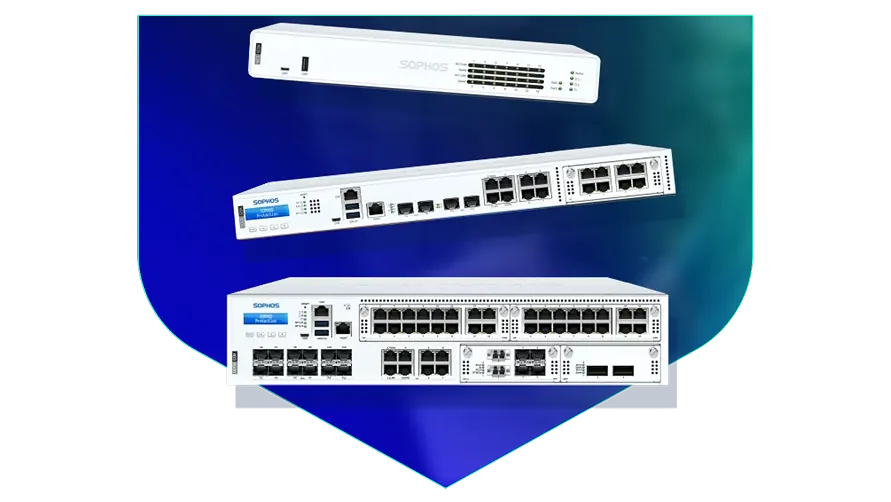
🏷️ SPECS:Scanning Without the CrawlTLS 1.3 InspectionSecond Chip for SpeedFibre Uplinks on Larger ModelsChecks Inside HTTPSProtection Stays Switched OnPorts Matched to Your BuildingHandles a Full OfficeBuilt for Busy AfternoonsBrowsing Stays FastZero-Day SandboxingBlocks RansomwareSynchronized SecurityAuto-Isolates Infected LaptopsSD-WAN FailoverAuto Line SwitchingDeep Packet InspectionOne Dashboard, All BranchesActive-Active HA ClusterStandby Unit Ready1U Rackmount ChassisDual Hot-Swap PSUFits Any RackDesktop Size ModelBypass Port PairsStays Up on FailureBranch-Size BoxModular Port BaysRuns Quiet in OfficeFront-to-Rear Airflow
A firewall with half its features switched off is not a firewall. That is what usually happens in practice: someone turns on virus scanning, the network slows to a crawl, and within a week the setting is quietly disabled again. The XGS boxes carry a separate chip for ordinary traffic, which is the whole reason the protection can stay on all the time. At Microtech Solutions we commission them with everything running, then show you the throughput figures so you know nothing was traded away.
📌 Sophos Supply and Aftercare for Business Buyers near Budge Budge
The video call freezes every time somebody in accounts starts a large upload, and by four in the afternoon nobody trusts the internet at all. A SophosNext-Gen Firewall for Business Networks sits between your office and your internet line and decides what gets priority, so meetings and accounting traffic go first while bulk downloads wait their turn. The security checks run on a separate chip, which is why speed does not collapse the moment you switch scanning on (Xstream FastPath offload). We size the unit against your real user count and install it for offices in and around Budge Budge.
One salesman's laptop picked up something from a pen drive, and by lunchtime three other machines were behaving strangely. The firewall talks continuously to the protection software on each computer, so a machine that starts misbehaving is cut off the network within seconds (Synchronized Security). Nobody has to notice it, ring IT and wait - the box does that part on its own. That single behaviour is why most of our customers in Kolkata stop treating antivirus as the whole plan.
🌟 Reasons This Works for Small Offices near Budge Budge
Power in and around Budge Budge does what it likes: a dip at three, a full cut at seven, a surge when the generator hands back. These appliances are built for continuous duty, and the rack models take two power supplies so you can feed them from two different circuits. We insist on an online UPS and a genuine earth connection before handover, because far more firewalls die of bad power than of hackers. It is a boring detail that quietly decides how long the box lasts.
Some businesses can lose an hour. A dispatch desk, a hospital front office or a trading room cannot. Two units can be paired so the standby picks up the live sessions the instant the first one stops, fast enough that a call in progress stays up (Active-Passive HA). Most customers start with one unit and add the second at the next budget cycle, and the pairing is designed to be added later.
Warehouse and Dispatch Sites Where Downtime Costs Orders
A CA firm of about thirty staff called us in the week after a partner's laptop encrypted itself during filing season. The replacement gateway opens unknown attachments in a sealed cloud test room before they reach a mailbox, and any machine that starts behaving oddly is pulled off the network automatically. Nothing similar has reached a second computer since. The firm also picked up the access log its bank's audit team had been asking for.
🛡️ STRAIGHT ANSWERS BEFORE YOU COMMIT
Planning, Cutover and What We Leave Behind
Cabling is the part a client sees and an engineer gets judged on. Patch leads are cut to length and labelled at both ends, fibre is dressed properly, and the rack is left tidy enough that the next person can trace a link without pulling the whole bundle apart. It costs us an extra hour and saves everyone a bad afternoon a year later.
Here are the jobs our field team handles for firewall customers:
▪Standby Unit That Takes Over When One Fails
▪A Bouncer for Your Website and Mail Server (WAF)
▪Unknown-Attachment Checks and Quarantine Rules
▪Annual Maintenance Contracts and Response-Time Cover
*Fair warning: emergency attendance outside contracted hours carries a call-out charge, quoted first, and it remains separate from any manufacturer service line.*
💡 Engineering Fact: Every minute or so the box quietly tests each internet line by pinging a known point and timing the reply. When one line starts dropping packets, calls shift to the other before anybody in the office complains.
💬 NOT SURE WHERE TO START
Describe the problem in your own words - slow internet, a virus scare, an auditor's question - and we will tell you honestly whether a firewall is even the right answer for your office in Kolkata.
🔖 Models, Plans and What Suits Whom for offices in Budge Budge
Below you will find sizing guidance alongside the technical ratings:
Desktop Firewalls for Small Offices and Shops
Small, silent boxes that sit on a shelf and guard the internet line of a five to fifty person office. Suits clinics, showrooms, CA practices and single-branch businesses.
🔹 WHAT'S EXTRA
A bracket kit is sold separately if you later want it screwed into a rack instead of standing on a table.
🔹 POWER
Draws little enough that a small office UPS carries it and the modem straight through a cut.
🔹 SPEED
A second chip handles ordinary traffic while the main one runs the security checks, which is why browsing does not crawl once scanning is on (Xstream FastPath).
Rack-Mount Firewalls for Head Offices
One-rack-unit appliances for a head office, hospital or college where a few hundred people are on the network all day. Built to sit in the server cabinet you already have.
🔹 SPARE POWER
A second power supply can be fitted and fed from a different circuit, so one tripped MCB does not take the office offline.
🔹 FITS
One rack unit high in a standard 19-inch cabinet, with cool air drawn in at the front and pushed out at the back.
🔹 WHO IT SUITS
Head offices, hospitals and colleges where two hundred to a thousand people share the connection.
Large Firewalls for Data Centres and Campuses
The heavy two-rack-unit units, for data centres, big campuses and companies pushing tens of thousands of connections at once. Everything that can fail is doubled up.
🔹 POWER
Two power packs come fitted as standard, and a dead one slides out and gets replaced while the rest keeps running.
🔹 IF IT FAILS
Runs as a pair, and some sites run both units live so neither one sits idle (Active-Active clustering).
🔹 VERY FAST PORTS
Twenty-five and forty-gigabit fibre sockets, so the firewall is never the narrow point between server rows.
Easy to set up Branch Boxes (RED) for Small Sites
For the two-person sales office, the godown, the site cabin. You courier the box, somebody plugs it in, and that location joins the head office network by itself.
🔹 WHAT STAFF SEE
Tally, the shared folder and the head office printer open exactly the way they do at the main location.
🔹 HOW IT CONNECTS
An encrypted tunnel back to the main firewall makes the branch behave like another room at head office.
🔹 SETUP
Nobody technical travels. The box is couriered, a local hand plugs in power and internet, and it fetches its own settings.
Managed Network Switches for the Server Room
For offices that have outgrown cheap unmanaged switches and want to see which port is causing the trouble. They also feed power to cameras, phones and access points down the same cable.
🔹 LONG RUNS
Fibre uplinks reach an upper floor or a second building without the speed loss a long copper run brings.
🔹 IF SOMEONE MAKES A LOOP
Plugging both ends of one cable into the same switch normally floods the whole office; the switch spots it and shuts that port.
🔹 WHO IT SUITS
Schools, hotels, hospitals and factories - anywhere the camera and phone count keeps climbing.
WiFi Access Points for Offices, Schools and Warehouses
Ceiling-mounted units that give a whole floor usable WiFi instead of one router struggling from a corner. Made for buildings where dozens of devices connect at the same time.
🔹 WHERE IT'S MANAGED FROM
One cloud console shows every unit, who is connected and which one is the busiest.
🔹 WHAT PEOPLE GET WRONG
Buying two very powerful units instead of five ordinary ones. Spread beats strength almost every time.
🔹 WHAT IT'S FOR
WiFi that holds up when twenty phones and laptops crowd into one meeting room.
Secure Remote Access for Staff Working from Home
Lets a person open the one office application they need - from home, from a client site, from a hotel - without dropping their laptop inside your whole network.
🔹 RECORDS
Each session is logged by person and by application, which is normally the exact evidence an audit wants.
🔹 WHAT THE USER DOES
Signs in with the usual office email and password, plus a code on the phone as a second step.
🔹 CONTRACTORS
A vendor can be given one server for a fixed number of days, after which the access simply stops.
Antivirus for Laptops and Servers That Talks to the Firewall
Protection on the machines themselves, wired to the firewall so the two act together. Useful for any office where staff install their own software or carry pen drives in.
🔹 WHAT'S EXTRA
Mail and mobile device protection are separate add-ons and are worth pricing at the same time.
🔹 SERVERS
The Tally server, ERP box and file server get settings tuned so the month-end run does not slow to a crawl.
🔹 THE PART PEOPLE LIKE
If a machine gets infected, the firewall drops it off the network within seconds, without waiting for anyone to notice (Synchronized Security).
Licence Renewals and Support Subscriptions
The yearly subscription that keeps the threat updates, web filtering and support alive. This is the part most buyers forget until the day it lapses.
🔹 WHAT PEOPLE REGRET
Letting it run dry for a couple of months to save money, then paying for reinstatement plus the clean-up afterwards.
🔹 IF THE HARDWARE DIES
Support levels differ in how fast a failed unit is replaced. Choose that before you need it, not on the morning you do.
🔹 MULTI-YEAR TERMS
A three-year term fixes the cost and removes two rounds of buy orders, approvals and chasing.
✉️ Service & Maintenance Support
Need site visits, AMC contract estimates, or customized installation architecture? Connect with our technical desk directly.
🛠️ Wall Cabinets, Half Racks and Very Small Server Rooms around Budge Budge
Everything below comes from actual site visits rather than from a manual, so treat it as the checklist your installer ought to be working through.
🔧 Power and Backup - How It Works in Budge Budge
🔹Rack it with a gap. Leave a clear 1U above and below the appliance so hot air can escape - in the unventilated cabinets common around Budge Budge, a unit wedged between two servers will throttle by May whatever the datasheet promises.
🔹Reserve bandwidth for the phones and for Tally or your ERP before you open general internet access; loosening a limit later is far easier than explaining choppy calls.
🔹Save yourself an argument with the routing table next year: put the LAN gateway address on a real physical port rather than inside a bridge group, because every VLAN you add later has to live with that decision.
⚙️ SYSTEM EVALUATION & CHECKLIST
Turnkey Next-Gen Firewall for Business Networks Metrics Checklist near Budge Budge
🛠️ Workflow Setup
On the day, the box goes into the rack, power comes off two circuits wherever the room allows, and the internet cable moves across from the old router. The old one stays connected and ready to go back.
⚠️ Pitfalls to Avoid
Rolling out encrypted-traffic checking before the certificate has reached every computer is the fastest possible way to have the whole office declare the new firewall broken.
🔌 Guidelines & Sizing
Label every cable at both ends before the cabinet door closes. The half hour you spend now is the half hour nobody spends at midnight guessing which lead goes where.
📈 Upgrade Triggers
The firewall you have stopped getting updates a couple of years ago and the manufacturer's site now lists it as end-of-life.
📌 Specifications, Explained in Plain Words near Budge Budge
Hardware and subscription are separate line items, and it is worth knowing which is which before you sign anything. The box keeps routing traffic when a subscription lapses, but the protection updates stop - a quiet failure rather than a loud one. We put the renewal date in writing and remind you well before it arrives.
Specification sheets are written for engineers, so here is the short version. The appliance runs two kinds of processing side by side: one part moves ordinary traffic at full speed, the other does the inspection work, which is why throughput holds up once features are switched on. For an office in Budge Budge, the figure that matters is not the headline number but the throughput with inspection running, and that is the one we quote.
🏆 CORE PARAMETER🔹 Sizes you can buyFanless desktop, 1U rackmount, 2U rackmount
🔹 Unknown attachmentsOpened in a cloud sandbox before they reach a user
🔹 Room temperature it tolerates0°C to 40°C (32°F to 104°F)
🔹 If the main unit failsStandby takes over - Active-Passive or Active-Active HA cluster
🔹 Sockets on the boxgigabit copper as standard, with 2.5-gigabit copper and 10-gigabit fibre on the models that offer them - we confirm the port list against the model you order
🔹 Joining your branchesSite-to-site IPsec, SSL VPN and plug-in RED devices
What Enterprise Grade Means on a Production Line
Nearly everything your staff open now arrives encrypted, and a firewall that cannot look inside it is guarding a door somebody has propped open. That is the problem this range was built around: one processor does the inspecting while a second waves already-checked video, voice and cloud traffic through at full speed (dual-processor design).
Your unit will probably not live in a data centre. It may well live in a cupboard behind reception with the door shut, so the hardware assumes that: continuous-duty fans, power circuitry that tolerates a wobbly supply, and a steel case that bolts into a rack or sits on a shelf. On the rack models a second power supply makes a lost feed an annoyance rather than an outage.
✉️ SUPPORT DESK
Coordinate custom hardware configurations, AMC maintenance contracts, and site engineering visits directly with authorized integration desks.
📌 Helpdesk Hours and Engineer Availability near Budge Budge
Who We Set Up For
What We Actually Do
Typical Turnaround
Cold Storage and Food Processing Units
Keeping temperature alarms and dispatch systems online when one internet line drops
Typically a day or two, planned around a dispatch lull
Jewellery Showrooms and Trading Houses
Billing counters kept apart from CCTV and customer WiFi, with an alert if anything starts talking out of the shop
Next working day in most cases
Diagnostic Labs and Small Hospitals
Patient records fenced off from front-desk computers, and doctors logging in from home without opening the whole network
Priority attendance, usually the same working day
🖥️ What Happens When Everyone Logs In at Once near Budge Budge
Read the good and the awkward together before you shortlist a model.
EVERYDAY WINS IN BRIEF
WHAT NEEDS SETTING UP FIRST IN ONE PLACE
✓Nothing has to be installed on a personal laptop, which matters when the person using it is a contractor you will not see again after March (clientless HTML5 portal with MFA).
—VPN speed between branches is capped by the upload speed your ISP gives you. No firewall can invent bandwidth the line does not have.
✓Audit questions get answered with readable summaries of who went where, not a pile of raw log files.
—Fibre ports ship empty. Transceivers or DAC cables are a separate buy, and the wrong part simply will not link up.
✓The steel case is shaped to pull air front to back, which is what keeps the unit alive in a warm, dusty cabinet.
—Encrypted scanning costs throughput. Size the box for the traffic you intend to inspect, not the headline number on the brochure, or users will feel it.
✓The second unit costs money and does nothing on most days, which is rather the point - it earns its keep on the one afternoon the first one dies (HA cluster).
—Without a UPS, every power cut becomes an unplanned reboot. Repeat that through a monsoon week and you are risking the hardware, not just the uptime.
✓Hosting your own website or mail server is what turns your office address into a target; a filter in front of it absorbs the standard break-in attempts before they reach the server (Web Application Firewall).
—Traffic pushed through anonymising proxies or unmanaged tunnels sits outside these controls, so policy alone will not stop a determined employee.
💡 Engineering Fact: Two units can be paired so that if the working one dies, the spare picks the traffic up fast enough that a call in progress usually survives it. It manages that because it has been quietly kept up to date on every open connection all along.
⚡ SYSTEM DEPLOYMENT ARCHITECTURE
Ready to secure your premises in Budge Budge?
Get comprehensive structured network setups, professional hardware alignment, and authorized warranty support allocations natively.
📌 Honest Pros and Cons From the Bench near Budge Budge
Do not leave office computers pointing at whatever DNS the ISP handed out. Point them at your own server, have it forward through the firewall, and you can suddenly filter and log every area lookup - which is how you notice a machine quietly talking to something it should not. When ransomware is preparing itself, DNS is usually where it shows up first.
A plastic desktop security box is fine until the day it is not: no second power supply, no standby unit, no fibre port, and a fan that gives up in a warm room. The metal rack units are designed for continuous running.
Software firewalls installed on a Windows server share that server's fate. When it needs a reboot, fills its disk or catches something, your perimeter goes with it - a separate appliance simply keeps working.
💡 Engineering Fact: Hosting your own website or mail server means the world can knock on your door. The firewall can stand in front of it, reading each request and turning away the standard tricks attackers try first.
Frequently Asked Questions
Q. What cabling, rack space and power does it need?
Smaller models are desktop-sized and live happily on a shelf; mid-range and larger ones are 1U or 2U and want a standard rack, a clean power feed, and clear air at the front and back. For 10G links inside one rack, short direct-attach copper leads are simplest and cheapest; between floors or cabinets you move to fibre with matching modules at both ends. Heat and dust do more damage in Indian server rooms than anything else, so we check ventilation and, on generator or inverter supply, the power quality too. Everything needed is listed in the quote, so install day holds no surprises.
Q. Can our staff still work from home?
Yes, and for many buyers that is half the reason for buying it. Staff install a small app, sign in with their office username plus a second factor, and then work as though they were at their desk (IPsec or SSL VPN). For anyone who cannot install software there is a browser-based route into a remote desktop or a shared folder. One limit worth naming: home broadband quality still sets the speed, and no firewall can make a weak line at somebody's house behave.
Q. How do we connect branch offices back to head office?
Two ways, depending on the branch. A small outlet gets a compact plug-in unit that dials home by itself the moment it has any internet - no engineer trip, no configuration done at the branch (Remote Ethernet Device). A larger branch with its own firewall gets a permanent encrypted link between the two sites instead. Either way the branch is treated as another wing of your network, so head-office filtering and rules apply there too, whether it is one shop or twenty across Kolkata.
Q. Our internet keeps dropping. Will this fix it?
It will not repair a bad line, but it can stop the drop from stopping work. Connect two links - a fibre leased line and a broadband or 4G backup, say - and the box watches both and shifts traffic onto the healthy one on its own (SD-WAN). Calls, Tally sessions and cloud apps ride whichever link is cleanest at that moment. If a single line is dropping five times a day, the real fix is a conversation with your ISP; this only makes the drops survivable.
Q. We are a 20-person office. Is this overkill for us?
Not really - the model matters far more than the brand. A small office on an entry-level unit gets the same scanning engine as a large one; it simply handles fewer users and less traffic. Overkill is buying a rack-sized box with modules you will never switch on, which does happen. Tell us your staff count, your line speed, whether you host anything in-house, and how many branches there are, and we will point at the smallest thing that fits comfortably.
💡 Engineering Fact: Files arrive split into pieces that often turn up out of order. The firewall reassembles them in memory before scanning, because half a virus in one packet and half in another would otherwise sail past untouched.
🔄 OTHER THINGS WE SET UP
What Else We Install and Look After in Budge Budge
Bad cabling causes more slow days than any virus - our structured cabling teams redo tired Cat6 runs across Kolkata.
🌆 Local Business area and Our Coverage throughout Kolkata
📍 Budge Budge
Budge Budge is a key industrial and shipping port hub along the Hooghly river in Kolkata, home to petroleum storage depots, jute processing units, and rail yards. Managing heavy vehicle traffic, loading terminals, and industrial perimeters demands strong surveillance. Next-Gen Firewall for Business Networks by Sophos delivers heavy-duty security designed for large-scale industrial properties. Terminal supervisors and factory security teams use Next-Gen Firewall for Business Networks to monitor main gate entry lanes, weighbridges, and storage godowns.
High-definition recording loops keep raw footage crisp and clear for incident audits. Ensuring industrial and commercial security in Budge Budge requires hardware built for tough conditions. Setting up Sophos camera networks guarantees reliable performance and complete perimeter protection.