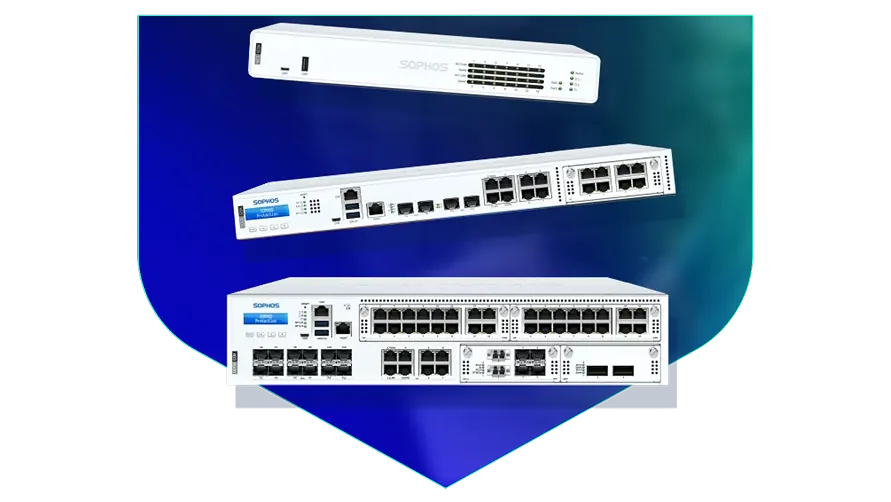
🏷️ SPECS:Scanning Without the CrawlTLS 1.3 InspectionSecond Chip for SpeedFibre Uplinks on Larger ModelsChecks Inside HTTPSProtection Stays Switched OnPorts Matched to Your BuildingHandles a Full OfficeBuilt for Busy AfternoonsBrowsing Stays FastZero-Day SandboxingBlocks RansomwareSynchronized SecurityAuto-Isolates Infected LaptopsSD-WAN FailoverAuto Line SwitchingDeep Packet InspectionOne Dashboard, All BranchesActive-Active HA ClusterStandby Unit Ready1U Rackmount ChassisDual Hot-Swap PSUFits Any RackDesktop Size ModelBypass Port PairsStays Up on FailureBranch-Size BoxModular Port BaysRuns Quiet in OfficeFront-to-Rear Airflow
Monsoon week is when the weak links show themselves. One broadband line drops, and half the office stops working until somebody notices. Plug two or three connections into the same firewall and the traffic simply moves to whichever line is alive, quickly enough that a video call survives the switch. I set the rules so billing and phone calls get first claim on the bandwidth, and general browsing takes what is left over.
🤝 Sophos Supply and Aftercare for Business Buyers around Belgachia
The video call freezes every time somebody in accounts starts a large upload, and by four in the afternoon nobody trusts the internet at all. A SophosNext-Gen Firewall for Business Networks sits between your office and your internet line and decides what gets priority, so meetings and accounting traffic go first while bulk downloads wait their turn. The security checks run on a separate chip, which is why speed does not collapse the moment you switch scanning on (Xstream FastPath offload). We size the unit against your real user count and install it for offices in and around Belgachia.
One salesman's laptop picked up something from a pen drive, and by lunchtime three other machines were behaving strangely. The firewall talks continuously to the protection software on each computer, so a machine that starts misbehaving is cut off the network within seconds (Synchronized Security). Nobody has to notice it, ring IT and wait - the box does that part on its own. That single behaviour is why most of our customers in Kolkata stop treating antivirus as the whole plan.
✅ Benefits Your Accounts Team Will Notice throughout Kolkata
You already own a Windows login system, a set of switches and possibly a Wi-Fi controller you would rather not replace. This gateway reads your existing office logins, so rules follow the person rather than whichever machine they sat at, and it drops into your current switch layout without re-cabling the floor. Nothing else has to be ripped out on day one. That is what makes a firewall change a one-evening job for most sites in Kolkata instead of a project.
A firewall that cannot be reached at nine at night is not really protecting anything. Our engineers configure and burn in each unit on our own bench before it ships, so what arrives on site already carries your rules and your addressing. If a unit fails inside warranty we arrange the replacement and put the saved configuration back on it. You get a named engineer to call, not a ticket number in a queue.
Patient Records, Imaging and Visitor Wi-Fi on One Line
A logistics operator running two warehouses outside Belgachia lost its dispatch system for most of a day whenever roadworks cut the fibre. Both sites now bring two lines into one appliance, and the system moves to the backup line without anyone logging in to make it happen. The most recent cut was noticed only because somebody saw the alert email. Dispatch has not stopped since the changeover.
🛡️ NETWORK SECURITY WORK, DONE PROPERLY
Support You Can Reach After Installation
Cabling is the part a client sees and an engineer gets judged on. Patch leads are cut to length and labelled at both ends, fibre is dressed properly, and the rack is left tidy enough that the next person can trace a link without pulling the whole bundle apart. It costs us an extra hour and saves everyone a bad afternoon a year later.
Here are the jobs our field team handles for firewall customers:
▪Separate Lanes for Guest WiFi, CCTV and Accounts (VLANs)
▪Out-of-Hours Switchover from Your Old Firewall
▪A Bouncer for Your Website and Mail Server (WAF)
▪Unknown-Attachment Checks and Quarantine Rules
*Important: fees apply to survey visits, cutover nights and emergency call-outs. Nothing on this page forms part of a factory support entitlement.*
💡 Engineering Fact: The reason a visitor on your guest WiFi cannot reach the accounts server is that the firewall treats them as separate neighbourhoods with no road between them, even though both use the same cabling.
🔍 YEARLY SUPPORT & SPARES
Who do you call at nine at night when the gateway stops passing traffic? Ask about yearly support with a defined response time, firmware patching and a replacement unit held ready for sites across Kolkata.
📁 Models, Plans and What Suits Whom for first-time buyers
Below you will find sizing guidance alongside the technical ratings:
Desktop Firewalls for Small Offices and Shops
Small, silent boxes that sit on a shelf and guard the internet line of a five to fifty person office. Suits clinics, showrooms, CA practices and single-branch businesses.
🔹 GUEST WIFI
Visitors and staff run on different networks, so a guest laptop never sees the accounts machine (VLAN).
🔹 WHAT'S EXTRA
A bracket kit is sold separately if you later want it screwed into a rack instead of standing on a table.
🔹 WHAT IT'S FOR
Offices, clinics and showrooms of roughly five to fifty people sharing one or two internet lines.
Rack-Mount Firewalls for Head Offices
One-rack-unit appliances for a head office, hospital or college where a few hundred people are on the network all day. Built to sit in the server cabinet you already have.
🔹 HEAT
Front-to-back cooling copes with a warm server room, though we still insist on a working AC and a clean filter.
🔹 LOAD
Antivirus, intrusion checks and encrypted-site scanning can all run together without the branch tunnels slowing to a crawl.
🔹 FIBRE PORTS
Ten-gigabit fibre sockets go straight into your core switch with no converter box in the middle (SFP+).
Large Firewalls for Data Centres and Campuses
The heavy two-rack-unit units, for data centres, big campuses and companies pushing tens of thousands of connections at once. Everything that can fail is doubled up.
🔹 POWER
Two power packs come fitted as standard, and a dead one slides out and gets replaced while the rest keeps running.
🔹 STORAGE
A pair of internal SSDs keep logs on the box itself, so a question about traffic from last month is answered from the appliance.
🔹 WHAT'S EXTRA
Rails, fibre modules and the right cables are quoted per site - we confirm cabinet depth before anything is dispatched.
Easy to set up Branch Boxes (RED) for Small Sites
For the two-person sales office, the godown, the site cabin. You courier the box, somebody plugs it in, and that location joins the head office network by itself.
🔹 WHAT IT IS NOT
This is not a standalone firewall. It leans on the main appliance, so budget for both together.
🔹 BACKUP LINE
A second connection, including a 4G or 5G dongle, can be attached where the local broadband is unreliable.
🔹 IF IT FAILS
Swap the unit. The replacement pulls the same configuration down on its own, so there is nothing to set up again.
Managed Network Switches for the Server Room
For offices that have outgrown cheap unmanaged switches and want to see which port is causing the trouble. They also feed power to cameras, phones and access points down the same cable.
🔹 WHAT IT'S FOR
Turning one network point into eight, twenty-four or forty-eight, with a proper record of what is plugged where.
🔹 LANES
Cameras, billing machines, guest WiFi and staff laptops stay apart on the same physical cabling (VLANs).
🔹 POWER DOWN THE CABLE
Access points, IP phones and cameras run off the network cable itself, so no adaptor is needed at ceiling height (PoE).
WiFi Access Points for Offices, Schools and Warehouses
Ceiling-mounted units that give a whole floor usable WiFi instead of one router struggling from a corner. Made for buildings where dozens of devices connect at the same time.
🔹 POWER
The network cable carries power up to the ceiling, so no electrician and no plug point above the false ceiling (PoE).
🔹 WHO IT SUITS
Schools with tablets, hotels, co-working floors, and warehouses running handheld barcode scanners.
🔹 GUEST WIFI
Visitors get their own name and password, on their own lane, with a login page and a daily expiry if you want one.
Secure Remote Access for Staff Working from Home
Lets a person open the one office application they need - from home, from a client site, from a hotel - without dropping their laptop inside your whole network.
🔹 WHAT IT'S FOR
Staff at home, on the road or at a client site who need the office server without the office network being wide open.
🔹 WHO IT SUITS
CA firms in filing season, sales teams, and any business whose auditor asks who opened what and when.
🔹 HOW IT DIFFERS FROM A VPN
An old-style VPN puts the laptop inside everything. This opens only the application that person is allowed to touch (ZTNA).
Antivirus for Laptops and Servers That Talks to the Firewall
Protection on the machines themselves, wired to the firewall so the two act together. Useful for any office where staff install their own software or carry pen drives in.
🔹 WHAT IT'S FOR
Guarding the laptops, desktops and servers themselves, rather than only the door they sit behind.
🔹 REPORTING
One list of every machine, whether its updates are current, and which computer is the repeat offender.
🔹 IF SOMETHING GETS THROUGH
A timeline shows where it came from - the attachment, the pen drive or the website - so the same door gets shut.
Licence Renewals and Support Subscriptions
The yearly subscription that keeps the threat updates, web filtering and support alive. This is the part most buyers forget until the day it lapses.
🔹 IF THE HARDWARE DIES
Support levels differ in how fast a failed unit is replaced. Choose that before you need it, not on the morning you do.
🔹 MULTI-YEAR TERMS
A three-year term fixes the cost and removes two rounds of buy orders, approvals and chasing.
🔹 WHEN YOU OUTGROW IT
Ask before you renew if headcount has doubled. Sometimes a bigger unit with a fresh term works out better than renewing the old one.
✉️ Service & Maintenance Support
Need site visits, AMC contract estimates, or customized installation architecture? Connect with our technical desk directly.
Turnkey Next-Gen Firewall for Business Networks Metrics Checklist near Belgachia
🛠️ Workflow Setup
Then the checks: browsing, email, Tally, the card machine, the CCTV app on the owner's phone. We do not pack up until somebody from your side has confirmed each one works.
⚠️ Pitfalls to Avoid
Putting your busiest internal rule at the bottom of a long list costs speed for no reason at all, because the box reads from the top down every single time.
🔌 Guidelines & Sizing
Buy through a proper distribution channel and keep the invoice with the serial number on it. Both the warranty claim and the licence renewal start from that piece of paper, and grey-market units fail that test.
📈 Upgrade Triggers
Video calls break up whenever the sales team pulls a report, and each department is quite certain the other one is at fault.
🛠️ Fitting the Appliance into a Rack That Is Already Full near Belgachia
Spend ten extra minutes on mounting, airflow and labelling and you buy years of not having to think about the appliance at all.
⚙️ Installation & Setup - How It Works in Belgachia
🔹Save yourself an argument with the routing table next year: put the LAN gateway address on a real physical port rather than inside a bridge group, because every VLAN you add later has to live with that decision.
🔹Give the HA pair its own cable. Run the heartbeat link directly between the two appliances on a dedicated port, never through a switch that somebody might reboot.
🔹Schedule the configuration backup on day one and send an encrypted copy off the site - the day you need that file is the day the box is dead.
📖 Honest Pros and Cons From the Bench around Belgachia
Do not leave office computers pointing at whatever DNS the ISP handed out. Point them at your own server, have it forward through the firewall, and you can suddenly filter and log every area lookup - which is how you notice a machine quietly talking to something it should not. When ransomware is preparing itself, DNS is usually where it shows up first.
A plastic desktop security box is fine until the day it is not: no second power supply, no standby unit, no fibre port, and a fan that gives up in a warm room. The metal rack units are designed for continuous running.
Software firewalls installed on a Windows server share that server's fate. When it needs a reboot, fills its disk or catches something, your perimeter goes with it - a separate appliance simply keeps working.
💡 Engineering Fact: A firewall remembers conversations, not just packets. Because it noted your request going out, the reply is allowed back in - and a packet claiming to answer a question nobody asked is dropped without ceremony.
📋 Onsite Visits, Remote Fixes and Escalation in and around Belgachia
Who We Set Up For
What We Actually Do
Typical Turnaround
CA, Audit and Law Firms
Locking down the Tally and document servers, and safe remote logins for partners during filing season
Usually a same-day survey, live inside a day
Co-working Floors and Shared Offices
A network of its own for every tenant so one company cannot see another's files, plus a fair share of the line for each desk
Usually a survey within a few days, cutover on a Sunday
Cold Storage and Food Processing Units
Keeping temperature alarms and dispatch systems online when one internet line drops
Typically a day or two, planned around a dispatch lull
⚡ What Happens When Everyone Logs In at Once for businesses in Kolkata
Read the good and the awkward together before you shortlist a model.
EVERYDAY WINS IN ONE LIST
WHAT NEEDS SETTING UP FIRST - THE SHORT LIST
✓The camera recorder nobody has updated since 2019 is the usual way in, so it gets fenced off from the Tally server instead of sharing a flat network with it (VLAN segmentation).
—Running BGP or OSPF routing is genuine network engineering. Budget for a competent hand on cutover day instead of treating it as a weekend experiment.
✓Login names come from your existing Microsoft accounts, so reports name people instead of IP addresses (Active Directory, LDAP, SAML 2.0).
—Bypass ports exist only on certain rack models. If your line needs that behaviour, it has to be confirmed before the buy order, not after delivery.
✓Hosting your own website or mail server is what turns your office address into a target; a filter in front of it absorbs the standard break-in attempts before they reach the server (Web Application Firewall).
—Automatic laptop isolation only works where the matching security agent is installed. Machines without it stay invisible to the firewall.
✓The steel case is shaped to pull air front to back, which is what keeps the unit alive in a warm, dusty cabinet.
—This is not a easy to set up device. Someone has to own the rule set, review it, and clear out the rules that were added temporarily two years ago.
✓Branches join the head office over an encrypted tunnel, so a shared ERP behaves as if everyone sat in one building (site-to-site IPsec).
—Firmware updates drop sessions briefly. On a single unit that means a late-night window agreed with the people who actually work late.
💡 Engineering Fact: Fibre between two buildings works by shining a laser down glass thinner than a hair. The common short-range module reaches about 300 metres, and picking the wrong one for a longer run is the cheapest mistake in networking.
⚡ SYSTEM DEPLOYMENT ARCHITECTURE
Ready to secure your premises in Belgachia?
Get comprehensive structured network setups, professional hardware alignment, and authorized warranty support allocations natively.
🧾 Specifications, Explained in Plain Words in and around Belgachia
Port layout decides how the box fits your building. Models arrive with ordinary gigabit copper ports for desks and switches, faster multi-gigabit ports for busy uplinks, and fibre slots where the cable run is long or the core switch is 10G. A leased line handed off on fibre and a broadband line on copper can end on the same unit without an extra media converter.
Rack models take two power supplies and can be paired with a second appliance, so neither a failed power feed nor a failed unit has to stop the office. Failover carries the live sessions across, which is the difference between a blip and a room full of dropped calls. Desktop models trade that redundancy for size and price, and for a single office in Kolkata that is usually the right trade.
🏆 CORE PARAMETER🔹 Sockets on the boxgigabit copper as standard, with 2.5-gigabit copper and 10-gigabit fibre on the models that offer them - we confirm the port list against the model you order
💾 Log storage on boardGood for large-scale setups SSD for local reporting and audit trails
🔹 If the main unit failsStandby takes over - Active-Passive or Active-Active HA cluster
🔌 Spare power supplyOptional on the smaller rack models, fitted as standard and hot-swappable on the larger ones
🔹 Sizes you can buyFanless desktop, 1U rackmount, 2U rackmount
🔹 Speed with scanning onA dedicated chip does the inspection, so the drop is far smaller than on an ordinary router - we size the model against the traffic you will actually scan
What Enterprise Grade Means on a Production Line
One screen covers the rules, the address translation, the routing, what gets scanned and what gets reported, instead of five consoles that disagree with each other. Whoever inherits your network can read a single line per rule and see who it applies to, what it allows and what is being checked (one policy list).
If a computer in your office starts behaving like an infected one, you should not have to wait for somebody to raise a ticket. The protection software on the machine and the gateway talk to each other continuously, so an unhealthy machine is cut back within seconds and the alert names both the machine and the person using it (Synchronized Security).
✉️ SUPPORT DESK
Coordinate custom hardware configurations, AMC maintenance contracts, and site engineering visits directly with authorized integration desks.
Q. What does it cost to renew, and can the price go up later?
Renewal is priced by model and by the bundle you are on, so it moves if you change hardware or add modules. Vendor list prices are revised from time to time and we do not control that, so nobody should promise you a number frozen for life. What we can do is quote a multi-year renewal at the time of buy, which fixes the rate for that stretch. We also send the renewal quote well before expiry rather than the week after it lapses.
Q. How do we connect branch offices back to head office?
Two ways, depending on the branch. A small outlet gets a compact plug-in unit that dials home by itself the moment it has any internet - no engineer trip, no configuration done at the branch (Remote Ethernet Device). A larger branch with its own firewall gets a permanent encrypted link between the two sites instead. Either way the branch is treated as another wing of your network, so head-office filtering and rules apply there too, whether it is one shop or twenty across Kolkata.
Q. How does it check encrypted sites without making browsing slow?
Nearly all web traffic is https today, so a firewall that cannot look inside encrypted sessions is blind to most of what arrives. Dedicated crypto hardware inside the appliance does the decryption maths, inspects the contents, and re-encrypts, instead of borrowing the main processor for the work (hardware-accelerated TLS 1.3 inspection). Day to day, browsing feels ordinary. Two caveats: a handful of banking and government sites have to be left out of inspection, and every office device needs the firewall's certificate installed or browsers will throw warnings.
Q. Who owns the settings and passwords afterwards?
You do. At handover you get the admin login, the licence details, the configuration backup file, and a written note of what was set up and why. We keep a copy so we can help you quickly, but the equipment and the manufacturer account stay in your name, and nothing is tied to us if you move to another vendor later. Ask for exactly this in writing from whoever you buy from - a surprising number of small offices cannot get into their own firewall.
Q. Is one enough, or do we need two?
One is enough for most offices. Two is worth it when a few hours offline would genuinely cost money or safety - a production line, a hospital, a call centre, a trading desk. The second unit sits quiet and takes over inside a second when the first one fails, so nobody on a call notices anything (Active-Passive HA). It roughly doubles the hardware spend, so do the sum honestly: what does one lost day actually cost you?
💡 Engineering Fact: Log writing happens off to one side rather than in the middle of the traffic path. That is deliberate: recording what happened should never be the reason a packet takes longer to get through.
🔄 OTHER THINGS WE SET UP
What Else We Install and Look After in Belgachia
Cameras share the same network as everything else, so it pays to plan CCTV and the firewall together rather than one after the other.
🏙️ Local Business area and Our Coverage in and around Belgachia
📍 Belgachia
Belgachia in Kolkata is a balanced locality with residential homes, markets, hospitals, and educational institutions spread throughout the area. Its strategic connectivity and active roads bring a steady flow of people, making safety an important consideration for locals. Whether someone lives in a standalone house, an apartment, or runs a small business, Sophos Next-Gen Firewall for Business Networks becomes a dependable solution for day-to-day monitoring.
Because Belgachia has both busy stretches and quieter lanes, residents often prefer having clear visibility around gates, corridors, and building entrances. Unexpected visitors, frequent deliveries, and maintenance-related movement are common in this area. Sophos Next-Gen Firewall for Business Networks helps capture all such activities with clarity, reducing uncertainty for families and business owners. It supports shops and clinics by keeping track of customer movement and ensuring proper oversight even during late hours.
As Belgachia grows with new buildings and increased traffic, maintaining safety becomes more important than ever. Sophos Next-Gen Firewall for Business Networks offers round-the-clock surveillance, allowing locals to stay informed and confident. Whether someone manages a small office or simply wants their home secured, the system helps keep awareness and more confidence in your daily security in this evolving neighbourhood.