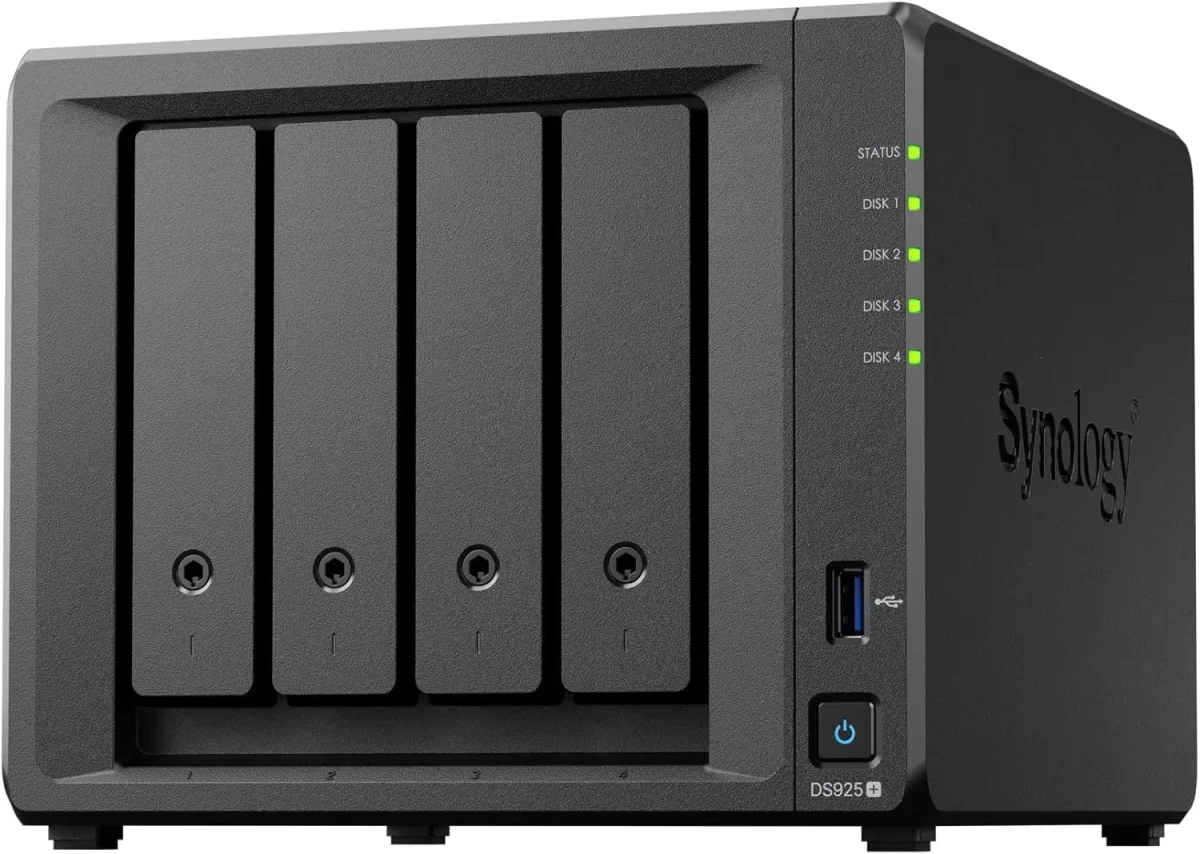
🏷️ SPECS:Btrfs File SystemImmutable SnapshotsHardware RAID 5/6/10Synology Hybrid RAID (SHR)Dual 10GbE SFP+ / RJ45Hot-Swappable SATA/SAS BaysActive Backup SuiteM.2 NVMe Cache AccelerationZero Per-User License FeesPrivate Cloud Drive SyncWORM Immutable StorageAir-Gapped Backup TargetHyper Backup to CloudSurveillance Station NVRActive Directory / LDAP SyncWindows ACL IntegrationReal-Time File VersioningCross-Office ReplicationECC Memory SubsystemDual Redundant Power Supplies4-Bay to 8-Bay Desktop Tower1U to 3U Rackmount RS-SeriesExpansion Unit ScalableEnterprise IronWolf / WD Red ProSynology HAT Enterprise DrivesSilent Fan Acoustic ModeEncrypted Shared FoldersAutomated S.M.A.R.T. ChecksSealed OEM Invoiced Units3 to 5 Year Hardware Warranty
Why are staff across the office still emailing spreadsheets to themselves or carrying files on pen drives just to work together on a drawing? In nine out of ten offices I visit, the shared folder lives on an old PC under an accountant's desk that freezes whenever four people open a CAD file simultaneously. The Synology Enterprise Network Attached Storage (NAS) consolidates company files into a high-speed centralized storage array with enterprise RAID redundancy, sub-second file search, and automated version history. We size, populate with tested enterprise drives, and deploy these systems for businesses across Ashram Road, verifying network read-write throughput in front of you before handover.
🗺️ Local Engineers for Synology Enterprise Network Attached Storage (NAS) throughout Ahmedabad
Designers, video editors, and structural engineers moving multi-gigabyte media files over standard gigabit cables waste hours watching transfer progress bars crawl across their screens. A Synology Enterprise Network Attached Storage (NAS) configured with dual-port 10GbE SFP+ fiber or 10GBASE-T network cards and NVMe solid-state cache pools delivers sequential transfer speeds exceeding 1,000 MB/s. Large project files open instantly across the local network, multiple editors work together directly off shared project folders without local caching, and design deadlines in Ahmedabad are met without workflow bottlenecks.
The external compliance assessor asked for proof of historical data retention, access permission logs, and automated disaster recovery copies, and nobody could produce a verified record from the office shared drive. A Synology Enterprise Network Attached Storage (NAS) maintains in-depth access logs, encrypts shared folders with AES-256 bit hardware encryption, and automates secondary offsite backups to a remote NAS or cloud repository via Hyper Backup. Reports export directly for compliance reviews, turning an audit scramble into a simple demonstration.
⭐ Where Synology Enterprise Network Attached Storage (NAS) Earns Its Keep around Ashram Road
Managing file permissions across four departments used to require maintaining complex Windows Server licensing and CALs. Synology DSM provides an intuitive web interface with full Windows Active Directory and LDAP area integration. Existing office user accounts and security groups map directly to shared folders, so permission inheritance and access restrictions follow organizational hierarchy easily.
Storage proposals from generic vendors often hide drive specifications, quoting consumer-grade drives that burn out under multi-user access. We provide transparent, itemized quotes specifying the exact NAS enclosure, processor tier, ECC RAM capacity, enterprise drive models with rotational vibration sensors, and warranty terms. You know precisely what endurance ratings and performance levels you are purchasing.
Ransomware-Proof Immutable Backup Targets for Windows Servers
A multi-branch diagnostic laboratory network with five centers across Ahmedabad required centralized storage to archive high-resolution medical imaging (PACS) and patient lab records generated daily. We installed a rackmount Synology Enterprise Network Attached Storage (NAS) at head office with Synology Drive ShareSync linked to compact branch NAS units. Lab reports and patient scans sync across all locations in real time, medical records remain redundant across two physical sites, and diagnostic doctors access imaging data instantly.
🛡️ LAB STAGING, SURFACE TESTING AND ENGINEERING PRACTICE
Why We Document Every Share, Permission and Policy
Deploying an enterprise Synology storage array into a live commercial network in Ashram Road begins with an inventory of shared folders, data growth rates, and department access permissions, not unboxing. We evaluate your current storage utilization, user concurrency, network switch speeds, and power protection before recommending a single enclosure. Only then do we schedule the migration window, typically over an evening, with a validated fallback plan so business operations are never disrupted.
Our engineers cover the following storage and backup tasks across Ahmedabad:
▪Enterprise {BRAND} Rackmount & Desktop NAS Enclosure Supply
*Please read: We trade as an independent systems integrator. Our engineering time is billable and operates alongside Synology's official factory hardware warranty channels.*
💡 Engineering Fact: 10GbE SFP+ Direct Attach Copper (DAC) cables provide 10-gigabit network connectivity between the NAS and core switches with power consumption under 0.5 watts per port.
🛡️ RANSOMWARE-PROOF SNAPSHOTS
Worried about ransomware encrypting your shared folders and USB backups in Ashram Road? We configure Synology NAS systems with Btrfs immutable snapshots and air-gapped backup policies that cannot be modified.
Every storage series, its bay layout and rack requirements, listed together:
Plus Series Desktop NAS Towers for Small Offices and Studios
Compact 4-bay to 8-bay desktop tower NAS enclosures (such as DS923+, DS1522+, DS1821+) designed for offices of ten to fifty staff needing high-speed file sharing, private cloud access, and automated backups without requiring a server rack.
🔹 ACOUSTICS & POWER
Quiet fan profiles suitable for open-plan administrative offices with low energy consumption (30W-60W).
🔹 EXPANSION
Supports attaching multi-bay expansion units (DX517) over eSATA when your data storage requirements grow.
🔹 NETWORK PORTS
Multiple 1GbE/2.5GbE RJ45 ports with link aggregation, plus optional 10GbE upgrade module slots for fast file transfers.
1U Rackmount RS-Series NAS for Standard Server Cabinets
Compact 1U rackmount NAS enclosures (such as RS422+, RS822+, RS1221+) designed to fit shallow and standard 19-inch server cabinets, providing strong RAID storage and virtualization backup targets.
🔹 EXPANDABILITY
Connects to dedicated rackmount expansion enclosures (RX418) for adding additional drive bays easily.
2U High-Capacity Rackmount Storage Servers for Enterprises
High-density 2U rackmount storage servers (such as RS2423+, RS2821RP+, RS3621xs+) built for heavy multi-user concurrent access, large media archives, and high-capacity database backup repositories.
🔹 10GbE/25GbE UPLINKS
PCIe Gen3/Gen4 slots supporting dual-port 10GbE and 25GbE SFP28 fiber interfaces for high-bandwidth switch uplinks.
Expandable up to 64GB+ of high-speed ECC registered RAM across multi-channel memory architectures.
Enterprise 24/7 SAS and SATA Hard Drives and Trays
High-endurance good for large-scale setups SATA and SAS hard drives (from Seagate IronWolf Pro, WD Red Pro, and Synology HAT series) engineered for continuous 24/7 multi-bay vibration environments.
🔹 TESTED BEFORE GO-LIVE
Every hard drive undergoes a 24-hour bad sector surface scan and S.M.A.R.T. Extended diagnostic test in our lab.
🔹 WARRANTY COVERAGE
Backed by 5-year manufacturer warranty coverage with data recovery rescue services on certified drive tiers.
🔹 ENDURANCE RATING
Rated for 550TB/year workload rates with Mean Time Between Failures (MTBF) exceeding 2.0 to 2.5 million hours.
M.2 NVMe SSD Cache Modules and 10GbE Network Cards
High-endurance enterprise M.2 NVMe solid-state drives for read-write cache acceleration, paired with PCIe 10GbE SFP+ fiber network adapters for wire-speed collaboration.
🔹 WHAT IT'S FOR
Eliminating storage I/O bottlenecks and accelerating file transfers for CAD designers, database users, and video editors.
🔹 10GbE SFP+ ADAPTERS
Dual-port 10GbE SFP+ PCIe cards supporting multi-mode optical transceivers and Direct Attach Copper (DAC) cables.
🔹 NETWORK BONDING
Supports link aggregation (LACP) across dual 10GbE interfaces for combined 20Gbps network bandwidth.
Synology High Availability (SHA) Redundant Storage Clusters
Active-Passive dual-NAS clustering that combines two identical storage servers into a single redundant cluster, providing automatic sub-minute failover if hardware fails.
🔹 MAINTENANCE ACCESS
Allows performing DSM firmware updates and hardware servicing on one node without taking shared folders offline.
🔹 AUTOMATIC FAILOVER
If the primary unit suffers a hardware, power, or network fault, the secondary unit takes over all shares in seconds.
🔹 BLOCK-LEVEL SYNC
All data writes, configuration changes, and snapshots replicate at the block level before transactions complete.
Active Backup for Business: License-Free PC, Server and M365 Backup
Complete, centralized backup software embedded in DSM that backs up all office Windows PCs, physical servers, virtual machines, and cloud mailboxes locally with zero recurring license fees.
🔹 WHAT IT'S FOR
Centralizing and automating backups for all company endpoints, servers, and cloud accounts onto on-premise NAS storage.
🔹 MICROSOFT 365 BACKUP
Backs up all corporate Exchange mailboxes, OneDrive accounts, and SharePoint team sites locally on schedule.
🔹 SELF-SERVICE PORTAL
Granular recovery portal allowing users to restore accidentally deleted files without calling the IT helpdesk.
Surveillance Station NVR Storage and Camera Licensing
Turns your Synology NAS into an good for large-scale setups Network Video Recorder supporting high-definition IP cameras, automated motion recording, and secure mobile monitoring.
🔹 SMART SEARCH
Timeline playback and intelligent video analytics allow searching hours of footage for motion events in seconds.
🔹 ISOLATED RECORDING
Video streams record directly to dedicated surveillance storage pools isolated from general office shared folders.
🔹 CAMERA SUPPORT
Compatible with over 8,000 ONVIF and enterprise IP cameras (including CP Plus, Hikvision, Dahua, and Axis).
Storage AMC Contracts, Health Monitoring and Preventative Upkeep
Annual maintenance contracts providing scheduled Btrfs data scrubbing, S.M.A.R.T. Drive health analysis, snapshot verification, and emergency on-site attendance.
🔹 HOT-SPARE POOL
Standby enterprise NAS hard drives, optical patch leads, and tested power adapters held ready for rapid replacement.
🔹 PREVENTATIVE VISITS
Regular physical passes - checking intake dust filters, inspecting UPS USB signaling, and updating logs.
🔹 TAILORED TIERS
Available as labour-only support or comprehensive contracts including hardware components.
✉️ Service & Maintenance Support
Need site visits, AMC contract estimates, or customized installation architecture? Connect with our technical desk directly.
RAID & Btrfs initialization: We build the hardware RAID array, format Btrfs storage pools, install NVMe cache modules, and update DSM operating system firmware.
⚠️ Pitfalls to Avoid
Never populate a multi-bay enterprise NAS with consumer desktop hard drives; desktop drives lack vibration damping and will drop out of RAID arrays.
🔌 Guidelines & Sizing
Specify genuine Synology PERC-grade hardware RAID controllers and make sure storage pools are formatted with the Btrfs file system for snapshot support.
📈 Upgrade Triggers
Someone accidentally deleted a critical client folder, and the only backup was an external hard drive that had not been plugged in for months.
📈 Feature List and Technical Detail across Ahmedabad
Management is handled through an intuitive web-based interface (DiskStation Manager) with full Windows Active Directory and LDAP integration. User access permissions, folder quotas, storage pool health, and automated S.M.A.R.T. Disk diagnostic alerts are monitored and administered from a single screen.
Hardware enclosures and enterprise hard drives are itemized transparently on our proposals. Every unit is supplied with authentic manufacturer warranty coverage, factory service tags, and local engineering setup. We document all IP configurations, RAID maps, and snapshot retention schedules at project handover.
🏆 CORE PARAMETER🔹 Expansion CapabilitySupports eSATA and SAS Multi-Bay Expansion Units (DX/RX Series)
🏠 File System ArchitectureBtrfs with Self-Healing Metadata and Ext4 Support
🔹 Hardware RedundancyDual Hot-Swappable Platinum Power Supplies (Rackmount Models)
🔹 Backup SuitesActive Backup for Business, Active Backup for M365, Hyper Backup
🔹 Drive Form FactorsHot-Swappable 3.5-inch and 2.5-inch SAS/SATA Enterprise HDDs and SSDs
🔹 Warranty Coverage3 to 5 Year Manufacturer Hardware Warranty with Local Support
Synology Thermal Management and Dynamic Fan Zone Engineering
Backed by rigorous manufacturing standards and comprehensive multi-year hardware warranties, Synology storage solutions deliver verifiable data protection, continuous availability, and dependable performance for growing commercial enterprises.
Synology network attached storage appliances are engineered from the ground up to deliver reliable data consolidation, business continuity, and comprehensive data management for modern commercial enterprises. Built to handle intensive multi-user file access, automated bare-metal backups, and high-throughput collaboration, the platform provides complete data sovereignty without recurring per-user software licensing fees.
✉️ SUPPORT DESK
Coordinate custom hardware configurations, AMC maintenance contracts, and site engineering visits directly with authorized integration desks.
🔧 Support Cover, Response Times and Visit Schedule throughout Ahmedabad
Industry Sector
Typical NAS Storage Configuration
Standard Lead Time
Educational Institutions & Colleges
High-capacity 12-Bay NAS hosting campus-wide faculty file shares, student records and NVR camera footage
Planned around term breaks
CA, Audit & Financial Firms
6-Bay Desktop NAS with RAID 6 Btrfs storage, Active Directory sync and immutable snapshots for client audit files
Typically 3 to 5 business days
Hospitals & Diagnostic Centers
2U Rackmount NAS with multi-terabyte storage pool for 24/7 PACS medical imaging archives and lab records
Scheduled 7 to 10 business days
📈 Room to Grow Before You Need an Upgrade for offices in Ashram Road
Timed from pulling a failed hard drive to the hot-spare completing parity rebuild.
PRACTICAL GAINS ON ONE PAGE
PREPARATION YOU WILL NEED - WORTH READING FIRST
✓Hyper Backup automates secondary offsite backups to a remote NAS, external storage, or cloud repository with client-side encryption.
—Initial RAID initialization, surface scanning, and parity building take several hours and must complete before loading live production data.
✓WORM (Write Once, Read Many) compliance shared folders prevent files from being modified or deleted during mandatory regulatory retention periods.
—Synology High Availability (SHA) clustering requires purchasing two identical NAS enclosures and identical hard drive configurations.
✓Proactive S.M.A.R.T. Disk telemetry alerts our service desk when a drive approaches error thresholds, allowing replacement before failure.
—A business NAS requires a direct USB signaling connection to an online UPS; running without battery backup risks dirty shutdowns and volume crashes.
✓High Availability (SHA) clustering pairs two identical units so that if one NAS suffers a hardware fault, the second takes over within seconds.
—Restoring terabytes of archived data across the network takes time, governed by physical hard drive read-write limits and network bandwidth.
✓Files open in seconds across the office network because the storage array manages concurrent read-write transactions on dedicated hardware.
—Expanding an existing RAID array by replacing drives with larger models requires rebuilding parity drive by drive, taking several days to expand.
💡 Engineering Fact: Synology High Availability (SHA) clustering pairs two identical NAS units over a dedicated heartbeat link, executing automatic sub-minute failover if the primary node stops.
⚡ SYSTEM DEPLOYMENT ARCHITECTURE
Ready to secure your premises in Ashram Road?
Get comprehensive structured network setups, professional hardware alignment, and authorized warranty support allocations natively.
🛠️ Power Conditioning, UPS USB Signaling and Clean Supply
A business NAS server rarely fails due to software; it fails from physical causes - unconditioned power cuts mid-write, accumulated fan dust, vibration from mismatched drives, or thermal pooling.
🛠️ Labelling & Documentation - A Walkthrough across Ahmedabad
🔹Always populate NAS storage pools with enterprise-certified 24/7 hard drives (IronWolf Pro, WD Red Pro, or Synology Enterprise) rather than consumer desktop drives.
🔹Assign static IP addresses to bonded network interfaces and configure LACP IEEE 802.3ad link aggregation on the connecting managed switch for redundancy.
🔹Format all primary storage volumes using the Btrfs file system to enable immutable snapshots and automated data integrity self-healing.
🔍 Where the Datasheet and Reality Differ for offices in Ashram Road
Follow the 3-2-1 backup rule: keep three copies of your data on two different media types, with one copy stored offsite. Use Hyper Backup on the NAS to replicate critical encrypted backups nightly to an offsite secondary NAS or secure cloud vault. If your primary building suffers physical damage or theft, your offsite copy guarantees full business recovery.
Comparing storage brands comes down to file system architecture, snapshot capabilities, and backup software integration. Synology leads the enterprise market with its Btrfs self-healing file system, license-free Active Backup ecosystem, and seamless multi-branch synchronization tools.
An external USB hard drive provides zero redundancy, lacks automated health monitoring, and can be dropped, stolen, or encrypted by ransomware in seconds. A Synology Enterprise Network Attached Storage (NAS) uses multi-drive hardware RAID redundancy, automated immutable snapshots, and continuous background data integrity verification.
💡 Engineering Fact: Synology Hybrid RAID (SHR) allows combining hard drives of different capacities within the same storage pool without wasting excess storage space.
Frequently Asked Questions
Q. How do immutable snapshots protect our company files from ransomware?
Ransomware attacks work by encrypting local files and network shared folders. The Btrfs file system on a Synology NAS captures point-in-time snapshots of your data independently of the operating system. When configured as immutable snapshots with WORM policies, these snapshots cannot be modified, encrypted, or deleted by any user or malware. If an infection occurs, our engineers restore your entire shared folder structure to its pre-attack state in seconds.
Q. What maintenance is required to keep our NAS storage operating reliably?
Routine maintenance includes reviewing S.M.A.R.T. Hard drive health logs, scheduling quarterly Btrfs data scrubbing, inspecting UPS USB signaling, checking snapshot retention schedules, verifying backup job completion, and applying tested DSM security updates during scheduled maintenance windows.
Q. Can staff access shared office files securely when working from home or traveling?
Yes. Synology Drive provides private cloud file access through secure web browsers, desktop sync clients, and mobile apps. All remote traffic is encrypted with TLS 1.3, and access can be restricted with two-factor authentication (2FA). Staff access their files securely without exposing internal shared folder ports directly to the public internet.
Q. Can we set individual storage quotas for different departments or users?
Yes. DSM allows administrators to enforce custom storage quotas per shared folder, user group, or individual user account. This prevents single departments (such as video production or marketing) from consuming the entire storage pool unexpectedly.
Q. What happens if our storage runs out of space in two years?
You can expand storage in three ways: replace existing hard drives with larger-capacity drives one by one on the fly without deleting data, insert additional drives into unpopulated drive bays, or connect a multi-bay expansion enclosure (such as DX517 or RX1222sas) to the dedicated expansion port.
💡 Engineering Fact: AES-256 bit hardware-accelerated volume encryption protects stored data from physical drive theft without imposing computational bottlenecks on file transfers.
🔄 RELATED INFRASTRUCTURE SOLUTIONS
Complementary Enterprise Systems We Deploy in Ashram Road
Connect your NAS storage array directly to an enterprise Dell PowerEdge server host for virtual machine backups in Ashram Road.
Ashram Road in Ahmedabad is one of the most prominent commercial roads, filled with offices, shops, and educational institutions. The area’s fast pace makes security important for both residents and businesses. Enterprise Network Attached Storage (NAS) from Synology offers a comprehensive surveillance solution, ensuring that your property stays safe, whether it's your home, shop, or office. Nearby areas like Vasna, Naranpura, and Paldi keep the area active at all hours, and Enterprise Network Attached Storage (NAS) ensures you can monitor every movement.
With its wide coverage and night vision capabilities, it provides constant monitoring of key areas like entrances, parking spaces, and common areas, giving you more confidence in your daily security throughout the day and night. For anyone on Ashram Road, installing Enterprise Network Attached Storage (NAS) ensures that your property remains secure, no matter how busy the street gets.