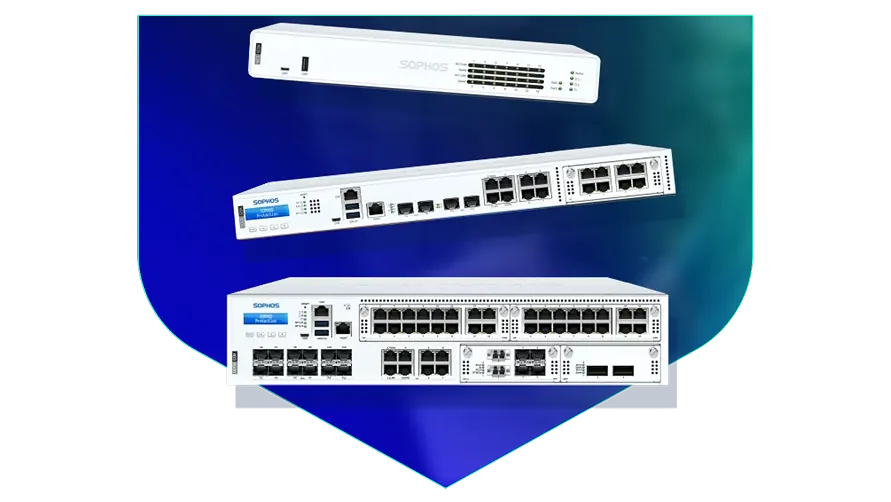
🏷️ SPECS:Scanning Without the CrawlTLS 1.3 InspectionSecond Chip for SpeedFibre Uplinks on Larger ModelsChecks Inside HTTPSProtection Stays Switched OnPorts Matched to Your BuildingHandles a Full OfficeBuilt for Busy AfternoonsBrowsing Stays FastZero-Day SandboxingBlocks RansomwareSynchronized SecurityAuto-Isolates Infected LaptopsSD-WAN FailoverAuto Line SwitchingDeep Packet InspectionOne Dashboard, All BranchesActive-Active HA ClusterStandby Unit Ready1U Rackmount ChassisDual Hot-Swap PSUFits Any RackDesktop Size ModelBypass Port PairsStays Up on FailureBranch-Size BoxModular Port BaysRuns Quiet in OfficeFront-to-Rear Airflow
The throughput figure printed on a datasheet is measured with almost every security feature switched off. Real numbers land far lower once virus scanning, intrusion prevention and encrypted traffic checks all run together, which is exactly how you will be running it. We keep units on the bench and load them properly before quoting, so the model we recommend has room to grow rather than a marketing number behind it. That single habit has saved a fair few clients from a box they would have outgrown inside a year.
💼 Sophos Next-Gen Firewall for Business Networks Supply, Setup and Support in Ashoknagar Kalyangarh
Almost every site your staff open is now encrypted, and an older firewall waves that traffic straight through unopened. A SophosNext-Gen Firewall for Business Networks can look inside those sessions for hidden malware and still keep pages loading quickly, because the decryption work is done in hardware (TLS 1.3 inspection). You choose what gets opened and what stays private, so banking and medical sites can be left alone. Without it, most of what enters your office is never examined at all.
Buying a firewall two sizes too big is expensive; buying one size too small is worse, because features get switched off one by one until it is just a router. We size the SophosNext-Gen Firewall for Business Networks against your actual staff count, your internet speed and the branches you plan to add. The range runs from a small desktop unit for one office to rack appliances with fibre ports for a head office. Tell us where you expect to be in three years and the quote for your site in Kolkata will be built for that, not for today.
🤝 What You Get That Cheaper Options Skip in Ashoknagar Kalyangarh
Ask any office that has owned a firewall for three years what they switched off. The honest answer is usually the scanning, because everything got slow - which leaves an expensive box doing the work of a router. The SophosNext-Gen Firewall for Business Networks keeps a second processor purely for routine traffic, so the main one is always free for the checks (Xstream architecture). Businesses around Ashoknagar Kalyangarh buy the protection once and it stays switched on.
Power in and around Ashoknagar Kalyangarh does what it likes: a dip at three, a full cut at seven, a surge when the generator hands back. These appliances are built for continuous duty, and the rack models take two power supplies so you can feed them from two different circuits. We insist on an online UPS and a genuine earth connection before handover, because far more firewalls die of bad power than of hackers. It is a boring detail that quietly decides how long the box lasts.
Co-working Floors around Ashoknagar Kalyangarh: Many Tenants, One Pipe
A three-branch diagnostic lab in Kolkata was couriering reports on pen drives because the branch links kept dying mid-upload. Each branch received a small unit joined to the head office over an encrypted tunnel, with a broadband line sitting behind the fibre so a cut no longer meant a stoppage. Reports now sync as they are generated, without anybody carrying anything. The courier line quietly disappeared from the monthly accounts.
🛡️ INSTALLATION STANDARDS AND CABLE DISCIPLINE
The People Who Do the Work, and How They Work
Cabling is the part a client sees and an engineer gets judged on. Patch leads are cut to length and labelled at both ends, fibre is dressed properly, and the rack is left tidy enough that the next person can trace a link without pulling the whole bundle apart. It costs us an extra hour and saves everyone a bad afternoon a year later.
Here are the jobs our field team handles for firewall customers:
▪Unknown-Attachment Checks and Quarantine Rules
▪Annual Maintenance Contracts and Response-Time Cover
▪Quarterly Rule Review and Clean-Up of Dead Policies
▪Infected Laptops Cut Off Automatically (Synchronized Security)
*A note on scope: advisory calls beyond the commissioning period are paid engagements, arranged with us directly and not through Sophos support.*
💡 Engineering Fact: Log writing happens off to one side rather than in the middle of the traffic path. That is deliberate: recording what happened should never be the reason a packet takes longer to get through.
🏭 FACTORY & WAREHOUSE SITES
Dust, heat and a network cabinet in the corner of the plant? We install for industrial sites around Ashoknagar Kalyangarh with the mounting, power and earthing done properly the first time.
🧾 Models, Plans and What Suits Whom for Ashoknagar Kalyangarh
What comes in the box, what costs extra, and what we add on site:
Desktop Firewalls for Small Offices and Shops
Small, silent boxes that sit on a shelf and guard the internet line of a five to fifty person office. Suits clinics, showrooms, CA practices and single-branch businesses.
🔹 GUEST WIFI
Visitors and staff run on different networks, so a guest laptop never sees the accounts machine (VLAN).
🔹 WHAT'S EXTRA
A bracket kit is sold separately if you later want it screwed into a rack instead of standing on a table.
🔹 NOISE
No fan inside. It can live in a reception area or a director's cabin and nobody hears it.
Rack-Mount Firewalls for Head Offices
One-rack-unit appliances for a head office, hospital or college where a few hundred people are on the network all day. Built to sit in the server cabinet you already have.
🔹 IF THE POWER GOES
Some models carry bypass sockets that physically join the two sides on power loss, keeping the line alive until you get there.
🔹 HEAT
Front-to-back cooling copes with a warm server room, though we still insist on a working AC and a clean filter.
🔹 WHO IT SUITS
Head offices, hospitals and colleges where two hundred to a thousand people share the connection.
Large Firewalls for Data Centres and Campuses
The heavy two-rack-unit units, for data centres, big campuses and companies pushing tens of thousands of connections at once. Everything that can fail is doubled up.
🔹 WHAT'S EXTRA
Rails, fibre modules and the right cables are quoted per site - we confirm cabinet depth before anything is dispatched.
🔹 VERY FAST PORTS
Twenty-five and forty-gigabit fibre sockets, so the firewall is never the narrow point between server rows.
🔹 SIZE
Two rack units, considerably heavier, and it needs proper rails in a full-depth cabinet rather than a shelf.
Easy to set up Branch Boxes (RED) for Small Sites
For the two-person sales office, the godown, the site cabin. You courier the box, somebody plugs it in, and that location joins the head office network by itself.
🔹 SETUP
Nobody technical travels. The box is couriered, a local hand plugs in power and internet, and it fetches its own settings.
🔹 BACKUP LINE
A second connection, including a 4G or 5G dongle, can be attached where the local broadband is unreliable.
🔹 WHAT STAFF SEE
Tally, the shared folder and the head office printer open exactly the way they do at the main location.
Managed Network Switches for the Server Room
For offices that have outgrown cheap unmanaged switches and want to see which port is causing the trouble. They also feed power to cameras, phones and access points down the same cable.
🔹 IF A PORT MISBEHAVES
You can spot the guilty port and shut it from the screen, instead of unplugging cables one at a time.
🔹 LONG RUNS
Fibre uplinks reach an upper floor or a second building without the speed loss a long copper run brings.
🔹 POWER DOWN THE CABLE
Access points, IP phones and cameras run off the network cable itself, so no adaptor is needed at ceiling height (PoE).
WiFi Access Points for Offices, Schools and Warehouses
Ceiling-mounted units that give a whole floor usable WiFi instead of one router struggling from a corner. Made for buildings where dozens of devices connect at the same time.
🔹 WHAT PEOPLE GET WRONG
Buying two very powerful units instead of five ordinary ones. Spread beats strength almost every time.
🔹 COVERAGE
Plan by walls, not by wattage. A brick partition or a lift shaft eats more signal than most people expect.
🔹 WHO IT SUITS
Schools with tablets, hotels, co-working floors, and warehouses running handheld barcode scanners.
Secure Remote Access for Staff Working from Home
Lets a person open the one office application they need - from home, from a client site, from a hotel - without dropping their laptop inside your whole network.
🔹 RECORDS
Each session is logged by person and by application, which is normally the exact evidence an audit wants.
🔹 IF A LAPTOP IS LOST
Access is cut from the dashboard in a minute. Nobody has to change the VPN password for the whole company.
🔹 WHAT THE USER DOES
Signs in with the usual office email and password, plus a code on the phone as a second step.
Antivirus for Laptops and Servers That Talks to the Firewall
Protection on the machines themselves, wired to the firewall so the two act together. Useful for any office where staff install their own software or carry pen drives in.
🔹 RANSOMWARE
It watches for a program that suddenly starts encrypting files, stops it, and puts the changed files back.
🔹 SERVERS
The Tally server, ERP box and file server get settings tuned so the month-end run does not slow to a crawl.
🔹 WHAT IT REPLACES
The free antivirus that quietly expired two years ago and the paid one nobody renewed after the IT person left.
Licence Renewals and Support Subscriptions
The yearly subscription that keeps the threat updates, web filtering and support alive. This is the part most buyers forget until the day it lapses.
🔹 BUNDLES
One combined subscription covers most of the protection at a better rate than buying the modules one by one.
🔹 WHAT IT'S FOR
Keeping virus updates, web filtering, sandbox checks and vendor support current on a firewall you already own.
🔹 IF THE HARDWARE DIES
Support levels differ in how fast a failed unit is replaced. Choose that before you need it, not on the morning you do.
✉️ Service & Maintenance Support
Need site visits, AMC contract estimates, or customized installation architecture? Connect with our technical desk directly.
🛠️ Before the Cutover: Physical Checks Worth Ten Minutes
Plant floors, clinics and open-plan offices each throw up a different mounting problem; here is how our teams handle the common ones across Kolkata.
✅ On-Site Work - The Plan for small and mid-sized teams
🔹Schedule the configuration backup on day one and send an encrypted copy off the site - the day you need that file is the day the box is dead.
🔹Feed the two power supplies from two different circuits, both behind an online UPS, so a single trip during the usual evening voltage swings does not take the gateway down with it.
🔹Clean fibre ends with an optical pen before seating them in SFP+ slots. Most links that flap every few minutes on dusty sites near Ashoknagar Kalyangarh are carrying a speck of dust, not a faulty module.
⚙️ SYSTEM EVALUATION & CHECKLIST
Turnkey Next-Gen Firewall for Business Networks Metrics Checklist near Ashoknagar Kalyangarh
🛠️ Workflow Setup
Handover is a folder, not a handshake. Passwords, rule list, port labels, licence dates and the number to call. Two weeks later we read the logs again and quieten anything that is over-alerting.
⚠️ Pitfalls to Avoid
Switching off every alert because the first week was noisy leaves you with an expensive box that watches carefully and tells absolutely no one.
🔌 Guidelines & Sizing
Put the firewall on an online UPS rather than the ordinary backup kind. The changeover gap on a cheap unit is long enough to reboot the box, and a reboot at eleven in the morning is not a small event.
📈 Upgrade Triggers
Twenty people became sixty, the WiFi now has three extenders hanging off it, and nobody can say which device on the network is which.
📄 Preventive Checks and Monthly Reporting in Ashoknagar Kalyangarh
Who We Set Up For
What We Actually Do
Typical Turnaround
Colleges, Schools and Hostels
Blocking what students should not reach and keeping exam portals quick at peak hours
Planned around a term break, three to four days
Garment and Engineering Exporters
Machines and office computers kept on separate networks, and a factory-to-office link that stays up
Planned around a shutdown window, often a weekend
Car Dealerships and Service Centres
One rule set copied to every showroom and workshop, all managed from the head office
About two days a location, rolled out in sequence
📌 How It Performs on a Normal Working Day in Ashoknagar Kalyangarh
Traffic pushed across two internet lines while one was deliberately dropped.
CLEAR ADVANTAGES SUMMED UP
COSTS BEYOND THE QUOTE - BEFORE YOU SIGN
✓You can see which application is eating the bandwidth at 3pm and cap just that one, without blocking the whole internet.
—To read inside encrypted sites, a certificate has to be pushed to every company laptop first. Personal and unmanaged devices will keep throwing warnings until that is sorted.
✓Threat lists refresh on their own through the day, so protection never depends on somebody remembering to update it.
—In-depth logging fills the internal disk if nobody sets rotation or ships the logs off the box.
✓The fake invoice from a supplier's hijacked mail account arrives over https, and a gateway that cannot open encrypted pages hands it straight to your accounts desk - this one opens it (TLS 1.3 inspection).
—The browser-based remote access screen leans on the user's own laptop and connection. On an old machine over patchy mobile data it feels sluggish.
✓Nothing has to be installed on a personal laptop, which matters when the person using it is a contractor you will not see again after March (clientless HTML5 portal with MFA).
—Automatic laptop isolation only works where the matching security agent is installed. Machines without it stay invisible to the firewall.
✓Every branch firewall is configured and watched from one browser login, which starts to matter past the third site (Sophos Central).
—Desktop models run on an external adapter with no second supply, so a failed adapter takes the office offline until a replacement reaches you.
💡 Engineering Fact: An attachment nobody has seen before is opened first inside a throwaway computer in the cloud. If it starts encrypting files or hiding from the operating system, it is never delivered to your staff.
⚡ SYSTEM DEPLOYMENT ARCHITECTURE
Ready to secure your premises in Ashoknagar Kalyangarh?
Get comprehensive structured network setups, professional hardware alignment, and authorized warranty support allocations natively.
👀 Engineer Notes From Real Installations in Ashoknagar Kalyangarh
Run the HA heartbeat straight between the two appliances. I have seen split-brain clusters caused by nothing more than an intermediate switch rebooting during a power event, after which both units believe they are in charge. A one-metre direct cable removes that entire class of problem. It is the cheapest reliability decision on the whole installation.
Antivirus on each computer only acts once a file has already landed on the machine. A gateway checks it on the way in, and also covers the printers, cameras and shop-floor equipment that cannot run antivirus at all.
Cloud-only filtering protects users while they are online through that service, but traffic between machines inside your own office never passes through it - and internal spread is exactly how ransomware travels once it is in.
💡 Engineering Fact: After the first few packets of a video call or a cloud ERP session, the firewall recognises the conversation and waves the rest through at full speed instead of re-checking every packet of a stream it has already cleared.
🗒️ Specifications, Explained in Plain Words in Ashoknagar Kalyangarh
On the software side you get web and application filtering, intrusion prevention, mail scanning, a cloud test room for unknown files, and a filter that can sit in front of your own web or mail server. All of it is configured in one place rather than across five separate products. Rules can be written per user group, which is what keeps them readable a year later.
Remote access is part of the base capability, not a separate box. Depending on model, the appliance carries anywhere from a few dozen to several hundred simultaneous encrypted connections, counting staff at home, branch tunnels and travelling users together. If you are planning for a work-from-home week, tell us the peak number and the sizing will allow for it.
🏆 CORE PARAMETER💾 Log storage on boardGood for large-scale setups SSD for local reporting and audit trails
🔹 If the main unit failsStandby takes over - Active-Passive or Active-Active HA cluster
🔹 Unknown attachmentsOpened in a cloud sandbox before they reach a user
🔹 Where it's managed fromWeb browser, command line, or the Sophos Central cloud console
🔹 If a laptop gets infectedFirewall isolates it on its own - Synchronized Security heartbeat
🔹 Sizes you can buyFanless desktop, 1U rackmount, 2U rackmount
🔹 Sockets on the boxgigabit copper as standard, with 2.5-gigabit copper and 10-gigabit fibre on the models that offer them - we confirm the port list against the model you order
How Sophos Actually Builds These Units
Open one login and you see every site you run, with the same rules, the same scheduled firmware updates and a stored copy of each configuration. A new branch joins the network without an engineer travelling there to type anything in, which is the difference between a week and an afternoon when you open shop number five (cloud console).
New threats appear faster than anybody can keep up with by hand, so the web categories, application signatures and known-bad addresses refresh on their own through the day. A file nobody has a verdict on yet is examined in Sophos's cloud analysis service before it reaches the person waiting for it. Nothing on your side depends on somebody remembering to update anything.
✉️ SUPPORT DESK
Coordinate custom hardware configurations, AMC maintenance contracts, and site engineering visits directly with authorized integration desks.
One is enough for most offices. Two is worth it when a few hours offline would genuinely cost money or safety - a production line, a hospital, a call centre, a trading desk. The second unit sits quiet and takes over inside a second when the first one fails, so nobody on a call notices anything (Active-Passive HA). It roughly doubles the hardware spend, so do the sum honestly: what does one lost day actually cost you?
Q. How are firmware updates done without taking the office offline?
New firmware installs onto a spare partition and the unit switches over on reboot, so a bad update rolls back to the previous version instead of leaving you stranded. Where a standby pair is running, we update the quiet unit first, move traffic onto it, then update the other, and nobody upstairs notices. On a single unit there is one reboot, a few minutes, which we schedule outside working hours. We also do not push a brand-new release the week it appears - it is allowed to settle first.
Q. Who owns the settings and passwords afterwards?
You do. At handover you get the admin login, the licence details, the configuration backup file, and a written note of what was set up and why. We keep a copy so we can help you quickly, but the equipment and the manufacturer account stay in your name, and nothing is tied to us if you move to another vendor later. Ask for exactly this in writing from whoever you buy from - a surprising number of small offices cannot get into their own firewall.
Q. We are a 20-person office. Is this overkill for us?
Not really - the model matters far more than the brand. A small office on an entry-level unit gets the same scanning engine as a large one; it simply handles fewer users and less traffic. Overkill is buying a rack-sized box with modules you will never switch on, which does happen. Tell us your staff count, your line speed, whether you host anything in-house, and how many branches there are, and we will point at the smallest thing that fits comfortably.
Q. Someone in accounts opened a bad attachment last year. Would this have caught it?
Very likely, though no one honest says always. Unknown files arriving from outside are opened first inside a sealed test space away from your network, and if the file starts encrypting things or calling home, it never reaches the mailbox (sandboxing). What it cannot do is stop a staff member typing the company bank password into a convincing fake login page - that is staff training and two-factor login, not hardware. Think of it as removing most of the risk, not all of it.
💡 Engineering Fact: On the larger models, two power packs share the load, and if one input dies the other takes the whole thing on instantly. In practice that input usually dies because of a tripped circuit or a wrongly pulled plug.
🔄 OTHER THINGS WE SET UP
What Else We Install and Look After in Ashoknagar Kalyangarh
Nobody to look after the boxes once they are in? Our yearly IT AMC covers the machines, the network and the 9pm phone call.
🏢 Local Business area and Our Coverage in Ashoknagar Kalyangarh
📍 Ashoknagar Kalyangarh
Ashoknagar Kalyangarh in Kolkata is a vibrant and rapidly growing locality that offers a mix of residential homes, small businesses, and commercial activities. With a steady flow of people, both from surrounding towns and local areas, it's important to have constant visibility around key areas like entrances, driveways, and parking zones. Sophos Next-Gen Firewall for Business Networks provides the best surveillance solution to make sure that all activity is tracked and monitored.
The region's combination of residential complexes and local businesses increases foot traffic, making it important to monitor common areas and shared spaces. Sophos Next-Gen Firewall for Business Networks offers clear visuals, even at night, providing more confidence in your daily security to homeowners and business owners by ensuring that no activity goes unnoticed. As Ashoknagar Kalyangarh continues to develop with more residential projects, new markets, and improved infrastructure, the demand for security systems grows.
Sophos Next-Gen Firewall for Business Networks gives residents and businesses reliable monitoring solutions, allowing them to make sure their premises are secure and protected.